

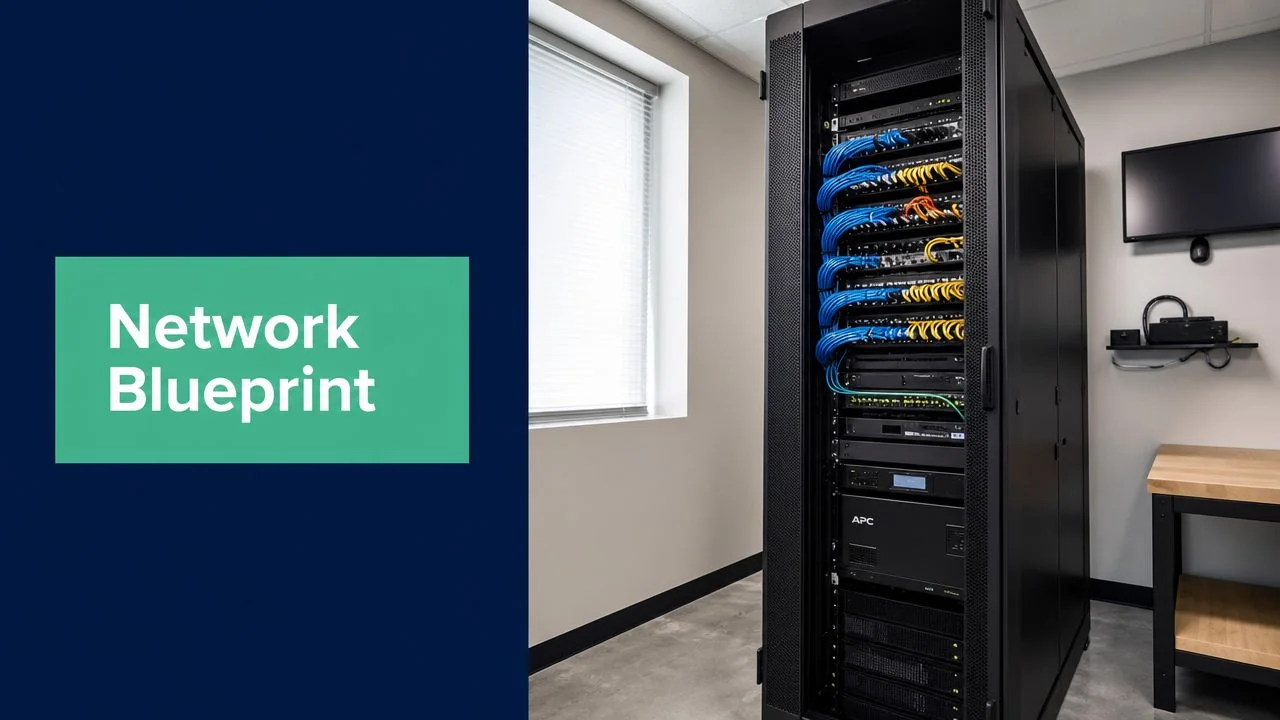
Your network probably feels fine until it doesn't. EFTPOS drops out during a busy period. A Teams call with a client turns robotic halfway through. Staff blame “the internet”, but the underlying issue is usually bigger than one bad modem or one weak Wi-Fi signal.
For Brisbane and South East Queensland businesses, that frustration often comes from treating the network as a collection of boxes instead of a planned system. Router, switch, firewall, Wi-Fi, cabling, backup internet, power protection. They all affect each other. If one weak link fails, productivity drops, customers notice, and your team loses time working around technology instead of using it.
Table of Contents
- Introduction Why Your Business Network Needs a Blueprint
- The Core Components of Your Network Explained
- Choosing the Right Architectural Pattern for Your Business
- Designing for Unbreakable Resilience and Security
- Your Step-by-Step Network Design Checklist
- Selecting Hardware and Managing Total Cost of Ownership
- Your Rollout Plan and Finding Local Brisbane Support
Introduction Why Your Business Network Needs a Blueprint
A business network is like the plumbing and wiring in your premises. If it was designed properly, people barely notice it. If it wasn't, every small issue becomes a daily annoyance. Slow file access, dropped calls, patchy Wi-Fi in the back office, cloud software lagging at the wrong time. Those aren't random events. They usually point to poor network infrastructure design.
That matters because most Australian businesses don't have a full in-house IT team. The Australian Bureau of Statistics reported that Australia had 2,592,365 actively trading businesses in 2023–24, with the overwhelming majority being small businesses, which means most networks are being run in organisations with limited IT resources and a high dependence on uptime for cloud apps, sales systems, and compliance workloads, as noted in this TierPoint summary of the ABS business count.
A proper plan stops you buying hardware in the wrong order, solving the wrong problem, or overbuilding where you don't need to. It also helps you spend money where it protects the business. That might be better Wi-Fi placement instead of a faster internet plan. It might be a managed firewall instead of another cheap switch. It might be battery backup for the rack because a brief power event is causing more pain than the internet circuit itself.
Practical rule: If your network only works properly when nothing goes wrong, it wasn't designed for business use.
For most Brisbane SMBs, the goal isn't building an enterprise data centre. It's building a network that supports staff, cloud systems, phones, security, and growth without becoming a constant source of disruption.
The Core Components of Your Network Explained
When business owners hear “network infrastructure design”, they often picture a tangle of cables and blinking lights. In practice, it's simpler than that. Each component has a specific job, and the quality of the overall design comes from making those jobs work together.
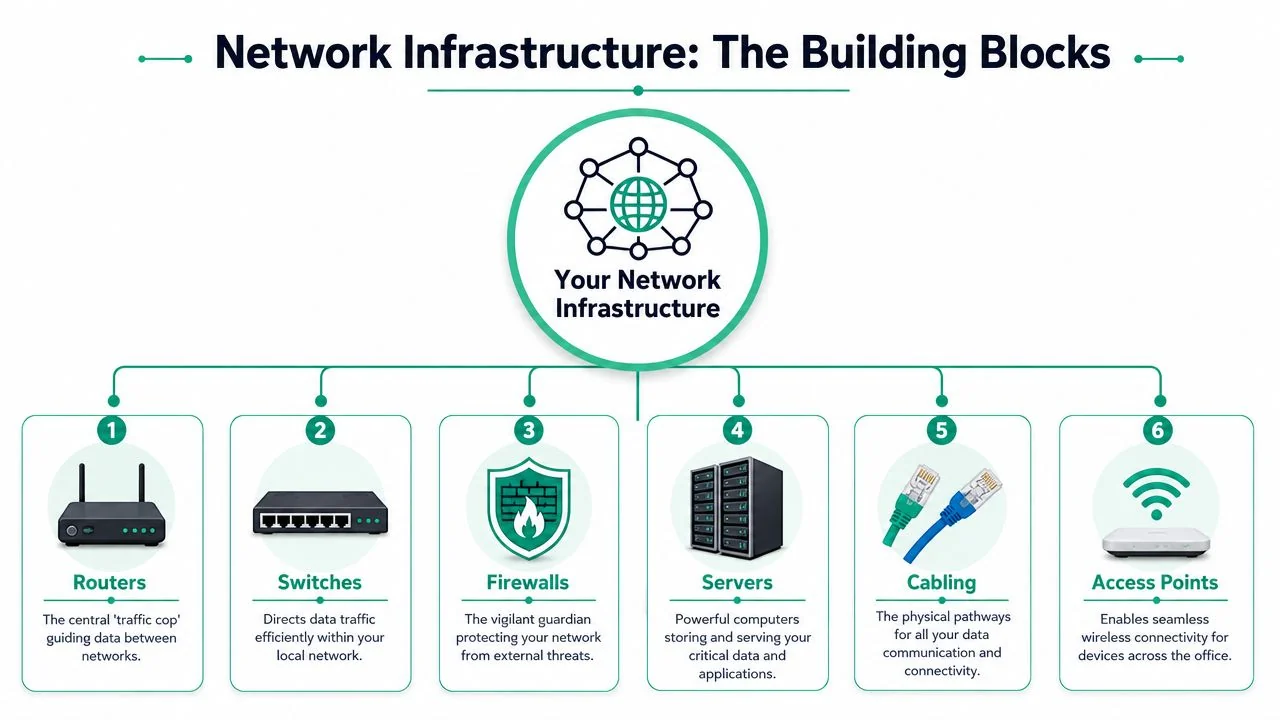
Think of it like a building
Your router is the front connection between your business and the outside world. It handles traffic moving to and from the internet or another site. In many small offices, people assume the router should do everything. That's where problems start.
Your switches are the internal pathways. They connect desks, printers, phones, access points, cameras, and sometimes servers. A cheap unmanaged switch can work in a very small setup, but it gives you almost no control over traffic, security, or troubleshooting.
Your firewall is the gatekeeper. It decides what traffic is allowed in, what's allowed out, and what should be blocked or inspected. For a modern SMB, this isn't optional. If staff access Microsoft 365, cloud accounting, remote desktop tools, or line-of-business apps, the firewall becomes a business control, not just a technical one.
Your Wi-Fi access points provide wireless coverage. They aren't the same thing as the internet service. A fast NBN plan won't fix poor access point placement, overloaded channels, or a single all-in-one device trying to cover a whole warehouse.
Then there's structured cabling, rack layout, patching, and power. These are the parts many businesses delay because they're less visible. They're also the parts that make later upgrades easier and faults easier to isolate.
If you want a practical overview of how these pieces fit into a business environment, Bridge IT's page on business networking solutions is a useful reference point for what gets included in a managed setup.
Why the NBN changes the design
Australian businesses have a local constraint that shapes almost every network plan. The National Broadband Network was established in 2009, and by 30 June 2024 it had passed 11.1 million premises with 8.6 million active connections, reflecting the scale of access variability Australian businesses work with, as outlined in this ConnectWise discussion of network infrastructure design and the NBN context.
That history matters because the NBN wasn't delivered as one uniform full-fibre model. Businesses across Brisbane and SEQ can have very different real-world experiences depending on service type, building conditions, and local congestion. Two offices on similar plans can behave differently.
Flat network versus segmented network
A flat network puts almost everything in one shared space. Staff PCs, printers, phones, guest devices, cameras, and point-of-sale equipment can all sit side by side. It's simple to set up, but it's harder to secure and harder to troubleshoot.
A segmented network separates traffic into logical groups. Staff devices can sit in one area, guest Wi-Fi in another, voice systems in another, and business-critical systems in another.
| Network style | What it looks like | What usually happens |
|---|---|---|
| Flat | One shared network for nearly everything | Easier setup, weaker security boundaries, more broadcast noise |
| Segmented | Separate VLANs and policies for different device groups | Better control, cleaner troubleshooting, lower risk of one issue affecting all users |
A lot of SMBs think segmentation is only for larger organisations. It isn't. If your guest Wi-Fi, office PCs, phones, and finance devices all share the same trust boundary, one mistake can spread much further than it should.
Choosing the Right Architectural Pattern for Your Business
The right design pattern depends less on your headcount and more on how your business operates. A ten-person legal office with heavy document handling and strict confidentiality often needs more structure than a larger warehouse with simpler endpoint needs. Good network infrastructure design follows business risk, not just business size.
Why segmentation is the default now
Cloud use and cyber risk have changed the baseline. The ABS reported that 39% of Australian businesses used cloud computing services in 2023–24, and the ACSC reported 1,113 cybercrime reports per 100,000 people in 2023–24, which is why secure remote access, segmented internal traffic, and robust monitoring now belong in standard design rather than premium extras, as captured in this video reference summarising those Australian figures.
That shifts the architectural question. It's no longer “can everyone get online?” It's “what should be allowed to talk to what, under what conditions, and what happens if one part is compromised?”
Separate trust zones early. It's far easier to design VLANs and access rules before deployment than to retrofit them after the business has grown around a flat network.
For many SMBs, the default pattern now looks like this:
- Corporate network: Staff desktops, laptops, managed mobiles.
- Voice network: IP phones or collaboration hardware where call quality matters.
- Guest network: Internet-only access for visitors and personal devices.
- Restricted systems: Finance machines, servers, medical software terminals, or specialised equipment.
- Management layer: Network gear administration kept away from normal user traffic.
What this looks like in real businesses
A medical clinic usually needs patient-facing and back-office systems kept apart. Reception Wi-Fi, practice software terminals, printers, and guest access shouldn't all sit on the same open segment.
A professional services firm needs strong separation between staff devices, remote access, and any server or storage handling sensitive client files. If one laptop has a security incident, that event shouldn't automatically expose the rest of the environment.
A trade business with a warehouse and field staff might prioritise resilient wireless coverage, mobile device access, and secure connectivity between office systems and site users. The right pattern there often values practical roaming and failover over a highly complex internal layout.
What doesn't work is buying “business-grade” hardware and leaving it configured like a home network. The hardware alone doesn't create resilience or security. The architecture does.
Designing for Unbreakable Resilience and Security
Resilience starts with one question. What happens when something fails at 11 am on a normal workday?
If the honest answer is “everyone waits until the internet comes back” or “we reboot the cabinet and hope”, the network needs work. A practical design puts business continuity first. That means explicitly testing what happens if the ISP, firewall, or core switch fails, and recognising that topology, cabling, power, and logical controls all affect whether the business keeps operating, as explained in this overview of business continuity-led network design.

Start with failure scenarios
Write down the three failures that would hurt most. For most Brisbane SMBs, they're usually internet loss, firewall failure, or power disruption to the comms rack.
Then decide what must stay available. Not everything needs the same level of protection.
Critical services first
EFTPOS, VoIP, booking systems, cloud line-of-business apps, remote access, and printers often matter more than general browsing.Choose sensible failover
A secondary connection such as 4G or 5G backup can keep key traffic moving when the primary service drops. That doesn't mean every user gets full normal performance. It means the business can still trade.Protect the rack
A UPS won't solve a long outage, but it can ride through short interruptions, protect equipment during unstable power, and allow controlled shutdown where needed.
Resilience isn't buying doubles of everything. It's deciding which failure is most likely, which process matters most, and which layer gives you the cleanest fallback.
Build layered protection
Security works best when it's boring and consistent. The goal is to reduce easy paths for mistakes, malware, and unauthorised access.
A practical SMB design usually includes:
- Separate guest Wi-Fi: Visitors and personal devices should not share the same network space as business systems.
- VLAN segmentation: Keep point-of-sale, cameras, voice, staff devices, and sensitive systems isolated where appropriate.
- Managed firewall policies: Control outbound and inbound access with clear rules instead of relying on default settings.
- Secure remote access: Staff working from home or on the road should connect through approved methods, not ad hoc workarounds.
- Logging and review: Security logs only help if someone checks them and acts on them.
For broader reading on policy thinking and layered controls, Throughwire on best practices for China security offers a useful external perspective on how structured network security practices reduce avoidable exposure.
If you're assessing firewalling, segmentation, and policy enforcement in an SMB environment, Bridge IT's page on managed network security services outlines the kinds of controls businesses typically put around these environments.
Make someone responsible for monitoring
A well-designed network still needs oversight. Alerts that go nowhere are just noise. Someone needs to own the review of internet failover events, hardware health, unusual traffic, and configuration changes.
That responsibility can sit with internal IT, a managed provider, or a shared model. What matters is that it's assigned and documented.
A network map, firewall rules summary, VLAN list, and escalation path should exist before a fault happens, not after.
Your Step-by-Step Network Design Checklist
Most businesses don't need a complicated design process. They need a disciplined one. The checklist below is what turns network infrastructure design from “we'll sort it out as we go” into a usable business asset.
Start with a planning view.
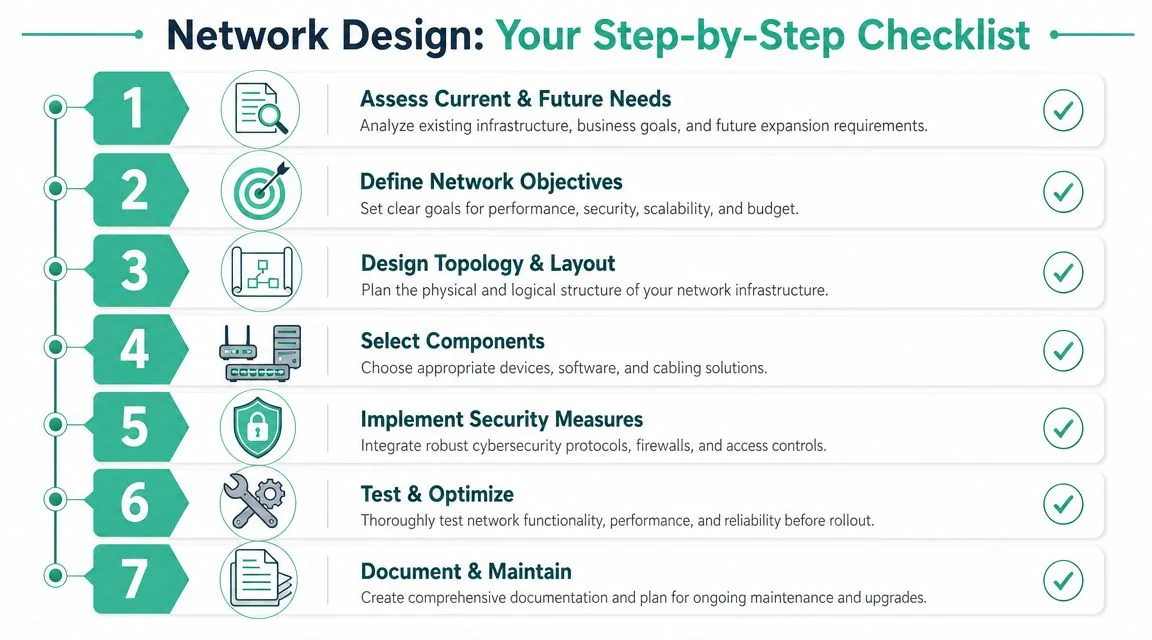
Step one to three define the shape of the network
1. Assess current and future needs
Don't begin with hardware brands. Begin with users, devices, and business processes.
- Count real usage types: Office staff, reception, warehouse handhelds, meeting room systems, printers, cameras, and guest access all place different demands on the network.
- List critical applications: Microsoft 365, Xero, practice management software, cloud storage, VoIP, remote desktop, and industry tools all behave differently.
- Allow for growth: New staff, extra rooms, second sites, and more cloud dependence change capacity requirements fast.
2. Define network objectives
A network can't be “good” in the abstract. It needs to be good at specific things.
Ask questions like:
- Is uninterrupted EFTPOS more important than maximum guest Wi-Fi speed?
- Do remote users need secure access to internal systems?
- Do phones and video calls need priority over general browsing?
- Do you want simple management or deep custom control?
3. Design topology and physical layout
Floor plans are important. Access point placement, switch locations, rack space, patch panel design, and cable paths all affect day-to-day reliability.
Common mistakes include putting Wi-Fi where it's convenient for cabling rather than where users work, or daisy-chaining small switches around the office because there was no central design.
A short technical walkthrough can help if you want to visualise the process before speaking with an adviser.
Step four to seven turn the plan into an operating system
4. Build the logical plan
Many SMB projects often rush this, even though it determines how manageable the network will be later.
Create:
- An IP addressing approach: Keep it organised and predictable.
- A VLAN structure: Match it to business functions and trust levels.
- A naming standard: Rooms, switches, access points, and patch ports should be easy to identify.
- A QoS policy: If voice or critical apps matter, decide what gets priority.
5. Select hardware against the plan
Buy gear that supports the design you've chosen, not gear that forces you into compromises later.
A few trade-offs matter here:
| Decision area | Lower upfront cost | Higher control or resilience |
|---|---|---|
| Switching | Unmanaged or lightly managed | Managed switching with VLANs, monitoring, and PoE control |
| Wi-Fi | Single all-in-one device | Multiple managed access points with proper coverage design |
| Firewalling | Basic internet gateway | Managed firewall with policy, logging, and remote access features |
| WAN resilience | One circuit only | Primary link with failover option |
6. Define security policy before rollout
Decide who can access what. Don't wait until after staff are connected and the business is busy.
That includes guest access rules, remote access approval, admin access restrictions, password policy alignment, and device onboarding. If your team uses personal devices, spell out what they can and can't reach.
7. Document everything
This sounds dull until something breaks. Then it becomes the difference between a quick fix and a long outage.
Your documentation should include:
- A network diagram: Physical and logical.
- A device register: Models, serials, locations, warranty status.
- Admin records: Who holds access and where credentials are controlled.
- Escalation notes: What to do if the internet, firewall, or switch fails.
Selecting Hardware and Managing Total Cost of Ownership
The buying stage is where many solid plans drift off course. A business approves a budget, compares a few quotes, and naturally gravitates toward the lowest upfront price. That's understandable, but network infrastructure design lives or dies on total cost of ownership, not carton price.
Compare hardware by operating model not sticker price
Different hardware ecosystems suit different operating styles.
Ubiquiti often appeals to SMBs that want strong visibility and decent central management without enterprise-level licensing complexity. It can be a good fit when the network is moderately complex and someone competent is managing it.
HPE Aruba suits businesses that want stronger switching and wireless capability with a more traditional infrastructure approach. It often fits professional offices, schools, and sites that need reliable roaming and solid policy control.
Cisco Meraki appeals to businesses that value cloud management, standardised deployments, and easier multi-site visibility. It can simplify administration, especially across branches, but recurring licensing becomes part of the budget model.
There isn't one right answer. The right choice depends on who will manage the environment, how much visibility you need, how many sites you run, and how comfortable you are with subscription-led management.
For businesses weighing procurement options more broadly, this guide on choosing the right technology for your business needs is a helpful way to frame purchase decisions beyond the basic quote comparison.
Energy use belongs in the buying decision
Power consumption rarely gets discussed in SMB networking, but it should. Australian data centres consumed about 5.2 TWh of electricity in 2023 and are projected to reach about 9.2 TWh by 2030, highlighting how energy efficiency is becoming a real infrastructure constraint, as noted in this discussion of energy-aware infrastructure planning.
That doesn't mean your office network resembles a data centre. It means the same principle applies. Oversized switches, inefficient UPS choices, unnecessary PoE draw, and poor cabinet ventilation all create ongoing cost.
Good buying decisions usually include:
- Right-sized switching: Enough ports for current use and sensible growth, not a large surplus that sits underused while drawing power.
- Measured PoE planning: Power what you need. Don't assume every port requires the same budget.
- Efficient rack design: Cleaner airflow and simpler cabling make maintenance easier and can reduce avoidable heat issues.
- Longer hardware life through fit-for-purpose choices: Underpowered gear fails in practice because staff work around it. Overpowered gear costs more to buy and run.
How rollout decisions affect long-term cost
The cheapest hardware can become expensive if it needs constant intervention. A firewall that's hard to manage, switches with poor visibility, or Wi-Fi that needs repeated manual tweaking all consume time.
The support model matters. Some businesses want internal ownership with occasional specialist help. Others prefer a managed arrangement where monitoring, firmware planning, and incident response are part of the operating model. Bridge IT Solutions is one local option in that category for Brisbane businesses that want networking supplied, installed, and supported as part of a broader managed IT environment.
Your Rollout Plan and Finding Local Brisbane Support
A network plan only pays off when the rollout is controlled. The technical work matters, but the implementation method matters just as much. Staff don't care whether your switch stack is elegant if Monday morning starts with phones down and printers offline.
Phased rollout versus big bang cutover
A phased rollout moves users or services in stages. That might mean one area of the office first, then another, or Wi-Fi first, then switching, then firewall changes. This approach usually lowers risk because faults are easier to isolate and correct.
A big bang cutover moves everything at once. It can be appropriate for a small office with simple systems, a hard move date, or limited tolerance for running old and new environments side by side. But it demands tighter preparation, better testing, and a clear backout plan.
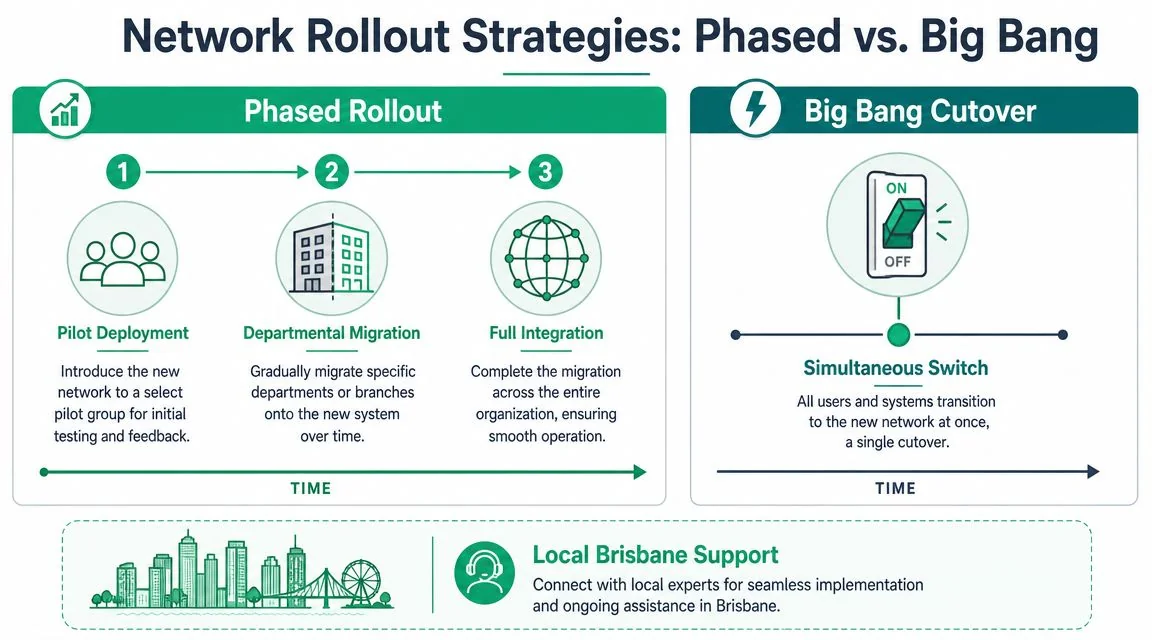
A practical rule is simple:
- Use phased rollout when the business has multiple teams, specialist systems, or limited downtime tolerance.
- Use big bang when the environment is small, dependencies are understood, and rollback is straightforward.
Before cutover, confirm:
- User impact windows: Schedule work outside trading peaks where possible.
- Testing order: Internet, firewall policy, switching, Wi-Fi, printing, phones, remote access.
- Fallback steps: Know what gets reverted, by whom, and in what order.
- Communication: Staff should know what changes, when it changes, and what to do if something isn't working.
Why local support changes the outcome
Brisbane and South East Queensland businesses deal with enough local variables already. Mixed building types, industrial sites, older offices, patchy last-mile behaviour, and teams spread between office, home, and mobile work all make generic remote support less useful than it sounds on paper.
A local support partner can inspect cabinet layout, test Wi-Fi coverage onsite, coordinate with electricians and cablers, and respond faster when a physical fault is involved. That's different from logging a ticket with a call centre that can only read from a script.
The long-term value is usually proactive rather than dramatic. Firmware gets reviewed before a problem. Failing hardware gets identified earlier. Documentation stays current. Network changes align with business changes instead of becoming rushed afterthoughts.
If your current setup feels fragile, the next step isn't replacing random hardware. It's getting the design right, then rolling it out in a way that protects normal operations.
If you want a practical review of your current setup, Bridge IT Solutions can help map your network, identify weak points in resilience and security, and turn an ad hoc setup into a clear, supportable design for your Brisbane or South East Queensland business.
