


Your website probably isn't down all the time. That's why bad hosting lingers for so long.
It shows up in smaller, more expensive ways. A contact form stops sending enquiries. Your booking page crawls on mobile. A plugin update breaks the site on a Friday afternoon and nobody can restore it quickly. You ring support and land in a queue with someone reading a script from another time zone. Meanwhile, a potential customer leaves and rings a competitor instead.
That's the essential problem with cheap hosting. The monthly fee looks harmless, but the business cost sits somewhere else. Lost trust. Lost leads. Staff time wasted chasing avoidable issues. If your site matters to sales, enquiries, bookings, or client confidence, hosting isn't a background utility. It's part of your business infrastructure, the same way your office internet, phone system, and locks are.
For many small businesses, especially in Brisbane and South East Queensland, web hosting for business gets chosen in a rush. A designer sets it up. A mate recommends a bargain plan. An offshore provider offers “unlimited” everything. Then the business grows, compliance starts to matter, and that early shortcut becomes a liability.
Table of Contents
- Why Your Web Hosting Is a Critical Business Decision
- Understanding the Main Types of Web Hosting
- Essential Criteria for Selecting a Hosting Provider
- Recommended Hosting Setups for Common Businesses
- Decoding Hosting Costs and Real Business Value
- The Local Managed Provider Advantage
- Your Simple Website Hosting Migration Checklist
Why Your Web Hosting Is a Critical Business Decision
A business owner usually notices hosting only when something goes wrong. The site slows down during a campaign. Email forms fail. Online payments wobble. Then the owner asks the wrong question: “Why is my website acting up?” The better question is, “Why did I put a business asset on bargain-basement infrastructure?”
Web hosting for business is closer to choosing commercial premises than buying stationery. If your shopfront had flickering lights, a faulty front door, and random power cuts, you wouldn't call it a cheap lease. You'd call it a risk. Your website is no different.
The Australian market is telling the same story. The Australia web hosting services market projection says the market is projected to reach $6.90 billion USD by 2032, growing at a 26.29% CAGR from 2025 to 2032. Businesses aren't pouring money into hosting because it's trendy. They're doing it because reliable digital infrastructure now affects sales, service delivery, and day-to-day operations.
Cheap hosting creates expensive problems
Low-cost plans usually win on one thing only. The advertised monthly fee.
They often lose on the things that matter when your business is busy:
- Response time under pressure when multiple visitors hit your site at once
- Recovery options when an update or malware issue breaks the site
- Support quality when you need someone to fix the problem, not explain a knowledge base article
- Business continuity when your site handles enquiries, bookings, or customer logins
Practical rule: If your website helps generate revenue or client enquiries, treat hosting as an operations decision, not a design add-on.
A lot of owners also lump website design and website hosting together. They're connected, but they solve different problems. Good design helps people trust you. Good hosting keeps the whole thing available, responsive, and recoverable. If you're reviewing both at once, Advisor Momentum's website services are one example of how businesses look at site presentation alongside the platform it runs on.
Hosting affects trust before anyone contacts you
Customers rarely tell you they left because your website felt shaky. They just disappear.
A slow or unstable site makes a business look disorganised. A broken contact page says, “We might miss your message.” A browser warning or hacked homepage says, “You can't trust us with your details.” That damage hits harder for accountants, lawyers, consultants, medical clinics, and any business asking people to share personal information.
Hosting isn't the whole website strategy. But it is the foundation. And foundations are a poor place to save money.
Understanding the Main Types of Web Hosting
Most small business owners don't need to memorise infrastructure terms. You do need to know what you're buying.
The easiest way to think about hosting is property. Some options are like renting a room in a crowded building. Others are like leasing your own secure premises with facilities management included. The right choice depends on how much control, stability, and support your business needs.
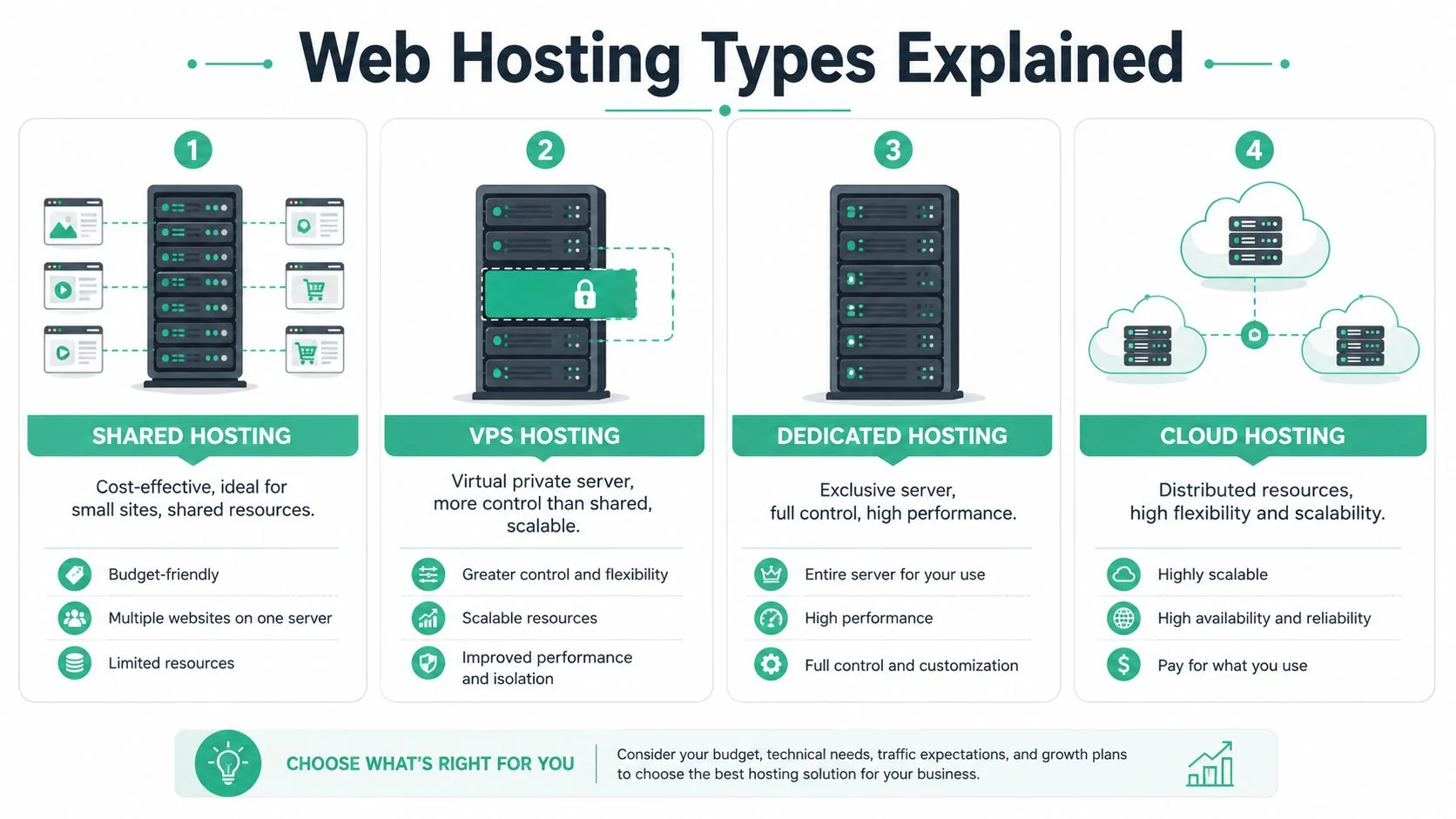
For Australian SMEs, Butterfly's guide to web hosting costs and options notes that business-grade managed cloud hosting typically starts around $100 AUD per month, while entry-level shared hosting can sit under $30 per month. That cheap end of the market usually lacks the redundancy and failover features businesses rely on when the site matters.
Shared hosting
Shared hosting is the apartment building model. Your website lives on a server with many other websites, all using the same core resources.
This is the lowest-cost option, and sometimes that's fine. If you've got a very simple brochure site with modest traffic and no critical integrations, shared hosting can work for a while.
The trade-off is simple. Your neighbours affect you.
If another site on that server gets hit with a spike, runs poor code, or causes resource strain, your website can slow down too. You also get less control over the environment and fewer business-grade safeguards.
Shared hosting suits:
- Very small websites with minimal functionality
- Early-stage businesses that need a basic online presence
- Temporary projects where downtime isn't commercially serious
Shared hosting does not suit:
- Online stores taking payments
- Businesses running lead generation campaigns
- Firms handling sensitive customer data
VPS hosting
VPS stands for Virtual Private Server. Think townhouse rather than apartment. You're still in a larger complex, but your space is partitioned and more independent.
A VPS gives you more dedicated resources and more control than shared hosting. Performance is usually steadier, and the environment is better suited to businesses running custom applications, larger WordPress sites, or more demanding plugins.
The catch is management. An unmanaged VPS can become a headache quickly if nobody on your team handles patching, monitoring, security hardening, and troubleshooting.
A VPS without active management is like buying a commercial ute because it looks capable, then realising nobody services it.
For businesses comparing infrastructure more broadly, this look at on-premise vs cloud servers helps frame where hosted environments fit against equipment you manage yourself.
Dedicated hosting
Dedicated hosting is the standalone house. One physical server, one customer. No sharing.
This setup offers strong control and predictable performance. It can make sense for specialised workloads or businesses with unusual application requirements. But for most small and mid-sized businesses, it's more power and more maintenance burden than they need.
Dedicated hosting also tends to push you closer to specialist administration. If your team doesn't have that expertise, the “control” you paid for becomes another risk.
Cloud hosting
Cloud hosting is the flexible utility model. Instead of relying on one box in one place, the environment draws from distributed infrastructure designed to handle change more gracefully.
For most Australian SMEs, this is the sweet spot. Cloud hosting is usually the most practical choice when paired with management. It gives you room to grow, better resilience than entry-level plans, and less dependence on one fragile setup put together years ago.
Here's the plain-English view:
| Hosting type | Best for | Main risk |
|---|---|---|
| Shared | Very small, simple sites | Performance and reliability limits |
| VPS | Growing sites needing more control | Management burden |
| Dedicated | Specialised, heavy workloads | Cost and complexity |
| Cloud | Most SMEs needing flexibility | Quality varies if unmanaged |
The hosting type matters. But management matters just as much. A good platform run badly is still a business problem.
Essential Criteria for Selecting a Hosting Provider
Two providers can sell what sounds like the same service and deliver a completely different business outcome.
One gives you a stable site, clean backups, clear support, and sensible guidance. The other gives you a dashboard, a billing portal, and a support ticket that sits unanswered while your homepage throws errors. That's why provider selection matters more than the hosting label on the brochure.
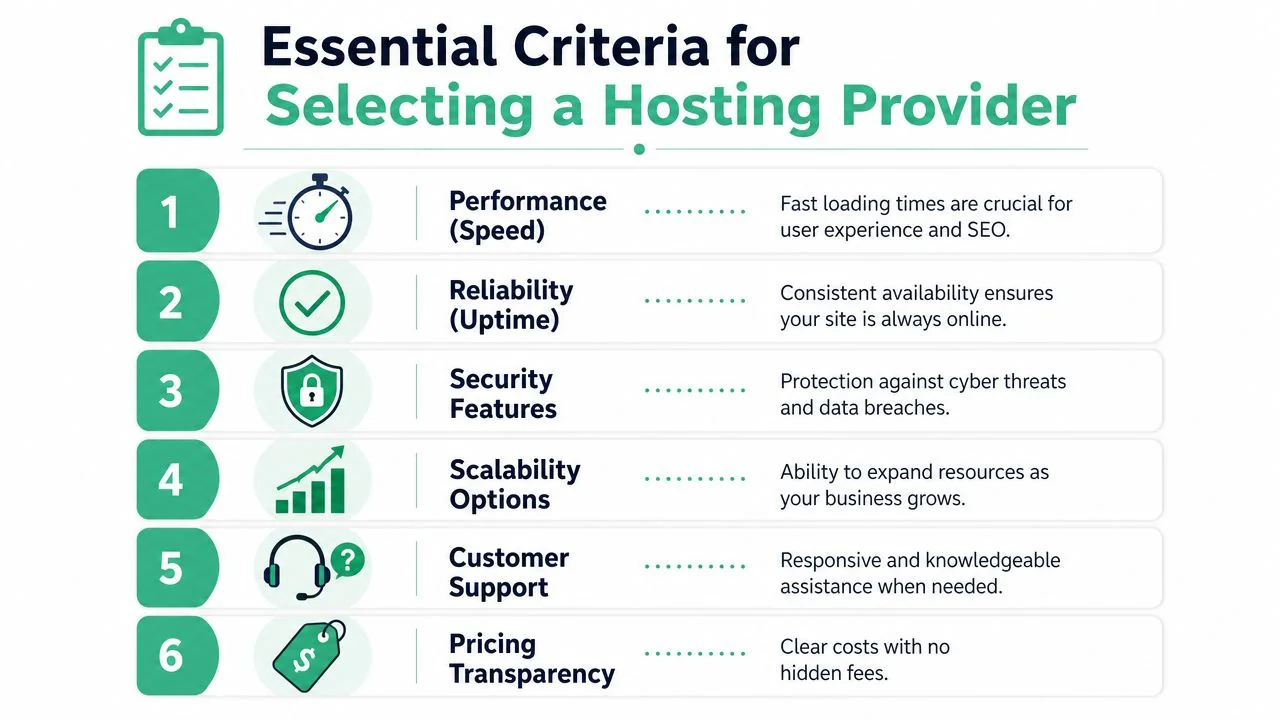
Performance and reliability
Speed isn't a vanity metric. It affects whether visitors stay, browse, and enquire.
If your market is local, Australian hosting has another practical upside. DreamIT Host's guide to Australian web hosting notes that local providers can deliver faster data speeds, improve local SEO relevance, and support compliance because hosting in Australian data centres reduces latency and supports data sovereignty.
Ask providers direct questions:
- Where is the website hosted? If they dodge the answer, move on.
- What happens if traffic spikes? You want a clear explanation, not marketing fluff.
- What uptime commitment do you back? Don't accept vague reassurance.
Security backups and support
Here, cheap hosting falls apart.
A business host should offer layered security, routine patching, malware scanning, and backup processes that can restore the site without chaos. It should also come with support that understands business urgency. “We'll escalate your ticket” isn't much help when your quote form is dead and staff are fielding complaints.
Look for these must-haves:
- Backups you can rely on with restoration support, not just a checkbox in a control panel
- Security controls such as malware monitoring and hardened environments
- Human support that can act on WordPress issues, plugin conflicts, and recovery tasks
- Clear scope around who handles updates, monitoring, and incident response
A provider doesn't need the fanciest interface. They need a mature process.
If support can't explain how they restore a broken site in plain English, they probably won't handle the situation well under pressure.
Compliance and data sovereignty
This point gets ignored until it becomes urgent.
For many Australian businesses, especially professional services and healthcare, where the data sits matters. The Digital Pacific discussion on small business hosting and privacy obligations highlights a major gap in awareness around data sovereignty under the 2023 Privacy Act amendments. It also states that over 60% of small businesses in Queensland are unaware that foreign-hosted data may not meet recent privacy compliance standards.
That should get your attention.
If your website collects enquiries, forms, documents, bookings, or any personal information, ask these questions before signing anything:
- Is website data stored in Australia?
- Are backups also kept in Australia, or somewhere else?
- Who can access the environment and from where?
- What help do you provide if a site is compromised?
A quick way to compare providers
Use this short scorecard in meetings or sales calls:
| Criterion | Strong answer | Weak answer |
|---|---|---|
| Hosting location | Specific Australian data centre answer | “Global infrastructure” |
| Backups | Clear frequency and restoration process | “Backups available” |
| Support | Business-hours or managed support with action | Ticket-only, vague turnaround |
| Security | Active monitoring and recovery help | Add-ons only |
| Scalability | Clear upgrade path | “You can always move later” |
| Pricing | Transparent inclusions | Low intro price, lots extra |
A hosting provider isn't just renting you server space. They're taking part in your business continuity plan, whether they admit it or not.
Recommended Hosting Setups for Common Businesses
The right setup depends on what your website does. A site that just displays opening hours doesn't need the same environment as a clinic taking appointment requests or an online store processing orders all day.

Ecommerce stores
An online store needs more than a nice theme and a payment gateway. It needs consistent performance, clean checkout behaviour, strong security, and room to handle promotion periods without wobbling.
My recommendation is straightforward. Use managed cloud hosting. Skip bargain shared hosting.
An ecommerce site is a sales counter. If pages drag, carts fail, or stock updates misbehave, you're not dealing with a technical annoyance. You're dealing with interrupted revenue and customer distrust. Stores also tend to accumulate plugins quickly, which makes maintenance and compatibility more fragile over time.
Best-fit setup: managed cloud hosting, active backups, security monitoring, and a support team that can assist with WordPress and plugin-related issues.
Professional services firms
Accountants, law firms, financial advisers, and consultants often underestimate how much sensitive information their websites collect. Contact forms, document uploads, booking tools, and lead capture workflows all create privacy and reputational risk.
For these firms, local hosting matters. Managed hosting matters more.
You want Australian data residency, routine maintenance, practical backup recovery, and support that understands business-hours urgency. The site may not get massive traffic, but the information running through it is often sensitive enough that a poor hosting decision becomes a governance problem.
A professional services website doesn't need to be flashy. It needs to be stable, credible, and handled like a client-facing system.
Best-fit setup: Australian-hosted managed cloud or managed VPS, depending on complexity, with clear data handling and recovery processes.
Medical and dental clinics
Clinics need uptime people can depend on. Patients don't care why the booking form failed. They just know they couldn't get through.
Medical and dental websites often connect to appointment requests, intake forms, location information, and service pages that patients access when they're already stressed. Add privacy obligations to that, and low-cost generic hosting becomes hard to justify.
For clinics, I'd avoid DIY hosting decisions altogether. The safer move is a managed local provider that can keep the environment monitored, patched, and recoverable.
Best-fit setup: Australian managed hosting with strong backup discipline, local data handling, and responsive support when the website affects bookings or patient communication.
Decoding Hosting Costs and Real Business Value
The cheapest hosting plan on the comparison page is rarely the cheapest option for the business.
That's because the monthly invoice is only one part of the cost. The actual number includes downtime, recovery effort, staff disruption, lost enquiries, and the ugly surprise fees that appear when you need help fast. Cheap hosting often works like a discount airline ticket. The base fare looks fantastic until you add baggage, seat selection, support, and the cost of delays.
The sticker price trap
Australia's hosting market is large and competitive. IBISWorld's overview of the Australian Internet Hosting Services industry says the industry generated $1.5 billion AUD in 2026 and includes 1,825 active businesses. That gives small businesses plenty of choice, but it also creates noise. Lots of providers compete on headline price because it's easy to market.
That's the trap.
A low-cost plan can still be expensive if it comes with:
- Slow support when your website breaks
- Paid extras for backups, migrations, malware cleanup, or SSL-related tasks
- Resource limits that throttle performance when campaigns start working
- Manual admin work pushed onto you or your staff
If you run an online store, it helps to think in whole-of-business costs rather than line-item hosting fees. Even though it's market-specific, this breakdown of understanding online store expenses is a useful reminder that platforms, payments, fulfilment, marketing, and support all interact. Hosting should be assessed the same way.
What you are actually paying for
A proper hosting budget buys four things.
First, availability. Your site stays online and usable when people need it.
Second, protection. If something goes wrong, backups, monitoring, and support reduce the damage.
Third, time back. Your staff aren't wasting hours lodged between a web developer, a host, and a plugin vendor, all blaming each other.
Fourth, predictability. You know what's included and who's responsible.
If you want to benchmark what managed business hosting can look like locally, website hosting pricing from Bridge IT is one example of how providers package hosting with maintenance and business support rather than just selling raw server space.
Here's the decision test I use with clients:
| Question | Cheap generic hosting | Managed business hosting |
|---|---|---|
| Who fixes issues? | Usually you, your developer, or a ticket queue | Provider and support team |
| What happens after an update fails? | Scramble and troubleshoot | Restore and resolve |
| Is compliance part of the conversation? | Rarely | It should be |
| Is the fee the full story? | Often no | More likely yes |
Don't buy hosting the way you buy printer paper. Buy it the way you buy insurance, locks, and internet redundancy. You hope you won't need the hard parts often. But when you do, they matter a lot.
The Local Managed Provider Advantage
If you're an Australian SME, especially in Brisbane or South East Queensland, I think the argument for local managed hosting is strong.
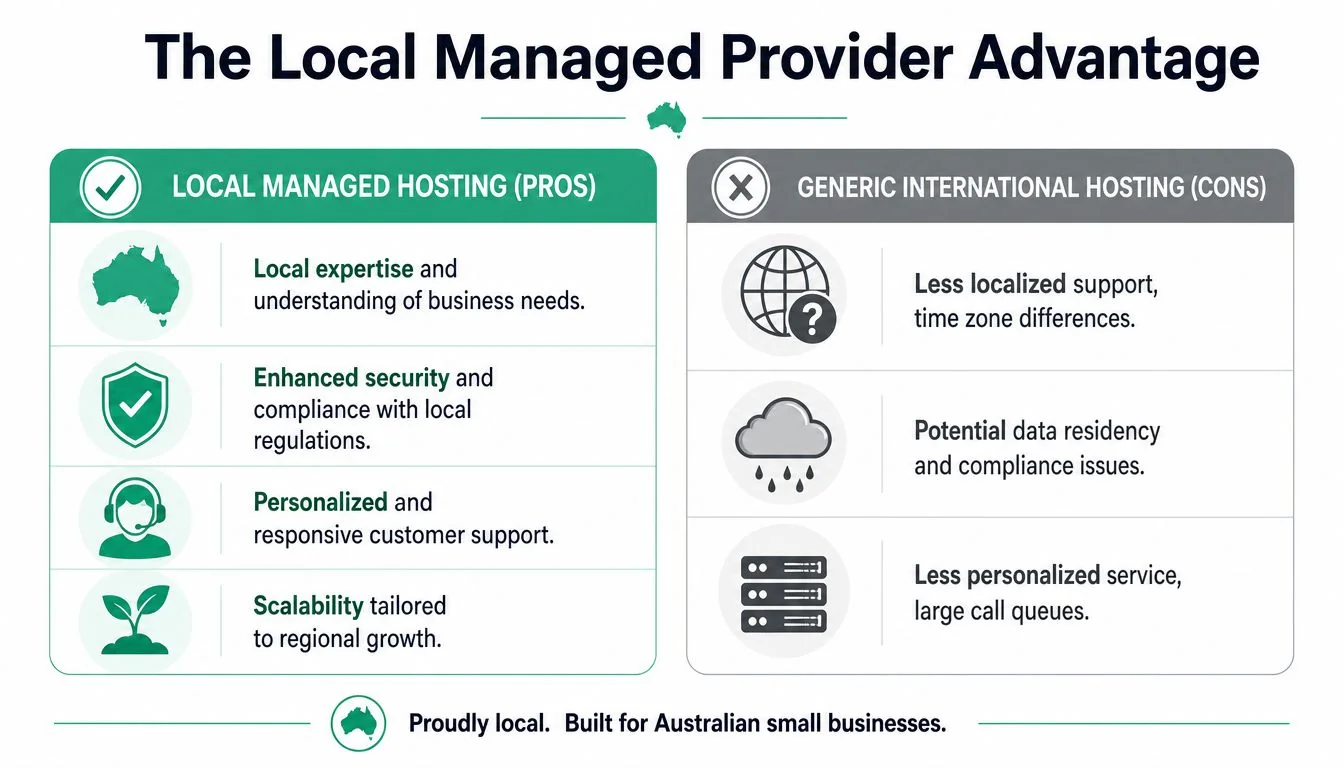
Generic international hosts sell scale. Local managed providers sell relevance. For a business website, relevance usually wins. You need someone who understands local compliance concerns, hosts data in the right place, responds during your working day, and treats your website like part of your operations instead of one account among thousands.
Why local matters in Australia
Hosting in Australia isn't just about patriotism or preference. It's practical.
Local hosting can improve speed for Australian visitors, help with local search relevance, and support compliance because the data stays under Australian control. That matters more when your site collects personal details, forms, booking requests, or documents.
The bigger advantage is accountability. When your provider is local, support conversations tend to be shorter and clearer. You're not spending half the morning trying to explain why a failed enquiry form is urgent for a Brisbane accounting firm in tax season or a dental clinic handling appointment demand.
What managed hosting changes day to day
Managed hosting removes jobs your business shouldn't be doing in the first place.
That includes monitoring, patching, backups, troubleshooting, and the awkward middleman work between website issues and infrastructure issues. A managed provider doesn't just give you a login. They take ownership of the boring but critical jobs that keep the website stable.
That's particularly useful for firms without an internal IT team, and for offices where the “tech person” is really the practice manager, admin lead, or business owner who got stuck with it.
A local option such as Bridge IT's web hosting in Brisbane fits this model by combining hosting with business support, backups, and website-related assistance for organisations that don't want to juggle multiple vendors.
Good managed hosting is less like renting server space and more like having building management for your digital premises.
Here's the plain comparison:
| Local managed provider | Generic international host |
|---|---|
| Support aligned to Australian business hours | Support may sit across time zones |
| Better fit for data sovereignty needs | Data location can be unclear |
| Help with business continuity and recovery | Often limited to infrastructure scope |
| Relationship-based support | Ticket-based volume support |
If your website is commercially important, local managed hosting is not overkill. It's the grown-up option.
Your Simple Website Hosting Migration Checklist
Changing hosts feels risky because business owners assume one wrong step could wipe out the site. That fear is understandable. It's also manageable if the migration is handled methodically.
Use this checklist to keep the move organised and low drama.
Before the move
Start with a proper inventory.
- List every website component including pages, forms, plugins, themes, ecommerce tools, tracking tools, and any third-party integrations.
- Confirm what must be preserved such as SEO settings, redirects, analytics tags, contact forms, and booking workflows.
- Create full backups of website files, databases, and any related assets before anyone touches the environment.
- Document current settings so you're not guessing later about how the site was configured.
- Check responsibilities between your developer, host, and IT support team so everyone knows who owns what.
This is also the right time to review whether old plugins, broken pages, or unnecessary tools should be cleaned up before the move.
During the move
A good migration is boring. That's a compliment.
- Copy the website to the new hosting environment with all required files and databases.
- Reconnect the site's key functions including forms, ecommerce tools, and any application integrations.
- Test on a staging or temporary version before making the site live.
- Check the practical things first. Can someone submit a form? Can a customer complete a checkout? Can staff log in and update content?
- Keep the old hosting active until the new environment has been confirmed as stable.
Don't treat “the homepage loads” as proof the migration worked. The homepage is only one part of the business process.
After the move
The work isn't finished the minute the new host goes live.
- Monitor the site closely for missing images, form failures, plugin conflicts, or odd layout problems.
- Test from different devices and browsers because user issues often appear there first.
- Review backups and security settings on the new host so you know protection is active from day one.
- Ask staff to report anything unusual quickly instead of assuming “someone else is handling it”.
- Cancel the old hosting only after everything is stable and you've confirmed the new environment is doing the job properly.
A migration should leave you with more than a new invoice. It should leave you with a hosting setup that's easier to support, easier to recover, and better matched to the business you're running.
If your current hosting feels cheap until something breaks, it's probably time for a review. Bridge IT Solutions works with Brisbane and South East Queensland businesses that need website hosting tied to real-world support, backups, security, and business continuity, not just server space and a login.
