

Your business probably already has software. That doesn't mean your systems are working.
If you're running an SME in Brisbane or wider South East Queensland, you've likely got the same patchwork most growing businesses end up with. A few spreadsheets. Xero. Microsoft 365. Staff entering the same client details in two or three places. Someone in the office who “knows the system” because they built a workaround nobody else understands. It holds together until it doesn't.
That's usually the point where owners start looking at custom software solutions. Not because they want something flashy, but because they're sick of paying staff to fight systems that should be helping them.
Table of Contents
- Why Consider Custom Software Now
- What Exactly Is a Custom Software Solution
- The Business Benefits and Hidden Risks
- The Custom Software Development Lifecycle
- Making the Decision Build vs Buy
- Budgeting for Custom Software in Brisbane
- Choosing Your Brisbane Technology Partner
- Frequently Asked Questions
Why Consider Custom Software Now
A Hemmant trade business with crews on the road doesn't need more apps. It needs fewer handoffs.
If jobs are booked in one system, stock is tracked somewhere else, and invoices are delayed because site notes come back by text message or paper docket, the problem isn't staff effort. The problem is process friction. Generic tools are fine when your business is simple. They become expensive when your team starts building manual bridges between them.
That's why custom software solutions are worth considering now. They let you build the missing connector, workflow, portal, or internal system that matches how your business runs. Not how a software vendor thinks a generic business should run.
The tipping point is operational drag
Most owners wait too long. They keep adding subscriptions, plugins, and admin steps because each one looks cheaper than building something properly.
Then the cracks become obvious:
- Staff double-handle work: Customer details, job notes, approvals, and invoices get entered more than once.
- Knowledge sits with one person: The office manager knows the workaround. Nobody else does.
- Reporting is slow: You can't get a clean answer on jobs in progress, overdue actions, or margins without chasing files.
- Errors become normal: Wrong versions, missed follow-ups, and inconsistent records start feeling routine.
Practical rule: If your team spends too much time translating information between systems, you don't have a software stack. You have a labour-intensive workaround.
This isn't some fringe move for big corporates. The Australian custom software development market generated USD 1,039.4 million in 2025 and is projected to reach USD 4,820.6 million by 2033, with a projected US$3,711.5 million by 2030, according to Grand View Research's Australia custom software development market outlook. That tells you businesses across Australia are moving away from clunky one-size-fits-all systems and towards tools built around their workflows.
Brisbane businesses have a local reason to act
SEQ businesses aren't operating in a vacuum. Local firms are dealing with cyber risk, compliance pressure, tighter margins, and staff who expect mobile-friendly systems that work from site, clinic, warehouse, or home office.
A custom solution can bake those realities into the design from day one. Mobile forms for field teams. Approval flows for directors. Secure document access for professional services. Cleaner client handover between sales and operations. That's what real digital transformation for Brisbane companies looks like. Less jargon, more useful systems.
What Exactly Is a Custom Software Solution
A custom software solution is software built for your business processes, your staff, and your goals. Not a general product sold to thousands of businesses with the same menu of features.
It's like a custom-made suit. Off-the-rack can be fine if your needs are ordinary and the fit is close enough. Custom is for when the fit matters, the importance is magnified, and “close enough” creates problems every week.
It's built around your workflow
Custom software usually solves a specific operational problem. It might be an internal job management tool, a client portal, a booking and approvals system, a reporting dashboard, or a platform that links tools like Microsoft 365, Xero, SharePoint, CRM software, and field data collection.
The key point is this. The software follows your process.
A generic platform often forces you to change the way you work so it can fit the product. A custom platform does the opposite. It reflects the way your business operates, including the approvals, exceptions, file handling, security rules, and handovers that make your business different.
It's not the same as tweaking off-the-shelf software
Owners frequently find this confusing.
There's a big difference between:
| Option | What it means | Good fit |
|---|---|---|
| Off-the-shelf software | Ready-made tool like Microsoft 365, Xero, or a SaaS job management app | Standard business needs |
| Configured software | A ready-made platform with settings, workflows, and add-ons adjusted | Businesses with mostly standard processes |
| Custom software | A system designed and built around your operations | Businesses with unique workflows or integration needs |
A SharePoint setup with forms and approvals is useful. A WordPress website with contact forms is useful too. But neither automatically counts as custom software in the true sense.
A brochure website tells people who you are. A custom software solution helps your business do the work.
It's more than a website
A simple website is mostly front-end communication. It gives clients information. It might collect enquiries. It might even include bookings or e-commerce.
Custom software goes further. It handles logic, rules, integrations, user roles, reporting, automation, and ongoing operations. It might connect site staff, admin staff, managers, and clients in one environment. It might trigger tasks, create records, sync documents, and control who sees what.
That's why the right question isn't “Do I need a custom app?” It's “Do I have a business process that generic software keeps mangling?”
If the answer is yes, then custom software solutions deserve a serious look.
The Business Benefits and Hidden Risks
Custom software can be a strong business asset. It can also become an expensive mess if you build the wrong thing, with the wrong team, for the wrong reason.
That's why owners need a clear-eyed view. Not sales fluff.
Where custom software earns its keep
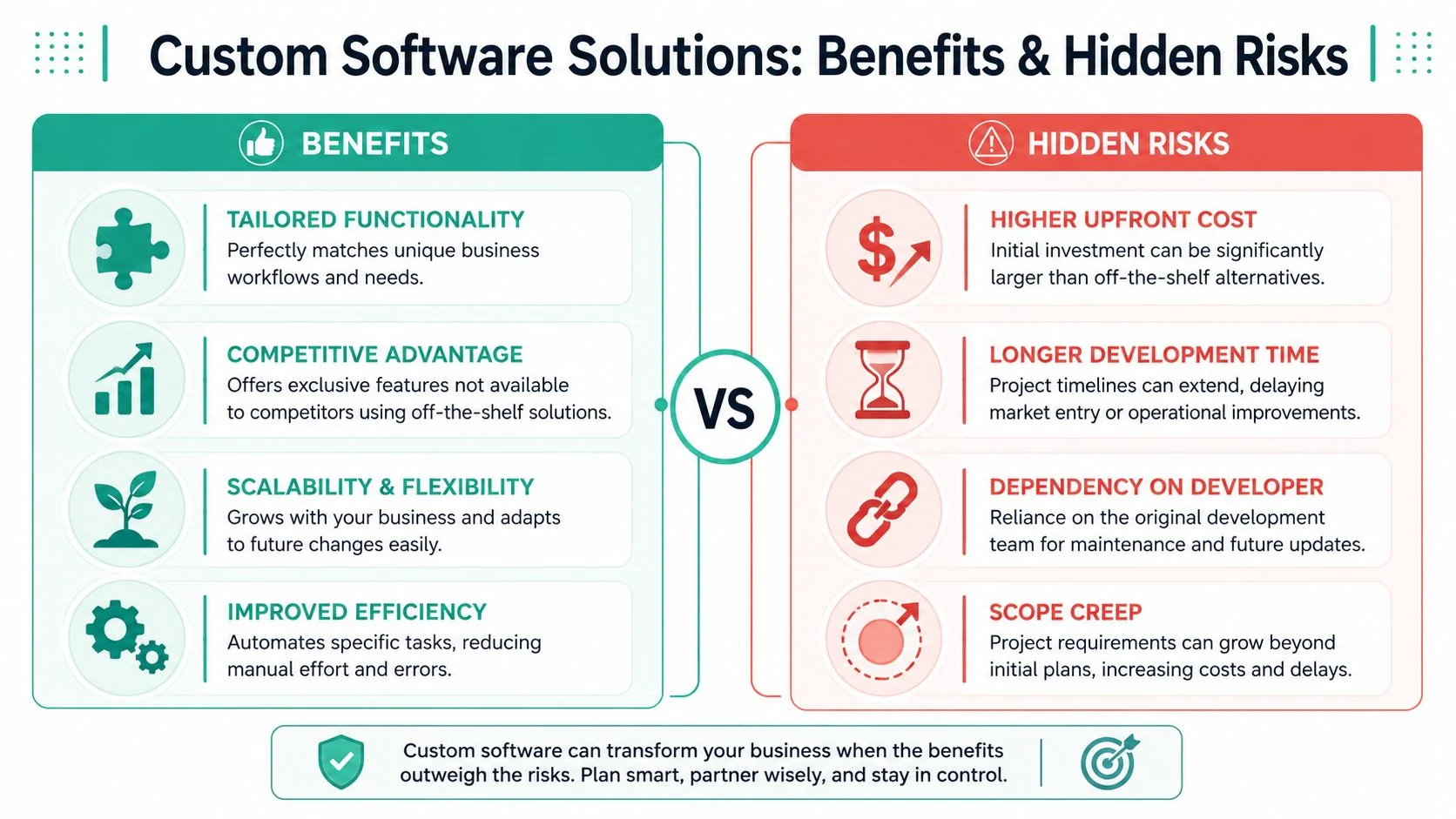
The biggest win is alignment. Your software matches your operations instead of creating friction around them.
That shows up in practical ways:
- Improved efficiency: Repetitive admin gets automated. Staff stop re-entering data and chasing missing information.
- Specific functionality: You only build the workflows, permissions, dashboards, and forms your team needs.
- Competitive advantage: If your customer experience depends on speed, visibility, or specialist service, a custom system can support that directly.
- Scalability and flexibility: You can adapt the system as your service lines, staff structure, or reporting needs change.
A Brisbane logistics, warehousing, or transport operator is a good example. Generic systems can handle the basics, but they often fall over when dispatch, proof of delivery, billing rules, and customer communication all need to line up. That's why resources discussing TMS benefits for hauliers are useful. They show how software starts delivering real value when it's tied tightly to operational workflow, not just record-keeping.
For many SMEs, the strongest benefit is simpler management. Better visibility. Fewer bottlenecks. Less reliance on one staff member to hold the whole process together.
Where owners get burned
The risks are real. Ignore them and you'll waste money.
First, custom software takes commitment. You need decisions, internal input, and discipline. If you can't explain your process clearly, a developer will guess. Guessing is expensive.
Second, maintenance doesn't disappear after launch. Software needs support, updates, security reviews, user changes, and occasional fixes. If you don't plan for that, the system will age badly.
Third, scope creep kills projects. Owners start with one clear problem, then add ten “while we're at it” features. Budget blows out. Timelines slip. Staff lose confidence.
The best custom software projects are narrow at the start. They solve one painful workflow properly before expanding.
Here's the balanced view:
| Benefit | Hidden risk |
|---|---|
| Process fit | You need to define the process clearly |
| Better automation | Bad requirements create bad automation |
| Ownership and control | You carry responsibility for upkeep |
| Unique features | Fancy extras can distract from the core problem |
That's why many SMEs benefit from first fixing process design. Then they use software to reinforce it. If your approvals are vague, your data is messy, and nobody agrees on who owns each step, custom code won't save you. Solid process automation and optimisation work has to come first or at least happen alongside the build.
The Custom Software Development Lifecycle
A lot of business owners think software projects start with coding. They don't. Good ones start with decisions.
If a developer opens a laptop before they understand your workflow, user roles, edge cases, and business rules, you're already in trouble.
A proper custom software project follows a sequence. Not because consultants like process charts, but because each step protects your budget and reduces rework.
What happens before anyone writes code
The early stage matters most. Here, the business problem gets translated into a plan.
Discovery and planning
You explain how work currently moves through the business. A good team asks annoying questions. That's a good sign. They should want to know who enters data, who approves it, what exceptions happen, what systems need to connect, and where delays occur.Requirements definition
This turns verbal pain points into concrete features. Not vague lines like “make reporting easier”. Real statements like “site supervisors must submit job completion photos before an invoice can be approved”.Design and prototyping
Before full development, you should see wireframes, mock-ups, or clickable prototypes. This is your chance to catch confusion early, while changes are still cheap.
If you can't review a prototype and show it to staff, you're buying blind.
What delivery looks like in practice
Once the workflow and design are locked down, development starts. This phase should still involve you. Not every day, but regularly.
A solid delivery phase usually includes:
- Development and coding: The team builds the agreed functions, integrations, permissions, and interfaces.
- Testing and quality assurance: Real-world scenarios get tested. Failed logins, missing fields, duplicate records, bad user input, approval errors, mobile usability.
- User review: Key staff should test the system before launch. Not just managers. The people doing the work every day.
- Deployment and launch: The software moves into production. Data may need to be migrated. Staff need clear instructions.
This video gives a useful visual overview of how software projects move from idea to release:
What happens after launch
Launch isn't the finish line. It's the handover into real operations.
That means a few practical things need to exist:
- Support arrangements: Who fixes issues, answers questions, and handles updates?
- Security oversight: Who monitors access, backup health, and vulnerability exposure?
- Change process: How are new features requested, scoped, approved, and costed?
- Documentation: Can your business operate the system without relying on verbal history?
A healthy lifecycle doesn't feel dramatic. It feels controlled. You know what's being built, why it matters, who signs off, and what happens next.
That's what SMEs should want. Not software theatre. A predictable path from problem to working tool.
Making the Decision Build vs Buy
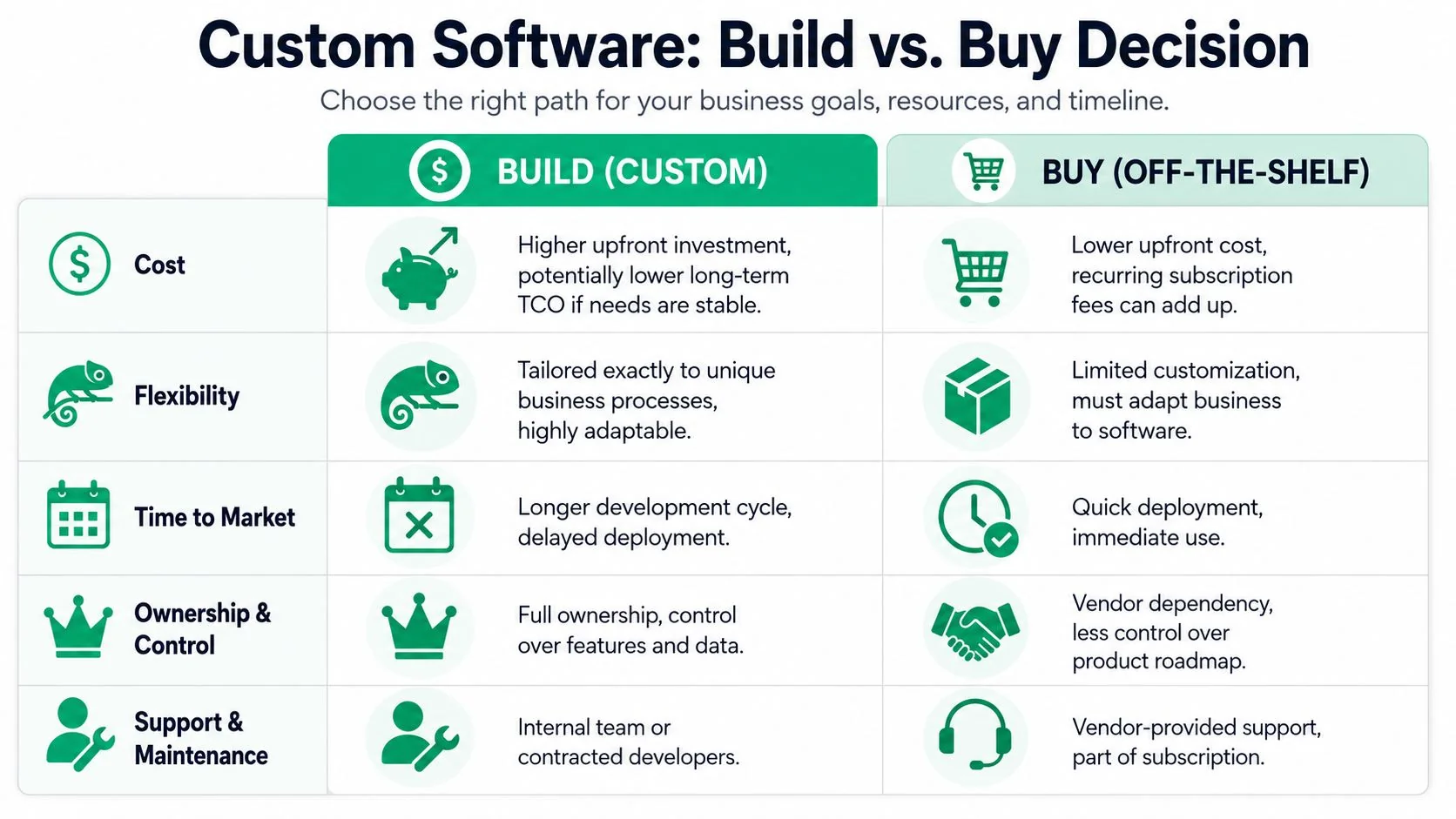
Most businesses should not build software by default.
That's the first thing I'd tell any Brisbane owner. If a solid off-the-shelf product already fits your process well, buy it. Get on with business. Don't commission a custom build because you like the idea of having “your own platform”.
The build decision only makes sense when the software itself needs to become part of how you operate, serve clients, or control workflow.
When buying is the smart move
Buy existing software if your need is common and your process doesn't create a real competitive difference.
Examples include:
- Email and collaboration: Microsoft 365 already does this well for most SMEs.
- Accounting: Xero or MYOB usually make more sense than building anything custom.
- Basic CRM: If your sales process is standard, configure an existing platform first.
- Simple booking or form workflows: Off-the-shelf tools can handle a lot before custom development is justified.
Buying also suits businesses that need speed. If you have a pressing operational issue and a proven SaaS product can solve most of it quickly, that's often the right call. Perfect fit is overrated when the current problem is urgent.
When building is the better decision
Build when your workflow is specific, central to the business, and repeatedly compromised by generic products.
That usually applies when:
| Scenario | Better choice |
|---|---|
| Your process is standard | Buy |
| Your process is unusual and business-critical | Build |
| You need something live fast | Buy |
| You need deep integration across multiple systems | Build |
| Your staff keep using workarounds because existing tools don't fit | Build |
| You only need a simple feature set | Buy |
A custom build also makes sense if you've already tried one or two platforms and they still force awkward workarounds. That's a strong signal. If you're bending the business to fit the software, you're carrying hidden cost every day.
Good software should reduce operational compromise. If it keeps creating compromise, stop trying to force it.
A simple decision filter
Use these questions before you spend a cent:
Is this process core to how we make money or deliver service?
If no, buy.Do existing tools handle it well enough with sensible configuration?
If yes, buy.Are staff using spreadsheets, emails, and manual checks to bridge software gaps?
If yes, custom may be justified.Do we need control over workflow, data handling, and future changes?
If yes, building becomes more attractive.Can we clearly define the problem we want solved?
If no, pause. You're not ready to build.
For Brisbane SMEs, the best answer is often hybrid. Buy proven platforms for standard functions. Build only where your workflow is unique or where integration pain is costing you time, accuracy, or customer confidence.
That keeps your budget focused where custom work matters.
Budgeting for Custom Software in Brisbane
Budget conversations go wrong when owners ask for a price before they've defined the problem.
That's like asking a builder for a quote on “some renovations”. You might get a number, but it won't mean much.
What Brisbane SMEs should expect to spend
In Australia, the typical cost range for custom software development in 2025 spans from AUD $25,000 for an MVP up to over AUD $500,000 for complex enterprise platforms, while business applications generally cost between AUD $50,000 and $150,000, according to Jaarvis on Australian custom software development costs.
That same source states that a custom MVP typically requires AUD $20,000 to $50,000 and takes 2 to 4 months, while enterprise-grade solutions can exceed AUD $500,000 and demand 8 to 18 months for delivery.
For a Brisbane SME, that usually translates like this:
- Internal tool or MVP: Best for proving a workflow, replacing a spreadsheet-heavy process, or testing a new service model.
- Business application: Suitable when multiple users, approvals, reporting, and integrations are involved.
- Enterprise-grade platform: Usually overkill for smaller operators unless the system is central to operations across multiple teams or sites.
What actually drives the cost
The biggest cost driver isn't code volume. It's complexity.
A simple tool with one clean process can be affordable. A system that needs user roles, mobile access, document handling, reporting, Microsoft 365 integration, accounting sync, and layered approvals gets expensive fast.
The main cost drivers are usually:
- Workflow complexity: More exceptions and approval paths mean more design and testing.
- Integrations: Connecting to Xero, Microsoft 365, CRMs, or industry systems adds work.
- Security requirements: Professional services and healthcare usually need tighter access control and audit thinking.
- User experience expectations: Clean mobile usability, dashboards, and polished interfaces take time.
- Change during delivery: Mid-project shifts are one of the fastest ways to inflate spend.
You also need to think beyond the build itself. Hosting, support, training, backups, access control, and future changes all sit inside the full cost of ownership.
How to think about return on investment
Don't calculate ROI like a hobbyist. “If this saves a few admin hours, maybe it pays for itself” is too loose.
Use a harder lens:
- Labour savings: Which manual tasks disappear or shrink?
- Fewer mistakes: What rework, missed billing, or inconsistent records get reduced?
- Faster turnaround: Does work move from quote to job, consult to invoice, or request to approval with fewer delays?
- Better visibility: Can directors and managers make decisions faster because the data is cleaner?
- Risk reduction: Does the system improve control over client data, files, or operational continuity?
Owners should budget for business outcomes, not software features. A dashboard is not an outcome. Faster invoicing is.
If you can't explain where the operational gain will come from, don't build yet. Tighten the business case first.
Choosing Your Brisbane Technology Partner
The wrong developer can still build working software. That doesn't make them the right partner.
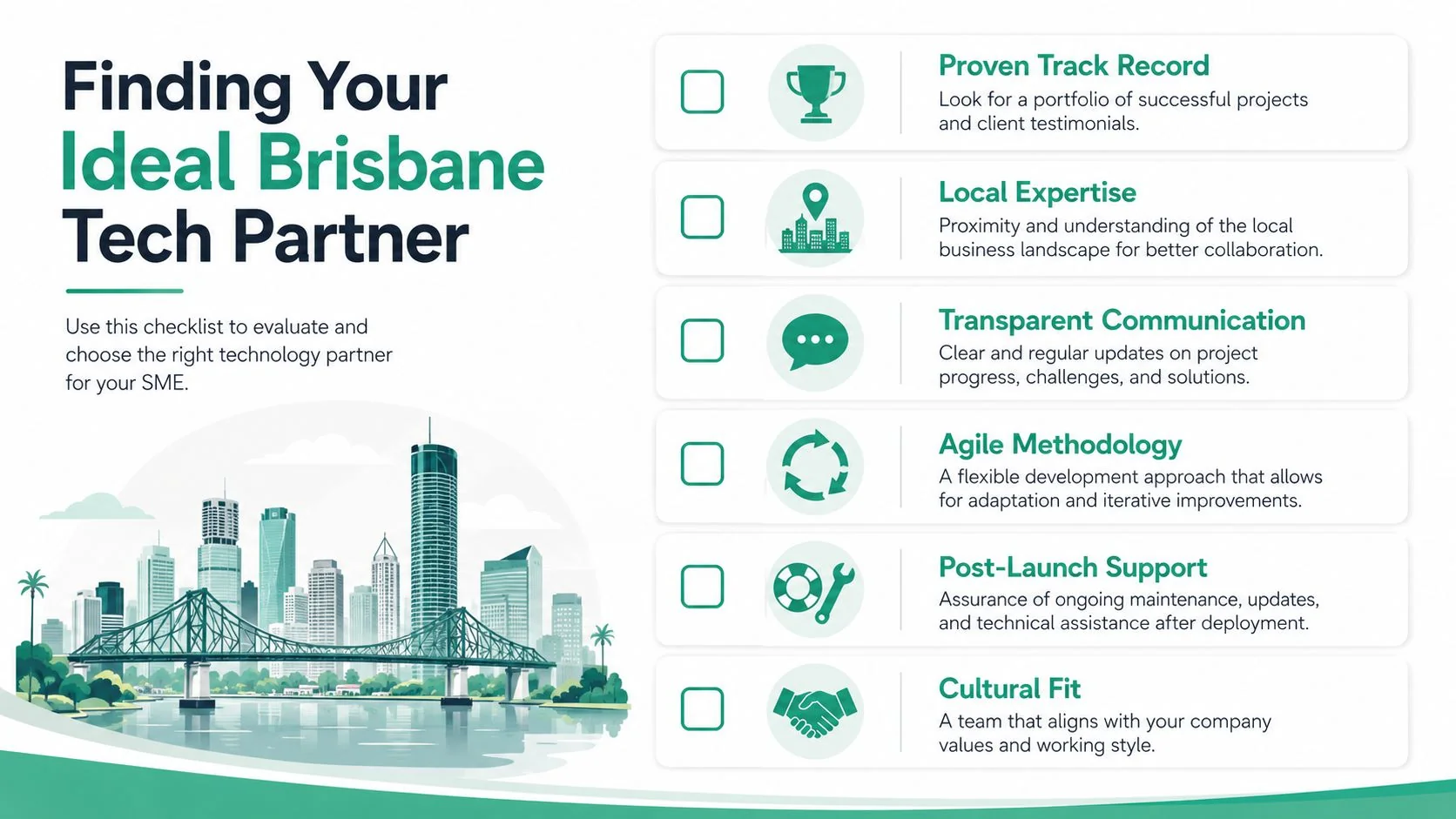
For a Brisbane SME, partner quality matters more than flashy demos. You need a team that understands business operations, communicates plainly, and can support the system after launch. If they disappear once the invoice is paid, you've bought a future headache.
What to ask before you sign anything
Ask direct questions. If the vendor gets slippery, move on.
Use this shortlist:
How do you handle discovery?
If they jump straight to quoting features without unpacking workflow, that's a red flag.Who owns the source code and documentation?
Don't assume. Get it in writing.What happens after go-live?
Support, updates, bug handling, hosting, backup responsibility, and security oversight should all be clear.How do you manage changes during the project?
You want a defined process, not vague assurances.Can you integrate with our current environment?
Microsoft 365, cloud storage, line-of-business tools, user identity, and security controls all matter.Who will do the work?
Sales people don't deliver projects. Delivery teams do.
A useful parallel exists in broader IT vendor management for business owners. The same rule applies here. You're not just assessing technical skill. You're assessing accountability, communication, and operational fit.
What good local partners do differently
A strong Brisbane-based partner usually brings practical advantages. They understand how local SMEs operate. They can meet in person when needed. They're more likely to think about support, network environment, cyber risk, and staff adoption together instead of treating software as a stand-alone item.
That matters because custom software rarely lives on its own. It sits inside your broader IT environment.
Good partners will ask things like:
| Question | Why it matters |
|---|---|
| How are staff authenticated? | Access control affects security and user experience |
| What backup and recovery model applies? | Business continuity can't be bolted on later |
| What devices will staff use? | Office, home, mobile, and field use all change the design |
| What compliance pressure exists? | Professional services and healthcare often need stronger controls |
| Who approves changes internally? | Weak ownership creates delays and confusion |
Choose the team that challenges your assumptions and clarifies your thinking. Not the one that agrees with everything in the first meeting.
Cultural fit matters too. If your business is practical and time-poor, don't hire a team that talks in circles. You want people who can turn complexity into decisions, not more confusion.
Frequently Asked Questions
Who should own the source code
Your contract should state this plainly. If ownership matters to your business, don't rely on assumptions or verbal comments in meetings. Clarify who owns the code, documentation, designs, and any third-party components before the project starts.
What's the best way to handle scope creep
Lock the initial scope around one painful workflow. Then treat every extra feature as a separate decision with its own impact on cost and timing.
That doesn't mean requirements can't change. It means changes need a formal process. Request, assess, approve, then build. If everything becomes “just a small addition”, the project will drift.
What should ongoing maintenance cover
Maintenance should cover bug fixes, security updates, user changes, platform updates, monitoring, backups where relevant, and support for minor operational issues. The exact model depends on the system and hosting setup, so get a written support schedule rather than relying on vague promises.
Is custom software only for large businesses
No. Small businesses often benefit when one messy workflow keeps wasting staff time or creating avoidable mistakes. The key is being selective. Build for the process that matters, not for everything at once.
What if my industry has compliance pressure
Then requirements gathering matters even more. A clinic, legal practice, or finance-related business should discuss permissions, audit trails, document handling, and access control early. If you work in regulated areas, it can also help to review broader sector resources such as Common queries for digital health companies, because they show the kind of practical questions businesses ask when systems, data, and compliance intersect.
If your business has outgrown spreadsheets, patchwork apps, and fragile workarounds, Bridge IT Solutions can help you assess the problem properly and map out a practical path forward. Start with the workflow that's slowing your team down, then decide whether configuration, automation, or a custom build is the right answer.
