

You're probably dealing with this already. Microsoft 365 comes from one provider, backup from another, phones from another, line-of-business software from a niche vendor, and internet from whoever had the least painful contract at the time. Then something breaks, and nobody owns the problem. One supplier blames another, support tickets bounce around, and a renewal lands in your inbox for a product nobody's used properly in months.
That's what IT vendor management looks like for most Brisbane SMEs before they put a process around it. It's not a corporate procurement exercise. It's the day-to-day work of making sure the companies you rely on for software, support, cloud, connectivity, security, and hardware are helping your business run.
For a local accounting firm, that might mean checking whether their document system integrates cleanly with Microsoft 365 and whether support responds when tax season is in full swing. For a trade business in South East Queensland, it might be about controlling who gets remote access to quoting, invoicing, or job scheduling systems. For a medical clinic, it's often about balancing locked-down access with the reality that a vendor may need to help urgently during an incident.
If your systems feel messy, the answer usually isn't “buy another tool”. It's to get organised first. A proper review of what you already have often uncovers overlap, weak support arrangements, and hidden risk. That's why a structured check of your current setup, like this guide on whether it's time for an IT audit, is often the right starting point.
Table of Contents
- Is Your Tech Working Against You
- Why Vendor Management Matters for Your Business
- The IT Vendor Lifecycle Explained
- Navigating Risk and Compliance in Australia
- Practical Vendor Management Tools and Templates
- Local Insights for Brisbane and SEQ Businesses
- How Bridge IT Can Support Your Vendor Program
Is Your Tech Working Against You
A common Brisbane SME scenario goes like this. The business started with a few sensible choices. Microsoft 365 for email and files, a cloud backup service, an antivirus platform, a practice management system, internet, phones, and maybe a website host. None of those decisions were wrong on their own.
The trouble starts when no one manages the mix as a whole.
One staff member knows the phone vendor. Someone in accounts handles software renewals. The office manager has the hosting login. An external software company has remote access because they “needed it once”. Then a laptop replacement is delayed because the hardware supplier says the distributor is waiting on approval, while the software vendor says the new device needs special setup first.
That's when owners realise they don't have a technology stack. They have a pile of disconnected vendor relationships.
Good IT vendor management means one thing. Every supplier has a clear purpose, a named owner, agreed service expectations, and an exit path if the relationship stops working.
For SMEs, that's the practical definition. IT vendor management is the process of selecting the right vendors, documenting the arrangement, measuring performance, reviewing risk, and making renewal or exit decisions before you're forced into them.
Why the chaos creeps in
Most businesses don't plan to end up here. It happens because growth is messy.
- Urgent fixes beat good process: You hire a vendor to solve one immediate problem and never revisit the arrangement.
- Auto-renewals hide in the background: Contracts keep rolling while the business changes around them.
- Support paths aren't documented: Staff don't know who to call, so issues take longer to resolve.
- Access accumulates: Old suppliers often keep permissions long after the original job is done.
The frustrating part is that this usually feels like an operations problem until it turns into a downtime, security, or billing problem.
What works instead
Small businesses don't need a big governance framework. They need a short, disciplined routine. Know who your critical vendors are. Keep contracts and contacts in one place. Track whether support is responsive. Review renewals before they lock in again. Remove access when a vendor no longer needs it.
That's the difference between technology supporting the business and technology undermining it.
Why Vendor Management Matters for Your Business
IT vendor management matters because tech spend, security exposure, and staff productivity now sit across multiple suppliers. If you don't manage those relationships deliberately, you'll pay for overlap, carry risk you can't see, and lose time every time something goes wrong.

This isn't a niche admin task anymore. The global vendor management software market was valued at USD 11.59 billion in 2025 and is projected to reach USD 30.86 billion by 2034, growing at 11.49% annually. For Australian SMEs, that points to a clear shift away from scattered spreadsheets and inbox searches toward structured oversight of contracts, service levels, and risk.
Financial control
Most SMEs don't overspend because they're reckless. They overspend because software and support decisions get made one at a time.
A business signs up for a backup platform, then adds another through a different provider. A specialist app gets purchased for one team and automatically renews even after the workflow changes. A vendor bundles extras into a contract because nobody challenged the scope before renewal.
Vendor management fixes that by forcing a few uncomfortable but useful questions.
| Question | Why it matters |
|---|---|
| Do we still use this service? | Stops zombie subscriptions from rolling on |
| Is another tool already doing this? | Reduces overlap and SaaS sprawl |
| What happens at renewal? | Prevents last-minute lock-in |
| Can we leave cleanly? | Protects your leverage in negotiation |
When an SME has a clear record of vendors, users, terms, renewal dates, and business purpose, cost control gets easier fast.
Risk reduction
Every external provider introduces risk. That includes software vendors, managed service providers, website hosts, cloud platforms, and niche support companies with remote access.
What matters isn't eliminating all risk. It's knowing which suppliers could hurt the business if they fail, get breached, or disappear at the wrong time.
Practical rule: If a vendor can access your systems, store your data, or interrupt a core process, they need more scrutiny than a standard supplier.
That's why many businesses move from ad hoc buying to a more deliberate support model with an ongoing adviser or small business IT partner. Someone needs to look across the whole vendor environment, not just one product at a time.
Performance and productivity
A vendor relationship can look fine on paper and still waste staff time every week.
Support might technically answer tickets, but not with the urgency your business needs. A platform might be stable, but integrate badly with other tools. A provider might promise onboarding help, then disappear once the invoice is paid.
For most SMEs, the test is simple. Do your vendors make work smoother, or do they create friction your staff has learned to tolerate?
When businesses start measuring vendors properly, they stop relying on whoever sounds confident in sales calls and start relying on evidence.
The IT Vendor Lifecycle Explained
The easiest way to understand IT vendor management is to think about hiring a staff member. You wouldn't recruit someone with no checks, skip induction, never review performance, and then be shocked when the exit is messy. Vendor relationships work the same way.
A simple lifecycle keeps things controlled without becoming bureaucratic.
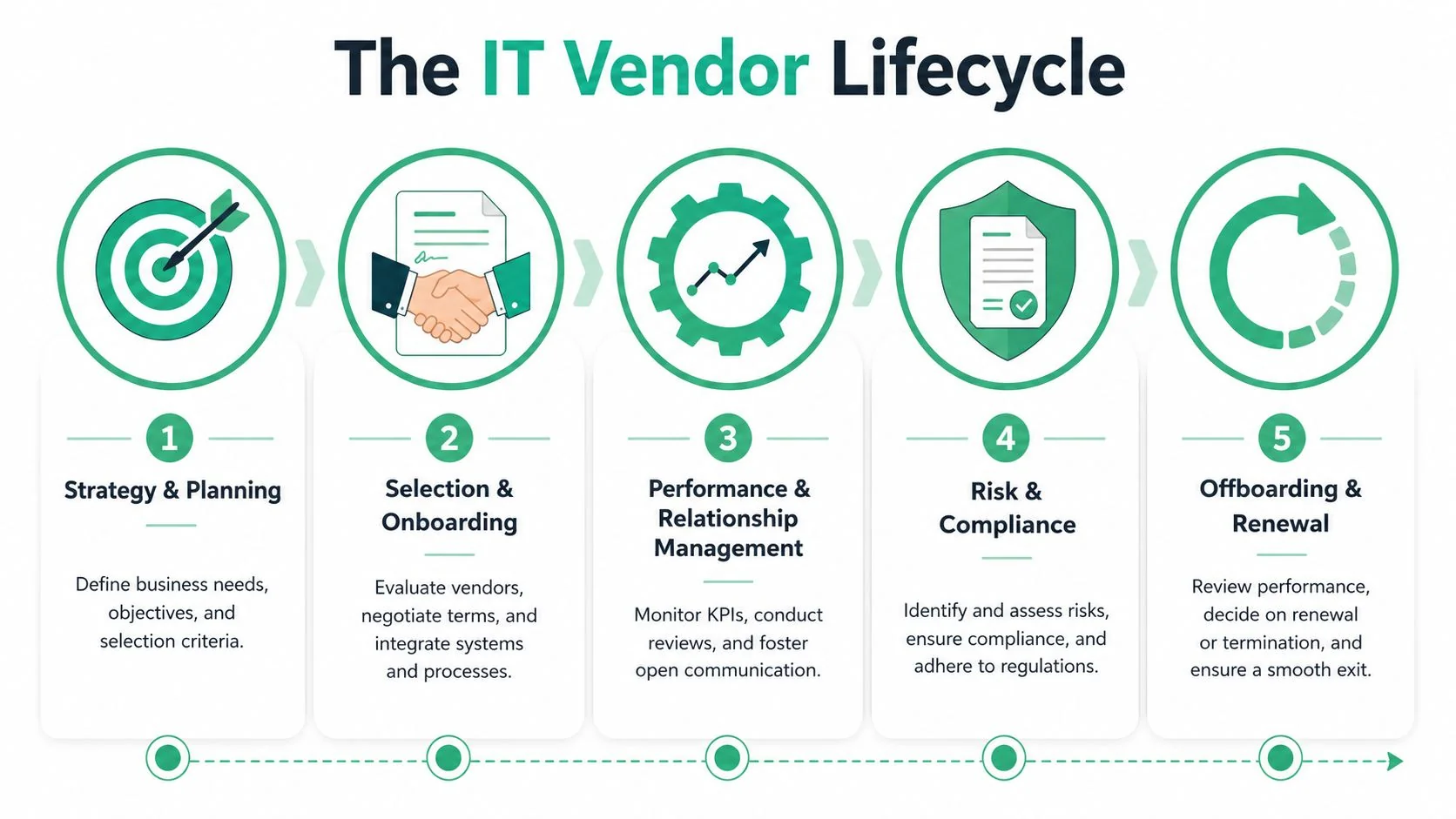
Selection starts before the quote
The biggest mistake at this stage is shopping for products before defining the business need. If you don't know what problem you're solving, every vendor demo sounds convincing.
Start with your own criteria. What must the service do, who will use it, what systems must it work with, what support response is acceptable, and what access will the vendor need?
For Brisbane SMEs, practical due diligence often includes:
- Business fit: Can the product handle the way your team works, not the way the sales demo works?
- Support fit: Is support local, remote, email-only, or phone-based, and does that match your operating hours?
- Security fit: Will the vendor need admin access, file access, or integrations into core systems?
- Exit fit: Can you get your data out cleanly if you need to move later?
For hardware and infrastructure purchases, this same thinking applies. A smart buying decision depends on compatibility, lifecycle, support, and deployment planning, not just price. That's why the procurement process matters as much as the product itself, especially when choosing the right technology for your business needs.
Onboarding is where most shortcuts hurt later
Once a vendor is selected, many SMEs relax too early. But onboarding is where control either gets built in or abandoned.
Good onboarding means documenting who owns the relationship, what access is being granted, where credentials are stored, how support is escalated, and what success looks like in the first few months.
Poor onboarding usually looks like this:
- Shared logins sent over email
- No record of who approved access
- No test of backups, reporting, or integrations
- No agreed process for incidents
- No internal owner for the vendor
A vendor can be technically capable and still become a headache if onboarding is loose.
This explainer is worth a few minutes if you want a broad visual overview of the process before tightening your own approach:
Performance needs evidence, not opinions
Many SMEs only review a vendor when something breaks badly enough to trigger a complaint. That's too late.
A better approach is to review performance routinely using a short scorecard. Did support respond quickly enough? Was the issue resolved? Has the service been stable? Are users avoiding the tool because it's clunky? Are integrations still working after updates?
If you can't describe how a vendor is performing without relying on memory or frustration, you're not really managing that vendor.
This doesn't need heavy software. Internal ticket trends, user feedback, outage records, and renewal dates already tell you a lot.
Renewal and offboarding decide whether you stay in control
Renewals are where weak vendor management gets expensive. Auto-renew clauses, notice periods, bundled add-ons, and unclear price changes often catch businesses because no one reviewed the agreement early enough.
Offboarding is the mirror image. If a vendor leaves, can they return data, remove access, transfer documentation, and hand over without disruption?
A strong exit process should confirm:
| Offboarding check | Why it matters |
|---|---|
| Access removed | Prevents lingering third-party access |
| Data returned or deleted | Protects business information |
| Systems transferred | Preserves continuity |
| Documentation updated | Avoids future confusion |
| Replacement plan active | Limits downtime during transition |
When selection, onboarding, review, and exit are all handled deliberately, vendor management stops being reactive and starts protecting the business.
Navigating Risk and Compliance in Australia
In Australia, vendor oversight isn't only about service quality. It's also about whether your business can meet its own legal and security obligations when a supplier is involved.
A vendor breach can become your problem
The key point many SMEs miss is that outsourced service doesn't mean outsourced responsibility.
Australia's Notifiable Data Breaches scheme took effect on 22 February 2018 under the Privacy Act and requires eligible entities to notify the OAIC and affected individuals when a breach is likely to result in serious harm, as outlined in this practical overview of Australian vendor management obligations. If your software provider, cloud host, managed service provider, or support contractor is part of the incident chain, your business may still carry the compliance burden.
That changes the whole conversation with vendors. Security clauses, breach notification timing, access control, and subcontractor visibility are not “nice to have” items buried in legal text. They are part of your risk posture.
For owners who want a broader business lens on this, this guide to comprehensive Australian risk management is useful because it connects technology risk with wider small business decision-making.
What good control looks like in practice
You don't need to be APRA-regulated to learn from APRA's standard. CPS 234 expects regulated entities to manage information security risks introduced by critical and other third parties. That's a sensible benchmark for any SME that depends on cloud software, outsourced support, or specialist systems.
The same local picture shows why. The OAIC reported 527 notifiable data breaches in 2H 2024, with 60% of notifications attributed to malicious and criminal attacks, according to this summary of vendor management best practices for Australian IT leaders. That points to an attack-driven environment where weak third-party controls can contribute directly to real breach exposure.
For practical control, segment vendors by criticality.
- Critical vendors: Providers that can affect operations, security, or sensitive data need the deepest review.
- Important vendors: They matter, but failure won't stop the business entirely.
- Low-impact vendors: Basic oversight is usually enough.
Then build your contract and review process around that ranking.
Ask your highest-risk vendors for evidence before go-live, not after an incident. It's much easier to negotiate access, notification, and security obligations before the contract is signed.
For regulated sectors and businesses handling sensitive information, that's the difference between being surprised by a supplier failure and being prepared for it.
Practical Vendor Management Tools and Templates
Most SMEs don't need specialised vendor governance software on day one. They need a workable operating system. If that starts as a disciplined spreadsheet, shared document set, and calendar reminders, that's fine. The value comes from consistency.
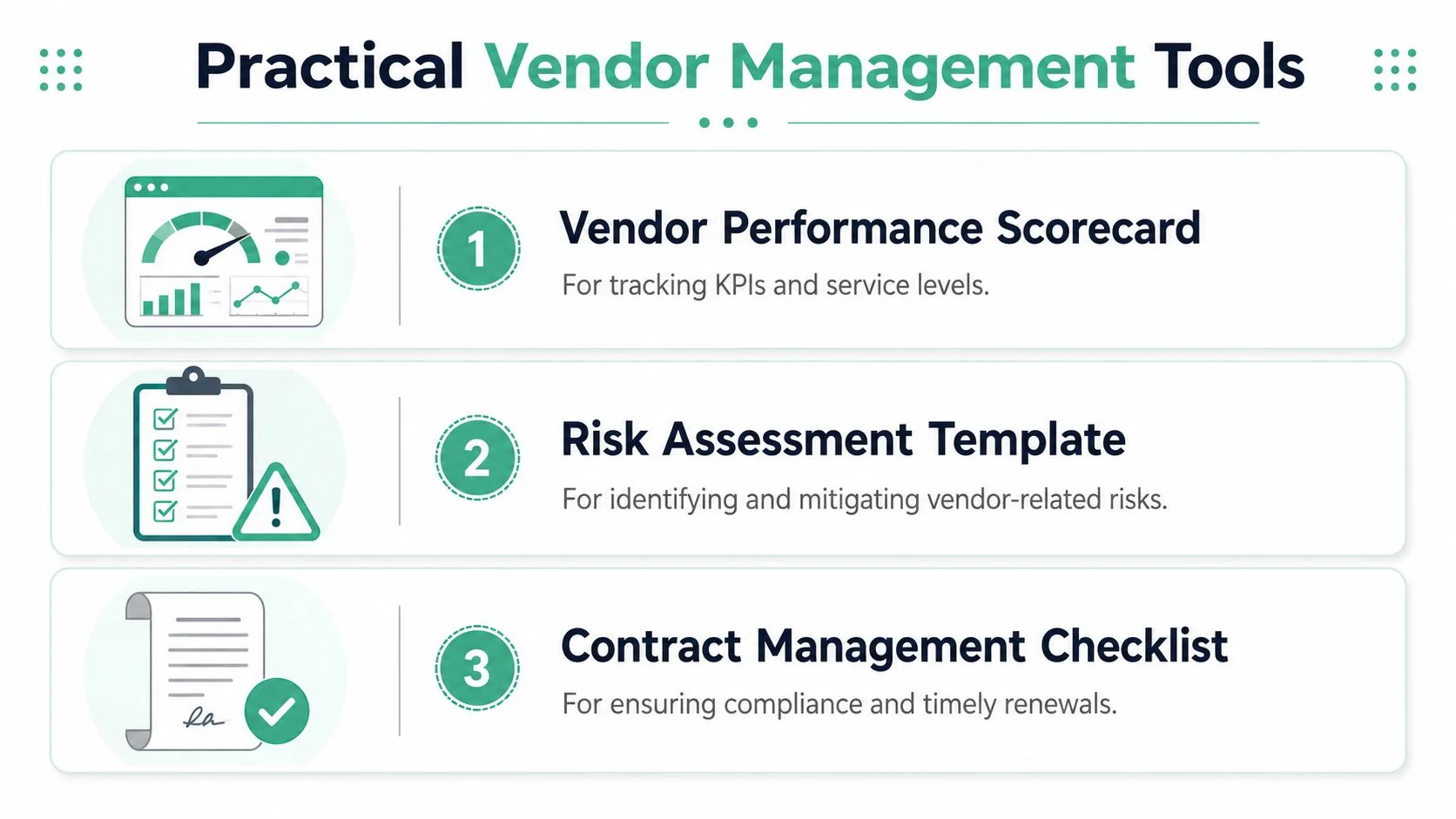
Industry guidance recommends creating a single system of record for all contracts and limiting deep management to the top 10–30 critical suppliers where spend and failure risk are concentrated, as described in this guide to IT vendor management best practices. The same guidance recommends a vendor scorecard with 5–7 metrics, including uptime and support response time, for SMEs using platforms such as Microsoft 365, backup, and security tools.
Your single source of truth
This can be a spreadsheet, SharePoint list, or another structured register. What matters is that one person can open it and answer basic questions quickly.
Include fields such as:
- Vendor name and service
- Internal owner
- Support contact and escalation path
- Contract start and renewal date
- Notice period
- Systems accessed
- Data handled
- Business criticality
- Last review date
That one register fixes a lot of chaos. It also makes handover easier if an office manager leaves or responsibilities shift.
One option for businesses that don't want to build and maintain the process internally is to use an external IT provider to help coordinate vendor records, reviews, and escalations. For local SMEs, Bridge IT Solutions offers vendor management as part of its service mix, alongside broader managed IT support.
A simple vendor scorecard
Keep the scorecard short enough that you will use it. If it becomes a compliance exercise, it'll get ignored.
A practical format looks like this:
| Metric | What to record |
|---|---|
| Uptime | Internal observation of outages or service interruptions |
| Support response time | How quickly the vendor acknowledges issues |
| Resolution effectiveness | Whether problems are actually fixed, not just answered |
| Integration reliability | Whether the service continues to work with your other systems |
| Communication quality | Clear updates, ownership, and sensible escalation |
| Security and access discipline | Whether access and change requests are handled properly |
Add comments, not just ratings. “Support was slow” is vague. “No update for two business days during a live issue” is usable.
What to check before renewal
The renewal review is where money and risk control show up together. Don't leave it to the final week.
Use a checklist like this:
Confirm usage
Is the service still required, and are the right people using it?Check support history
Look at tickets, outages, complaints, and workarounds your team has adopted.Review contract terms
Look for auto-renewal dates, notice periods, data return clauses, and support commitments.Assess security exposure
What access does the vendor still have, and is it still justified?Test exit readiness
Can you leave without losing data, documentation, or continuity?Compare against alternatives
Not every renewal needs a tender process, but every renewal should face a challenge.
A business that does this consistently usually ends up with fewer vendors, cleaner contracts, and far less confusion when something goes wrong.
Local Insights for Brisbane and SEQ Businesses
Generic advice on vendor management often assumes an internal IT team, bigger budgets, and formal procurement processes. That isn't how most Brisbane and South East Queensland SMEs operate. Local businesses need controls that work effectively, with limited time and mixed levels of technical confidence.
Trades need simple access control, not enterprise theatre
A lot of SEQ trades and construction businesses rely on practical, fast-moving arrangements. The invoicing app vendor needs temporary remote access. The website person needs admin rights for a plugin update. The copier or phone supplier needs to touch the network. None of that is unusual.
What is risky is when temporary access becomes permanent because nobody owns offboarding.
A 2025 ACSC report noted that 60% of cyber incidents targeting Queensland small businesses involved third-party access mismanagement, and 75% of those businesses lacked formal vendor offboarding. That's a local reminder that small businesses don't need expensive enterprise tooling first. They need simple least-privilege habits, named approvals, and a checklist for removing access when work is done.
For most small businesses, the strongest control is not complexity. It's knowing exactly which vendor accounts exist and deleting the ones that no longer need to be there.
Healthcare has a speed problem during incidents
Healthcare practices in Brisbane face a different tension. They need strong controls around patient data, but they also need vendors to move fast when systems are under pressure.
A 2024 Queensland Health audit found that 45% of dental practices reported compliance-heavy vendor contracts slowed cyber incident response by over 12 hours. That's the kind of issue generic compliance advice misses. If vendor access rules are too rigid and no emergency pathway exists, response slows when time matters most.
For local clinics, a better setup usually includes:
- Pre-approved emergency access rules: So urgent support doesn't depend on improvisation.
- Named decision-makers: Someone can authorise access quickly during an incident.
- Documented revoke process: Emergency access should end cleanly once the job is done.
- Clear vendor contacts: Not just a generic support queue.
Professional services firms sit somewhere in the middle. They may not have the same continuity pressures as a clinic, but they still handle sensitive data and rely heavily on dependable software. For them, vendor management often becomes the difference between a manageable issue and a week of disruption during a busy period.
How Bridge IT Can Support Your Vendor Program
Some SMEs want to own vendor management internally. Others want a local IT partner to coordinate the moving parts. Both models can work, but the key is that someone must take responsibility for the vendor ecosystem as a whole.
A practical support arrangement usually falls into one of three patterns.
One point of contact
Instead of your staff chasing software companies, internet providers, hardware suppliers, and specialist support desks separately, one IT partner manages the conversation, escalation, and follow-through. That reduces finger-pointing and saves admin time.
Framework and oversight
If you already have internal capability, external support can still help by setting up the register, review cadence, scorecards, renewal checks, and access controls that make vendor management repeatable.
Business-aligned reviews
The most useful vendor reviews aren't technical for the sake of it. They connect vendor performance to business outcomes. Is the system stable enough for your team? Are support delays hurting service delivery? Are you paying for tools that don't match how the business now operates?
That's where local context matters. A Brisbane accounting practice, a northside dental clinic, and a SEQ trade business don't need the same vendor framework. They need the same discipline, applied differently.
If your vendors feel disorganised, expensive, or risky, Bridge IT Solutions can help you put structure around them. That can mean reviewing your current supplier mix, building a practical vendor register and scorecard, tightening access and renewal controls, or acting as the coordination point across your existing providers so your team isn't stuck managing IT by email chain.
