

You're probably dealing with this already, even if you haven't called it a cyber risk problem yet.
A staff member logs into Microsoft 365 from a home laptop. Your bookkeeper gets an invoice that looks normal. Your practice manager saves client records in a cloud app and assumes the provider handles all the security. Then you hear about a nearby firm hit by a breach, locked files, or an email compromise, and the question lands fast: if this happened to us tomorrow, who pays for the clean-up?
That's where a lot of Brisbane business owners get stuck. They know cyber security matters, but they're less clear on where IT protection stops and cyber liability insurance starts. The two aren't interchangeable. One helps prevent the incident. The other helps your business survive the financial fallout when prevention fails.
Table of Contents
- Why Every Brisbane Business Needs a Cyber Plan
- What Is Cyber Liability Insurance Really
- What Your Policy Covers and What It Leaves Out
- How Insurers Price Your Cyber Risk
- How Proactive IT Reduces Your Risk and Premiums
- A Checklist for Choosing the Right Policy
- Your Cyber Insurance Questions Answered
Why Every Brisbane Business Needs a Cyber Plan
A common pattern goes like this. A business owner hears that another local firm had email accounts compromised. At first it sounds like an IT problem. Then the details come out. Client communications were exposed, systems were unavailable, invoices had to be checked manually, and outside specialists had to be brought in quickly.
That's the point where cyber risk stops being abstract.
Across Australia, the scale is already clear. In 2024 to 2025, the ACSC responded to over 42,500 calls to its cybercrime hotline, and the average self-reported cost per report was $56,600 for small businesses and $97,200 for medium businesses, according to the Insurance Council of Australia's cyber risk overview. For a Brisbane SME, that isn't a nuisance cost. That can disrupt payroll, cash flow, client trust, and normal trading.
Why this lands hard for small business
Most small businesses don't have spare internal capacity for incident response. If your files are encrypted, email is down, or customer information may have been exposed, you suddenly need decisions on legal advice, technical triage, restoration, notification, and communications. Those decisions have to happen fast, often while the business is still trying to operate.
Practical rule: If a cyber incident would force you to ask “who do we call first?”, you don't just need better security. You need a plan.
A cyber plan usually has two parts:
- Prevention and resilience: secure Microsoft 365, managed backups, endpoint protection, staff training, patching, and access control.
- Financial transfer: insurance that can respond when the technical controls didn't stop the incident.
For Brisbane owners who want a practical baseline, this guide to cyber security for small business in Australia is a useful starting point because it frames cyber protection as an operational requirement, not an optional add-on.
Insurance is only one part of survival
Insurance won't stop an attacker logging in with stolen credentials. It won't configure multifactor authentication for you. It won't fix poor offboarding, weak passwords, or shared admin accounts.
What it can do is stop one bad event from turning into a business-threatening cash shock. That's why every Brisbane business needs a cyber plan, not just a policy document.
What Is Cyber Liability Insurance Really
Cyber liability insurance is easiest to understand when you stop treating it like a niche product for large companies.
It's liability and loss protection for digital operations. If public liability insurance helps when a physical event causes damage or injury, cyber liability insurance is the equivalent for data, systems, communications, and digital services.
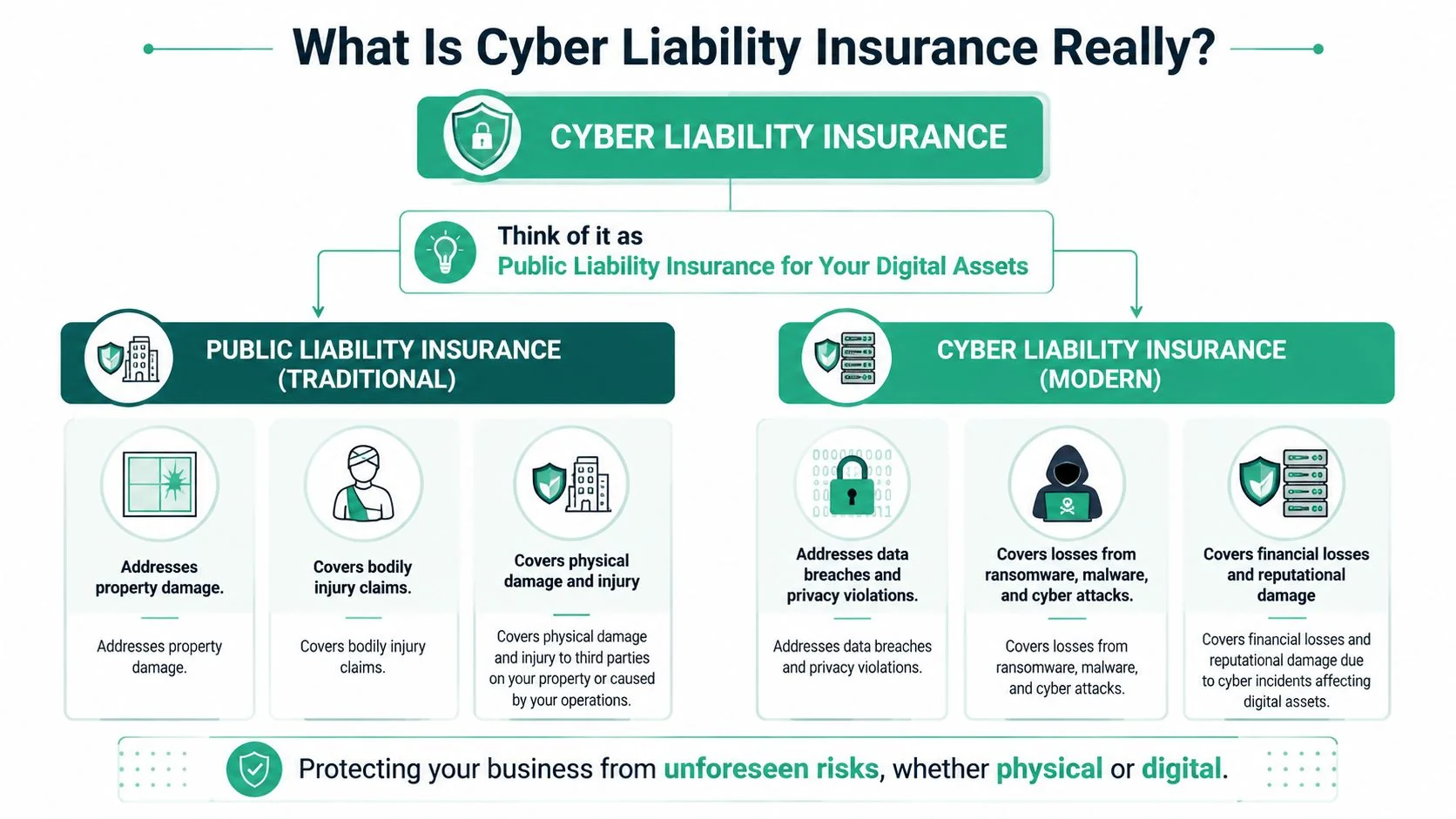
Think of it as digital liability cover
A practical definition is this: cyber liability insurance shifts specific cyber-related financial risks off your balance sheet and onto an insurer, subject to the policy terms.
That can include your own direct incident costs and your liability to others. For example, if a breach affects customer information, the policy may respond to investigation, legal support, communications, and claims from affected parties. If ransomware stops your operations, it may help with parts of the response and recovery, depending on the wording.
If you want a plain-English companion read focused on breach scenarios, PIA Southern Alliance on data breaches is useful because it explains how the cover connects to real business events rather than just insurance terminology.
Why the gap matters
Many Australian SMEs still haven't bought standalone cover. As of January 2025, only about 20% of Australian SMEs had standalone cyber liability insurance, according to Bellrock Advisory's January 2025 market update. That matters because a lot of owners assume their existing business insurance package already takes care of cyber-related losses.
Often, it doesn't.
Cyber insurance isn't “hacker insurance”. It's a contract about who carries the cost when digital systems, data, or communications create loss.
That distinction changes how you evaluate cover. A good policy isn't just about the event itself. It's about whether the insurer will respond to the exact chain of costs that follows the event.
A better way to think about it is with this comparison:
| Insurance type | Main concern | Typical trigger |
|---|---|---|
| Public liability | Physical injury or property damage | Someone is harmed, or property is damaged |
| Cyber liability insurance | Digital incidents, data exposure, network and privacy issues | A breach, ransomware event, system compromise, or data-related claim |
That's why cyber liability insurance now belongs in the same conversation as backups, MFA, endpoint protection, and staff awareness. It's part of the operating model of a modern business, especially if you hold client records, payment details, health information, legal documents, or financial data.
What Your Policy Covers and What It Leaves Out
The biggest mistake small businesses make is assuming a policy covers “a cyber attack” as one single thing. Policies don't work that way. They respond to categories of cost, obligations, and liability. If you don't understand those categories, you can buy the wrong cover and only find out after an incident.
A useful way to read a policy is to split it into two buckets. First, what it pays for when your own business is directly affected. Second, what it pays for when other people say your business caused them loss.
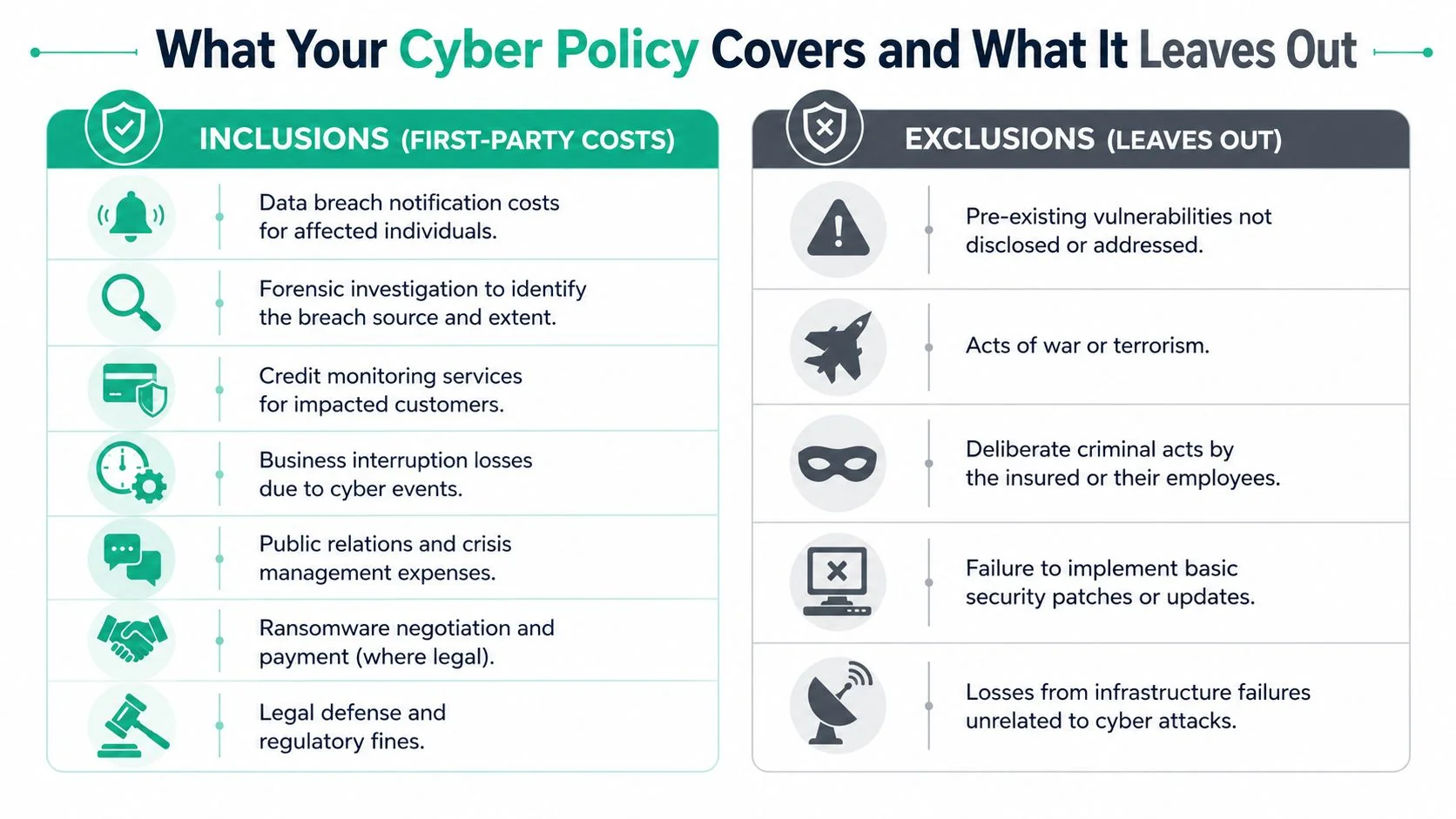
The costs most policies are built to handle
On the first-party side, cyber liability insurance often responds to the direct expenses of managing the incident itself. In practice, that can include technical investigation, data restoration, customer notification, crisis support, and business interruption related to a covered event. Some policies also address cyber extortion and ransomware response where legally permissible.
On the third-party side, the focus shifts to liability. If clients, suppliers, or regulators allege your business failed to protect information or maintain adequate security, the policy may help with defence costs, settlements, or regulatory matters, depending on the wording.
This short explainer gives a decent visual overview of how cover is commonly framed:
Where assumptions usually go wrong
Cloud services are where I see the most confusion. Many owners assume that if they use Microsoft 365, Google Workspace, Xero, or another hosted platform, the provider's security and the insurer's policy will line up neatly. They often don't.
An OECD review of 35 Australian cyber insurance policies found that only 12% explicitly clarify liability transfer in cloud failure scenarios, while 68% of Australian small businesses rely on cloud platforms for core operations, as noted in the IAIS and OECD-linked cyber underwriting review. That's a serious wording issue, not a technical footnote.
If your business runs on cloud platforms, ask one direct question: when the cloud service is involved, exactly whose loss is covered, and under what trigger?
Here's the practical distinction owners need to make:
- Provider outage: a service interruption may not be treated the same way as a malicious breach.
- Compromised user account: if an attacker logs into your Microsoft 365 tenant using stolen staff credentials, that may be treated as your security event, not the provider's.
- Shared responsibility gaps: the provider secures part of the environment, but your business still controls identity, access, retention, configuration, and user behaviour.
Exclusions deserve as much attention as inclusions
Read the exclusions with the same care as the schedule.
Look closely at these areas:
- Undeclared weaknesses: if the proposal form asked about MFA, backups, patching, or endpoint controls, your answers need to be accurate.
- Failure to maintain controls: some policies expect you to keep the controls you declared in place for the policy period.
- Deliberate acts or internal fraud: these are often treated differently from external attacks.
- Infrastructure events: not every outage or service failure will be considered a covered cyber event.
If you remember one thing, make it this. The quality of a cyber policy is not judged by the headline promise. It's judged by the definitions, conditions, and exclusions that apply when your business is under pressure.
How Insurers Price Your Cyber Risk
A cyber insurance premium isn't random. Underwriters are trying to answer a practical question: how likely is this business to suffer a cyber event, and how expensive would that event be if it happened?
That's why two Brisbane businesses with similar turnover can receive very different terms. One may have clean access controls, managed backups, documented onboarding and offboarding, and MFA across Microsoft 365. The other may have shared accounts, unmanaged devices, and no tested recovery process.
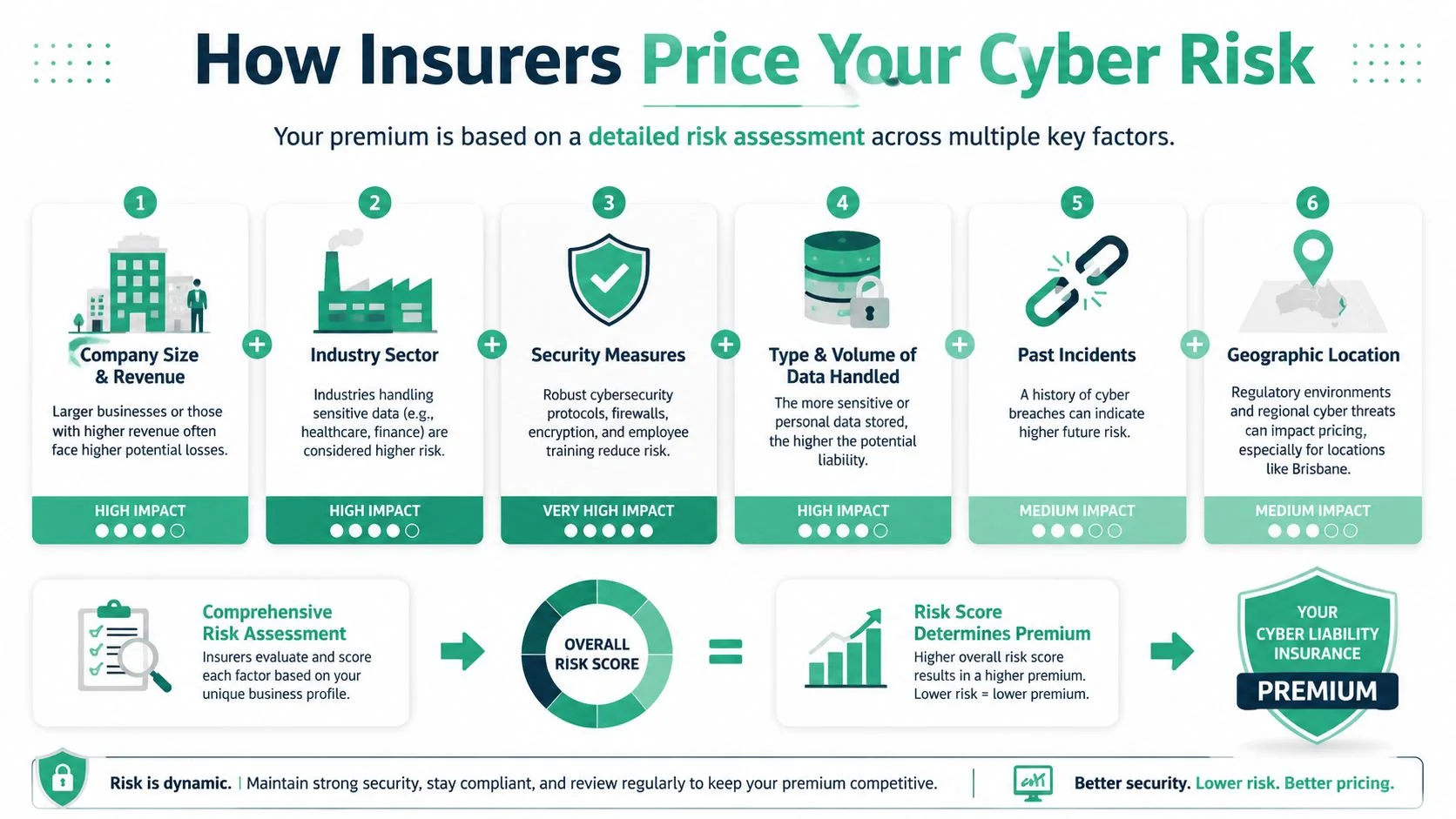
What underwriters actually look at
Insurers usually care about a mix of exposure and discipline. Exposure means the kind of data you hold, how dependent you are on technology, and how much damage a disruption would cause. Discipline means whether your business runs secure systems in a repeatable way.
They'll commonly focus on areas like these:
- Business profile: your industry, revenue, client obligations, and whether you store sensitive personal, financial, or health information.
- Technical controls: MFA, endpoint protection, email security, patching, backups, encryption, and how admin access is managed.
- Human risk: staff awareness, phishing resilience, joiner-mover-leaver processes, and who can approve payments or reset accounts.
- Operational maturity: incident response planning, vendor management, cloud configuration, and whether critical systems are monitored.
A firm that handles trust data, patient records, or confidential legal documents usually presents a different risk profile from a trade business using email and quoting software only. That doesn't mean one can't get cover. It means the insurer will look harder at the consequences of failure.
How limits and excesses work in practice
The limit is the maximum amount the insurer will pay for covered loss, subject to the policy wording. The excess is the amount your business retains before the policy starts responding.
The trade-off is straightforward:
| Choice | Usual effect |
|---|---|
| Higher limit | Broader financial buffer, usually at higher premium |
| Higher excess | Lower premium, but more cost retained by the business |
| Tighter wording | Lower ambiguity, often more valuable than a seemingly broader headline |
Decision test: Don't ask only “what does it cost?” Ask “if our systems were down and client data was exposed, would this limit actually carry the event?”
This is also where your IT setup affects value. If your controls are strong, the insurer may view you as a better risk. If your controls are weak, the policy can become more restrictive, more expensive, or both.
How Proactive IT Reduces Your Risk and Premiums
The cheapest way to handle cyber risk is still prevention. The second-cheapest way is being prepared enough that an incident stays containable. Insurance matters, but insurers pay close attention to whether you did the basics before the event.
Often, businesses encounter a common pitfall. They buy a policy, assume they're protected, then discover the insurer expected specific security controls to be operating all along.
Security controls affect more than prevention
There's a critical warning in the Australian market. 41% of Australian insurers deny ransomware claims where employee training lapses are proven, and the Department of Finance notes that government coverage excludes non-fortuitous incidents, according to the Comcover cyber risk information sheet. In plain terms, if the event looks avoidable because the business failed to manage known human risk, the claim may become much harder.
That changes how you should think about IT spending.
Security awareness training, simulated phishing, MFA, device management, least-privilege access, secure email filtering, and tested backups aren't just best practice controls. They can influence whether you qualify for cover cleanly, what conditions get attached, and how a claim is assessed after the incident.
Good security evidence helps twice. It lowers the chance of the event, and it helps show the business took reasonable steps before the event happened.
What works better than box-ticking
Insurers don't want a checkbox answer that says “yes, we do training”. They want signs that the controls are real, current, and enforced.
The businesses that usually present better to insurers do things like this:
- Lock down identity first: MFA on Microsoft 365, separate admin accounts, and fewer people with administrative rights.
- Manage endpoints properly: laptops and desktops are patched, monitored, protected, and removed from access when staff leave.
- Train people in context: invoice fraud, credential theft, fake Microsoft prompts, and business email compromise are more useful topics than generic cyber slides.
- Prove recovery exists: backups are monitored, restorable, and separated enough that ransomware doesn't wipe out the fallback option.
A practical benchmark for Australian SMEs is the Essential Eight cyber security guidance. Not because every small business needs enterprise-level maturity, but because insurers and assessors increasingly care about the same fundamentals: patching, application control, MFA, restricted admin access, and recoverability.
What doesn't work is buying a policy while leaving obvious weaknesses untouched. That usually produces the worst combination possible. Higher risk, shakier cover, and more arguments later.
A Checklist for Choosing the Right Policy
A policy comparison should feel more like a procurement review than a quick price check. If a broker or insurer can't answer clear operational questions, that's a warning sign.
Use this checklist before you commit.
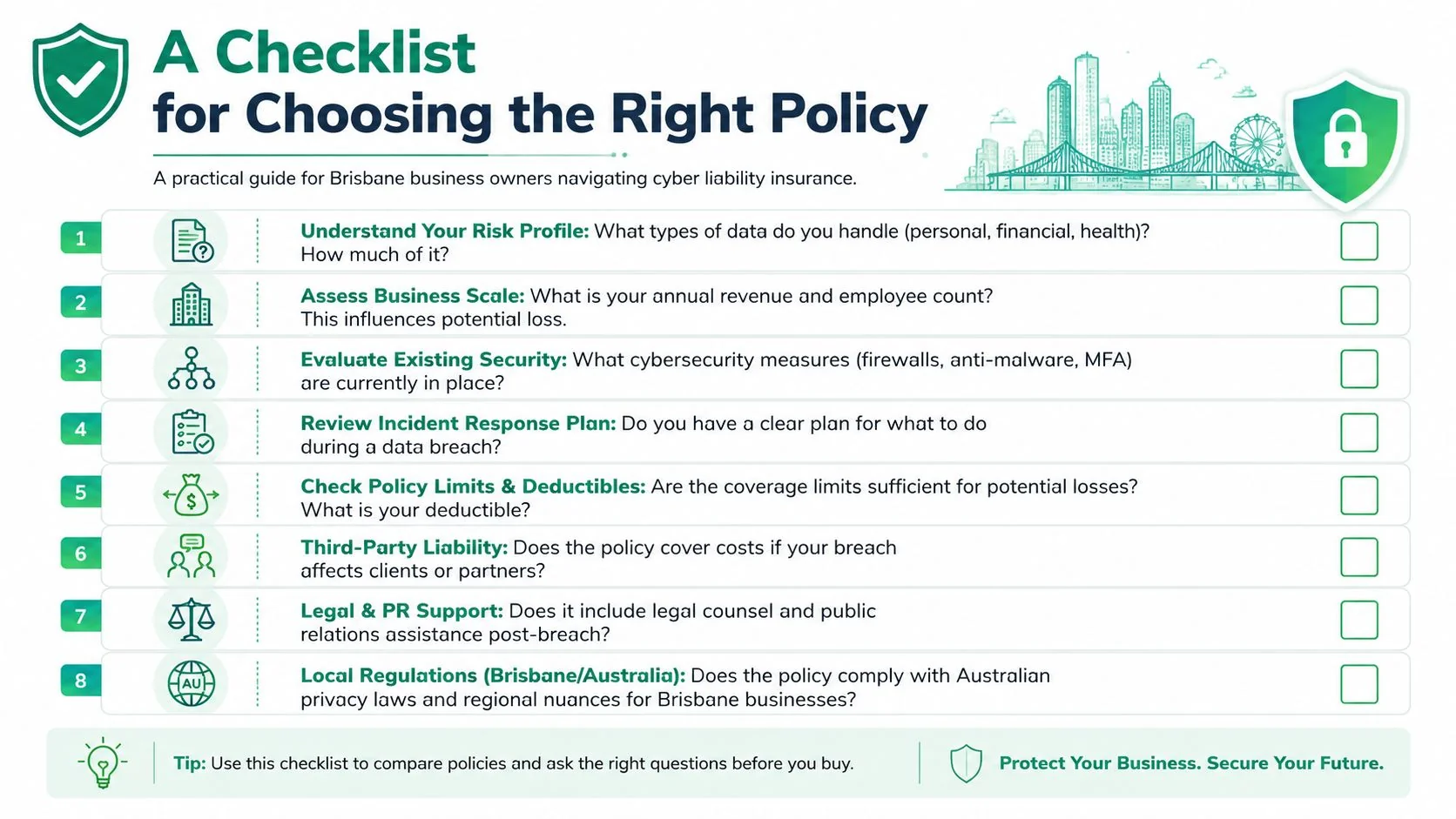
Questions to ask before you buy
What incidents actually trigger cover
Ask whether the wording responds to ransomware, business email compromise, unauthorised access, privacy breaches, and cloud-account compromise.Which first-party costs are included
Get clarity on forensic work, data restoration, legal support, notification, crisis communications, and business interruption.What third-party liability is covered
Ask what happens if clients, patients, customers, or suppliers claim they suffered loss because your systems or data security failed.What exclusions matter for our business
Professional services, healthcare, trades, and not-for-profits all have different technology dependencies. Ask for the practical exclusions, not the marketing summary.What security controls are mandatory
Specifically ask about MFA, endpoint protection, backup standards, email filtering, privileged access, and staff training.Who can we use during an incident
Some policies require insurer-approved legal, forensic, or response vendors. You want to know that before a breach, not during one.How do we notify a claim
Ask for the exact reporting steps, after-hours process, and what evidence you'll need to preserve.
What a good answer sounds like
A strong insurer or broker won't stay vague. They'll explain the trigger, the condition, and the limitation in plain English. If the answer sounds broad in conversation but narrow in the wording, trust the wording.
This is also the right point to review your own environment before applying. A simple internal assessment often reveals missing controls or documentation that would weaken your application or create avoidable conditions. For a practical starting point, use this cyber assessment form to organise your risk profile before speaking with the market.
A final tip. Keep notes of the answers you receive and compare policies side by side. The goal isn't just to buy cyber liability insurance. It's to buy a policy your business can realistically comply with.
Your Cyber Insurance Questions Answered
What should I do first after a breach
Contain the problem before you try to explain it. Disconnect affected devices if needed, preserve evidence, stop staff from deleting suspicious emails or logs, and escalate quickly to your IT team or incident response contact.
Then notify the insurer as early as the policy requires. Don't wait until you've “finished investigating”. Early notification matters because many policies give the insurer a role in appointing legal, forensic, and response providers.
How does a claim usually unfold
Most claims move through a sequence like this:
Incident identified
Someone reports suspicious activity, missing data, locked files, fraudulent email activity, or unusual account behaviour.Immediate triage
Access is contained, critical systems are reviewed, and evidence is preserved.Insurer notification
The insurer or broker is contacted through the required channel. This step is important because using unapproved providers too early can complicate reimbursement in some cases.Forensic and legal assessment
Specialists work out what happened, what data or systems were affected, and what obligations may exist.Recovery and communication
Systems are restored, stakeholders are informed where required, and business operations are stabilised.Cost review and claim adjustment
Covered costs are documented and assessed against the policy wording, sub-limits, conditions, and exclusions.
Is cyber cover included in a standard business policy
Sometimes there's a limited extension. Often there isn't enough cover to handle a serious event. That's why it's dangerous to assume your Business Pack, public liability, or professional indemnity policy automatically handles cyber loss in a meaningful way.
You need to confirm whether you have standalone cyber liability insurance, a narrow extension, or no real cyber cover at all. The difference only becomes obvious when there's a claim.
Why the claims process gets expensive quickly
The cost stack builds fast. In Australia, small businesses reported average losses of $49,600 per cyber incident in 2025, covering costs such as forensic investigation, data restoration, customer notification, and potential regulatory penalties, according to Insurance Business Australia's cyber insurance provider overview. Even when the event seems contained at first, the investigation and follow-up work can continue well after systems are back online.
The first visible problem is rarely the full loss. The invoices that arrive later often tell the real story.
Can good IT support make claims easier
Yes, if it improves evidence, speed, and control. Businesses are in a better position when they can show when the issue started, what systems were affected, which controls were active, how access was managed, and what recovery steps were taken.
That doesn't replace policy wording. But it does reduce confusion, delays, and preventable disputes. Clean logs, documented controls, tested backups, and a sensible incident process make the technical side of a claim far easier to support.
If you want help aligning your cyber security controls with the realities of cyber liability insurance, Bridge IT Solutions can help you review the gaps between your current IT setup, insurer expectations, and real-world incident response. For Brisbane and South East Queensland businesses, that means practical support with Microsoft 365 security, managed IT, backups, phishing resilience, and the operational controls that make cover easier to obtain and easier to rely on when something goes wrong.
