

Your team is probably already working across more devices than you officially manage.
A salesperson checks email on a personal iPhone between meetings. A project manager opens a client file from home on a laptop bought at Officeworks. A new starter turns up with their own Android phone and wants Teams, Outlook, and shared documents on day one. Everything feels convenient until a device goes missing, a staff member leaves, or someone saves sensitive data in the wrong place.
That's where many Brisbane businesses get stuck. They've moved to Microsoft 365, they've enabled hybrid work, but device control hasn't caught up. Security becomes inconsistent, onboarding becomes messy, and the person who “sort of handles IT” spends too much time chasing settings one device at a time. Good Intune device management fixes that, but only when it's implemented properly.
Table of Contents
- The Modern Risk of Unmanaged Business Devices
- What Is Microsoft Intune and How Does It Work
- Core Features That Secure and Streamline Your Business
- Practical Intune Setups for Queensland Businesses
- Navigating Intune Licensing and Implementation
- The Bridge IT Advantage Why Partner for Intune Management
- Taking Control of Your Business Devices
The Modern Risk of Unmanaged Business Devices
A common pattern in small business looks harmless at first. Staff use whatever device is closest, because the work still needs to get done. The trouble starts when there's no clear line between a personal device and a business endpoint.
A Brisbane business owner might have a sales manager reading client emails on a personal phone at a café, a remote employee storing files locally on an unencrypted laptop, and a new team member using their own device with no formal setup. None of that feels dramatic in the moment. It just feels normal.
Then a laptop is stolen from a car. A staff member leaves and still has access to business data through an app that was never secured properly. Someone updates one device but not another, and now files, email, and access rules differ from person to person.
The cost is more than security
Unmanaged devices create two kinds of damage.
The first is obvious. Sensitive information can end up on the wrong device, in the wrong app, or in the hands of the wrong person. In Australia, unmanaged laptops have exposed over 60% of enterprise organisations to significant security risks, according to this Australian industry post on endpoint protection and Intune adoption.
The second is quieter. Every exception turns into manual work. Someone has to reset access, reinstall apps, check whether a device is safe enough, and guess which settings were applied last time. That wastes time and creates inconsistent service for staff.
Practical rule: If your team can access company email, files, or apps from devices you can't see and can't control, you don't have a device strategy. You have a trust gap.
What Brisbane businesses usually feel first
For most SMBs, the early warning signs aren't technical alerts. They're operational annoyances:
- New starters take too long: Devices, apps, and permissions aren't standardised.
- Offboarding feels risky: You can disable a user, but you can't be sure where business data still sits.
- Remote work is uneven: One employee can log in smoothly, another can't access what they need without a support call.
- Personal devices raise tension: Staff want privacy, but the business still needs control over company information.
That's why Intune matters. Not as another Microsoft add-on, but as the system that gives a business one place to set rules, protect data, and keep work moving without relying on guesswork.
What Is Microsoft Intune and How Does It Work
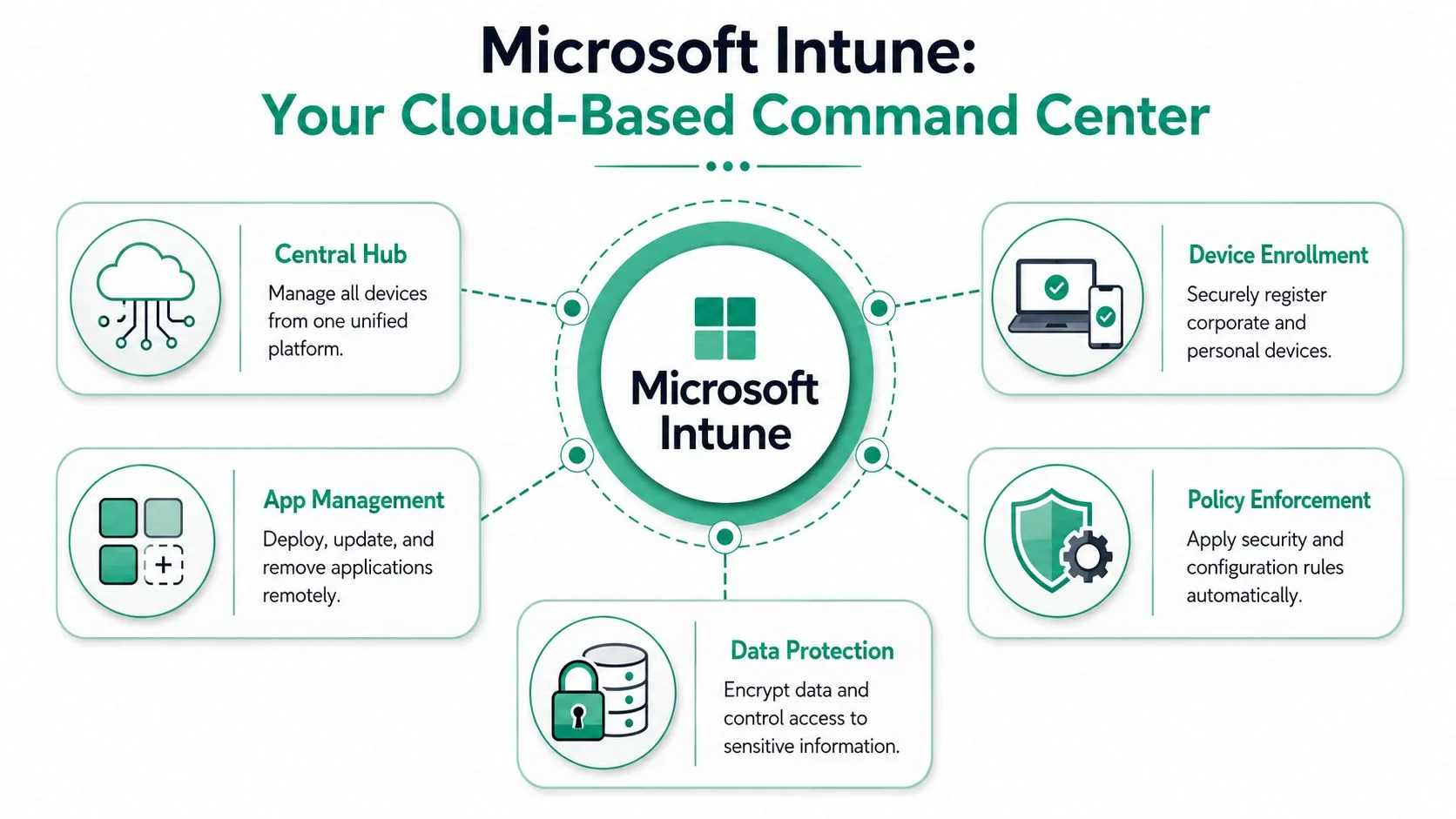
A Brisbane business adds three new staff on Monday, one director replaces a lost phone on Tuesday, and someone leaves on Friday. If every device needs manual setup, app installs, access changes, and a separate security check, the week disappears fast. Intune is Microsoft's cloud platform for controlling those moving parts from one place.
It manages business devices and business apps through policies tied to users, groups, and device types. An authorised admin can set security rules, deploy software, check whether devices meet company standards, and decide what can access company data. The goal is straightforward. Less manual setup, fewer gaps between devices, and more consistent protection across the business.
One dashboard instead of scattered fixes
Intune supports Windows 10/11, macOS, Android, and iOS. That matters because most SMBs are already dealing with a mixed fleet, whether they planned for it or not. A sales manager may use an iPhone, the office team may be on Windows laptops, and a director may expect email and files to work across all of them.
For a business owner, the benefit is operational consistency. New devices can follow a standard build. Required apps can be installed automatically. Access can be limited if a device falls out of policy. If you already use Microsoft 365, Intune usually makes more sense as part of the wider Microsoft 365 for business environment, where identity, collaboration, and device rules work together instead of being managed as separate projects.
That integration is where many SMBs hit a real-world challenge. Intune has a wide feature set, but a good outcome depends on how those features are configured. Plenty of businesses switch it on, apply a few default policies, and assume they are covered. In practice, the hard part is choosing the right level of control for company-owned devices, shared devices, and staff-owned phones without creating extra support load.
The same principle shows up in other asset-heavy operations. If you've looked at maximizing efficiency with industrial asset software, the lesson is familiar. A central system helps, but the value comes from clear rules, clean ownership, and consistent execution.
A quick visual walkthrough helps if you haven't used the platform before.
MDM and MAM are not the same thing
This distinction matters because many SMBs need both.
MDM, or Mobile Device Management, gives the business control over the device itself. That usually suits company-owned laptops, tablets, and phones. You can enforce encryption, require screen lock settings, push apps, apply restrictions, and wipe the device if it is lost or no longer in service.
MAM, or Mobile Application Management, focuses on protecting company data inside approved apps. That is often the better fit for BYOD. Staff keep control of their personal phone, while the business controls how work data is used in Outlook, Teams, and other supported apps.
| Scenario | Better fit |
|---|---|
| Company laptop issued to staff | MDM |
| Business-owned tablet in reception | MDM |
| Employee's personal iPhone using Outlook and Teams | MAM |
| BYOD Android device accessing work files | MAM |
As outlined in this Intune feature overview covering MAM and encryption controls, Intune can remove corporate app data from a personal device without wiping personal photos, messages, or apps. For many business owners, that is the point where BYOD becomes manageable instead of uncomfortable.
The practical decision is not whether to control everything. It is whether each device gets the right level of control for its role, risk, and ownership. That is also why many SMBs benefit from an experienced Intune partner. The platform can do a lot, but good implementation comes from sound policy decisions, not just turning features on.
Core Features That Secure and Streamline Your Business
Most business owners don't need to memorise Intune terminology. They do need to understand how the moving parts work together. Good Intune device management isn't one setting. It's a set of controls that reinforce each other.
Policies that set the rules
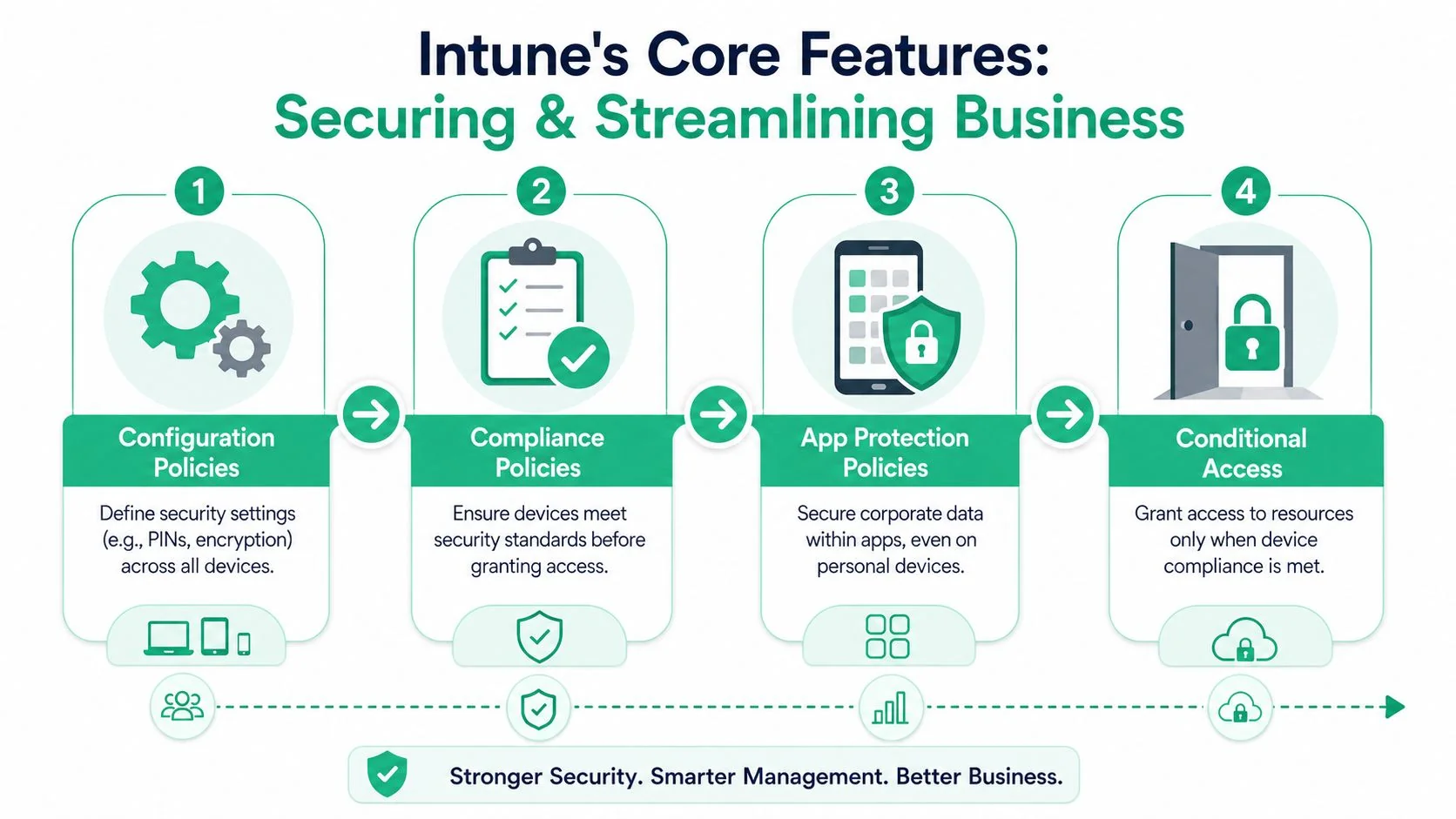
Configuration policies define what a device should look like. That can include password requirements, encryption settings, approved system features, Wi-Fi profiles, and app behaviour. These policies reduce the “every device is different” problem.
Compliance policies answer a separate question. Is this device healthy enough to trust? A device might be enrolled but still fail compliance if it doesn't meet required standards.
This distinction matters in real business use. Configuration says what you want. Compliance checks whether the device meets that standard.
A simple example:
- Configuration policy: Require a PIN and device encryption on company tablets.
- Compliance policy: Mark the tablet non-compliant if encryption is missing or the required security state isn't met.
- Business outcome: Staff get a consistent setup, and risky devices can be treated differently.
Conditional Access is where security becomes real
Conditional Access is the feature that turns policy into action.
If a device is compliant, the user can access business resources such as Microsoft 365 email or files. If it isn't compliant, access can be blocked automatically. That's the practical face of a Zero Trust model. Access is earned based on the current state of the device, not assumed because someone knows a password.
Microsoft states that Intune uses this Zero Trust approach and that Conditional Access can automatically block resource access for non-compliant devices. For Australian deployments, policy evaluation and app deployment rely on TCP 443 connectivity to Asia Pacific CDN endpoints such as macsidecarap.manage.microsoft.com, as described in Microsoft's Intune fundamentals documentation.
For business owners, the technical detail only matters because failed connectivity can make a rollout look inconsistent. A policy may be well designed, but if the environment isn't prepared properly, staff see delays and admins chase ghosts.
Key takeaway: Security policies only protect the business when they're tied directly to access decisions.
A strong Microsoft environment usually combines Intune with broader Microsoft 365 security controls, so identity, device status, and data protection work together instead of being managed in isolation.
App protection matters most on mixed-use devices
Intune often delivers the fastest practical win for SMBs.
On a personal phone, full device control is usually the wrong approach. Staff resist it, and in many cases they should. App protection policies offer a cleaner middle ground. They can limit copy and paste between work and personal apps, require a work PIN to open business data, and allow corporate information to be removed without touching family photos, texts, or personal apps.
For mixed fleets, the combination works well:
| Feature | What it helps with |
|---|---|
| Configuration policies | Standard setup across company devices |
| Compliance policies | Identifying risky or out-of-standard devices |
| App protection policies | Securing work data on personal devices |
| Conditional Access | Blocking access when standards aren't met |
That's why Intune can improve both security and productivity at the same time. Staff get clearer, more predictable access. The business gets defined rules instead of exceptions.
Practical Intune Setups for Queensland Businesses
Theory matters less than fit. The right Intune setup for a Brisbane law firm won't look identical to the right setup for a Gold Coast clinic or a construction company with crews spread across South East Queensland.

Professional services
A law firm, accounting practice, or financial advisory business usually cares about three things first. Protecting client data, keeping file access controlled, and making sure staff can work securely from office, home, and court or client sites.
A practical Intune setup here often includes encrypted laptops, controlled access to Microsoft 365 apps, and app-level protections on personal mobiles. Copy and paste restrictions can be useful where staff handle sensitive documents on BYOD phones or tablets. So can rules that stop company data being saved into unapproved personal apps.
For firms in this space, the biggest win is consistency. Every solicitor or adviser shouldn't have a custom setup based on who configured their device on the day.
Healthcare and clinics
Medical and dental clinics have a different device pattern. Shared reception tablets, practitioner laptops, telehealth devices, and personal mobiles used by managers all sit in the same environment.
The workable Intune setup is usually role-based. A waiting-room tablet can be locked to a single check-in or forms app. Clinical and admin laptops can have tighter controls around updates, encryption, and access to patient-related systems. BYOD phones can be allowed for Outlook and Teams without opening the whole device to business control.
The platform is used in Australian healthcare settings to improve endpoint security, support operations, and help meet strict compliance requirements, according to the earlier Australian industry material. In practice, the value is that a clinic can keep devices usable for staff while still applying clear security boundaries.
In healthcare, “easy to use” and “secure enough” have to exist together. If staff need workarounds to serve patients, the setup will fail.
Trades and field teams
Construction, maintenance, and field service businesses tend to have the messiest real-world mix of devices. Office staff use laptops. Site supervisors carry smartphones. Some businesses issue rugged devices, while others rely partly on BYOD.
Intune works well when the setup reflects that reality instead of pretending every worker sits behind a desk.
A practical field setup often includes:
- Preloaded apps: Job management, quoting, safety, and document apps can be pushed remotely to company phones and tablets.
- Basic device standards: PIN requirements, encryption, and update rules help reduce risk when devices are used on site and in vehicles.
- Remote actions: If a phone is lost on a worksite or left in a ute, corporate data can be removed quickly.
- Simple user experience: Staff should open the phone and get to the apps they need without extra friction.
Intune device management either supports the business or gets ignored. If the policies are too heavy, crews look for shortcuts. If they're too loose, the business carries avoidable risk.
Navigating Intune Licensing and Implementation
A Brisbane business can buy the right Microsoft licences on Monday and still have unmanaged devices by Friday.
That gap catches a lot of SMBs. Licensing is usually straightforward. Getting Intune set up in a way that improves security without frustrating staff takes more judgement than many businesses expect.
Licensing is often simpler than expected
For many small and mid-sized businesses, Intune is already part of the Microsoft 365 discussion rather than a separate buying decision. If the business is on Microsoft 365 Business Premium, there is often more device management capability available than the owner realises.
That matters for cost control. It can mean the business already owns tools for device compliance, app control, and access rules, but is not yet using them well.
If the licensing side still feels unclear, this software licensing guide for Brisbane businesses gives useful context before making changes.
Why DIY Intune often stalls
The common frustration with Intune is not a lack of features. It is the gap between what the platform can do and what a small business can realistically configure, test, and maintain without a clear plan.
That is why Intune often feels a mile wide and an inch deep in SMB environments. The menu is broad. The path to a clean, working setup is not always obvious.
A business owner might assume device management means a single policy for every laptop and phone. In practice, the right setup usually separates company-owned devices, personal phones, shared devices, and admin accounts. It also stages the rollout. Start with enrolment and baseline security. Then add app deployment, compliance rules, and access conditions in an order the business can support.
Common implementation problems usually look like this:
- Mixed device history: New devices are easy to standardise. Older machines often carry local admin settings, outdated apps, and inconsistent update history.
- Unclear BYOD boundaries: Staff need access to email and files, but the business has to decide where company control stops on a personal device.
- Too much policy too early: Security settings pushed all at once can create login prompts, blocked apps, and help desk noise.
- Dashboard false confidence: Devices show up as enrolled, but key protections may still be missing or only partly applied.
This is the trade-off many guides skip. A fast rollout looks efficient at first, but poor sequencing creates rework, user resistance, and weak coverage in the places that matter.
A good Intune deployment starts with business risk, user roles, and a realistic support model. That is usually the difference between owning Intune and realizing its value.
The Bridge IT Advantage Why Partner for Intune Management
The hard part of Intune isn't finding features. It's choosing the right ones, sequencing them properly, and making them work across the devices your business is using.
The gap between available features and working outcomes
This is why businesses often feel disappointed after a DIY rollout. They expected a switch. What Intune really requires is a management model.
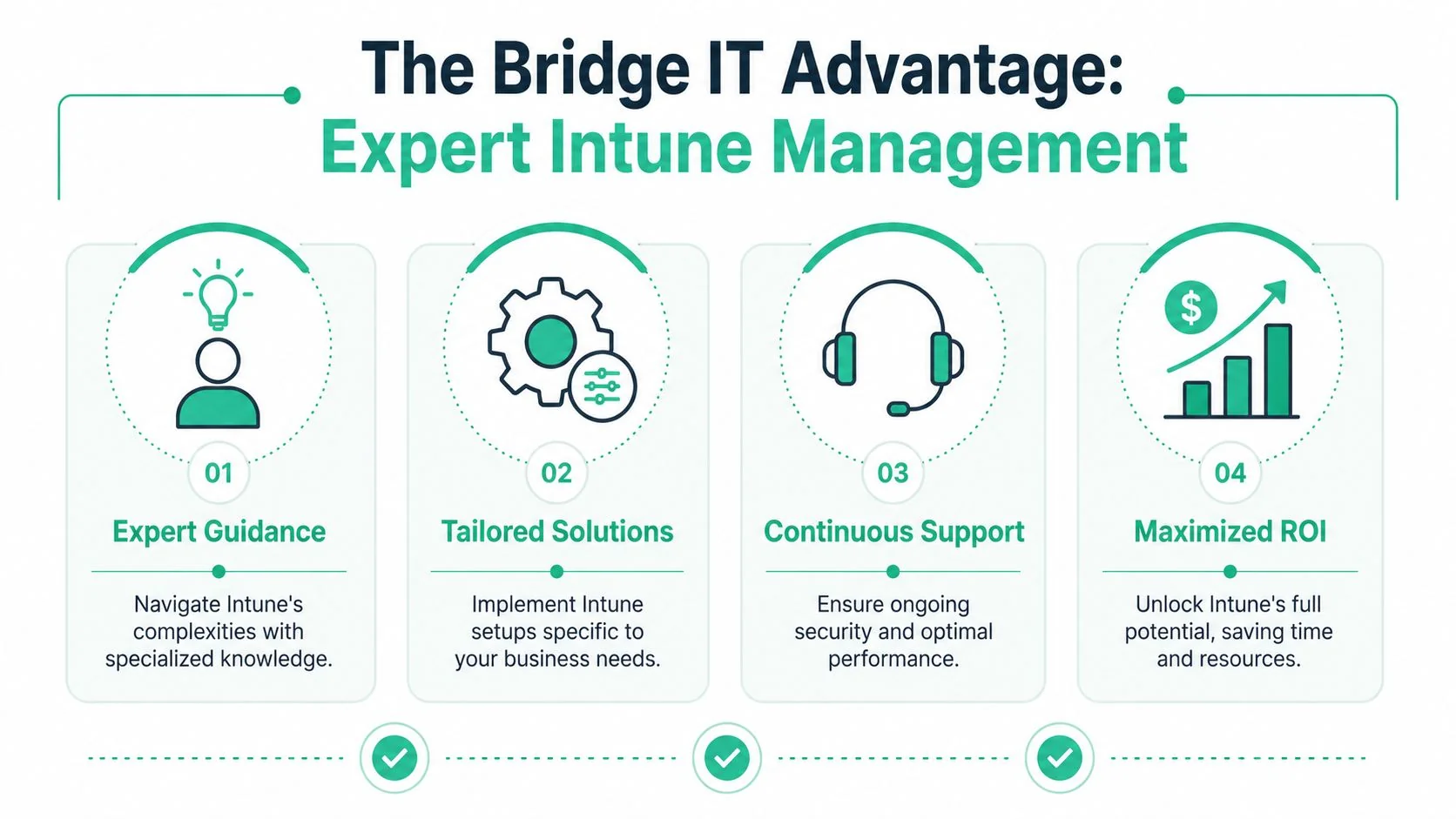
A capable partner translates broad Microsoft capability into policies that match how your people work. That means asking practical questions first. Which devices are business-owned? Which roles use BYOD? What data needs tighter boundaries? Which access rules would strengthen security without slowing the team down?
Those decisions matter more than the dashboard itself.
A successful Intune deployment feels boring to staff. Devices work, access rules make sense, and security happens in the background.
What expert management changes
The value of experienced Intune management usually shows up in four areas.
- Policy design: The business gets a clean structure for company devices, personal devices, frontline roles, and admin users rather than one blanket rule for everyone.
- Rollout order: New devices, existing devices, and shared devices can be handled in a sequence that limits disruption.
- Troubleshooting: When enrolment, compliance, or app protection behaves unexpectedly, someone can identify whether the issue sits with identity, policy conflict, connectivity, or the device itself.
- Ongoing review: Device management isn't a one-time project. Staff roles change, apps change, and risk settings need to evolve with the business.
That's especially important for Queensland SMBs with lean internal teams. Most don't need another platform to learn. They need the Microsoft tools they already own configured in a way that's safe, supportable, and proportionate.
The best partner approach also resists overengineering. Not every business needs every Intune feature. Good advice narrows the setup to what delivers security, productivity, and manageable overhead.
Taking Control of Your Business Devices
Modern work has moved faster than most device policies. That's why many small businesses end up with business data spread across personal phones, home laptops, and company devices that were never standardised properly.
Intune is a strong answer to that problem. It gives businesses a way to manage endpoints, protect company data, and control access without relying on office-based infrastructure. But the tool alone isn't the result. The result comes from clear policy decisions, sensible rollout choices, and ongoing management that keeps security aligned with how the business operates.
For Brisbane and South East Queensland businesses, that matters for more than compliance. It affects downtime, staff experience, onboarding, offboarding, and confidence in hybrid work.
Take control of the devices connected to your business, and a lot of other problems become easier to manage.
If you want a practical next step, talk to Bridge IT Solutions about an Intune readiness assessment. It's a straightforward way to review your current devices, identify where your risks and inefficiencies sit, and map out an Intune device management approach that fits your business without adding unnecessary complexity.
