

A cyber attack hits an Australian business every 10 minutes. For a small business, that can mean days of disruption, delayed invoices, lost customer trust, and a clean-up bill that lands at the worst possible time.
I see the same problem across many small businesses. Owners know cyber risk is real, but they are forced to make decisions with limited time, limited budget, and too much conflicting advice. The right starting point is not a long checklist or another software subscription. It is a short list of controls that reduce the biggest risks first.
For most Australian businesses, the highest-return actions are straightforward. Lock down accounts, keep reliable backups, secure staff devices, and know exactly what to do in the first 24 hours if something goes wrong. Those four areas usually cut far more risk than spreading budget across tools you will not configure properly or monitor consistently.
If you are reviewing the basics of protecting your small business network, keep that work tied to email security, account protection, and backup recovery. Attackers do not care which weakness they use. They care about which one gets them in fastest.
This guide is built for that reality. It focuses on the 20% of actions that usually reduce 80% of the practical risk for Australian small businesses, with clear priorities and a plain-English response plan for non-technical owners.
Table of Contents
- Why Cyber Security Is a Top Priority for Your Business
- Understanding the Modern Threat Landscape in Australia
- Conducting a Simple 5-Minute Risk Assessment
- Your Prioritised Cyber Defence Action Plan
- How to Budget for Cyber Security Realistically
- Your First 24 Hours Incident Response Checklist
- When to Partner with a Managed IT Provider
Why Cyber Security Is a Top Priority for Your Business
A successful cyber incident can shut a small business down faster than a bad quarter. For owners, the problem becomes real the moment staff cannot access email, invoices stop going out, or a client calls about a fake payment request sent from your account.
As noted earlier, cybercrime is frequent in Australia, small and medium businesses are common targets, and the financial hit can be large enough to disrupt cash flow for months. For a small business, the direct cost is only part of the problem. Lost trading time, recovery work, delayed projects, and damage to trust usually hurt more than the initial incident.
A simple test helps. If your business would struggle after one day without email, shared files, accounting access, internet, or online banking, cyber security belongs near the top of your operating priorities.
I see the same trade-off often. Owners invest in tools that help them sell, serve customers, and get paid faster. Security gets pushed back because it does not feel urgent until something breaks. That is understandable, but it is expensive. A few well-chosen controls usually cost far less than one week of disruption.
Small businesses are exposed in very ordinary ways. A reused password on Microsoft 365. A bookkeeper approving a fake supplier invoice. No usable backup when a laptop fails or files are encrypted. A home router or office firewall that was never reviewed after installation. The goal is not to chase every possible threat. The goal is to reduce the common failure points that cause the biggest business losses.
That is why this guide focuses on the 20% of actions that cut most of the risk. Start with access control, email security, recoverable backups, and a clear first-day response plan. If you also need to review protecting your small business network, treat it as part of business continuity, not a separate IT project.
Long checklists do not help much if they sit untouched. A short, prioritised plan does.
Understanding the Modern Threat Landscape in Australia
An Australian cyber-fitness study found that 84% of small businesses had adopted online services and were relying on up to 30 separate technologies. The same study reported that 2 in 5 small businesses had direct experience with cyber incidents (Australian Cyber Collaboration Centre). For owners, the takeaway is simple. Every app, device, login, and supplier adds another opportunity for a mistake or compromise.
A useful way to think about the threat environment is this. Your business doesn't have one front door anymore. It has dozens.
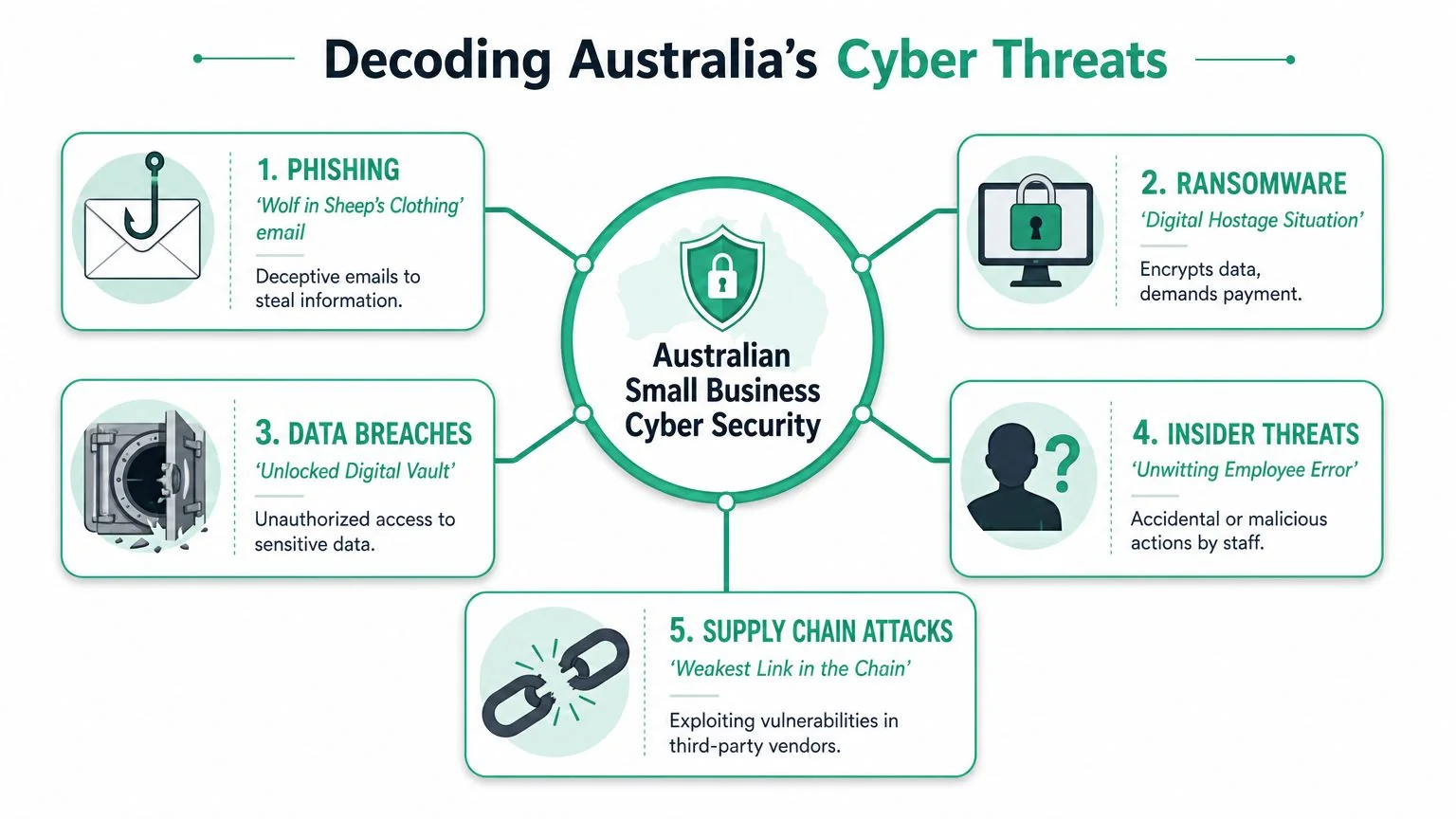
What attackers usually go after
Phishing is the most common starting point. It works like someone dressing as a trusted courier and asking you to hand over your keys. The email might look like Microsoft 365, your bank, a supplier, or even your own colleague. The goal is to steal a password, trick someone into approving a payment, or get malware onto a device.
Ransomware is a digital hostage situation. A criminal gets into your systems, encrypts files, and leaves you unable to work. Sometimes the bigger damage isn't the encryption itself. It's the lost access to scheduling, client records, shared documents, and operational history.
Credential theft is quieter and often more expensive than people expect. If an attacker gets into a mailbox, they can read conversations, set forwarding rules, impersonate staff, and wait for the right invoice or bank detail change to appear.
If you want a plain-English view of how these risks overlap, this piece on understanding digital vulnerability is a useful companion read.
Why small businesses are easier to reach
Attackers don't need a dramatic weakness. They usually need an ordinary one.
Common examples include:
- Shared passwords: A former staff member still knows them, or they're reused across multiple services.
- Poor admin control: Everyone has more access than they need, so one compromised account opens too many doors.
- Unmanaged devices: Laptops and phones miss updates, or no one can confirm whether protection is active.
- Third-party exposure: Bookkeepers, web plugins, file-sharing tools, and remote access products all expand your risk surface.
A small business rarely gets compromised by one cinematic hack. It usually happens through a series of ordinary gaps that line up on the wrong day.
Where privacy obligations enter the picture
If your business handles personal information, a cyber incident can become a privacy issue as well as an IT one. Under Australia's Notifiable Data Breaches scheme, some incidents require assessment and notification. For small businesses, that means cyber security isn't only about keeping systems running. It's also part of your duty of care to customers, patients, clients, and staff.
That matters most in sectors like healthcare, legal, accounting, and any business holding identity documents, payroll records, or payment-related data. Even if you're not technical, you need to know what information you hold, where it lives, and who can access it.
Conducting a Simple 5-Minute Risk Assessment
Before you buy anything, work out what would hurt if it broke. Most small businesses don't need a formal audit to begin. They need an honest view of their digital crown jewels.
Start with business interruption
Forget technical language for a moment. Ask which system would cause the most chaos if it stopped working today.
For some businesses, it's email. For others, it's Xero, Microsoft 365, a practice management platform, a CRM, a shared file store, or the one laptop that runs quoting and invoicing. The answer tells you where protection and recovery planning should start.
A fast way to do this is to map three categories:
| Business area | Ask yourself | Why it matters |
|---|---|---|
| Money | How do we access banking, invoices, payroll, and payments? | Fraud and lockouts hit cash flow first |
| Operations | What system would stop jobs, appointments, or service delivery? | Downtime spreads quickly |
| Trust | Where do we store client, patient, staff, or donor information? | Privacy and reputation damage lasts longer |
Ask five blunt questions
Write down the answers. Don't overthink them.
Where is our most important data stored?
Be specific. Is it in Microsoft 365, a local PC, a NAS, a bookkeeping system, a web app, or all of the above?Which accounts have the most power?
Look for Microsoft 365 admin accounts, banking access, payroll logins, domain accounts, and backup consoles.If one staff member got phished tomorrow, what could they reach?
This exposes over-permissioned accounts very quickly.Can we restore critical files and systems without guessing?
A backup that hasn't been tested is a hopeful theory, not a recovery plan.Who would we call first if something went wrong?
If the answer is unclear, that is itself a risk.
The point of this exercise isn't perfection. It's clarity. Good security decisions get easier when you know what must stay available, what must stay private, and what would cost the most to rebuild.
Your Prioritised Cyber Defence Action Plan
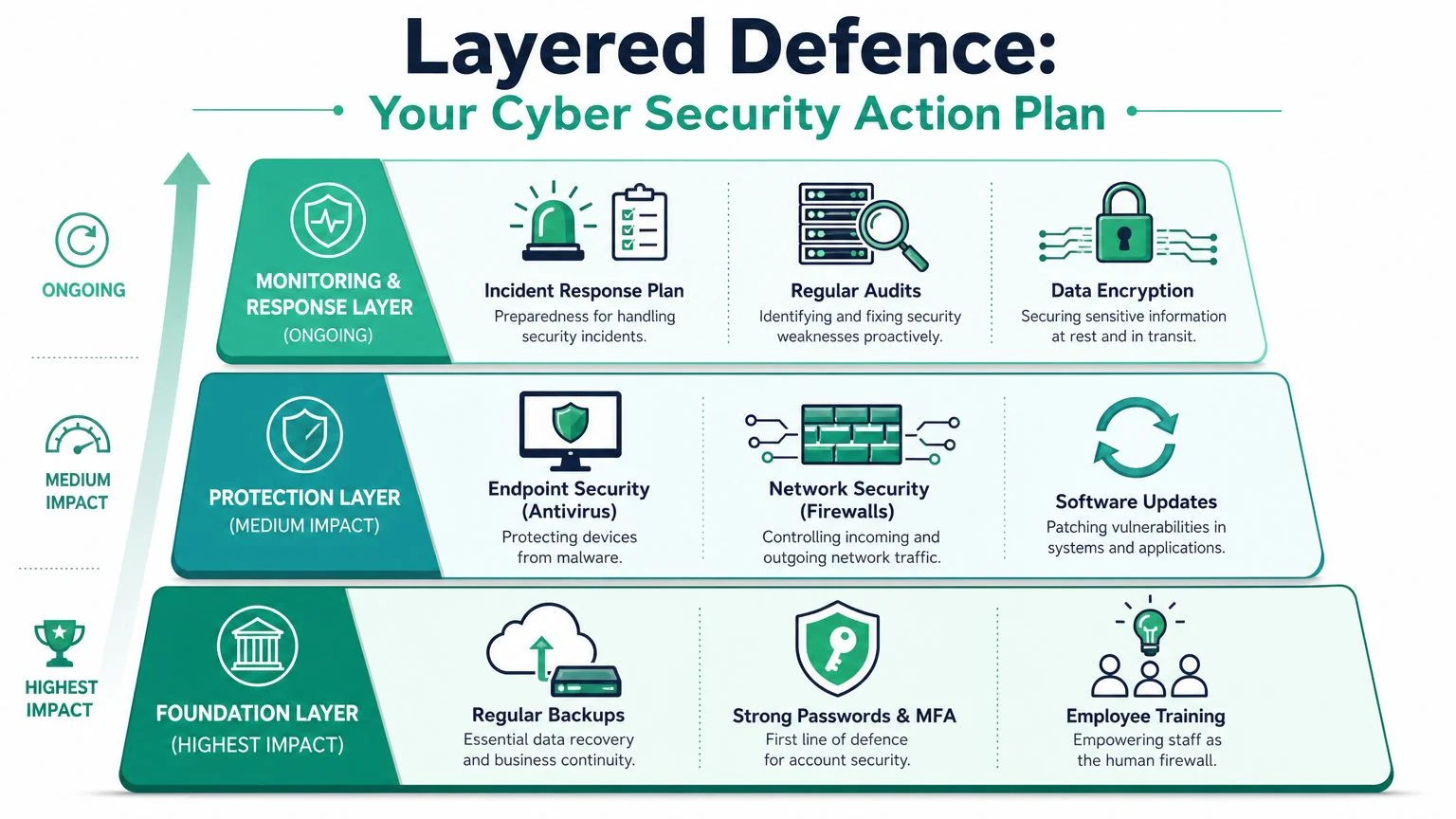
Small businesses usually get better results from five well-chosen controls than from fifteen half-managed ones. The goal here is to cut the biggest risks first, with actions that are affordable, realistic, and proven to reduce the chance of fraud, downtime, and messy recovery work.
To make that easier to visualise, use this layered model.
Fortify your digital identity
If I had to set priorities for a small Australian business with a limited budget, identity would be first. Email and cloud accounts are still the fastest path to payment fraud, data access, and business impersonation.
Start with the controls that shut down common account attacks:
- Turn on multi-factor authentication: Apply it first to Microsoft 365, banking, accounting, backup platforms, and remote access tools.
- Use a password manager: This reduces password reuse and gives you a safer way to manage shared access.
- Separate admin accounts from everyday accounts: Staff should not use high-privilege accounts for email, web browsing, or routine work.
- Remove old users and stale permissions: Former staff, old contractors, and forgotten shared accounts are common entry points.
Owners sometimes push back on MFA because it adds one more step. That trade-off is small compared with the cost of a hijacked mailbox, a fake invoice sent from your domain, or a criminal changing bank details mid-conversation.
Secure your primary workspace
For many small businesses, Microsoft 365 is the business. It holds email, files, Teams chats, identities, and often the records staff rely on all day. If it is loosely configured, one stolen login can do a lot of damage quickly.
Focus on a short list of settings that prevent common abuse:
- Review mailbox forwarding and sign-in alerts: Attackers often set forwarding rules to monitor invoices and payment conversations.
- Lock down sharing: Limit anonymous links and review who can share files outside the business.
- Apply automatic updates on all devices: Known weaknesses are easiest to exploit when updates are delayed.
- Use endpoint protection with enforced updates: Protection only helps if devices stay current and are being monitored.
- Restrict local admin rights: Staff should not be able to install any software they like on work machines.
External support can make a real difference here, especially if no one in the business owns security day to day. Bridge IT Solutions provides Microsoft 365 security hardening, managed backup, simulated phishing, and malware recovery as part of broader business IT support.
A short explainer is useful here as well:
Build your safety net
Backups decide whether an incident becomes a bad day or a long shutdown.
A useful backup plan answers three practical questions without guesswork:
- What is being backed up?
- Where is it stored?
- How fast can we restore the systems and files that keep the business running?
For most small businesses, that means backing up core cloud data, keeping a separate copy that cannot be wiped with the same credentials, and testing restores on a schedule. I see one mistake often. Businesses assume Microsoft 365 retention settings equal full recovery. They do not. Retention can help in some situations, but it is not the same as a tested restore plan built around business continuity.
Backups only matter if you can restore the right data, in the right order, fast enough to keep trading.
Defend your perimeter
Your perimeter now includes more than the office. It includes home networks, mobile phones, laptops on public Wi-Fi, supplier logins, web apps, and any website connected to the business.
Keep this part practical:
- Use a business-grade firewall and secure Wi-Fi: Separate guest traffic from business systems.
- Add email filtering and anti-phishing controls: Email remains the easiest way into many small businesses.
- Run basic security awareness training: Staff need to recognise fake invoices, login prompts, and urgent payment requests.
- Use simulated phishing carefully: It should teach staff what to look for, not embarrass them.
- Maintain websites and plugins: An old WordPress site can become the weakest point in the business.
Do not buy tools just to look covered. Buy the controls you can maintain. That is usually the better investment, especially if you are trying to balance security spending with broader technology costs and small business IT budget optimisation.
How to Budget for Cyber Security Realistically
The financial argument for cyber security is stronger than the technical one. The ACSC-reported average cost per cybercrime report was A$39,000 for small business in 2021–22, while nearly half of Australian SMEs spent less than A$500 annually on cybersecurity (Export Finance Australia). That's a serious mismatch between exposure and spend.
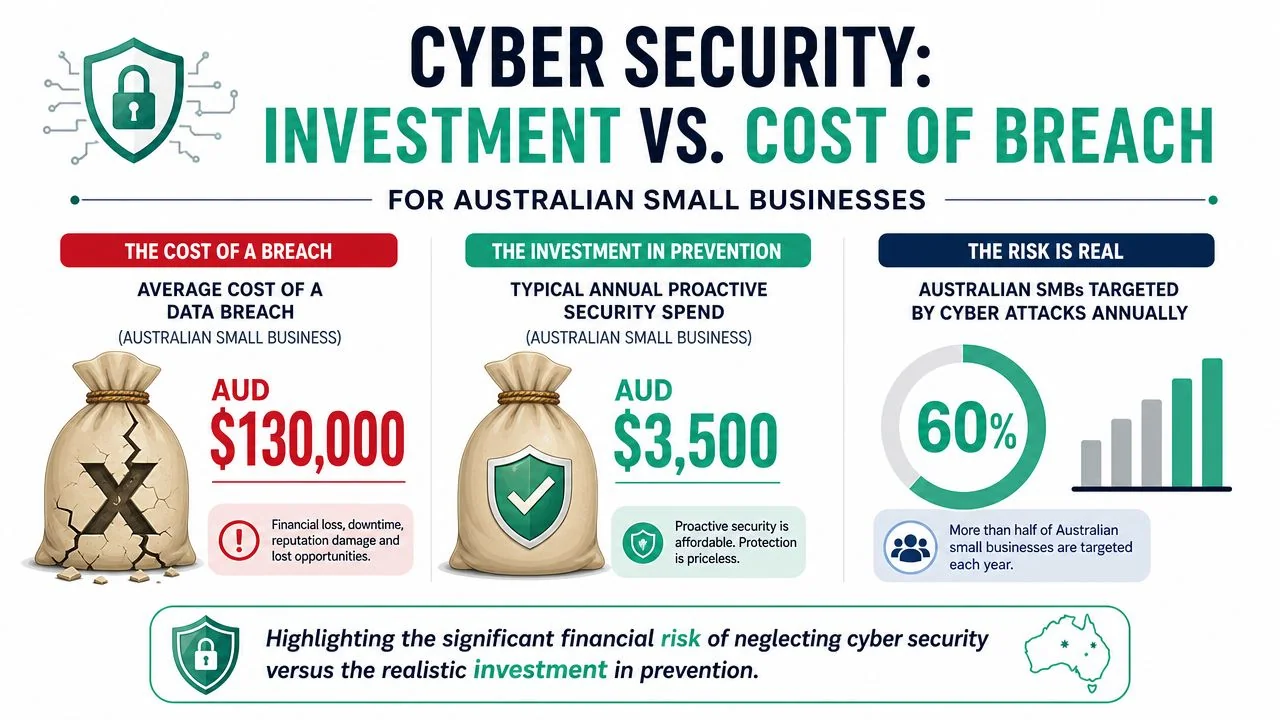
What under-spending really costs
Owners sometimes compare the monthly cost of protection against a calm month where nothing happened. That's the wrong comparison.
The right comparison is between planned spend and unplanned disruption. A cyber incident doesn't arrive as one neat invoice. It shows up as downtime, urgent cleanup, lost work, reputational repair, staff distraction, and difficult customer conversations. In some cases, it also triggers legal and privacy obligations.
This is why cyber budget planning belongs in the same conversation as business resilience. If you're reviewing broader technology costs, it's worth aligning security decisions with the same framework you use for IT budget optimisation for small businesses.
A practical way to think about budget tiers
Instead of chasing an exact magic number, use tiers based on maturity.
| Budget tier | Best fit | Focus |
|---|---|---|
| DIY essentials | Sole traders and very small teams | MFA, password manager, endpoint protection, basic backup, software updates |
| Managed basics | Growing firms with shared systems | Monitoring, Microsoft 365 hardening, backup oversight, user management, response support |
| Comprehensive protection | Regulated or data-sensitive businesses | Stronger policies, advanced monitoring, testing, documented incident process, broader recovery planning |
A few budgeting principles matter more than the label:
- Fund the boring controls first: Identity, backups, updates, and endpoint protection do more than flashy add-ons.
- Budget for management, not just licences: An unused tool doesn't reduce risk.
- Stage improvements: You don't need to fix everything this quarter, but you do need a sequence.
Good security budgeting is about reducing the chance of expensive chaos. It's not about building an enterprise stack in a ten-person business.
Your First 24 Hours Incident Response Checklist
When a cyber incident hits, owners often make the same mistake. They panic, click around, delete evidence, and restart systems before anyone understands what happened. That can make recovery slower and the final damage harder to measure.
This checklist is designed for the first day, not forensics perfection.
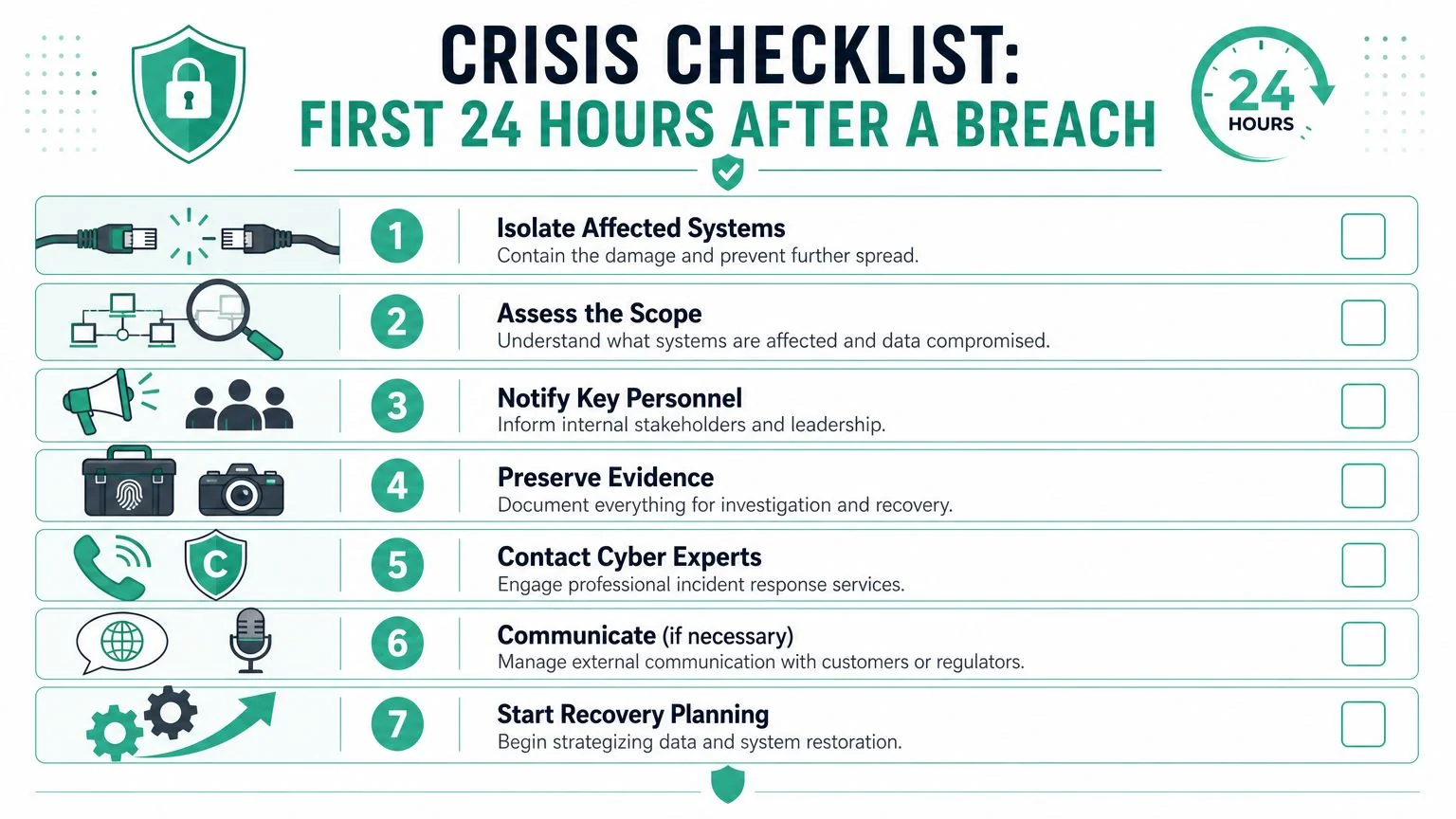
The first moves matter most
Isolate affected devices
Disconnect compromised computers from Wi-Fi or the office network. If a user account appears compromised, disable access or force a password reset through a clean admin account.Stop the spread before cleaning up
Don't rush into wiping machines or deleting suspicious emails. First contain access. If email is involved, check for mailbox forwarding rules, unauthorised sign-ins, and unusual sent items.Preserve evidence
Take screenshots, note times, save suspicious emails, and record what users saw. This helps whoever assists you determine what happened and whether data left the environment.Check critical accounts
Review Microsoft 365 admin accounts, banking access, accounting platforms, backups, and remote access tools. These are the places attackers use to deepen damage.Tell the right people internally
One person should coordinate decisions. Staff need clear instructions on what not to do, especially if phishing or invoice fraud is involved.
If you're unsure whether an incident is contained, assume it isn't and work from the most critical systems outward.
A ransomware-specific recovery path may also help if encrypted files are part of the problem. Bridge IT's guidance on cryptolocker removal and file recovery is relevant in that scenario.
Who to contact in Australia
If you have 19 or fewer employees, the Australian Government's Small Business Cyber Resilience Service offers free specialized support and can route live incidents to the Australian Cyber Security Hotline for immediate help (Small Business Cyber Resilience Service).
That makes a big difference for sole traders and micro-businesses that don't have in-house IT.
Use this sequence:
- Call for help early: If the incident is live, don't wait until you've tried to solve it alone.
- Contact affected providers: Banking, accounting, cloud, or telecom providers may need to place holds or review access.
- Consider customer communication carefully: If personal information may be involved, get advice before sending rushed messages.
- Decide restore versus rebuild: If backups are clean and the scope is clear, restore may be appropriate. If trust in the environment is low, rebuilding key systems is often safer.
Calm, documented action usually beats speed without control.
When to Partner with a Managed IT Provider
A lot of small businesses can handle the first layer of cyber security themselves. The trouble starts when security work becomes ongoing operational work, not a one-off setup task. Someone needs to review user access, check alerts, confirm backups can be restored, approve security changes, and respond quickly when something looks wrong.
That is usually the point where a managed IT provider starts to make financial sense.
For Australian small businesses, the best use of outside support is not handing everything over. It is getting help with the few tasks that reduce the most risk and are hardest to do consistently in-house. In practice, that often means identity, backups, device management, and incident response ownership.
Signs DIY has reached its limit
A managed IT partner is worth considering when several of these apply:
- You store sensitive business or customer data: Payroll records, client files, medical information, financial data, and identity documents increase the cost of mistakes.
- Your business runs on Microsoft 365 and cloud platforms: Cloud tools are efficient, but access sprawl, weak sharing settings, and old accounts build up fast.
- Security jobs keep getting postponed: Patching, account reviews, backup testing, and staff offboarding slip because no one owns them.
- You have already had a near miss: A phishing email, suspicious login, failed backup, or malware event usually shows where the gaps are.
- You want one accountable contact: Small business owners should not have to guess who is checking endpoint protection or whether recovery is possible.
I see this often. The business is not ignoring cyber security. It is just relying on busy staff to do specialist work between their normal responsibilities.
What a useful partner should deliver
A good provider should reduce risk and reduce decision fatigue at the same time. If they add more jargon, more dashboards, and more vague recommendations, they are not helping.
Look for practical outcomes such as:
- A prioritised action plan: What needs attention first, what can wait, and what business risk each item addresses.
- Stronger identity controls and backup hygiene: These are high-value protections for many small businesses because they limit account compromise and make recovery possible.
- Routine patching and device oversight: Unpatched laptops and unmanaged phones are a common weak point.
- Clear incident support: You need to know who to call, what they will do in the first hour, and what that support costs.
- Plain-English advice: If your team cannot understand the recommendation, it usually will not be implemented properly.
If you are also assessing external testing capability, this guide on selecting a white-label pentest partner is a useful reference for what competent specialist support should look like behind the scenes.
If you want security support built into day-to-day IT operations, review how managed IT services can enhance cybersecurity for small businesses. The point is not to outsource responsibility. The point is to make sure the work that matters most gets done, checked, and improved over time.
For many owners, the right time to bring in help is simple. If an incident tomorrow would leave you unsure who owns containment, recovery, and follow-up, you are already at the stage where outside support is worth considering.
If you want a practical, budget-conscious cyber security plan suited to your business, Bridge IT Solutions can help you prioritise the controls that matter most, tighten identity and backup protection, and put a clear response process in place without overcomplicating your environment.
