

Australian businesses reported cybercrime at a pace of about 1 report every 6 minutes, with the Australian Cyber Security Centre recording 94,000 cybercrime reports in 2022 to 2023, up 23% on the prior year. In that same period, the average cost of a cybercrime incident was A$46,000 for a small business and A$97,200 for a medium business according to this Australian cybercrime summary. For a Brisbane or South East Queensland SME, that changes the conversation. Cybersecurity isn't just an IT issue. It's a business continuity issue.
A good vulnerability assessment service helps you find weak spots before someone else does. If your business runs on Microsoft 365, cloud backup, remote support tools, laptops, mobiles, and a few office systems that have grown over time, your risk isn't usually one dramatic flaw. It's the collection of small gaps no one has reviewed together. If ransomware is part of your concern, this overview of the rising threat of ransomware for businesses gives useful context on why early detection matters.
Table of Contents
- The Rising Cyber Threat to Australian Businesses
- What Is a Vulnerability Assessment Really
- The Vulnerability Assessment Process Step by Step
- Vulnerability Assessment vs Penetration Testing
- Why Your Business Needs This Service
- How to Choose a Service in Brisbane
- Partner with Bridge IT for Proactive Security
The Rising Cyber Threat to Australian Businesses
For a lot of business owners, cyber risk becomes real only when it interrupts payroll, halts access to files, or leaves staff unable to serve customers. For Brisbane and South East Queensland SMEs, that risk often sits in ordinary, business-as-usual systems. Microsoft 365 logins, shared inboxes, remote desktop access, cloud backups, Wi-Fi for visiting staff, and a few older devices that still keep part of the operation running.
A common local example is a professional services firm or logistics business with a hybrid setup. The office might be in Brisbane, staff may work from home across the region, invoices and client records live in Microsoft 365, and a line-of-business application still relies on an on-premises server or remote access tool. That kind of environment works well for productivity. It also creates more doors to check. If one account lacks multi-factor authentication, one firewall rule is too open, or one server misses updates, an attacker does not need to break through every layer. They only need one usable gap.
This is why ransomware and account compromise hit smaller businesses so hard. The problem is rarely a dramatic Hollywood-style breach. It is more like a warehouse roller door that does not quite shut. Day after day, it looks fine, until someone notices the opening and walks in. Our guide to the rising threat of ransomware for Australian businesses explains how quickly that kind of disruption can spread from one weak point into downtime, recovery costs, and difficult client conversations.
Brisbane SMEs also face a practical challenge that larger organisations can absorb more easily. Their systems have usually grown bit by bit. A new cloud app gets added. A remote worker needs access. A supplier portal is connected. An old PC remains in service because it still runs one important function. None of those decisions are reckless on their own. Together, they can leave blind spots.
That is the issue. Visibility.
A vulnerability assessment service helps you find those blind spots before they become an incident. For a non-technical owner, the useful question is not, “Do we have cyber security?” It is, “Has someone checked the parts of our environment that attackers are most likely to test first?” A good provider should be able to answer that clearly, show you what was reviewed across your cloud and on-premises systems, and explain what needs attention in business terms. If you want a broader framework for that conversation, this strategic risk assessment guide is a helpful reference.
What Is a Vulnerability Assessment Really
A vulnerability assessment is a structured review of your systems, devices, cloud services, and security settings to find weaknesses before someone else does. For a Brisbane or South East Queensland SME, that usually means more than a quick scan of office computers. It often includes Microsoft 365, remote access, firewalls, backup systems, laptops used from home, and older equipment that still runs an important part of the business.
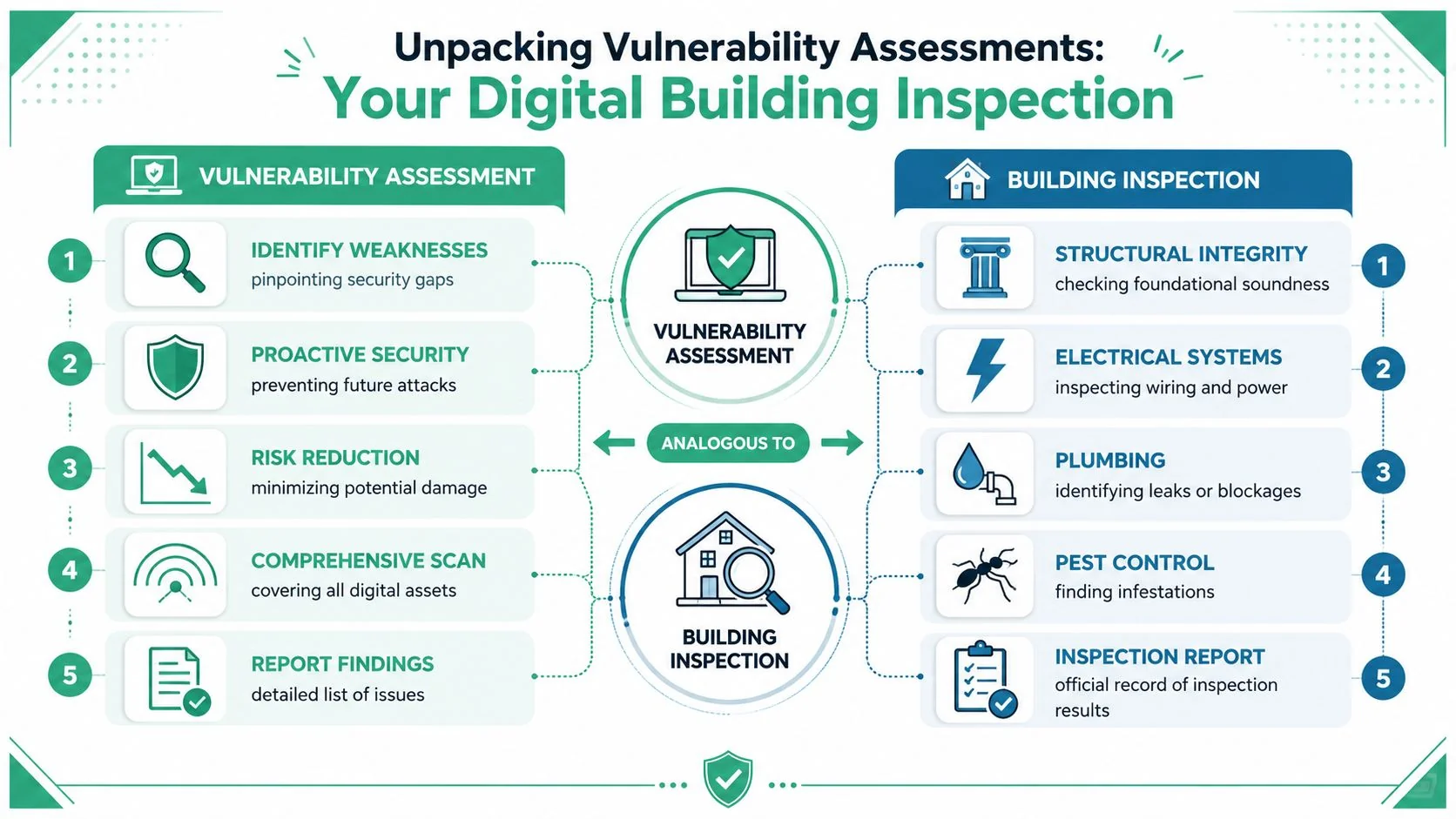
A useful comparison is a building inspection for a commercial property. You check locks, wiring, entry points, maintenance issues, and areas people rarely look at until there is a problem. A vulnerability assessment works in much the same way across your IT environment. It looks for open doors, poor configuration, missing updates, exposed services, and gaps in oversight.
What matters is not just finding flaws. It is understanding which ones create real business risk.
For example, a low-priority issue on an isolated test machine is very different from weak multifactor authentication settings in Microsoft 365, an internet-facing firewall rule, or an unpatched server that supports your accounts or job scheduling system. A good provider separates background noise from the items that could interrupt operations, expose client data, or lead to expensive recovery work.
In practical terms, the assessment should answer four questions:
- What do you have: This includes office infrastructure, cloud platforms, user devices, remote access tools, third-party apps, and older systems that may have been forgotten.
- Where are the weaknesses: Common examples include missing patches, unsafe default settings, excessive permissions, exposed ports, and unsupported software.
- Which findings matter first: Priority should reflect business impact, not just technical severity.
- What should happen next: You should get a clear action plan, not just a spreadsheet full of alerts.
This is why many business owners ask for a cybersecurity health check for business systems before making bigger security decisions. It gives context. You can see what is in the environment, where the risk sits, and what needs attention first.
For non-technical owners, the most useful question to ask a provider is simple: “Will you explain the findings in plain English and tell me what they mean for my business?” In a typical cloud-hybrid setup across South East Queensland, that conversation should cover more than servers and PCs. It should include identity, email security, conditional access, backups, remote workers, and who still has access to what.
If you're also trying to place this within broader business risk planning, this strategic risk assessment guide is a useful companion read because it frames security issues as operational risks, not just technical defects.
Practical rule: If a report leaves you with a list of jargon but no clear order of action, the assessment may be technically detailed but commercially unhelpful.
The Vulnerability Assessment Process Step by Step
A vulnerability assessment works much like a building inspection. Before anyone checks the wiring or the locks, they need the floor plan. In a business setting, that means knowing exactly which systems, accounts, devices, and cloud services are in scope.
Step one starts with visibility
A technically sound assessment starts with asset discovery and scoping. If a provider misses part of your environment, they can also miss the weaknesses sitting there.
For a Brisbane or South East Queensland SME, scope usually extends well beyond the office network. A typical setup might include a firewall in the office, staff laptops working from home or on the road, Microsoft 365 for email and files, cloud backup, mobile devices, and a handful of third-party apps connected to your accounts. Many businesses also have older systems still running in the background because one printer, finance workflow, or line-of-business app still depends on them.
That is why the first questions matter:
- What systems are you assessing?
- Are Microsoft 365, email security, and identity included?
- Are remote devices and home users included?
- Are you checking external exposure, internal exposure, or both?
External testing looks at what someone on the internet can reach. Internal testing looks at what could happen if an attacker gets in with a stolen password or a compromised laptop. In a cloud-hybrid environment, both views matter.
If your environment has grown quickly and no longer feels simple, a cybersecurity health check for business systems can help confirm what should be included before the assessment begins.
What happens after the scan
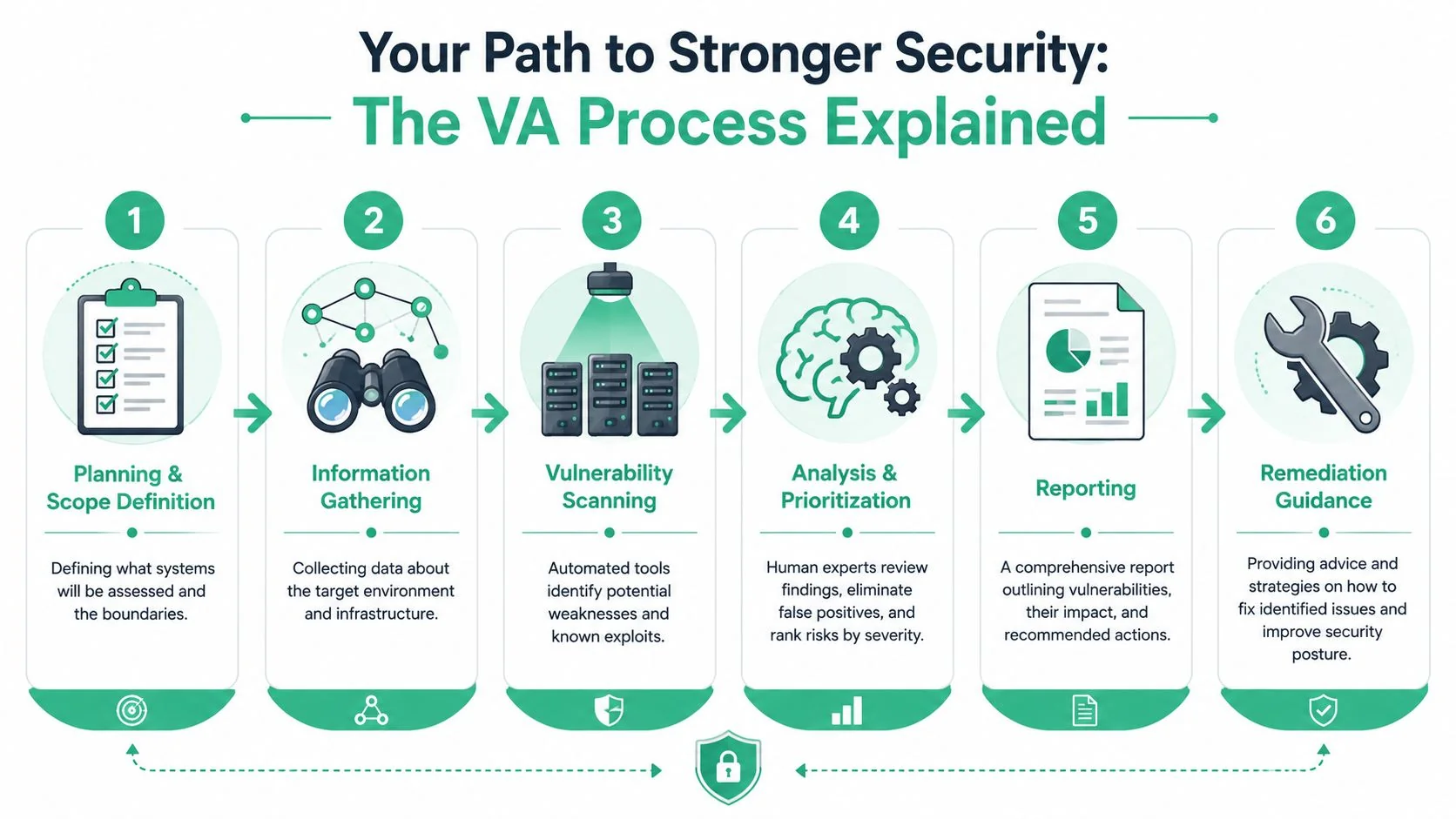
Once the scope is agreed, the provider gathers information through automated scanning and manual review. Scanning is fast and good at spotting known issues. Manual review adds judgment. That combination matters because business owners do not need a dump of every alert. They need a short list of issues worth fixing first.
A useful service usually follows this sequence:
- Scan the agreed assets. This covers systems, services, versions, ports, settings, and exposed interfaces.
- Review the findings manually. This helps remove false alarms and catch context a tool may miss.
- Rank issues by business risk. A problem tied to customer data, email access, or a critical finance system should sit higher than a minor issue on a low-value device.
- Recommend practical fixes. Good advice should tell your IT team what to patch, reconfigure, remove, or restrict.
For South East Queensland SMEs, this business context is where many assessments become either useful or frustrating. A technically accurate report can still miss the point if it ignores how your staff work. For example, a weak conditional access policy in Microsoft 365 may deserve higher priority than an isolated workstation issue, because email and identity are often the front door in real attacks.
This short explainer is a helpful companion if you'd like a visual walk-through of the concepts involved.
What you should receive at the end
The final report should help you make decisions. It should not read like a spreadsheet exported from a scanner.
A useful report answers practical questions in plain English:
- What is exposed?
- Which issues create the highest business risk?
- What can your team fix quickly?
- Which items need a project, budget, or provider support?
- What should be verified after the fix is applied?
The clearest reports also group findings in a way a non-technical owner can act on. That usually means separating urgent items from scheduled maintenance and explaining the likely business effect of each issue.
| Priority view | What it means for the business | Typical response |
|---|---|---|
| Critical business exposure | A weakness affects an important system or sensitive data | Act first and confirm the fix |
| Important but contained | The issue matters, but impact is limited or layered controls exist | Schedule prompt remediation |
| Lower operational risk | Useful to resolve, but not the first job | Address as part of planned maintenance |
Good providers also explain ownership. Some fixes belong with your internal IT contact. Others may sit with your managed service provider, software vendor, or cloud administrator. That clarity saves time and avoids the usual problem where everyone assumes someone else is handling it.
The goal is simple. Know what matters, fix the highest-risk issues first, and show steady progress over time.
Vulnerability Assessment vs Penetration Testing
For many Brisbane and South East Queensland SMEs, the confusion is not technical. It is practical. If you are paying for security work, you need to know what question each service answers.
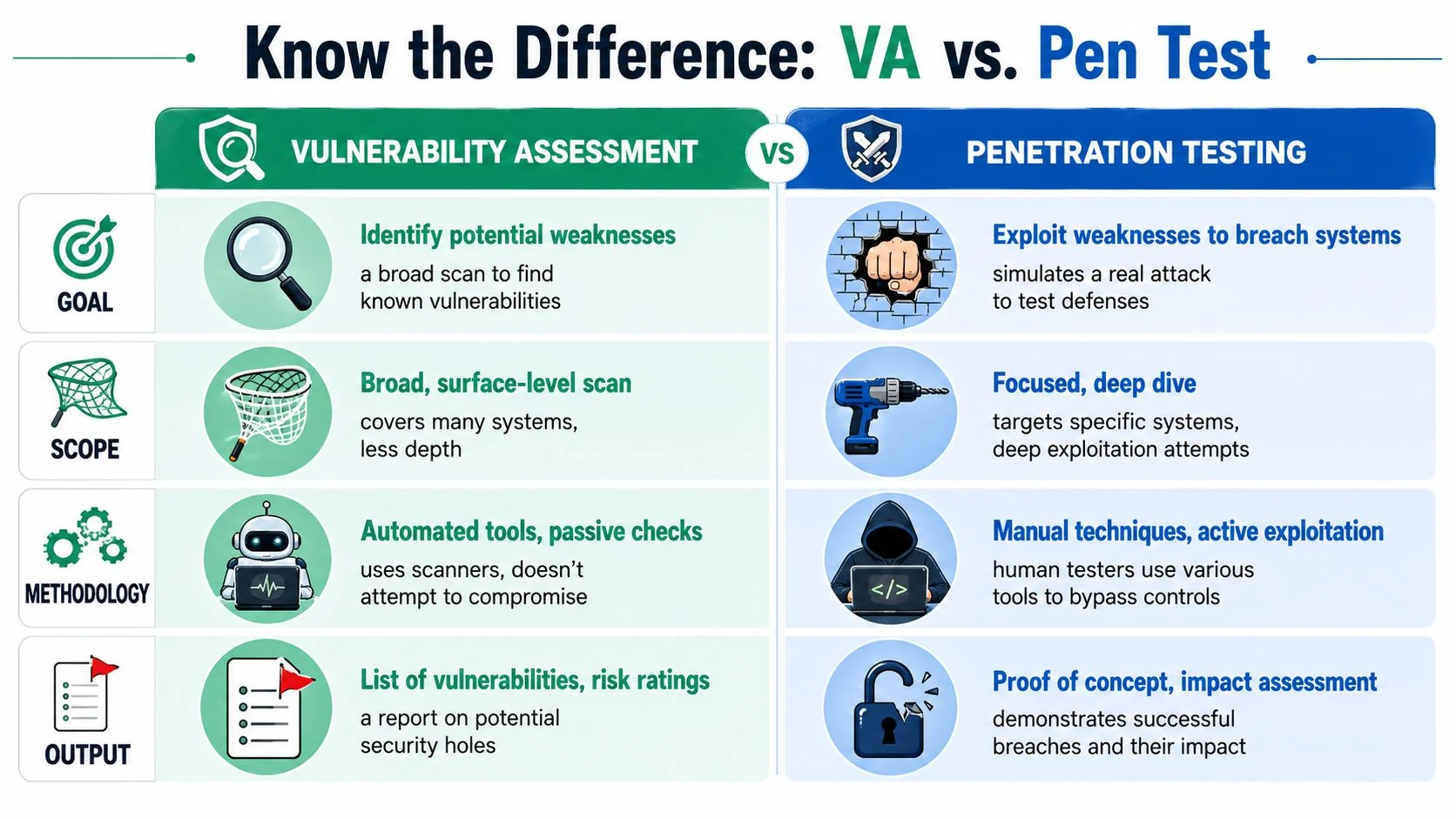
A vulnerability assessment is designed to show you where weaknesses exist across your environment. That usually includes endpoints, servers, firewalls, cloud services, and common business platforms such as Microsoft 365. A penetration test has a different purpose. It focuses on selected systems and attempts to exploit specific weaknesses to show what an attacker could achieve in real conditions.
A side-by-side view
| Area | Vulnerability assessment | Penetration testing |
|---|---|---|
| Main goal | Find and prioritise weaknesses | Attempt to exploit selected weaknesses |
| Scope | Broad coverage across many assets | Narrower scope with deeper testing |
| Output | Risk-ranked findings and remediation guidance | Evidence of exploitability and likely impact |
| Best use | Ongoing visibility and security hygiene | Validating high-risk paths or sensitive systems |
The difference matters because the services support different business decisions.
If you run a professional services firm in Brisbane with remote staff, Microsoft 365, a line-of-business app, and a managed firewall, a vulnerability assessment helps you ask, "What are we missing across the whole setup?" A penetration test helps you ask, "If someone targets our email, remote access, or client data systems, how far could they get?"
This is also where provider quality becomes easier to judge. A good assessment service should give you broad asset coverage, clear prioritisation, and realistic remediation advice tied to business risk. A good penetration test should define scope carefully, explain rules of engagement, and show the consequence of a successful exploit without turning the project into a disruption.
For non-technical owners, the simplest way to choose is this. Start with a vulnerability assessment if you do not yet have a clear, current view of your weaknesses across the environment. Choose a penetration test after that baseline exists, or when a client requirement, insurance questionnaire, major system change, or governance program calls for proof that important controls hold up under attack. If you are reviewing your broader security responsibilities at the same time, it also helps to understand common IT governance frameworks.
Ask providers direct questions before you sign anything: Will you assess Microsoft 365 configuration as well as on-premise devices? Will you include externally exposed services and remote access points? Will the report separate urgent business risk from routine maintenance? Will you retest key fixes?
For many SMEs, the right sequence is straightforward. Get visibility first. Validate high-risk areas second.
Why Your Business Needs This Service
A vulnerability assessment service is easy to frame as a technical exercise. In reality, it's a business control. It helps you reduce avoidable disruption, make smarter IT decisions, and show clients or stakeholders that security is being managed with intent.
It reduces avoidable business risk
Most incidents don't begin with some cinematic hack. They begin with an old system, an exposed setting, weak access hygiene, or a patch that no one realised had been missed. An assessment helps surface those issues early, while the fix is still straightforward.
The business value usually shows up in four places:
- Less preventable downtime: If weaknesses are found before they cause an outage, your team avoids disruption and urgent recovery work.
- Better prioritisation: Your IT budget goes toward the issues that present the clearest risk, not the loudest vendor alert.
- Stronger patching discipline: Teams stop treating updates as a background chore and start linking them to real business exposure.
- More confidence in hybrid systems: Microsoft 365, remote devices, backups, and office infrastructure are reviewed as one environment instead of separate silos.
It also helps with trust and governance
For firms in professional services, healthcare, finance, and similar sectors, clients often assume you have sensible security controls in place. They may never ask for technical detail, but they will care if something goes wrong. A vulnerability assessment gives you a stronger foundation for internal governance, supplier conversations, and security-related questionnaires.
That doesn't mean every small business needs a large governance program. It does mean your security controls should be organised enough to support business decisions. If you're trying to connect technical controls to wider management practice, this overview of IT governance frameworks is a practical way to think about structure without overcomplicating things.
Some businesses also use vulnerability assessments as supporting evidence when discussing insurance, compliance expectations, or client due diligence. The exact requirement varies, so the safest approach is to ask what proof of review, remediation, and ongoing oversight you may need.
How to Choose a Service in Brisbane
Choosing a provider is a bit like choosing a building inspector for a commercial property. You do not just want a long defect list. You want someone who knows which cracks are cosmetic, which ones affect the structure, and what needs attention first.
That matters for Brisbane and South East Queensland SMEs because a typical environment is rarely simple. Many local businesses now run a mix of Microsoft 365, cloud backup, remote access, mobile devices, office Wi-Fi, line-of-business apps, and a few older systems that still support daily operations. A generic scanning service can miss how those pieces connect, which is often where risk hides.
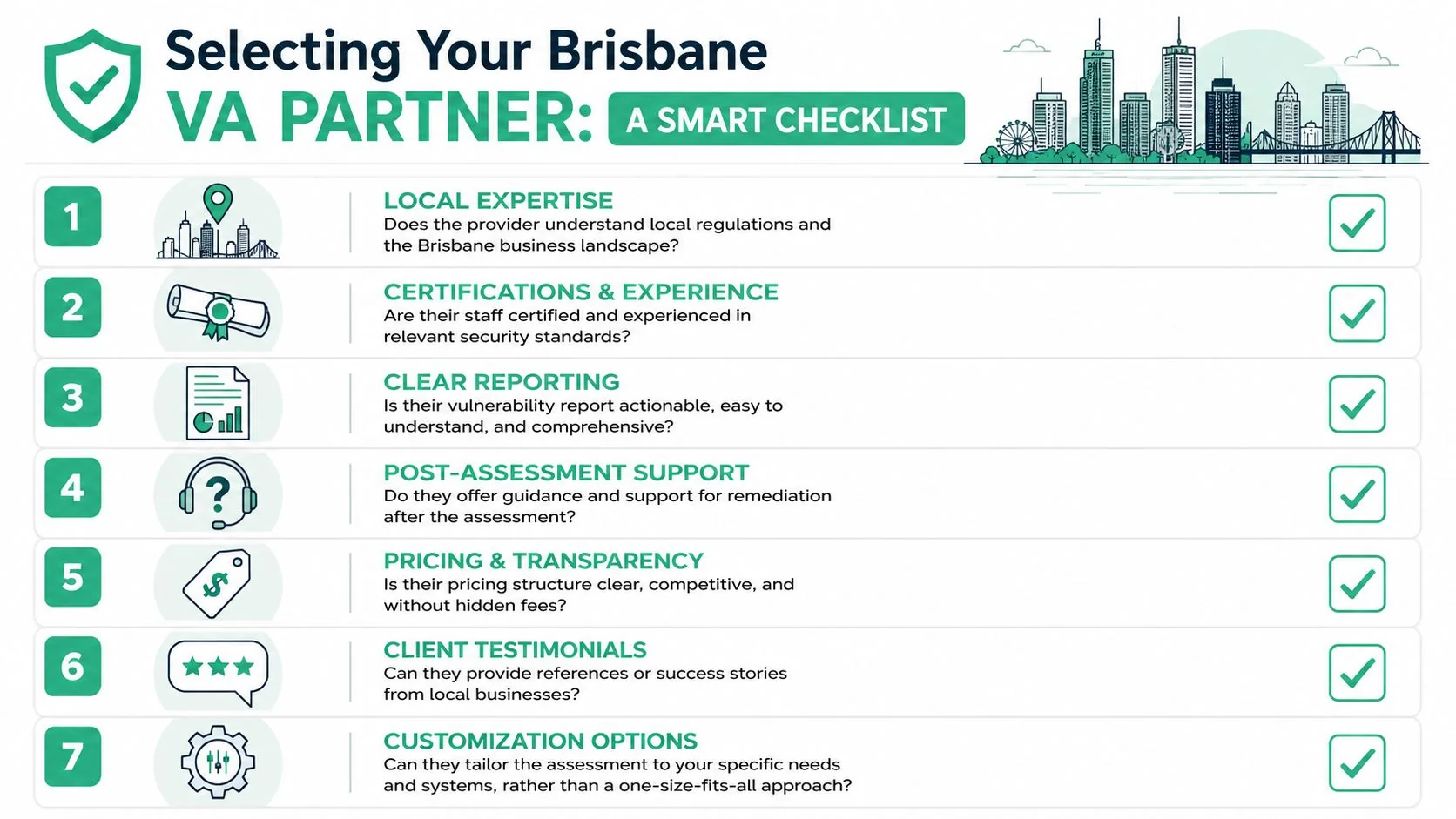
Questions worth asking before you sign
Ask any potential provider these questions:
- How do you set the scope for a hybrid environment? Ask whether Microsoft 365, cloud backup, endpoints, remote access tools, and office infrastructure are included where relevant.
- How do you confirm findings are real? Good providers validate results so your team does not waste time chasing false positives.
- Will the report be clear to a business owner or manager? You need technical detail for fixes, plus plain-English guidance for budgeting and decision-making.
- How do you rank what gets fixed first? Look for a method that considers exploitability, business importance, and the likely effect on operations.
- What support do we get after the report is delivered? Some firms stop at the document. Better providers help you interpret the results and plan remediation.
- Can you assess both internal and external exposure? This gives a more realistic picture of how an attacker might approach your business.
- How do you keep the assessment relevant as devices, users, and cloud services change? Fast-moving environments need a service model that can keep up.
Listen for plain answers, not jargon. If a provider cannot explain their method in everyday language, there is a fair chance the final report will be just as hard to use.
It also helps to ask how their work supports your wider obligations. Many Brisbane businesses need security evidence for client questionnaires, insurance discussions, or internal governance. If you want a clearer view of those expectations, this guide to IT security compliance for Brisbane businesses is a useful reference point.
What a sensible cadence looks like
A good provider should help you choose a review schedule that fits your business, not sell a one-off scan and disappear. The right cadence depends on how often your systems change and how disruptive a missed weakness would be.
For example, a legal practice in Brisbane CBD with Microsoft 365, remote staff, and document-heavy workflows may need a different assessment rhythm from a trade business in Logan with fewer cloud services but more mobile devices and field access. Both need visibility. The difference is how quickly their risk changes and how much sensitive information they handle.
A practical schedule usually depends on five things:
- How often your environment changes
- How sensitive your client, financial, or patient data is
- How dependent you are on cloud platforms such as Microsoft 365
- How quickly your team can patch and verify fixes
- Whether you have internal IT staff or rely on an external partner
Here is the key question to ask. What review rhythm is realistic for our environment, and how will you help us keep coverage current as assets change?
That question usually leads to a better outcome than asking for the cheapest scan. For many SMEs across South East Queensland, the better option is an ongoing service that reviews changes over time, keeps scope current, and turns findings into an action plan your business can follow.
Partner with Bridge IT for Proactive Security
Brisbane and South East Queensland businesses need security advice that fits the way real SMEs operate. That means practical scoping, clear reporting, support for Microsoft 365 and hybrid environments, and help prioritising what to fix first. A vulnerability assessment service should reduce uncertainty, not add another layer of jargon.
Bridge IT Solutions brings that local, business-focused approach. The team supports SMEs across South East Queensland with managed IT, cybersecurity, cloud services, backup, and business continuity. With 25+ years' experience, 100+ business clients, a 5-star Google rating, and police-checked technicians, Bridge IT combines local support with hands-on expertise across Microsoft, HPE, Sophos, Cisco, Acronis, Veeam, and the everyday systems many SMEs rely on.
If you want a clearer picture of your risks, a more defensible assessment cadence, and guidance you can act on, a local partner makes a real difference.
If you'd like practical help reviewing your environment, planning a vulnerability assessment service, or tightening security across Microsoft 365 and your wider hybrid setup, talk to Bridge IT Solutions. They work with Brisbane and South East Queensland SMEs to turn cyber risk into a manageable, prioritised action plan.
