

You're probably seeing the same pattern every week. Another headline about a data breach. Another software prompt asking for updates. Another email from Microsoft 365 asking you to review security settings you've been meaning to check. If you run a small business in Brisbane or anywhere across South East Queensland, it's easy to feel like cyber security is built for banks, government departments, and companies with full-time IT staff.
It isn't.
For a small team, the challenge isn't understanding that cyber risk is real. The challenge is working out what to do first, what can wait, and what's realistic when you've also got payroll, clients, phones, stock, and staff to deal with. That's where the Essential Eight helps. It gives you a practical order of operations instead of a pile of disconnected advice.
The Australian Cyber Security Centre built the framework as a baseline of eight core mitigation strategies. In plain English, it's a short list of the controls that do the most work against common attacks. For a sole trader, a medical clinic, an accounting practice, or a construction business, that matters more than jargon. Good essential 8 cyber security isn't about buying every security product on the market. It's about putting the right controls in place, in the right order, and making sure they work day to day.
Table of Contents
- Your Business Is a Target But Security Is Achievable
- What Are the Essential Eight Controls
- Understanding the Three Maturity Levels
- Your Practical Implementation Roadmap
- Mapping the Essential Eight to Microsoft 365
- How a Managed IT Partner Simplifies Everything
- Your Path to a Secure Business
- Frequently Asked Questions
Your Business Is a Target But Security Is Achievable
A Brisbane business owner hears that a local firm got hit by ransomware. Staff couldn't open files. Email access was disrupted. Clients started asking questions. The owner's next thought is usually the same. “We're smaller than that business, but would we be any better prepared?”
That reaction is reasonable. Small businesses rarely have the luxury of a security manager, an internal help desk, or time set aside each week for reviewing logs and security alerts. Most owners are making decisions between jobs, meetings, and invoices. Cyber security then gets pushed into the same mental bucket as tax compliance and insurance paperwork. Important, but not urgent until something goes wrong.
The problem is that attackers don't grade businesses on size before they try password spraying, phishing, malicious attachments, or vulnerable software. The ACSC has said that 60% of cyber incidents in Australia target small businesses in the context of the SME resource gap around Essential Eight implementation, which is exactly why a simpler, prioritised approach matters so much for smaller operators (Qualys summary of ACSC context).
Good security for a small business isn't about doing everything. It's about removing the easy wins attackers rely on.
That's why the Essential Eight is useful. It doesn't ask you to build a government-grade security operations centre. It gives you a shortlist of protections that directly reduce common attack paths. For a small office using laptops, Microsoft 365, cloud storage, and line-of-business apps, that's a much better fit than a sprawling compliance framework.
If you strip away the policy language, the message is simple. Lock down what can run. Keep software updated. Protect logins. Limit admin access. Back up data properly. None of that is out of reach for a Queensland sole trader or a team of ten. It just needs to be translated into everyday business decisions.
What Are the Essential Eight Controls
The framework in plain English
The Australian Cyber Security Centre formally established the Essential Eight as a baseline of eight core mitigation strategies, including Application Control, Patching, Multi-Factor Authentication, and Regular Backups. Its guidance also recommends patching critical vulnerabilities on internet-facing systems within 48 hours (ACSC Essential Eight guidance).
That sounds formal, but the idea is straightforward. These eight controls are there to stop three things from happening:
- Unauthorised access to your systems and accounts
- Malicious software from running inside your business
- Long outages when something goes wrong
This visual gives you the full list at a glance.
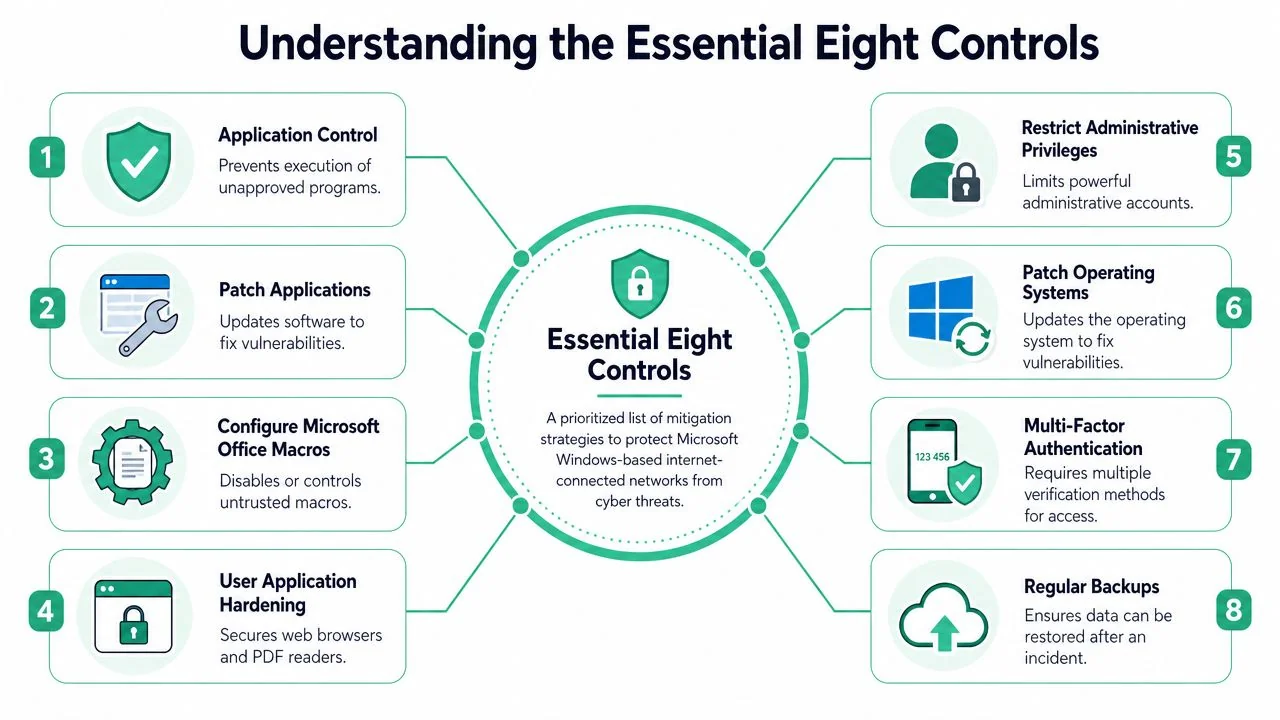
If you want a simple companion checklist for the basics, this small business cyber security checklist is a useful starting point alongside the framework.
The eight controls as building security
A lot of the Essential Eight makes more sense if you compare it to securing an office or warehouse.
- Application Control is your guest list. Only approved people get through the door. In IT terms, only approved software is allowed to run.
- Patch Applications is fixing a broken side gate as soon as you know it won't latch. If attackers know a program has a flaw, delays matter.
- Configure Microsoft Office Macro Settings is refusing to let strangers walk in with tools and start rewiring the building. Macros can automate useful work, but they're also a common delivery method for malicious code.
- User Application Hardening is removing unnecessary entry points. If you don't need certain browser features, Flash-style content, Java, or risky behaviours, disable them.
- Restrict Administrative Privileges is limiting master keys. Not every staff member should have unrestricted access to every cupboard, server, and system setting.
- Patch Operating Systems is maintaining the actual structure of the building. If Windows or another operating system has a known weakness, attackers will go after it.
- Multi-Factor Authentication is requiring a keycard and a PIN instead of a single key. A stolen password on its own shouldn't be enough.
- Regular Backups are your off-site copies of contracts, records, and operational files. If the office floods or systems are encrypted, you still have a way back.
Practical rule: If a control sounds technical, translate it into a business question. Who can get in? What can run? What happens if we lose access tomorrow?
For small businesses, the most common mistake isn't ignoring security completely. It's assuming antivirus alone covers everything. It doesn't. Antivirus might detect known threats, but it won't replace sound admin controls, disciplined patching, or a tested backup process.
Another mistake is treating the Essential Eight like a pass-or-fail audit. It works better as a roadmap. Some controls are simple to improve quickly. Others need planning. That's normal.
Understanding the Three Maturity Levels
Think crawl walk run
The Essential Eight isn't just a checklist. It's a maturity model with three levels: Level 1, Level 2, and Level 3. The easiest way to think about them is crawl, walk, run.
Level 1 is the practical starting point. It focuses on the basics that prevent common attacks and reduce obvious weaknesses. For most small businesses, this is the right initial target because it forces action on the controls that usually get skipped, such as MFA, patching discipline, and access restrictions.
Level 2 is where the framework becomes more operational. The ACSC's maturity model says organisations at this level must centrally collect and analyse logs for every successful and failed MFA attempt and privileged access event, which shifts security from basic setup to active monitoring (ACSC Essential Eight maturity model).
Why most small businesses should start at Level 1
A lot of owners hear “maturity model” and assume they need enterprise tooling from day one. They don't. What they need is consistency.
A Level 1 mindset means:
- Accounts are protected with stronger sign-in controls.
- Devices are updated on a schedule instead of “when someone remembers”.
- Backups exist outside the day-to-day production environment.
- Admin rights are limited so one compromised account doesn't become a business-wide disaster.
The jump from Level 1 to Level 2 is usually where businesses discover the true workload. Central logging, review processes, stronger authentication methods, and better oversight all take time. That doesn't mean Level 2 is out of reach. It means small businesses should earn their way there by making Level 1 routine first.
The businesses that improve fastest don't start with perfect tooling. They start with disciplined habits.
If you're a sole trader or a team without internal IT, that's good news. You don't have to “finish” essential 8 cyber security in one project. You can build it in stages.
Your Practical Implementation Roadmap
Start with the controls that stop the most damage
Small businesses get into trouble when they try to tackle all eight controls at once. The better approach is to start with the controls that reduce the biggest risks quickly. In practice, that means MFA, patching, and backups first.
This roadmap captures the order most SMBs should follow.
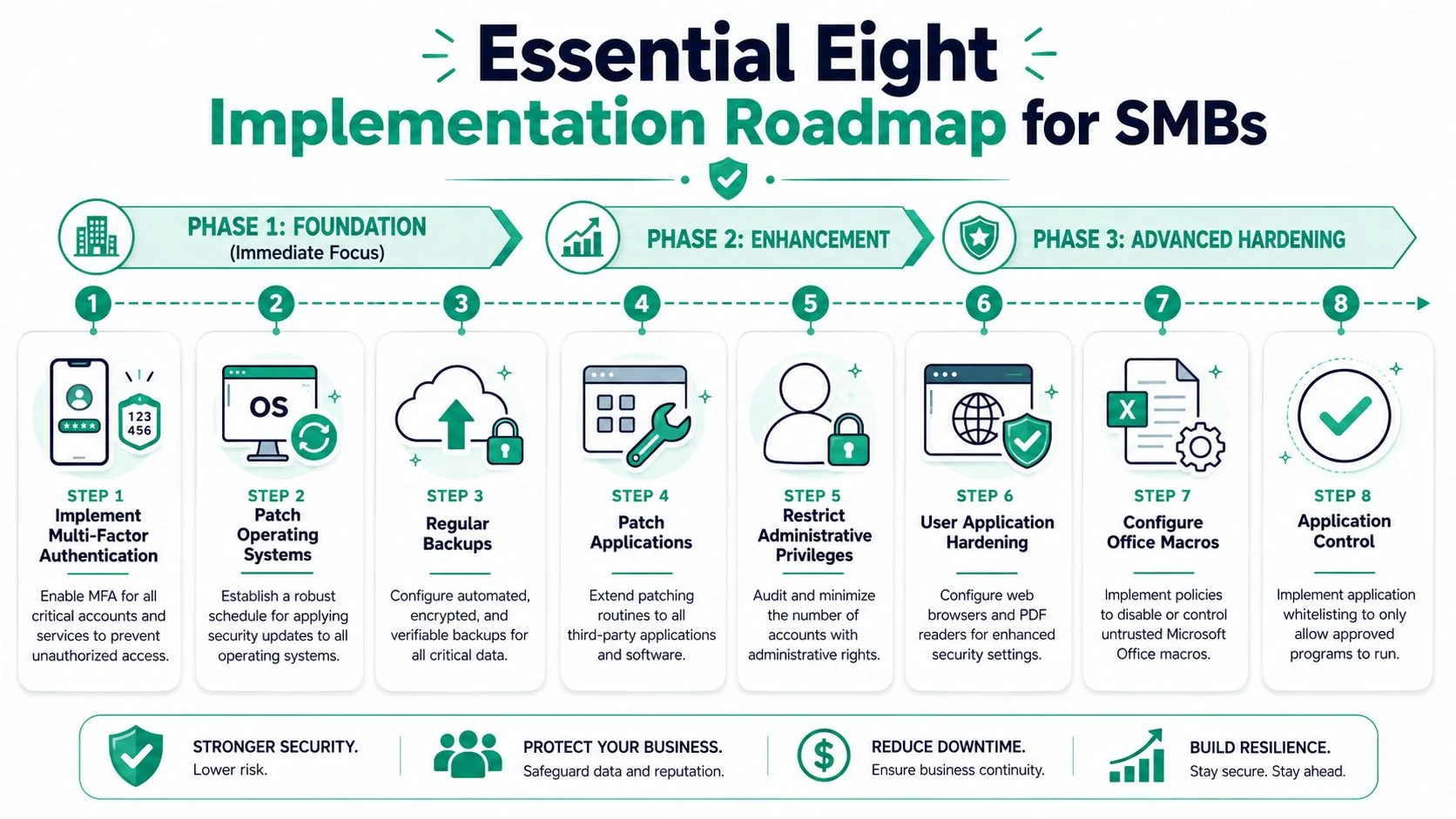
Start with these actions.
Turn on MFA everywhere that matters
Begin with Microsoft 365, email, remote access, banking, password managers, and any cloud platforms holding client or financial data. Don't leave privileged accounts until later. Those should be first.
Set updates to happen automatically where possible
Windows, Microsoft 365 apps, browsers, and common business software should not depend on staff remembering to click “install”. Where auto-update isn't available, create a recurring task in Outlook, Microsoft Planner, or your practice management tool so someone owns the check.
Make sure backups are separate from the network and recoverable
The Essential Eight expects backups to be kept separate and tested regularly. A backup you've never restored isn't a recovery plan. It's an assumption.
The patching side deserves special attention. The framework mandates a 14-day patching window for applications and operating systems, and this accelerates to 48 hours for actively exploited vulnerabilities. The ACSC links that faster threshold to the mitigation of major exploits such as Log4j (Qualys discussion of ACSC patching guidance).
Phase the rest instead of forcing everything at once
Once those first controls are in place, move into the next layer.
| Phase | Focus | Practical small business example |
|---|---|---|
| Foundation | MFA, operating system updates, backups | Secure Microsoft 365, patch PCs, verify backup restores |
| Enhancement | Application patching, admin restrictions | Remove local admin from everyday users, update third-party apps |
| Hardening | Macros, browser/PDF hardening, application control | Block risky macros, tighten browser settings, allow only approved software |
A phased rollout works because each step depends on the one before it. There's no point trying to enforce application control if half the software estate is outdated and nobody knows who still has admin rights.
A few trade-offs are worth being honest about:
- MFA can annoy staff at first. It's still worth it. The answer is better setup and training, not skipping it.
- Patching can break older software. Test critical line-of-business apps, but don't use compatibility concerns as a blanket excuse to defer updates forever.
- Backups take oversight. Someone has to check job failures, storage use, and restore capability.
For small teams, one missing piece is usually user behaviour. Technical controls matter most, but they work better when staff know how to spot suspicious links, unexpected prompts, and fake login pages. That's where implementing security awareness can support the more technical parts of your Essential Eight rollout without making it feel like a compliance exercise.
A practical weekly rhythm is often enough. Review failed sign-ins, confirm backups completed, check pending updates, and remove access for former staff immediately. That routine won't make your business bulletproof, but it will remove a lot of the low-effort opportunities attackers count on.
Mapping the Essential Eight to Microsoft 365
Where Microsoft 365 helps
Many Queensland small businesses already pay for Microsoft 365, but they only use the obvious pieces like Outlook, Teams, Word, and SharePoint. The security value is often sitting there unused.
That matters because MFA is a mandatory control, and ACSC guidance on MFA says it can lead to a 99.9% reduction in account compromise risks. The same guidance states that 90% of Australian businesses compromised by credential theft lacked enforced MFA on privileged accounts, and Level 2 expects more secure methods such as FIDO2 keys (ACSC Multi-Factor Authentication guidance).
If you already use Microsoft 365 Business Premium or a similar plan, you can map much of the Essential Eight to features you may already own.
Essential Eight Controls in Microsoft 365 Business Premium
| Essential Eight Control | Microsoft 365 Feature/Policy |
|---|---|
| Application Control | Microsoft Defender for Business, App control policies, Intune-managed device restrictions |
| Patch Applications | Microsoft Intune update policies, Microsoft 365 Apps update channels, software deployment policies |
| Configure Microsoft Office Macro Settings | Intune configuration profiles, Microsoft 365 Apps policy settings, macro restrictions from internet-sourced files |
| User Application Hardening | Microsoft Edge security settings, Intune compliance and configuration policies, attack surface reduction settings |
| Restrict Administrative Privileges | Microsoft Entra ID role-based access, separate admin accounts, privileged role controls |
| Patch Operating Systems | Windows Update for Business through Intune |
| Multi-Factor Authentication | Microsoft Entra ID MFA, Conditional Access, FIDO2 security keys |
| Regular Backups | Microsoft 365 retention features plus separate third-party backup for Exchange, OneDrive, and SharePoint data |
A deeper review of Microsoft 365 security services for business can help if you want to see which subscriptions support which controls.
What this means for a small business
The practical win here is cost control. Many SMBs assume essential 8 cyber security means buying a whole new stack. Sometimes it does require extra tooling, especially around backup and advanced monitoring, but often the first lift comes from configuring what's already in place.
There are limits, though.
Microsoft 365 can support the framework well, but it doesn't configure itself. Default settings are rarely the same as secure settings.
That's where businesses often get stuck. They have Business Premium licences, but no one has enforced Conditional Access properly, separated admin accounts, locked down macros, or reviewed device compliance. The subscription is there. The security posture isn't.
For a small office, the sensible approach is to ask three questions:
- What are we already paying for but not using?
- Which settings protect email, identity, and endpoints first?
- Which gaps still need another tool or service?
That framing usually turns the Essential Eight from a vague compliance goal into a practical configuration plan.
How a Managed IT Partner Simplifies Everything
What DIY gets right and where it breaks down
A hands-on business owner can absolutely make progress alone. Turning on MFA, reviewing admin accounts, setting update policies, and checking backups are all achievable steps. For very small teams, that DIY effort is often the right place to begin.
The strain shows up after the initial setup. Patches fail. New staff get added without the right access controls. Someone needs local admin for a specialist app. Backup alerts come through at the wrong time. Security becomes a maintenance job, not a one-off project.
That's where many businesses drift. The framework still exists on paper, but the day-to-day enforcement starts to slip.

What ongoing support changes
A managed IT partner changes the model from “someone should check that” to “this is being monitored and managed”. That includes routine patching, policy enforcement, account reviews, device compliance, backup oversight, and advice when a business application creates a security exception that needs handling properly.
The benefit isn't just technical labour. It's judgement. A good partner knows when to tighten a control, when to phase a change to avoid breaking operations, and when a quick fix will create a bigger problem later.
For a small business owner, that usually means:
- Less time spent chasing settings
- Fewer security tasks sitting with untrained staff
- A clearer path from basic controls to stronger maturity
- More confidence that the setup still matches how the business works
If you want a broader look at the operational side, this guide on managed IT services and small business cyber security explains why support matters after the initial hardening is done.
Your Path to a Secure Business
The Essential Eight isn't reserved for large organisations with compliance teams. For a small business, it's a practical way to decide what matters first and avoid wasting money on scattered security products.
Start with the basics that change your risk quickly. Turn on MFA. Patch systems and applications on a defined schedule. Make sure backups are separate and restorable. Then work through admin restrictions, macro controls, application hardening, and tighter software control as your process improves.
The important part is momentum. A business that acts on the first few controls is in a stronger position than one that keeps researching and never changes anything.
Frequently Asked Questions
Is the Essential Eight legally required for private businesses
Not in the same way it applies to government environments. For many private businesses, it works best as a recognised security baseline rather than a universal legal requirement.
That said, clients, insurers, and industry obligations may still push you toward the same controls. Even when the framework isn't mandatory, the practical protections still matter. If your business handles sensitive client data, medical information, financial records, or legal documents, using the Essential Eight as your minimum standard is a sensible move.
Can a sole trader really use the Essential Eight
Yes, but not every control needs to start at the same depth as a large enterprise.
A sole trader can still apply the core ideas. Use MFA on email and cloud apps. Keep devices patched. Back up files properly. Don't use an admin account for everyday work. Disable risky Office macro behaviour. That's all still relevant even if you've only got one laptop, one phone, and a Microsoft 365 subscription.
The mistake is thinking “small” means “not worth targeting”. Attackers often prefer easier environments, not bigger ones.
Do I need expensive software to get started
Not always. Many businesses can make a meaningful start with tools they already have, especially if they use Microsoft 365 Business Premium or similar cloud platforms.
What usually matters more at the beginning is correct setup. Plenty of small businesses already own security-capable tools but haven't configured them well. Over time, you may need additional services for backup, monitoring, endpoint control, or more advanced access management. But the first lift often comes from better use of existing licences and clearer operating habits.
Start with what you already own, then buy what closes a real gap.
What should I do first this week
If you want a short, realistic starting list, do these in order:
- Enable MFA for Microsoft 365, email, banking, and any remote access tools.
- Review admin access and remove local admin rights from everyday user accounts where possible.
- Check update settings on Windows devices and critical business applications.
- Confirm backups exist outside the production environment and test a restore.
- List your critical systems so you know which devices, apps, and accounts need priority protection.
That's enough to move from vague concern to actual progress. Once those basics are steady, the rest of the Essential Eight becomes much easier to implement properly.
If you want a practical view of where your business stands today, Bridge IT Solutions can help you assess your current setup, identify the most important Essential Eight gaps, and build a realistic plan that fits a small business budget in South East Queensland.
