

It's late on a Friday in Brisbane. Your receptionist says email has stopped working. A staff member can't open shared files. Someone in accounts has a strange Microsoft 365 login prompt on their phone, and your practice software is crawling. At that point, most small businesses aren't asking for a formal cybersecurity framework. They want to know three things. What's happening, who do we call, and how do we keep trading on Monday?
That's what cybersecurity incident response really is for an SMB. It isn't a thick policy document built for a bank. It's a practical plan for getting control fast, keeping people informed, preserving evidence, and restoring the business without making the damage worse.
Australian small businesses don't need enterprise theatre. They need a playbook that works when the owner is on the road, the office manager is fielding customer calls, and nobody has an in-house legal team or a dedicated SOC analyst. They also need a plan for the messy reality. Email might be down. Shared drives might be encrypted. Backups might need checking before anyone trusts them. Phones and paper may become part of the response.
Table of Contents
- Why Every SMB Needs a Cybersecurity Incident Response Plan
- Building Your Response Foundation Before a Crisis
- Detecting and Containing an Active Threat
- Eradication and Recovery Playbooks for Common Attacks
- Managing Communications and Post-Incident Analysis
- Your Essential Incident Response Checklist
Why Every SMB Needs a Cybersecurity Incident Response Plan
A small business can absorb a short disruption. It usually can't absorb confusion.
When there's no plan, people make their own. One staff member restarts a device that should have been isolated. Another deletes suspicious emails that should have been preserved. A manager sends a reassuring customer message before anyone knows whether data was exposed. That's how a manageable incident turns into a legal, operational, and reputational problem.
A response plan changes the pace of the day. Instead of guessing, your team follows decisions that were made earlier, while everyone was calm. Who can authorise isolation of a laptop or server. Which outside contacts get called first. Where backups are checked. How staff communicate if Microsoft 365 or your phone system is affected. Those details matter more than fancy language.
A plan is a survival document, not a compliance document
The best SMB plans are short, clear, and usable under pressure. They should tell your team:
- What to look for: suspicious logins, antivirus alerts, users reporting locked files, unusual password reset prompts, payment changes, or outbound email complaints.
- Who owns decisions: one person to coordinate, one person to handle technical triage, one person to manage staff and customer updates.
- What happens first: contain affected systems, preserve evidence, and keep critical operations moving through fallback methods.
- How the business keeps functioning: paper forms, alternate phones, local device hot spots, temporary laptops, and manual workarounds.
Practical rule: If your plan can't be used from a phone while systems are down, it isn't finished.
Preparation also sits upstream of incident response. Good prevention won't stop every problem, but it reduces the mess you'll be dealing with later. A simple starting point is UpTime's tips for data protection, especially for businesses trying to tighten backups, access control, and basic website security before an incident starts.
For many SMBs, incident response also links directly to their broader security support model. If you're weighing whether outside help should be part of your plan, this guide on why managed security services matter is a useful reality check. Most small teams don't need a large internal security function. They do need someone who can step in quickly when something breaks.
Building Your Response Foundation Before a Crisis
Most businesses don't fail during incident response because staff don't care. They fail because basic decisions were left until the worst possible moment. If you want a calmer incident, build the boring parts first.
That includes roles, backups, contact paths, asset visibility, and continuity arrangements for the day your core systems are unavailable. That last part gets overlooked constantly. The OAIC reported 527 data breach notifications in the first half of 2025 according to the healthcare continuity discussion and cited Australian breach context. The lesson for SMBs is simple. Recovery is bigger than restoring a server. You need a way to keep serving customers when core systems are down.
A small team still needs clear roles
You don't need a formal security department. You do need named responsibilities.
| Role | Primary Responsibility | Example Person |
|---|---|---|
| Incident Lead | Makes decisions, approves escalation, keeps the response moving | Owner, practice manager, operations manager |
| Technical Lead | Confirms the incident, isolates systems, coordinates remediation | Internal IT contact, MSP engineer, trusted contractor |
| Communications Lead | Handles staff updates, customer messaging, and external coordination | Office manager, director, admin manager |
In a three-person business, one person may wear two hats. That's fine. What doesn't work is assuming people will “figure it out” during a live incident.
A practical SMB role sheet should also list external contacts next to each function. For example, your cyber insurer, legal adviser, managed IT provider, line-of-business software vendor, and backup provider. Keep this list offline as well as online.
What to prepare before anything goes wrong
The strongest plans usually come down to a short list of habits.
- Inventory the systems that matter most: list Microsoft 365 tenants, laptops, servers, cloud platforms, finance tools, practice software, websites, and file repositories. During a real incident, you won't want to remember from scratch where the business resides.
- Test backups, don't just buy them: confirm that backups are restorable and identify who can access them if normal accounts are compromised.
- Set up out-of-band communication: if email, Teams, or VoIP goes down, staff still need a way to receive instructions. That might be a phone tree, a secure messaging app agreed in advance, or a printed contact sheet.
- Prepare continuity workarounds: healthcare and professional services firms often need alternate communication channels, temporary devices, or manual procedures if clinical, booking, billing, or document systems are offline.
- Define evidence handling: decide which logs, screenshots, emails, or device images need to be preserved before someone starts cleaning things up.
When systems are unavailable, the business still needs to quote jobs, answer patients, send invoices, and reassure staff. Your incident plan should support that, not just the technical cleanup.
There's another preparation step many SMBs miss. Review the systems and applications that would hurt most if they were compromised, especially cloud tools that handle customer data or operational workflows. If your business runs heavily on web apps and cloud platforms, external assessment can help identify weak points before an attacker does. A plain-English overview of SaaS pentesting is useful for understanding where that kind of testing fits.
A good response foundation should also include:
Keep these items offline
- Printed contact list: leadership, IT support, insurer, software vendors, building access, and key suppliers.
- IR cheat sheet: immediate containment steps, who can approve what, and what not to do.
- Asset priority list: which systems must return first for the business to function.
- Customer and staff templates: short holding statements that can be adapted without guessing under pressure.
The businesses that cope best usually haven't built complicated plans. They've built usable ones.
Detecting and Containing an Active Threat
The first job isn't to be clever. It's to stop the problem spreading.
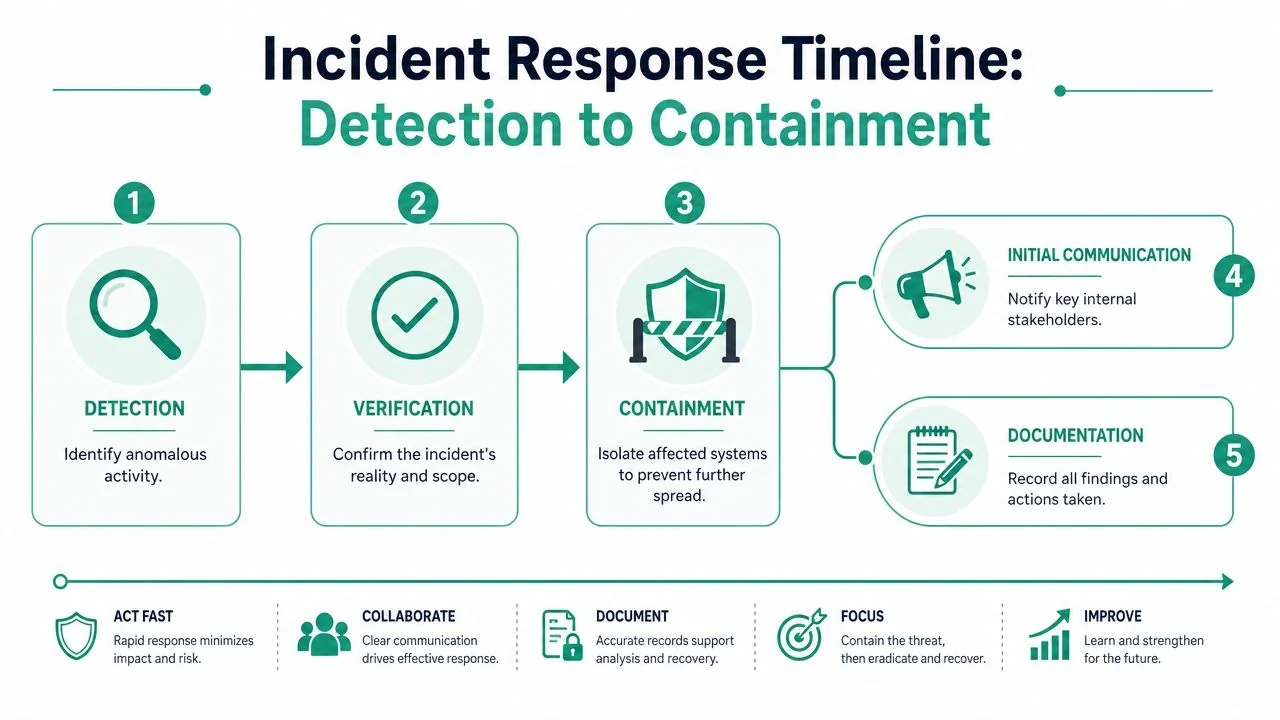
The Australian Cyber Security Centre's practical emphasis for SMBs is to move from detection to containment quickly using predefined playbooks, and the common mistake is delaying containment while trying to investigate everything first, as reflected in NIST's incident response guidance. In plain terms, isolate first, analyse properly once the blast radius is under control.
What counts as a credible incident
Not every alert is a breach, but some patterns should trigger an immediate response review:
- Account warning signs: repeated MFA prompts, impossible travel alerts, mailbox rules appearing unexpectedly, or users reporting sent messages they didn't send.
- Endpoint signs: antivirus or EDR alerts, disabled security tools, unknown software, locked files, or machines becoming suddenly slow.
- Business signs: supplier bank details changed by email, clients receiving odd messages, shared drives unavailable, or a key system failing after a suspicious login.
- Human reporting: a staff member clicked a link, opened an attachment, approved an MFA prompt by mistake, or entered credentials into a fake sign-in page.
One useful discipline is to treat user reports seriously in the first few minutes. Plenty of real incidents are first spotted by someone saying, “This doesn't look right.”
What to do in the first hour
Once you have a credible incident, work through a simple sequence.
Confirm enough to act
Check logs, endpoint alerts, recent account activity, or the user's description. You don't need full root cause to decide that an account or endpoint is at risk.Classify severity
Ask three questions. Is customer data involved? Is the attacker still active? Is a core business system affected?Isolate affected assets
Remove the device from the network, disable or lock the compromised account, revoke sessions where appropriate, and stop further access.Preserve evidence
Record times, alerts, screenshots, impacted users, and actions taken. Don't wipe or rebuild too early.Notify the right people internally
Keep this message short: what happened, what's being isolated, what staff must not do, and who is coordinating.
If you're debating whether to isolate a system because it might interrupt work, ask the harder question. What happens if the attacker keeps moving for another hour?
A simple first-call script helps. “We have a suspected cyber incident affecting [system or user]. Do not restart affected devices. Do not delete emails or files. Await instructions from [Incident Lead]. If you've seen anything similar, report it now.”
Containment decisions are rarely convenient. Disconnecting a machine, forcing password resets, or shutting off a shared account can interrupt a day's work. It still beats letting the incident spread into payroll, backups, or customer data.
Eradication and Recovery Playbooks for Common Attacks
Once the threat is contained, the work shifts from stopping damage to removing the attacker's foothold and restoring safe operations. Different attacks need different playbooks. If you use the same recovery steps for a phishing incident and a ransomware event, you'll miss important details.
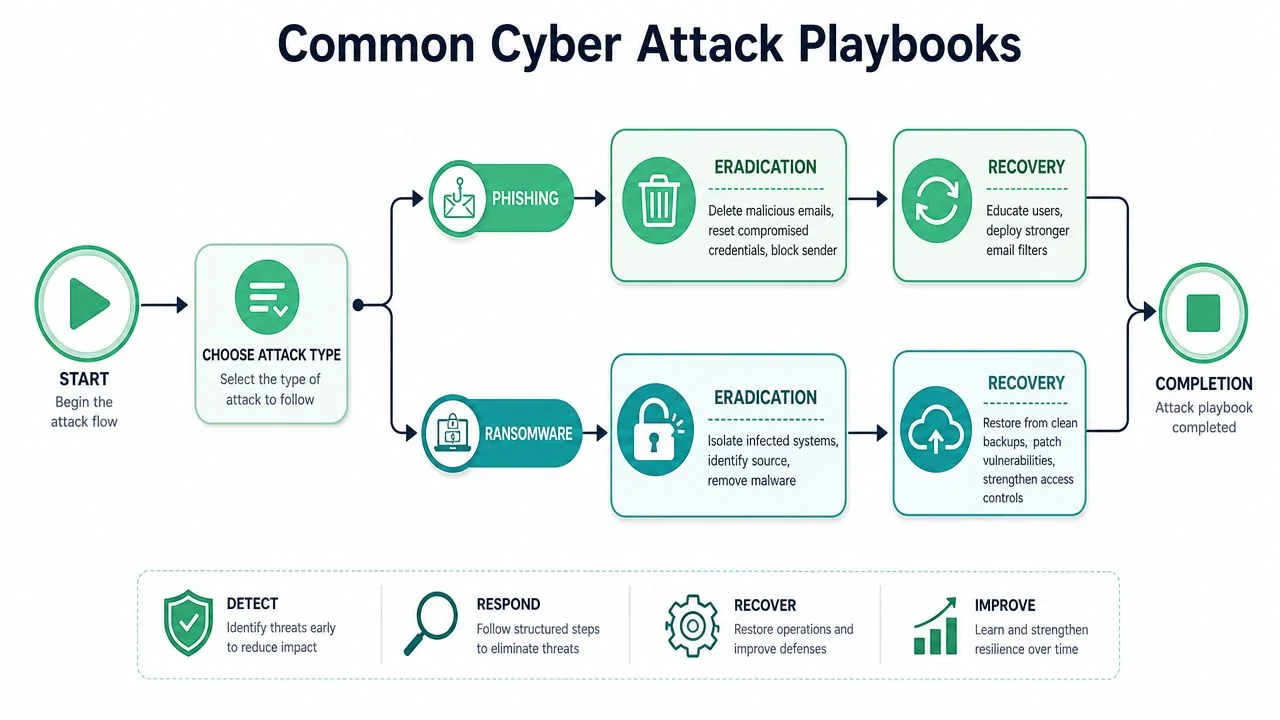
A quick overview can help frame the response before the detail starts.
Phishing and account compromise
When a staff member clicks a phishing link or enters credentials into a fake portal, speed matters more than perfection.
Start with the account itself. Disable sign-in if needed, revoke active sessions, reset the password, and force MFA re-registration if there's any sign the second factor was bypassed or approved by mistake. Then inspect the user's mailbox for malicious forwarding rules, delegated access, and outbound messages sent from the compromised account.
Recovery usually includes:
- Mailbox cleanup: remove malicious messages from affected inboxes where possible and warn internal recipients.
- Credential hygiene: reset the user account and any reused passwords on linked systems.
- Scope review: check whether the account accessed SharePoint, finance platforms, CRM systems, or client data stores.
- User follow-up: explain what happened in plain language so the same click doesn't happen again next week.
For Microsoft 365-heavy environments, this often becomes an identity incident rather than just an email incident.
Ransomware on endpoints or servers
Ransomware is where continuity planning gets tested for real. You need to know what's encrypted, what's isolated, and what can be trusted.
The first recovery question is not “How fast can we restore?” It's “Are the backups clean, accessible, and relevant to the affected systems?” Before any restore begins, confirm the original access path has been closed. That may mean patching an exposed service, removing persistence, resetting privileged credentials, and checking segmentation between workstations and servers.
A typical ransomware recovery sequence looks like this:
- Verify the infection boundary: identify which endpoints, servers, shared folders, and user accounts were affected.
- Remove persistence mechanisms: clean or rebuild compromised devices rather than trusting partial cleanup.
- Patch the exploited weakness: if an attacker used a known vulnerability or weak access path, close it before reconnecting anything.
- Restore in order of business priority: line-of-business software, finance, shared files, communications, then lower-priority systems.
- Validate before reopening widely: confirm users can work normally and that signs of reinfection aren't present.
For businesses dealing with encrypted files or suspicious endpoint behaviour, Cryptolocker removal and file recovery outlines the practical issues involved in containment, cleanup, and getting data back safely.
Clean recovery is better than fast recovery that reintroduces the attacker.
Business email compromise and data exposure
Business email compromise often looks less dramatic than ransomware, but it can be just as damaging. There may be no malware at all. Instead, an attacker can monitor mail, change payment details, intercept invoices, or access sensitive attachments undetected.
Eradication here means removing all access pathways and understanding who the attacker communicated with. Review mailbox rules, delegate permissions, sign-in history, sent items, deleted items, and recent file access in connected cloud platforms. If finance workflows were touched, verify recent payment changes directly with suppliers and clients using trusted contact details.
Recovery should focus on control and trust:
- Reset the compromised identity properly: not just password reset, but session revocation and MFA review.
- Review exposed information: contracts, medical records, payroll documents, IDs, or financial data may affect notification obligations.
- Contact affected parties carefully: provide facts, not guesses. If a payment diversion attempt occurred, act quickly with banks and impacted customers.
- Tighten approval processes: require verbal confirmation for bank detail changes and unusual payment requests.
This kind of attack is where many SMBs realise their incident response plan needs both technical and business process controls. Email security alone won't fix a payment approval process that trusts any message with the right signature block.
Managing Communications and Post-Incident Analysis
An incident isn't finished when staff can log back in. The final stage is where businesses either reduce future risk or repeat the same mistakes six months later.
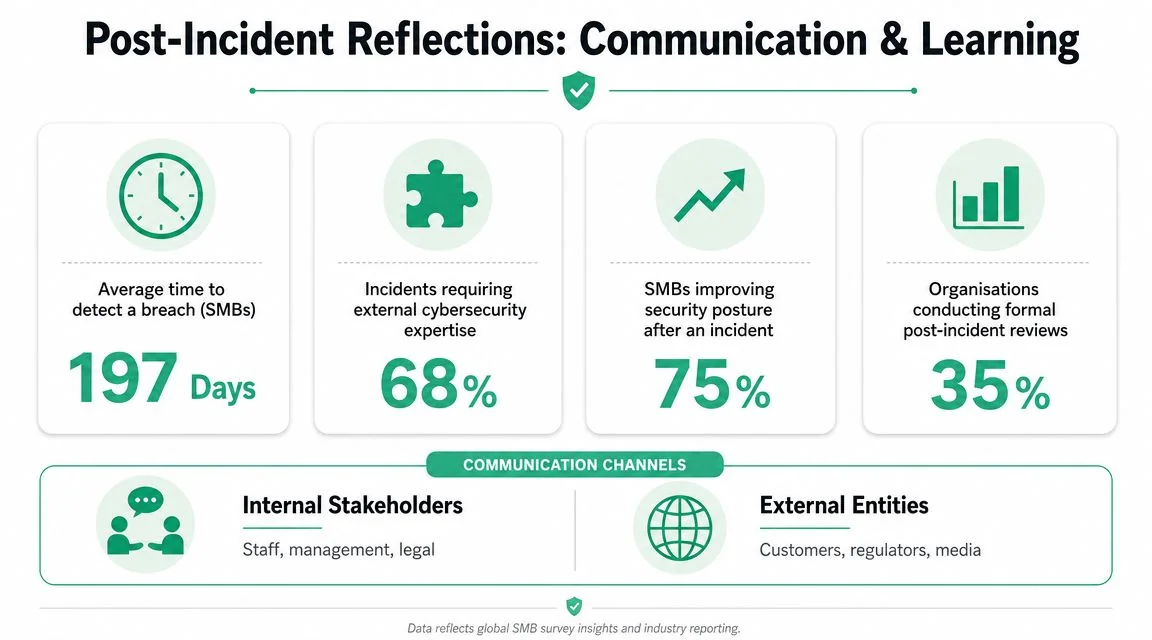
Australia's national incident framework became more structured when the Cyber Security Act 2024 commenced on 1 April 2025 and the Cyber Incident Review Board began operating as an independent body to publish lessons learned, making post-incident analysis part of the broader national approach, as noted in incident management guidance linked to that framework.
Who needs to know and when
Most SMBs struggle with communication because they want certainty before saying anything. In real incidents, you rarely have certainty early.
A better approach is staged communication.
- Internal staff first: tell employees what systems are affected, what workarounds apply, and what they must avoid doing.
- Leadership and advisers next: management, IT support, insurer, and legal advice if personal information may be involved.
- Customers and partners when facts are stable: explain what happened, what may be affected, what you've done, and what they should do next if action is required.
Keep messages calm and specific. Don't speculate on attacker identity, exact scope, or timelines you can't support. “We're investigating suspicious access affecting one business system” is better than overconfident wording that may need correction later.
If you've never defined what an incident owner looks like, a role description like this IT cybersecurity incident response manager is useful as a reference point. Most SMBs won't hire that role full-time, but the responsibilities still need to exist in some form during a live event.
How to run a useful post-incident review
The most practical review is blameless and structured. Staff need to speak openly about what happened, including the click, the missed alert, the delayed escalation, or the backup issue that nobody wanted to mention.
Focus on a small set of questions:
| Review question | What you're looking for |
|---|---|
| How was the incident first detected? | Whether user reporting, EDR, SIEM, or vendor notification worked |
| Where did time get lost? | Delay in acknowledgement, containment, approvals, or communication |
| What evidence was available? | Logs, mailbox records, endpoint telemetry, backups, screenshots |
| What needs to change? | Playbooks, training, access controls, backup process, vendor contacts |
For performance, the most useful operational measures are the time-based response metrics often used in incident response, especially MTTD, MTTA, MTTR, and MTTC, with SecurityScorecard's discussion of incident response metrics noting that MTTC is the more holistic measure because it spans detecting, acknowledging, and resolving an alert. For SMBs, the practical point isn't the acronym. It's learning where the delay occurred.
The question after any incident is simple. Did the business lose time because the attack was sophisticated, or because the response was disorganised?
Document the timeline, preserve the evidence trail, update the playbook, and rehearse the improved version. That's how one bad day becomes a useful lesson rather than a recurring pattern.
Your Essential Incident Response Checklist
A usable incident checklist should fit on a desk, in a cabinet, or on a phone. If it reads like policy, it won't help during a real incident.
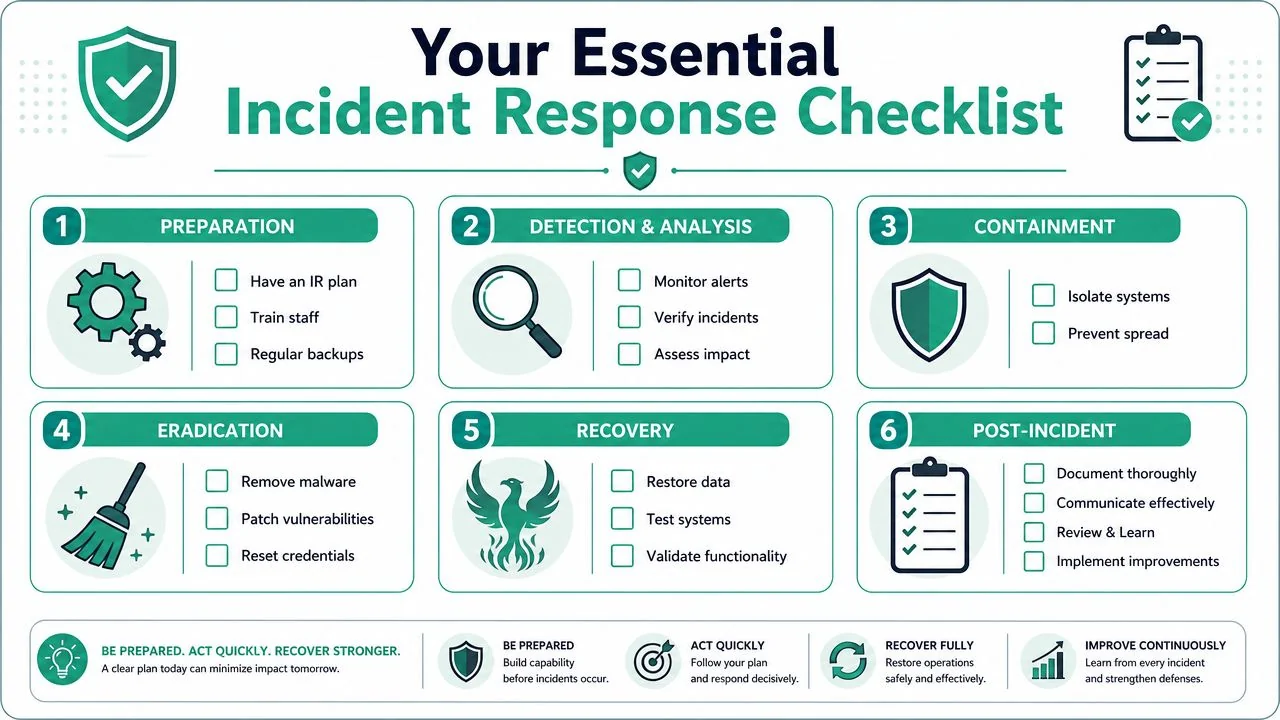
Print and keep this list accessible
Preparation
- Assign roles: name an Incident Lead, Technical Lead, and Communications Lead.
- Keep contacts offline: insurer, IT provider, software vendors, legal contact, and key staff.
- Test backups: confirm restore access and business priority order.
- Prepare fallback operations: phones, paper forms, spare devices, and manual workflows.
Detection and analysis
- Treat credible reports seriously: suspicious MFA prompts, file encryption, mailbox anomalies, or strange outbound email.
- Confirm enough to act: use endpoint alerts, logs, and user reports.
- Classify impact: data exposure, active attacker access, and affected business systems.
Containment
- Isolate first: disconnect affected devices or disable compromised accounts.
- Stop spread: revoke sessions, segment access, and block further use of impacted systems.
- Preserve evidence: screenshots, alerts, timestamps, account activity, and affected assets.
Eradication
- Remove persistence: clean or rebuild systems as needed.
- Reset access: passwords, MFA, privileged accounts, and risky shared credentials.
- Close the weakness: patch exploited systems and tighten rules or approvals.
Recovery
- Restore from trusted sources: only after confirming the environment is ready.
- Validate operations: test critical workflows before full reopen.
- Monitor closely: watch for repeated logins, unusual activity, or reinfection.
Post-incident
- Communicate clearly: staff first, then customers and partners when facts are stable.
- Review the timeline: where detection, escalation, or containment slowed down.
- Update the playbook: fix the process, not just the symptom.
For a broader readiness review, this cybersecurity checklist for small business is a practical companion to incident response planning.
If your business needs a workable incident response plan, tested backups, clearer Microsoft 365 security controls, or support during a live security event, Bridge IT Solutions can help you put the process into plain language and operational steps that fit an Australian SMB. The goal isn't to add complexity. It's to make sure the next incident is contained, communicated, and recovered from with far less chaos.
