

Your receptionist is at home with a sick child. Your bookkeeper is logging in from a personal laptop. A contractor needs access to one job folder before lunch. Someone in sales is checking files from a client site on public WiFi. That's normal business now.
The problem isn't remote work itself. The problem is giving people the access they need without unwittingly giving attackers a way in as well. For most Brisbane SMBs, secure remote access isn't a niche IT topic anymore. It's the difference between flexible operations and a very expensive interruption.
In Australia, remote work shifted from occasional to mainstream during and after COVID. The Australian Bureau of Statistics reported that in 2021, 37% of employed people usually worked from home, up from 24% in 2016, while 66% worked from home at least once during the Census week, as noted in this Australian remote work security context. For a small business owner, that means remote access is now part of ordinary operations, not an edge case.
If you're reviewing policies for staff working from home, this guide on Intelligent Contacts for compliant remote networks is a useful companion read. For a broader look at practical setups, these remote work solutions for small business add helpful context.
Table of Contents
- The Modern Workplace and The Need for Secure Access
- Why Secure Remote Access Matters for Your SMB
- Comparing Your Remote Access Technology Options
- Essential Security Controls Beyond the Technology
- Your SMB Implementation Checklist
- Choosing Your Path DIY or Managed IT Support
- Secure Your Business with a Local IT Partner
The Modern Workplace and The Need for Secure Access
A decade ago, many small businesses could treat remote access as an occasional favour for one or two senior staff. Today it's built into how the business runs. Staff move between home, office, warehouse, clinic, job site, and customer premises. Contractors need temporary access. Owners want to approve invoices from their phone. None of that is unusual anymore.
Secure remote access means your team can reach the systems, files, and apps they need from outside the office, while you keep that access authenticated, encrypted, and limited to what each person should use. In plain English, it's like giving the right people a keycard to the right door, instead of leaving the whole building open to all.
What business owners usually want
Most SMB owners aren't asking for “zero trust architecture” or “conditional device posture checks”. They want straightforward outcomes:
- Staff can work from anywhere without calling for help every hour.
- Client data stays protected whether someone is at home, in the office, or on the road.
- Access can be added or removed quickly when roles change or contractors come and go.
- The business keeps moving if the office is inaccessible, a team member travels, or weather disrupts normal operations.
Secure remote access should feel boring when it's done properly. Staff log in, do their work, and the security sits quietly in the background.
Where businesses get caught out
The common mistake is assuming convenience and security are opposites. They're not. Poorly designed access is both insecure and frustrating. Staff forget odd login steps, save files locally, email documents to themselves, or use unsanctioned apps when the official setup is clunky.
A sound setup gives people easy access to approved systems and makes unsafe workarounds less tempting. That's why remote access belongs in the same conversation as productivity, customer service, and business continuity, not just cybersecurity.
Why Secure Remote Access Matters for Your SMB
Small businesses often assume attackers are focused on large enterprises. That's the wrong frame. Criminals usually look for the easiest path, not the most famous brand. Weak remote access gives them exactly that.
The stakes are clear in Australia. The ACSC's Annual Cyber Threat Report 2023 to 2024 recorded 87,400 cybercrime reports, or about one report every 6 minutes, and the average cost of cybercrime for small businesses rose to $49,600, up 8% year on year, according to these secure remote access best practices with Australian cybercrime figures. For SMBs, that's not an abstract security issue. It's payroll, downtime, lost jobs, delayed invoices, and damaged trust.
The business risk is bigger than the login screen
When remote access is weak, a breach rarely stays neatly contained. One compromised account can lead to:
- Data exposure. Client records, financial files, HR documents, and email history can become accessible.
- Operational downtime. Staff can't work if systems are locked, unstable, or taken offline for cleanup.
- Reputation damage. Customers may forgive a delay. They're less forgiving if they think you mishandled their information.
- Compliance headaches. Professional services, healthcare, and finance firms can't shrug off poor access controls.
A lot of owners focus on the front door. Username, password, maybe an extra code. That matters, but it's only part of the picture. If the login path is exposed, credentials are reused, or access is too broad once someone signs in, the business is still carrying unnecessary risk.
Good remote access also helps your business run better
There's a positive side to this. Well-designed secure remote access removes friction for your team.
| Business need | Poor setup | Better setup |
|---|---|---|
| Staff working from home | Slow logins, support calls, file confusion | Reliable access to the right apps and folders |
| Contractors or temporary users | Shared passwords or overbroad access | Time-limited, role-based access |
| Travel or field work | Public WiFi use with weak controls | Encrypted access with clear policy controls |
| Team changes | Access lingers after role changes | Faster onboarding and cleaner offboarding |
Business view: Secure remote access is not just a defensive spend. It supports mobility, hiring flexibility, faster response to clients, and cleaner control over who can reach what.
The best SMB setups don't try to make every worker a security expert. They reduce avoidable risk while keeping the daily routine simple.
Comparing Your Remote Access Technology Options
Choosing a remote access tool gets confusing fast because vendors love jargon. A better way to think about it is building access.
A simple way to think about VPN RDP and ZTNA
A VPN is like giving someone a key that opens the front door to the building. Once they're inside, they may be able to walk around more broadly than they really need to.
RDP is like opening a window so someone can reach a specific desk. It can be useful, but if it's exposed carelessly, it's risky.
ZTNA or zero trust network access is more like sending a security escort who takes a verified person to one approved room and nowhere else.
Early in the selection process, this visual comparison helps clarify the difference in access philosophy:
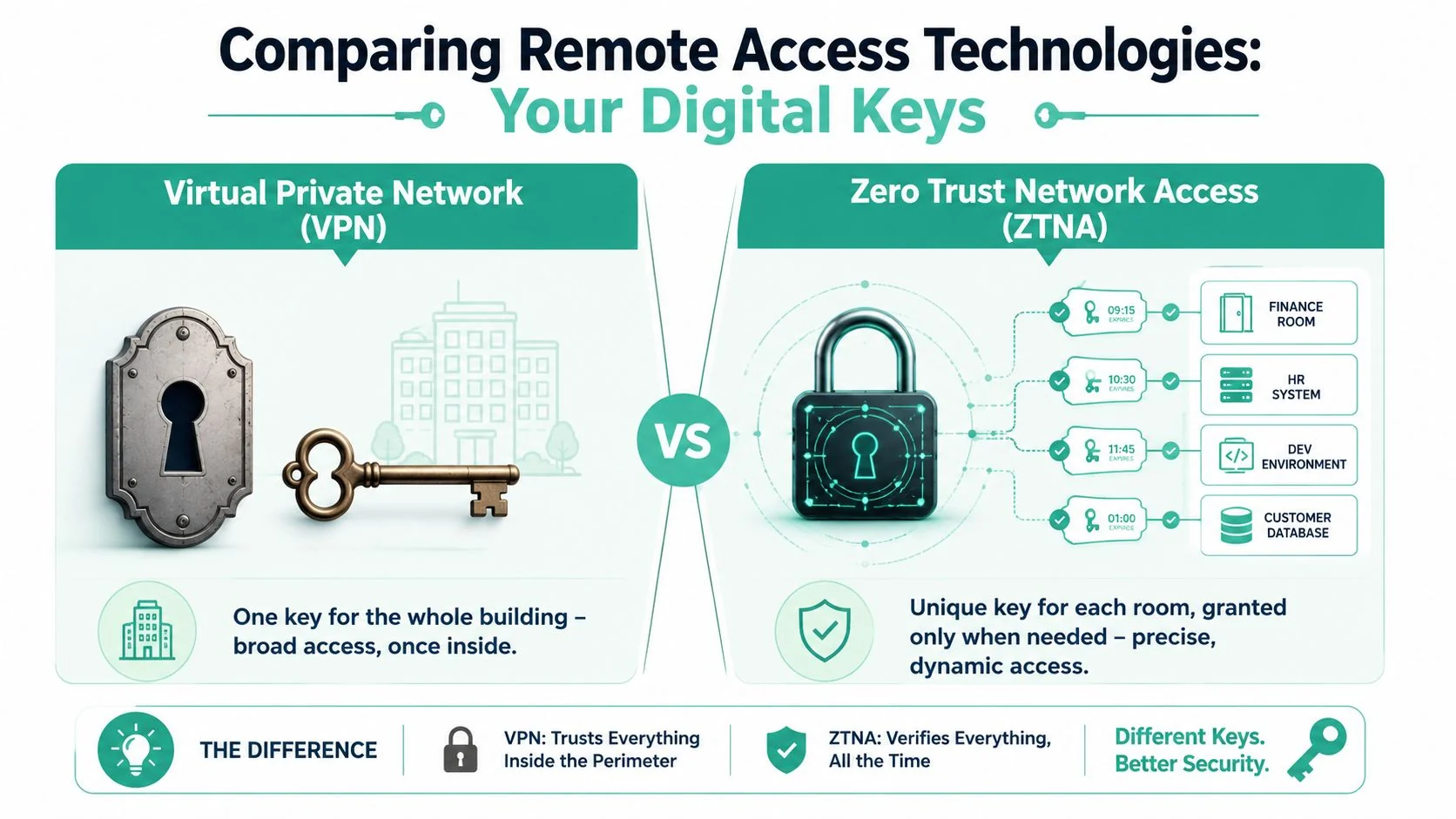
A stronger modern design is to replace broad VPN access with zero-trust or segmented access paths and strong encryption such as TLS 1.3 and AES-256, because isolation narrows exposure if a remote device is compromised, as outlined in this guide to secure remote access solutions.
Where each option fits
VPN
VPNs are familiar and still common in SMBs. They create an encrypted tunnel back to the business network, which is useful when staff need access to older on-prem systems, file servers, or line-of-business apps that were never designed for modern web access.
The downside is scope. Traditional VPN setups often grant access to a chunk of the network rather than one tightly defined application. If a user signs in from an unsafe machine, the VPN has done its job technically, but the business may still be exposed.
RDP
Remote Desktop Protocol can be practical when someone needs to connect to a specific office computer or server desktop. Plenty of businesses use it for administration or access to software that only runs in one environment.
The catch is simple. RDP should never be treated casually. If it's published broadly or protected poorly, it becomes an obvious target. For SMBs, that usually means RDP belongs behind additional controls, not sitting out in the open.
Before you compare products in detail, this short explainer is worth a look:
ZTNA
ZTNA is the cleaner fit for many modern businesses because it narrows access by identity, device, and policy. Instead of connecting a person to the whole network, it connects them to the specific application or service they're allowed to use.
That doesn't mean it's magically perfect. Some products are easier to manage than others, and rollout takes planning. But from a risk point of view, it's usually a better answer than broad network-level access.
| Option | Best for | Main strength | Main weakness |
|---|---|---|---|
| VPN | Legacy systems and broad network access needs | Familiar and widely supported | Can allow more access than necessary |
| RDP | Connecting to one desktop or server session | Direct access to a known machine | High risk if exposed or loosely controlled |
| ZTNA | App-specific access for modern hybrid work | Granular, policy-driven access | Requires better planning and design |
If your current setup gives every remote user the digital equivalent of a master key, you don't have a remote access strategy. You have a liability that happens to be convenient.
Essential Security Controls Beyond the Technology
A lot of articles stop at “choose VPN or choose zero trust”. That's incomplete. The bigger issue for many SMBs isn't the tunnel. It's the device at the other end.
If a staff member signs in from a personal laptop that's unpatched, shared with family, loaded with old software, or already compromised, strong login controls only solve part of the problem. You've verified the person. You haven't verified the machine they're using.
Why identity alone is not enough
This is the blind spot I see most often with smaller organisations. They add MFA, feel relieved, and assume the job is done. MFA is necessary. It's just not sufficient on its own.
A major weak point is device trust on unmanaged endpoints. The ACSC reported 1,113 cybercrime reports from small businesses in 2023 to 2024, and the Australian Signals Directorate's Cyber Threat Report said 77,000 cybercrime reports were made nationally in the same year, as highlighted in this analysis of modern secure remote access and device trust. Those figures reinforce a practical truth. Authentication-only controls don't protect you if the endpoint itself is unsafe.
A home laptop can be the weak link in several ways:
- It may not be patched with current operating system or browser updates.
- It may not be encrypted, which matters if it's lost or stolen.
- It may be shared, especially in home environments.
- It may connect through risky networks, including open or poorly secured WiFi.
If public or guest WiFi is part of how your staff or visitors connect, this overview of enterprise WiFi risk solutions is useful background on why the network edge still matters. For a local overview of broader network security services for business, the same principle applies. Access decisions should account for more than a password.
The controls that matter most
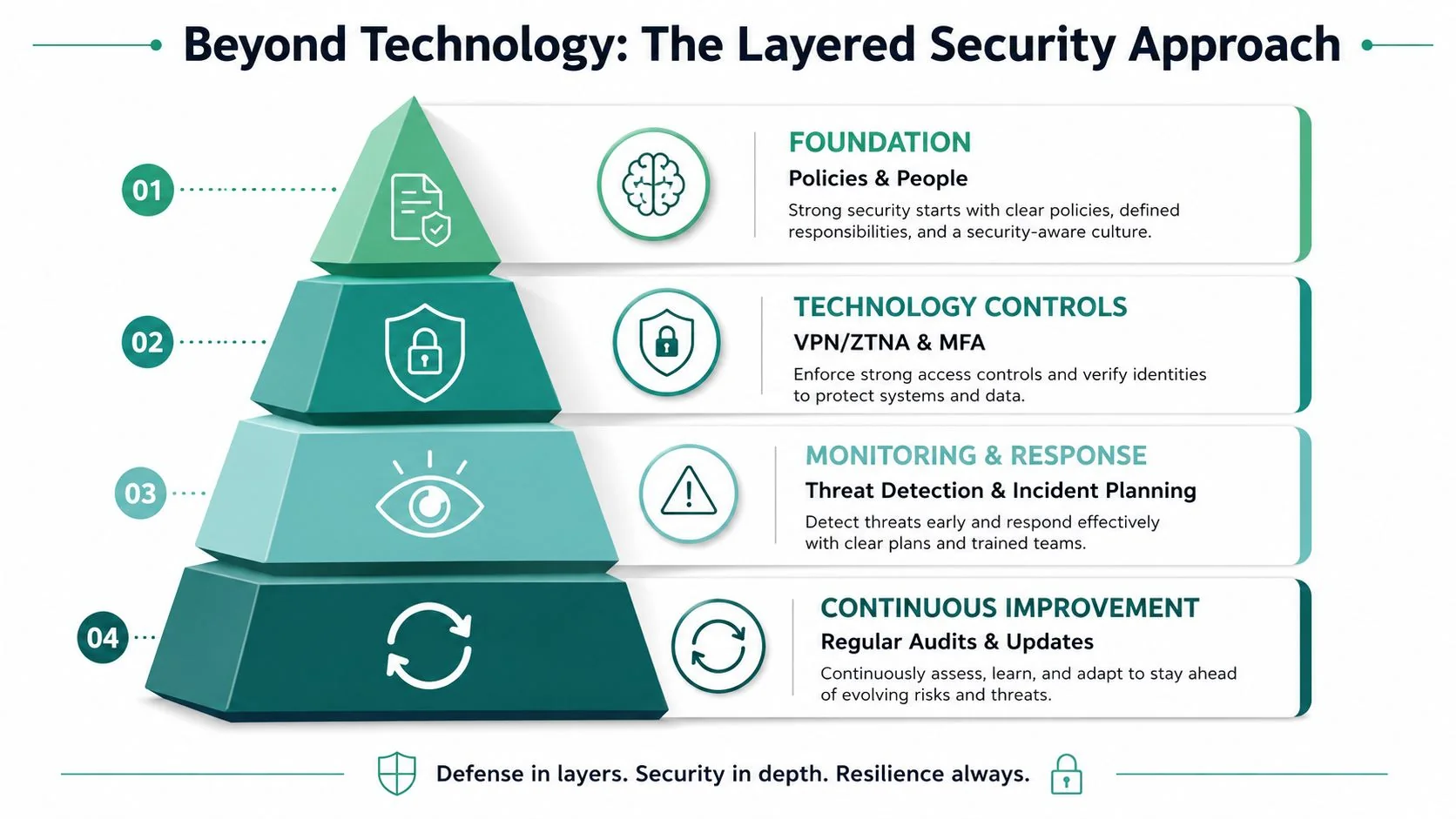
The right approach is layered. Think of it as a series of checks, not a single gate.
- MFA for every remote login. This reduces the chance that a stolen password alone gives someone access.
- Least privilege access. Staff, contractors, and third parties should only reach the systems they need.
- Device posture checks. Before access is granted, confirm the device meets your rules. For example, approved operating system, security updates, encryption, and basic endpoint protection.
- Segmentation. Keep access narrow. If one account or one device is compromised, the issue shouldn't spread freely.
- Logging and review. You need a record of who connected, from what device, and to which system.
- Clear BYOD policy. If people use personal devices, spell out what's allowed and what isn't.
Field advice: If you can't answer “which devices are allowed to connect to which systems, under what conditions?” then your remote access controls are still too loose.
For many SMBs, the practical shift is from trusting the login event to continuously judging risk. Who is this person? What device are they on? Is that device healthy enough? Are they asking for access that matches their role? That's the level where remote access becomes properly defensible.
Your SMB Implementation Checklist
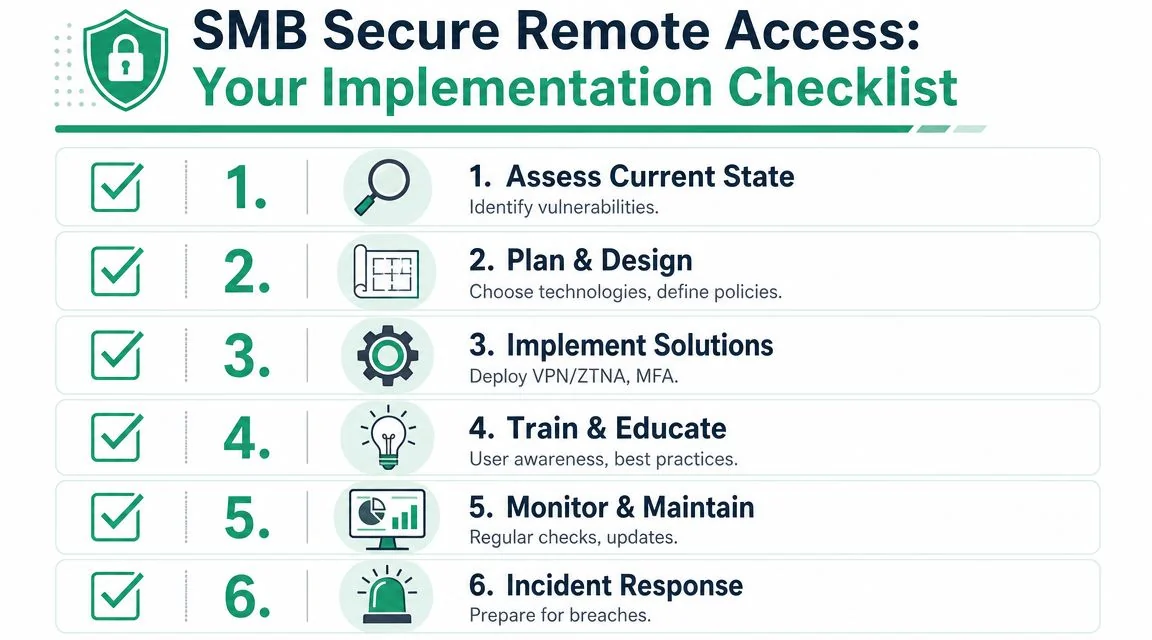
Most businesses don't need a massive security program to improve remote access. They need a disciplined checklist and someone to enforce it.
Start with access mapping
Begin with people, not products.
- List every remote user group. Include staff, owners, contractors, outsourced finance, external IT, and temporary workers.
- Map each group to the systems they need. Email, Microsoft 365, accounting apps, CRM, file shares, practice software, job management platforms.
- Remove inherited access. Long-time staff often accumulate permissions they no longer need.
A useful test is this. If someone left tomorrow, would you know exactly what remote access to turn off? If the answer is no, the permissions model is already messy.
Build the rules before the rollout
Technology works best when the business rules are settled first.
- Define your BYOD position. Will personal laptops be allowed? If yes, what security conditions must they meet?
- Set minimum device requirements. Current operating system, encryption, screen lock, supported browser, approved security software.
- Decide what can't be accessed remotely. Some systems are better restricted to managed devices only.
- Document approval steps. Who authorises access for a new starter, a contractor, or a departing employee?
Don't let remote access grow by exception. That's how businesses end up with old accounts, shared credentials, and no clear ownership.
Operate it like a business system
Once the design is in place, the day-to-day habits matter.
| Checklist item | Why it matters | What good looks like |
|---|---|---|
| Enable MFA | Stops password-only access | Applied to all remote accounts, including admin accounts |
| Use role-based access | Limits damage from mistakes or compromise | Access tied to job function, not individual preference |
| Check device posture | Reduces risk from unmanaged or unhealthy devices | Access conditional on device compliance |
| Train staff | Cuts unsafe workarounds | Staff know how to connect safely and report issues |
| Review logs | Helps detect misuse and investigate incidents | Regular checks of remote sign-ins and access patterns |
| Test offboarding | Prevents orphaned access | Remote access removed promptly when roles end |
The final piece is review. Remote access isn't a one-time install. New apps get added. Staff roles change. Contractors come and go. Devices age. If nobody revisits the setup, it drifts.
For SMBs, a quarterly review is a sensible rhythm. Not because a framework says so, but because business realities change faster than most access rules do.
Choosing Your Path DIY or Managed IT Support
There's no single right answer here, but there is an honest one. Most small businesses can do parts of this themselves. Very few can do all of it well, consistently, and without creating blind spots.
When DIY can work
DIY is realistic if your environment is small, your requirements are simple, and someone inside the business understands identity controls, endpoint management, logging, access reviews, and secure configuration. That usually means a very limited number of users, mostly cloud apps, and little or no contractor complexity.
Even then, the hidden cost is time. Someone has to maintain policies, troubleshoot user issues, review logs, remove stale access, and keep settings aligned as the business changes. That work doesn't disappear because the software has a clean dashboard.
Why managed support suits most SMBs
Managed support becomes the better option when remote access touches compliance, sensitive customer information, multiple locations, mixed device ownership, or older systems that need careful integration.
The value isn't just technical setup. It's ongoing discipline:
- Consistent monitoring so failed sign-ins, unusual access attempts, and policy issues are noticed.
- Faster onboarding and offboarding so access changes happen cleanly.
- Stronger documentation for audits, insurers, and internal accountability.
- Local support when a director, practice manager, or office admin needs a straight answer quickly.
For many Brisbane businesses, the comparison isn't DIY versus paying a provider. It's DIY versus the cost of getting security half-right. That second option is where businesses often spend money twice. First on tools, then on cleanup.
If your team already leans on outside expertise for helpdesk and maintenance, managed remote IT support for business is the natural place to anchor secure remote access as well.
A remote access platform is only as good as the people reviewing the policies, the device rules, and the exceptions. Tools don't manage themselves.
A good provider should be able to explain trade-offs in plain English, support your compliance needs, define service levels clearly, and tell you exactly how they'll handle access for staff, contractors, and unmanaged devices.
Secure Your Business with a Local IT Partner
Secure remote access has changed from an IT convenience into a core business function. Staff expect flexibility. Clients expect confidentiality. Owners expect the business to keep moving whether people are in the office, at home, or on the road.
The important part is this. Choosing between VPN and a more modern access model is only the start. Real protection comes from layered controls, especially around device trust, least privilege, and ongoing review. That's the area many SMBs miss, and it's often where the risk sits.
For Brisbane businesses, local context matters. Professional services firms, clinics, tradies, and growing family businesses all have different systems, different staff habits, and different risk profiles. The setup should reflect that, rather than forcing everyone into the same template.
If you want a practical review of your current setup, a local partner can help you sort out what's working, what's exposed, and what needs tightening without turning the business upside down. Brisbane-based support also makes a difference when you need quick decisions, plain language, and advice that fits the way your team works.
If you'd like a no-obligation review of your remote access setup, talk to Bridge IT Solutions. Their Hemmant-based team supports Brisbane and South East Queensland SMBs with cybersecurity, Microsoft 365, cloud services, and managed IT, with a practical focus on secure systems that people can effectively use.
