

Most small businesses in South East Queensland already know this isn't optional. In a 2024 Australian Government survey, 92% of SMEs said IT modernization was a critical priority, and businesses in Brisbane and the Gold Coast that invested in modern infrastructure reported a 34% reduction in downtime and a 27% increase in employee productivity (Australian Government survey summary via TierPoint).
That matters because most owners don't need more technology. They need fewer interruptions, less manual rework, better security, and systems that support growth without becoming a daily frustration. A practical IT modernization strategy isn't about chasing the newest platform. It's about fixing the bottlenecks that waste time, expose risk, and make your business harder to run.
For Brisbane SMEs without an internal IT department, the challenge is usually prioritisation. You may already use cloud tools, but still have patchy backups, unclear device ownership, old hardware in key roles, or no reliable recovery process if something goes wrong. That's where a disciplined, staged approach works better than a wholesale replacement.
Table of Contents
- Assess Where Your Organisation Stands Today
- Aligning Technology Goals with Business Outcomes
- Building Your Phased Roadmap and Budget
- Making Key Decisions on Cloud and Security
- Managing the Transition with People and Partners
- Measuring Success and Your Next Steps
Assess Where Your Organisation Stands Today
A sound IT modernization strategy starts with honesty. Not a glossy spreadsheet of software names. Not a vague sense that “our systems are getting old”. You need a plain-English view of what's slowing the business down, what's risky, and what's costing more than it should.
Start with business friction, not hardware lists
Most owners begin with devices. How many laptops, what server, what internet plan. That's useful, but it misses the core issue. The better question is where your team loses time.
Ask your staff where technology gets in their way. You'll usually hear the same patterns. Files are hard to find, remote access is clunky, printers fail at the wrong time, systems don't talk to each other, and someone always has to “know the trick” to get a job done.
Practical rule: If a task depends on one person's memory, one ageing computer, or one piece of software no one wants to touch, it belongs on your modernization list.
Also look for hidden costs that don't appear as an IT line item:
- Manual workarounds: Re-entering data between systems, printing forms for approval, or chasing documents by email.
- Subscription sprawl: Multiple apps doing similar jobs, old licences still being paid, or unmanaged renewals.
- Downtime by nuisance: Slow logins, unstable Wi-Fi, outdated PCs in key roles, or small recurring faults that interrupt work.
If you want a structured way to review your environment before making decisions, this guide on when a small business should consider an IT audit is a practical starting point.
Use a simple owner-level checklist
You don't need deep technical skills to do a first-pass review. You need a checklist that connects systems to daily operations.
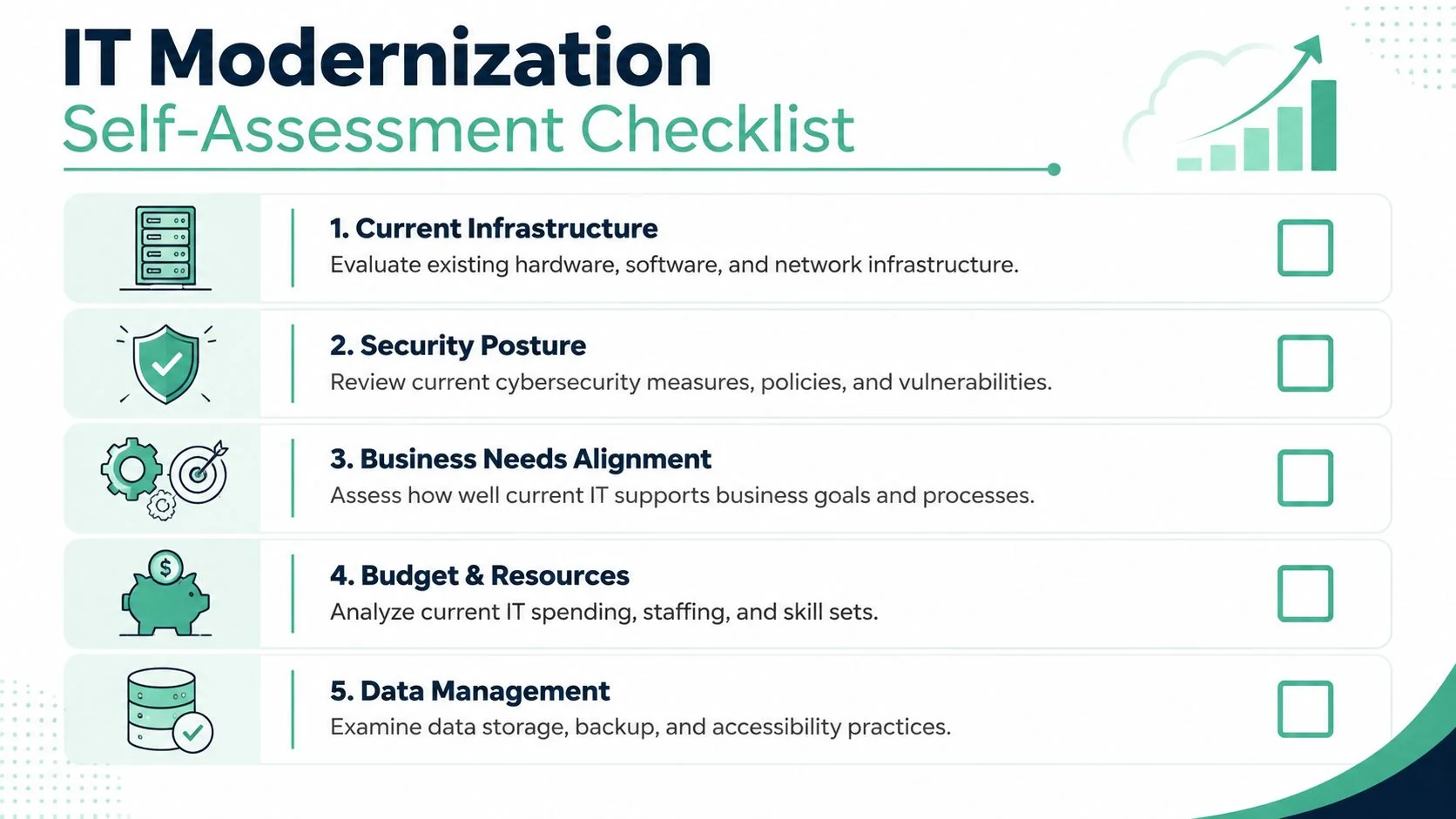
Work through these five areas:
Current infrastructure
List business-critical devices, internet services, core software, shared storage, and any on-site equipment you still rely on. Note what fails often, what can't be supported easily, and what no longer fits how your team works.Security posture
Check whether accounts use multifactor authentication, who has admin access, how staff handle suspicious emails, and whether backups are tested. Security gaps often sit in routine habits, not just in firewalls.Business needs alignment
Write down the jobs your systems must support. Fast quoting, patient records access, mobile job scheduling, secure client communication, reliable invoicing. Then ask whether your current setup makes each one easier or harder.Budget and resources
Note what you spend now on support, licences, hardware replacement, backup, and emergency fixes. If no one owns IT internally, that's not a failure. It just means your strategy must be simpler and more supportable.Data management
Identify where key data lives, who can access it, how it's backed up, and how quickly you could recover it after a problem.
A separate but related task is asset lifecycle planning. If you haven't reviewed disposal, replacement timing, and control of old equipment, these essential IT asset strategies for enterprises are useful because the same principles apply to smaller businesses trying to reduce risk and waste.
By the end of this review, you should be able to name your top three operational pain points, your top three risks, and the systems you can't afford to lose. That's enough to start making sensible decisions.
Aligning Technology Goals with Business Outcomes
The fastest way to waste money is to modernise technology without tying it to a commercial result. New platforms don't create value on their own. Better workflows do.
A business-first IT modernization strategy asks a simple question at every step. What business problem are we solving, and how will we know it improved?
Translate goals into operational requirements
Owners often describe goals in business terms, while IT projects get framed in technical ones. Those two need to match.
Here's what that translation looks like:
“We need to get invoices out faster.”
That may point to better integration between job management, approvals, and accounting, not just a software swap.“Staff need to work from site, home, and office.”
That usually means secure cloud file access, identity controls, device standards, and clear permissions.“We can't afford to stop during a cyber incident.”
That points to backup, recovery, security monitoring, and response planning before any discussion about advanced tools.
Automation can produce real gains when it's targeted properly. According to a 2023 AISC report, Australian SMEs that incorporated automation into modernization achieved a median 42% reduction in IT operating costs within 18 months, and 61% reported faster decision-making from real-time data (AISC report summary via Flexera).
That doesn't mean every business should automate everything. It means the strongest returns usually come from repetitive, high-friction tasks. Client onboarding. Document approval flows. Stock updates. Internal reporting. Repetitive admin is where modern systems earn their keep.
What good alignment looks like
A Brisbane accounting firm might not need a dramatic rebuild. It may need secure document sharing, better user access controls, and fewer manual handoffs between email, file storage, and practice software.
A trades business may get more value from mobile-friendly scheduling, standardised devices in the field, and faster quoting than from replacing every back-office system at once.
Good modernization decisions sound like business outcomes. Faster approvals. Fewer login issues. Clearer reporting. Less rework.
When people say “we need better IT”, they usually mean one of four things:
| Business need | Likely technology requirement |
|---|---|
| Faster turnaround | Workflow automation, simpler approvals, integrated apps |
| Better client service | Reliable systems, secure communication, easier access to records |
| More flexible work | Cloud access, device policies, identity security |
| Lower operating friction | Standardised tools, fewer duplicate apps, better support |
If your priorities are still broad, it helps to step back and map technology directly to growth, service quality, and operational control. This article on digital transformation for Brisbane companies is useful for that wider business lens.
The point isn't to produce a perfect strategy document. It's to avoid spending on projects that look modern but don't change the way the business performs.
Building Your Phased Roadmap and Budget
Trying to modernise everything at once is where small businesses get hurt. Costs become unclear. Staff get disrupted. Problems stack on top of each other. A phased roadmap keeps the work controlled.
The numbers strongly support that approach. Data from the Australian Government's Digital Transformation Agency shows that phased modernization projects achieve a 92% success rate in delivering measurable KPI improvements within the first 12 months, while 79% of big bang overhauls run into significant disruptions or budget overruns (DTA data summary via CSIRO).
Use impact versus effort to choose the order
The easiest way to prioritise is with an impact versus effort matrix. Put every possible initiative into one of four groups.
High impact, low effort
These are your first moves. Examples might include Microsoft 365 security hardening, cleaning up inactive accounts, standardising backups, or replacing a single unstable line-of-business PC that creates regular delays.High impact, high effort
These belong in the roadmap, but not all at once. Think file server migration, Wi-Fi redesign, line-of-business system replacement, or site-wide device refreshes.Low impact, low effort
Do these only if they support the bigger plan. Cosmetic clean-ups and nice-to-have tooling often sit here.Low impact, high effort
Defer them. Over-engineering frequently conceals itself in such efforts.
Here's a visual way to think about the sequence.
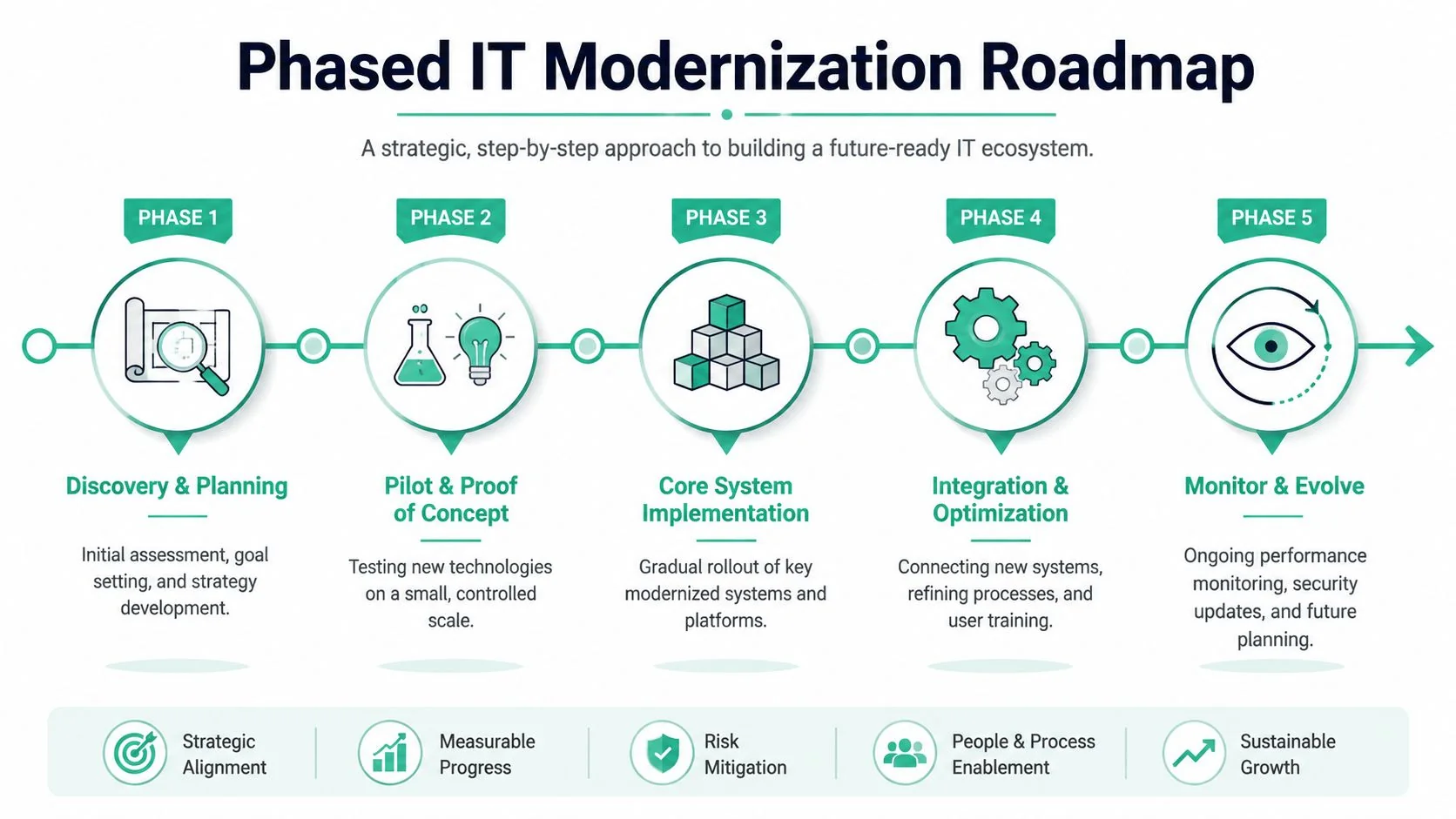
A practical phased roadmap for an SME
A small business roadmap often works best in waves rather than one large program.
Phase 1 discovery and planning
Confirm what's critical, what's risky, and what's draining time. Set ownership, decide what success looks like, and lock in the first small wins.
Phase 2 pilot and proof of concept
Test changes with a limited group. Migrate a subset of users, trial a backup platform, or pilot a new workflow before broad rollout.
A short explainer can help if you want a visual overview of how staged IT change programs work in practice.
Phase 3 core system implementation
Roll out the core platform changes in a controlled order. Email, files, identity, backup, endpoint protection, and key business applications usually come before secondary systems.
Phase 4 integration and optimisation
Fix the rough edges. Train users. Remove duplicate tools. Adjust permissions. Clean up old systems so you're not paying for two environments longer than needed.
Phase 5 monitor and evolve
Review support issues, staff feedback, recovery readiness, and security alerts. Modernization isn't finished when migration ends. It's only finished when the new setup is stable and adopted.
Sample IT Modernization Prioritisation Matrix
| Low Effort | High Effort | |
|---|---|---|
| High Impact | MFA rollout, backup verification, licence clean-up, device standardisation | File migration, server replacement, network refresh, business app replacement |
| Low Impact | Minor software tidy-up, inbox rules clean-up, basic admin improvements | Nice-to-have app changes, non-essential customisation, premature platform shifts |
If a project is expensive, disruptive, and hard to explain in business terms, it usually isn't the next priority.
Budgeting works the same way. Start with the controls that reduce risk and improve daily operations. Add larger platform changes only when the business case is clear. For a broader perspective on planning spend without overcommitting early, this guide to IT budget optimisation for small businesses is worth reading.
If you're comparing service management or asset workflows at a larger scale, these enterprise Nuvolo insights provide a useful example of how platform complexity grows. For most SMEs, that's also a reminder not to buy enterprise-grade process overhead before you need it.
Making Key Decisions on Cloud and Security
For most Brisbane SMEs, modernization decisions narrow quickly to two things. Where your systems should live, and how well they're protected.
The first trap is assuming cloud solves everything. The second is assuming security comes bundled with whatever cloud platform you buy.

Cloud first does not mean cloud only
For many small businesses, Microsoft 365 is the practical starting point because it combines email, collaboration, file access, identity, and security features in one familiar environment. That's often far more useful than trying to maintain ageing on-site infrastructure just because “it still works”.
But cloud choices should follow business needs. A dental clinic may need reliable access controls and dependable recovery for practice data. A construction business may need mobile access, standardised devices, and dependable connectivity across sites. A professional services firm may care most about secure file sharing and controlled client communication.
A hybrid setup can still make sense when one legacy app must remain on-site for a period, or where internet dependency creates operational issues. Hybrid shouldn't be a long-term excuse for keeping everything old. It should be a temporary bridge where there's a real business reason.
Security controls that belong in the first wave
Australia already has broad cloud adoption, but resilience often lags behind. Australian Bureau of Statistics data shows 81.5% of businesses use cloud computing, while only 52.5% have a documented disaster recovery plan (ABS data summary via Vivid Cloud). That gap is where many modernization plans fail in practice.
A sound baseline for SMEs usually includes:
- Identity protection: Multifactor authentication, controlled admin access, and prompt offboarding when staff leave.
- Managed endpoint security: Protection for laptops and desktops, with active monitoring rather than a set-and-forget antivirus mindset.
- Tested backups: Backups that cover the systems and data you need, with recovery steps someone has verified.
- Email risk reduction: Staff awareness training, phishing simulation, and controls around malicious attachments and links.
- Basic recovery documentation: A short, usable plan for what happens if systems fail, accounts are compromised, or data becomes unavailable.
Cloud services improve accessibility. They do not remove your responsibility to secure accounts, protect devices, and recover data.
If budget is tight, start with identity, backup, and endpoint security before chasing more advanced automation. Those three areas usually reduce risk fastest. A modern stack without recovery discipline is still fragile.
Managing the Transition with People and Partners
Technology projects usually fail in ordinary ways. Staff don't understand the change. No one owns decisions. Training is rushed. Old habits stay in place. The systems go live, but the business never gets the value.
That's why the human side of an IT modernization strategy deserves the same attention as the technical plan.
Why user adoption decides the outcome
An Australian Institute of Technology study found organisations had a 70% higher adoption rate of new systems when training and governance were implemented properly, and that 85% of IT project failures in Queensland SMEs came from human factors rather than technology (AIT findings summary via CSIRO).
Those figures match what practitioners see on the ground. Teams don't resist change because they love old systems. They resist change when the new process feels unclear, risky, or harder than the old one.
Use a transition checklist that deals with people directly:
- Name an internal owner: Someone in the business must approve process decisions, answer user questions, and keep the project moving.
- Explain what changes for each role: Reception, finance, field staff, managers, and directors don't need the same training or the same message.
- Train close to go-live: Too early and people forget. Too late and they panic.
- Keep old and new workflows from overlapping too long: Parallel processes create confusion, duplicate work, and blame-shifting.
- Capture user issues quickly: A short feedback loop in the first weeks matters more than a perfect training deck.
A smooth rollout is usually less about the platform and more about whether staff know what to do on Monday morning.
How to choose the right external partner
If you don't have in-house IT staff, partnering with an expert isn't a luxury. It's often the only realistic way to keep the project sensible and supportable.
Price matters, but it shouldn't be the lead filter. Better questions include:
- Do they understand businesses like yours? Healthcare, professional services, trades, and nonprofits have different operational risks.
- Will they simplify decisions? You want clear options and trade-offs, not jargon-heavy reports.
- Can they support the environment after rollout? Modernization without ongoing support often leaves businesses with a newer version of the same old problem.
- Are responsibilities explicit? You need clear service expectations, escalation paths, documentation, and ownership boundaries.
- Are they local enough to be practical? For many Brisbane businesses, local context still matters when outages, site visits, or hardware issues are involved.
A capable partner should be willing to say no to unnecessary complexity. That's usually a better sign than an impressive slide deck. If every recommendation sounds large, expensive, and urgent, they're probably selling a platform, not solving your business problem.
Measuring Success and Your Next Steps
A modernization project is only successful if the business feels the difference. Staff should spend less time fighting systems. Owners should have fewer unpleasant surprises. Clients should see better responsiveness and consistency.
The broader policy context is also shifting. The Australian Government's 2024 to 2030 Cyber Security Strategy sets the ambition for Australia to become a world leader in cyber security, and it reflects a reality many SMEs already face. Modernization is now tied directly to risk reduction, and many smaller businesses don't have the in-house cyber capability to manage that alone (Australian cyber strategy summary via Hyland).
Track business results, not vanity metrics
Good measurement is simple. Start with a short list of indicators that connect to the reasons you modernised in the first place.
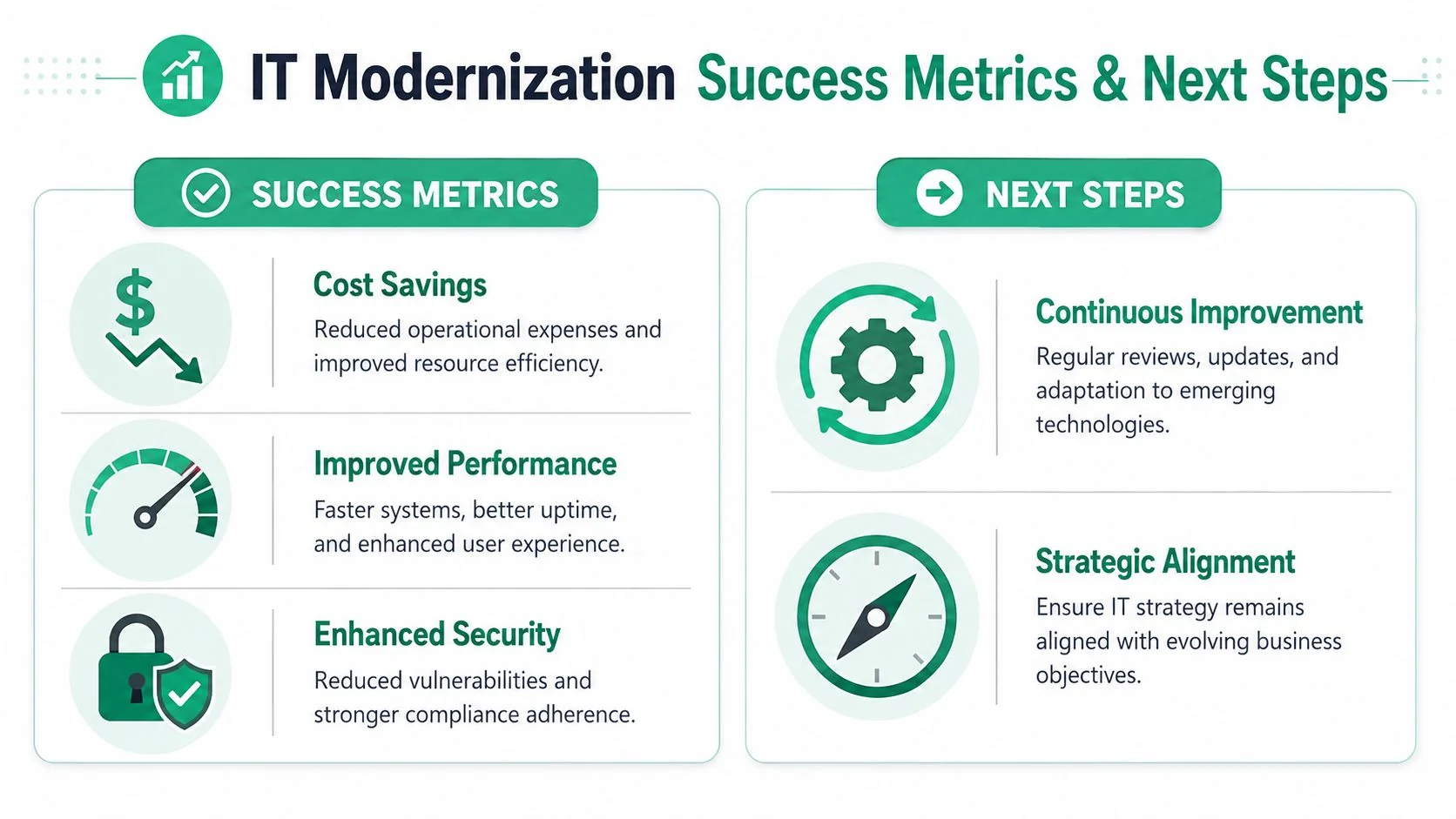
Useful measures often include:
- Operational stability: Fewer outages, fewer recurring support issues, and less time lost waiting on systems.
- Staff efficiency: Faster onboarding, smoother remote work, fewer manual handoffs, and less duplication.
- Security posture: Better account control, cleaner device management, clearer backup confidence, and quicker response to suspicious activity.
- Commercial impact: Faster quoting, cleaner invoicing, fewer missed client communications, and better continuity during disruptions.
For businesses that want a more structured lens on uptime and recovery performance, this comprehensive reliability metrics resource is useful. Not every metric in it will apply to a small office, but the thinking is sound. Measure reliability in ways that inform decisions, not just reporting.
Modernization is a cycle, not a finish line
The strongest result of a good IT modernization strategy isn't a dramatic one-off change. It's a business that becomes easier to run because technology decisions are made in the right order.
That cycle looks like this:
- Assess the actual friction and risk
- Tie improvements to business outcomes
- Stage the work into manageable phases
- Secure the foundations properly
- Support people through the change
- Measure what improved, then refine
This approach suits SMEs because it respects cash flow, limited internal time, and the fact that most owners can't stop operations for a large IT project. It also creates a clear point to bring in outside help. If you can identify the problems but can't confidently rank them, scope them, or support the new environment after rollout, that's usually the moment to involve an expert.
The next step doesn't need to be a major commitment. It should be a practical review of your current environment, priorities, and risks, followed by a staged recommendation you can act on.
If you're ready to turn business frustrations into a workable roadmap, Bridge IT Solutions can help with a practical Technology Business Review for your organisation. It's a straightforward way to identify what to modernise first, where to tighten security and recovery, and which changes will deliver the best return without overcomplicating your environment.
