


You're probably already doing IT strategy. Just badly, and under pressure.
A staff member can't get into Microsoft 365. The printer drops off the network again. Quotes are sitting in someone's inbox. Files live in three places. Nobody's sure if the backup works. You meant to sort it out months ago, but clients, payroll, and day-to-day work kept winning.
That's normal for small business in Brisbane and across South East Queensland. It's also expensive. Not just in fees or hardware, but in wasted time, distracted staff, and preventable risk.
A proper IT strategy for small business isn't a corporate document that gathers dust. It's a practical operating plan for how your business uses technology to stay productive, secure, and easy to run. That matters because small businesses make up about 97.99% of all Australian businesses, based on ABS business counts cited in this overview of small business IT planning. In other words, this isn't a big-end-of-town problem. It's the day-to-day reality for almost every local business owner.
If you want a useful primer on getting ahead of the chaos, this guide to the role of IT planning in future-proofing your business is worth a read.
Table of Contents
- Your Business Runs on Tech Does It Have a Plan
- Why a Missing IT Strategy Costs You More Than Money
- The 7 Core Components of a Modern IT Strategy
- From Overwhelmed to Organised A Pragmatic IT Roadmap
- Your Small Business IT Strategy Checklist and Budget Guide
- DIY vs Done For You When to Call a Managed IT Partner
- Frequently Asked Questions About Small Business IT
Your Business Runs on Tech Does It Have a Plan
Most small businesses don't fail because they chose the wrong app. They struggle because nobody made clear decisions about where data lives, who has access, what gets backed up, and what happens when something breaks.
That's the job of an IT strategy for small business. It's not about buying shiny tools. It's deciding what technology your business needs, what order to fix things in, and who owns the decisions.
Tech problems are usually business problems
If your email is unreliable, sales slow down. If your files are scattered, staff duplicate work. If one person knows all the passwords, your business has a single point of failure. None of that is “just IT”.
A decent strategy answers simple questions:
- What systems matter most: Email, accounting, phones, file storage, job management, booking software, and any line-of-business app you rely on daily.
- What can't go down: The systems that stop invoicing, client communication, appointments, or field work.
- Who can access what: Especially finance, payroll, HR records, and shared mailboxes.
- How you recover: Not in theory. In practice, on a bad day.
A business without a tech plan usually ends up with accidental systems, accidental risk, and accidental costs.
Stop treating IT like a side task
Plenty of owners still see IT as a clean-up job. Buy a laptop when one dies. Add antivirus after a scare. Move files when storage gets messy. That's reactive, and reactive IT always costs more in time and disruption.
A better approach is smaller and sharper than typically assumed. You don't need an enterprise stack. You need a plan that supports the way your business works in Brisbane, Ipswich, Logan, Redlands, the bayside, or the Sunny Coast. Fast internet helps. Good software helps. But clarity helps more.
The goal is simple. Your staff should be able to work, your data should be protected, and your systems should support growth instead of fighting it.
Why a Missing IT Strategy Costs You More Than Money
No builder starts with random timber and hopes a house appears. They start with a plan. Your business tech is no different, but a lot of small businesses still run it like a pile of urgent fixes.
That approach creates costs you won't always see on a profit and loss statement.

Productivity leaks become normal
The biggest cost is usually friction. Slow logins. Shared folders nobody trusts. Staff chasing versions of documents. One person rebooting the modem because “that usually fixes it”. When this happens every week, people stop noticing how much time it burns.
For service businesses, missed communication hurts as well. If your team is hard to reach, opportunities vanish. If you want to put a dollar value on that side of the problem, this tool to calculate your missed call costs is a useful reminder that poor systems affect revenue, not just convenience.
Security gaps hit cash flow fast
Security isn't only a problem for large organisations. It's a small-business cash flow issue. The annual average cost of cybercrime for Australian small businesses increased to about A$49,600, according to this summary referencing Australian cyber reporting.
That's why weak access controls, poor backups, and sloppy device management are business risks, not technical details.
Practical rule: If one compromised inbox could disrupt your invoicing, customer communication, or bookings, your setup needs work.
A local owner doesn't need a lecture on threat actors. They need to know what happens if a staff member clicks the wrong link on a Thursday afternoon. Can you isolate the issue? Can you restore data? Can the team keep operating on Friday morning?
If the answer is “I think so”, that's not a strategy. That's hope.
For a deeper look at the fallout, this breakdown of the real cost of a cybersecurity incident lays it out well.
Growth gets blocked by messy systems
The third cost is missed momentum. Businesses hit a ceiling when systems are held together by memory and goodwill. New starters take too long to onboard. Reporting is manual. Remote access is clunky. Everyone relies on the same two people to know where things are.
Common warning signs include:
- New staff causing chaos: Every additional person creates more confusion instead of more capacity.
- Software overlap: You're paying for multiple tools that do roughly the same job.
- Owner dependency: Too many systems depend on the owner knowing the workaround.
- No upgrade path: Every change feels risky because nobody documented the current setup.
That's why inaction is usually the expensive choice. Not because technology is magical, but because disorganisation compounds.
The 7 Core Components of a Modern IT Strategy
A strong IT strategy isn't one decision. It's a handful of core disciplines handled properly. If even two or three are weak, the whole thing feels unreliable.
This visual sums up the structure.
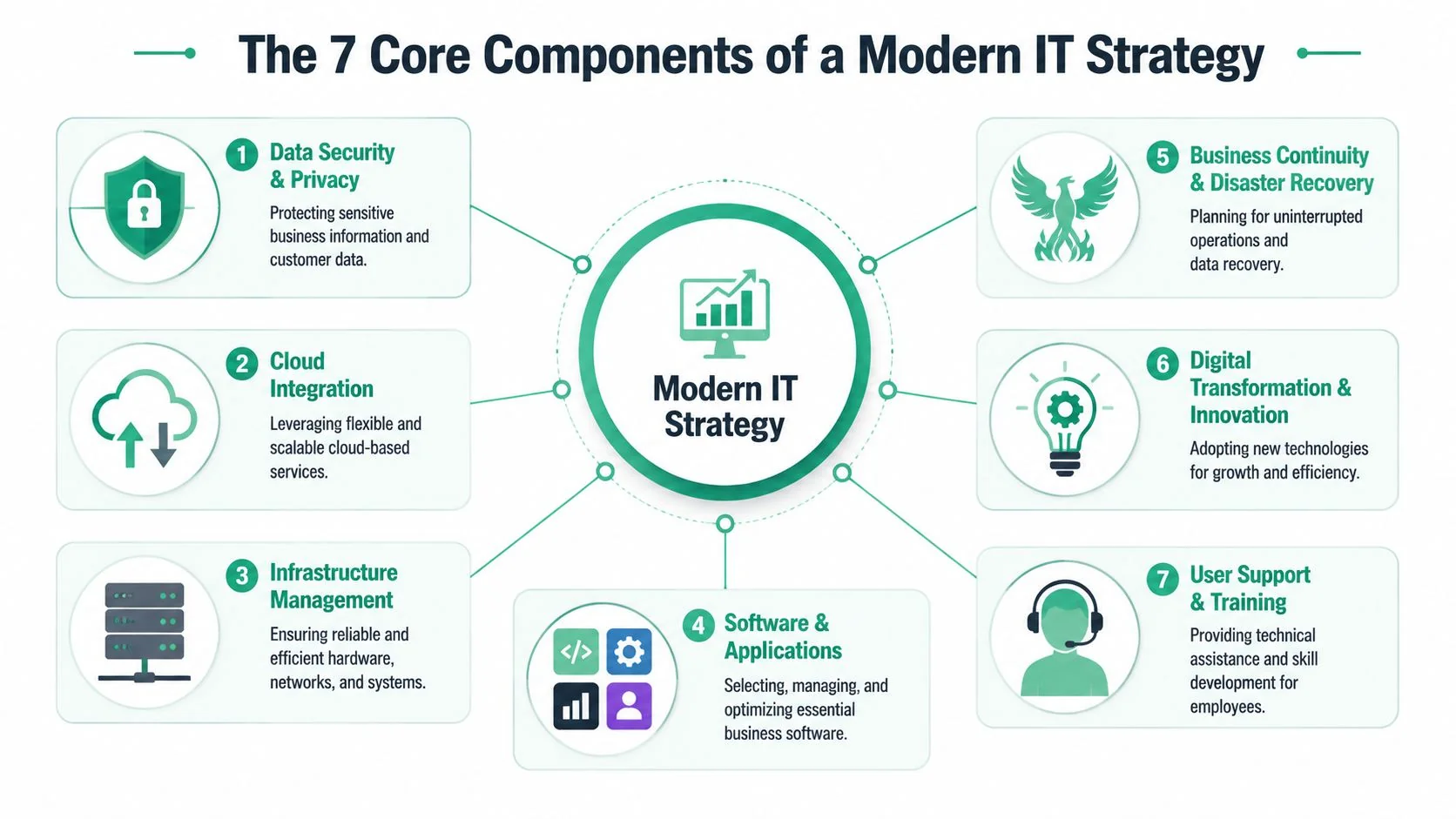
What each component actually does
Governance
This is just decision-making. Who approves software? Who owns password standards? Who signs off on new devices? If nobody owns these calls, staff make them ad hoc.Cybersecurity
Protect access to email, files, finance systems, and client data. For most small businesses, that means stronger identity controls, device protection, and less blind trust between systems.Cloud solutions
Microsoft 365, cloud file storage, cloud backup, and cloud-based business apps make work more flexible. They also need structure, or you end up with a cloud mess instead of a server mess.Backup and disaster recovery
Backup is about data copies. Recovery is about getting the business working again. You need both. If you can't restore cleanly, the backup story is incomplete.Hardware lifecycle
Laptops, desktops, networking gear, phones, and printers all age out. If you replace gear only after failure, downtime chooses your schedule.Vendor management
Internet, phones, software subscriptions, line-of-business platforms, and copier contracts all intersect. Someone should know what you're paying for, what's critical, and what service levels matter.Staff training
Your team doesn't need to become engineers. They do need to recognise risky emails, use shared systems properly, and follow simple security habits.
The minimum standard I'd expect
Modern security advice is shifting toward phased zero-trust controls, not just basic antivirus and a password policy. That shift is outlined in this step-by-step guide to zero trust for small businesses. In plain English, that means you stop assuming that every user, device, or connection should be trusted by default.
For a typical Brisbane small business using Microsoft 365, I'd translate that into this:
- Secure identity first: Turn on strong sign-in protections and review who has admin rights.
- Check device health: Don't let any random unmanaged laptop become the front door to company data.
- Separate critical systems: Finance, backups, and sensitive records should not sit in the same casual access pool as everything else.
- Reduce broad access: Staff should have the access they need, not access to everything.
- Test recovery: Restore files and confirm the result.
If you want a practical foundation underneath all this, this guide to building robust IT infrastructure for small businesses is useful background.
The best small-business setup is boring in the best way. Staff log in, systems work, access is controlled, and recovery is straightforward.
From Overwhelmed to Organised A Pragmatic IT Roadmap
Most owners get stuck because the list feels endless. New laptops, cyber insurance questions, SharePoint, backups, Wi-Fi, training, phone systems, remote access. It all lands as one giant blob.
Don't tackle it that way. Sequence it.
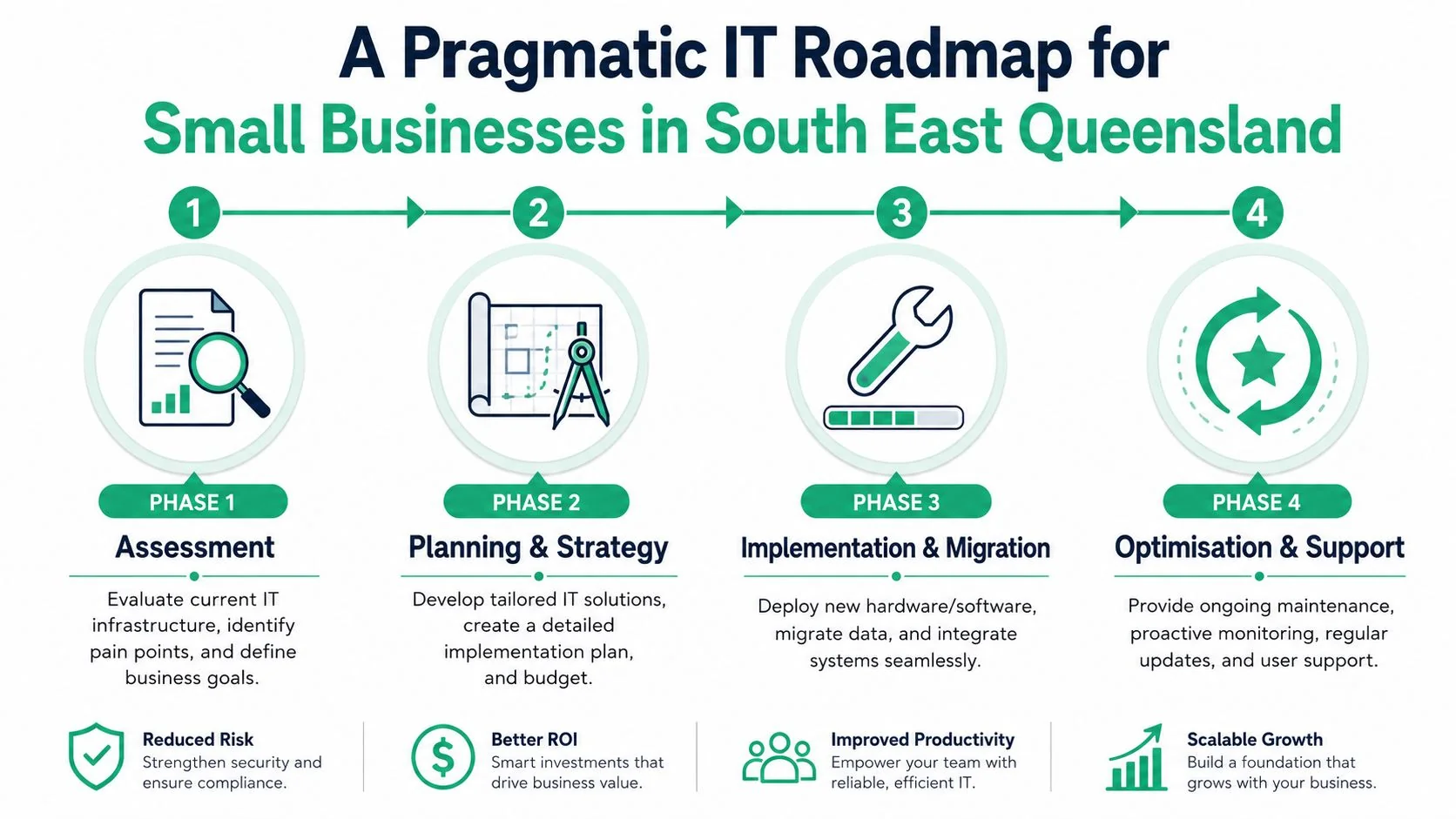
Start with a baseline audit
Before you spend a dollar, map the current state. Independent strategy guidance consistently recommends a current-state assessment and gap analysis first, because that identifies which workflows are most IT-dependent and where downtime risk is concentrated, leading to better budgeting and lower implementation risk, as explained in this strategic IT planning guide for small businesses.
That audit should cover:
- Core systems: Email, accounting, file storage, phones, CRM, booking or job systems.
- Data flow: Where information starts, where it moves, and where it gets stored.
- Identity controls: Who has admin rights, shared accounts, and ex-staff access.
- Recovery dependencies: What must come back first after an outage.
- Known pain points: Slow systems, repeated outages, shadow IT, and staff workarounds.
Phase 1 stabilise the essentials
This is the minimum viable stack stage. The goal is continuity.
Focus on email security, proper backups, multi-factor authentication, device patching, shared file structure, and password hygiene. If your team can't work reliably or recover quickly, don't jump to AI tools or fancy automation.
For most small firms, the Phase 1 stack looks something like this:
- Business email and collaboration: Usually Microsoft 365.
- Secure file storage: Structured shared storage, not documents scattered across desktops.
- Endpoint protection: Every laptop and desktop covered.
- Backup with restore testing: Especially for cloud data and critical files.
- Basic access controls: No casual admin rights.
Phase 2 improve how the team works
Once the basics are stable, remove friction.
Cloud collaboration, document standards, mobile device management, and simple workflow automation start to pay off. Think shared calendars that people use, job or project templates, cleaner onboarding, and less manual handover between admin and operations.
If staff keep inventing workarounds, your systems are telling you where to improve next.
Phase 3 tighten and scale
Now you can justify sharper controls and smarter operations. Segment sensitive systems. Improve reporting. Standardise procurement. Build policies for onboarding, offboarding, and vendor approvals. Start using automation to reduce repetitive support tasks.
This is also where a small firm should review whether internal ownership still makes sense, especially if growth, compliance, or remote work is making the environment more complex.
A roadmap works because it stops you buying tools out of order. That's the key advantage.
Your Small Business IT Strategy Checklist and Budget Guide
The smartest small-business IT plans aren't the biggest ones. They're sequenced properly. That's the point Bain makes in its discussion of the small business market: the key question isn't just what to buy, but how to sequence investment under tight budgets, with a focus on a minimum viable IT stack that supports continuity and growth without creating excess overhead, as discussed in this Bain perspective on serving small businesses.
A practical checklist
Use this as a working list, not a wish list.
- List your critical systems: Write down the apps and services your business can't operate without.
- Check access: Remove shared logins where possible, review admin rights, and close old accounts.
- Confirm backup coverage: Know what is backed up, where it goes, and how restoration is tested.
- Standardise devices: Keep staff on supported business-grade machines and consistent software.
- Lock down email: Treat Microsoft 365 security settings as business-critical, not optional.
- Clean up file storage: One agreed structure beats five personal workarounds.
- Document vendors: Internet, software, phones, websites, and support contacts should all be recorded.
- Train staff: Short, regular habits beat one annual lecture.
- Set review dates: Technology drifts. Your strategy shouldn't.
Sample IT Budget Guidance for Small Businesses
This table is intentionally simple. It's a planning tool, not a price list.
| Business Stage | Focus | Indicative Monthly IT Spend (per employee) |
|---|---|---|
| Sole trader | Email, secure file storage, device protection, backup, password management | Low |
| Microbusiness | Shared collaboration, endpoint security, backup, basic support, documented access | Low to moderate |
| Growing team | Standard devices, identity controls, managed support, cloud administration, recovery planning | Moderate |
| Established small business | Security hardening, policy enforcement, vendor management, compliance support, strategic reviews | Moderate to higher |
A few budgeting rules I'd push hard:
- Fund resilience before extras: Backup, identity security, and stable devices come before novelty tools.
- Budget for support, not just purchases: Buying hardware without planning support creates future pain.
- Avoid software sprawl: Fewer well-managed tools beat a stack of overlapping subscriptions.
- Tie spend to outcomes: Better uptime, smoother onboarding, cleaner collaboration, and lower risk.
If your budget is tight, strip the plan back to the minimum viable stack. Don't strip out the foundations.
DIY vs Done For You When to Call a Managed IT Partner
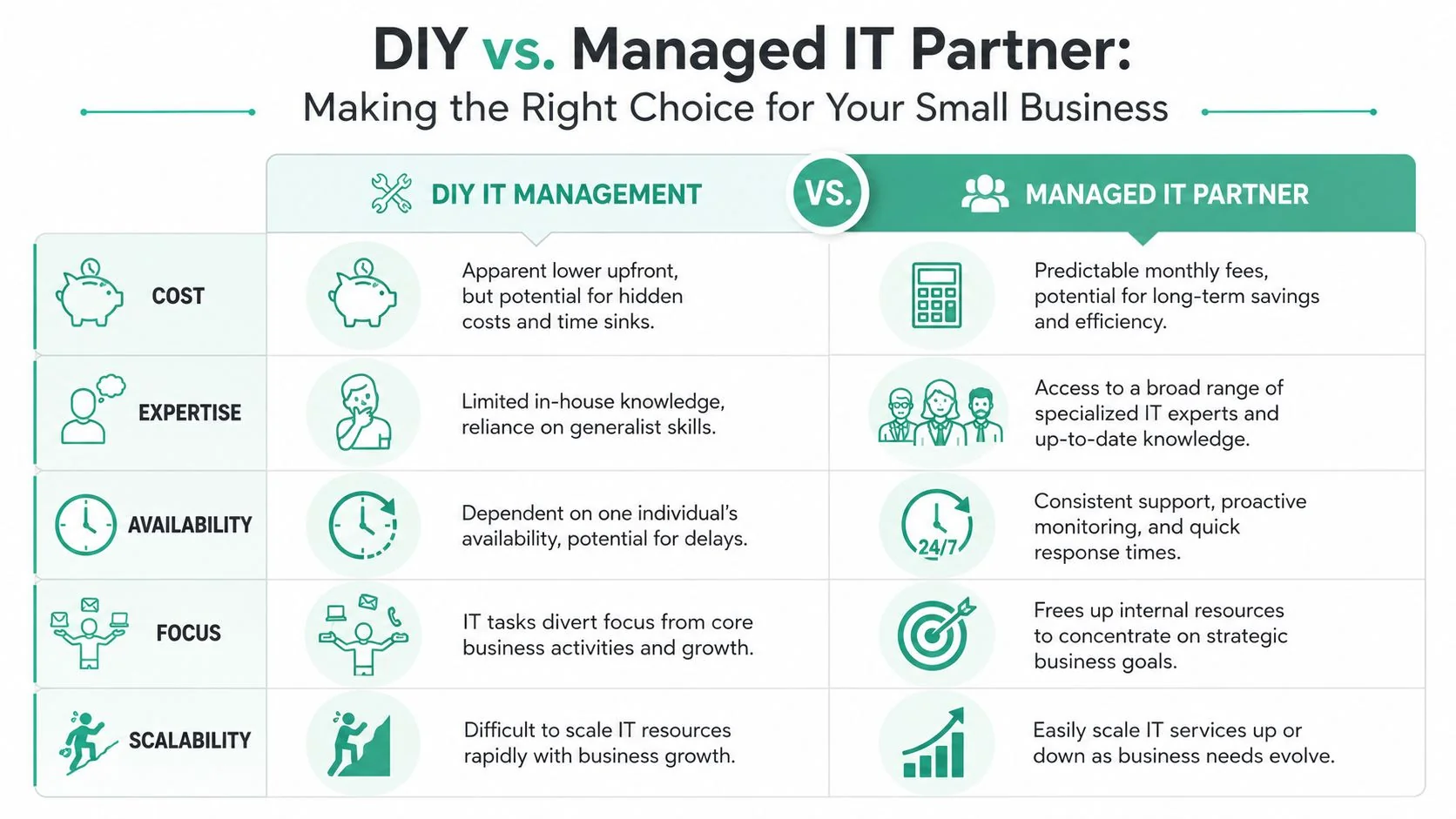
Not every business needs a full managed service from day one. Some can handle the basics in-house for a while. But there's a line where DIY stops being lean and starts being risky.
This comparison helps.
When DIY still makes sense
DIY can work if your setup is simple, your team is tiny, and someone inside the business is disciplined enough to manage the basics properly.
That usually means:
- A very small environment: Few users, few devices, limited software complexity.
- Low compliance pressure: No heavy industry-specific requirements.
- Clear ownership: One person maintains access, devices, backups, and vendors.
- Stable operations: Minimal change, few remote workers, and no messy legacy systems.
If that's you, fine. Keep it tidy. Document everything. Don't pretend “Barry knows where it all is” counts as governance.
The signs you need help
A managed IT partner makes sense when the business cost of amateur hour becomes obvious.
Call in support when any of these show up:
- IT issues keep interrupting the owner: If you're still the fallback help desk, your attention is in the wrong place.
- You're growing the team: More staff means more devices, permissions, onboarding, and support load.
- You handle sensitive information: Healthcare, legal, finance, and professional services can't afford loose controls.
- Remote work is normal: Access management gets harder fast when staff work from multiple locations.
- You need better security than a generalist can provide: Microsoft 365 hardening, backup isolation, and policy enforcement need proper attention.
- Vendors are piling up: Internet, cloud apps, phones, websites, printers, security products. Someone should coordinate them.
Local support matters when something physical breaks, when a network issue needs eyes on site, or when you want advice grounded in how small businesses here actually operate.
The right partner shouldn't drown you in jargon. They should help you keep systems stable, reduce risk, and make decisions in the right order.
Frequently Asked Questions About Small Business IT
How much does creating an IT strategy cost
It can be very small if you start with a focused audit and a shortlist of priorities. The expensive version is buying tools before you know what problem you're solving. Start with clarity, then spend in stages.
My business is just me do I still need one
Yes. Your version is just simpler. If you rely on email, files, online banking, quotes, bookings, or customer records, you need a plan for access, backup, device security, and recovery. A sole trader still has operational risk.
How long does it take to implement
The first useful version can happen quickly if you stay practical. Audit what you have, stabilise the essentials, then improve in phases. Don't wait for a perfect master plan. Most businesses benefit from fixing the highest-risk gaps first.
How often should I review it
Review it whenever the business changes. New staff, new locations, remote work, a new line-of-business platform, compliance pressure, or repeated support issues are all triggers. Even without major change, a scheduled review keeps the plan current and stops drift.
A good IT strategy for small business should feel usable. It should help you make better decisions, not give you another document to ignore.
If you want a local team to help you sort the essentials, tighten security, and build a practical roadmap without overcomplicating it, talk to Bridge IT Solutions. They work with small and medium organisations across South East Queensland and can help turn scattered tech into a setup that's stable, secure, and easier to run.
