

You're probably wearing five hats before 9 am. You've replied to a client, chased an invoice, handled a staff question, approved a supplier bill, and tried to work out why one laptop won't print. By lunchtime, someone mentions a suspicious email, your phone starts buzzing, and suddenly “sort out IT” becomes today's emergency as well.
That's normal for a Brisbane small business owner. You're not just running a business. You're protecting cash flow, client trust, staff productivity, and your own sanity. The trouble is that most IT advice aimed at small business owners is either too vague to use or too technical to act on.
So let's cut through that. If you run a business in Brisbane or South East Queensland and you want a practical way to tighten up your systems without wasting money, this is the checklist that matters.
Table of Contents
- More Than a Title It Is Your Entire Focus
- Defining the Modern Australian Small Business Owner
- The Top Operational Challenges Every Owner Faces
- Your Practical IT and Security Priority Checklist
- How a Brisbane IT Partner Solves These Problems
- From Overwhelmed Owner to Confident Leader
More Than a Title It Is Your Entire Focus
Owning a small business sounds tidy on paper. In real life, it's messy, personal, and relentless. One minute you're doing sales, the next you're fixing rostering, approving payroll, or trying to understand a software bill you never meant to sign up for.
For a lot of owners, technology sits in the background until it doesn't. The internet drops out during invoicing. A shared mailbox gets spammed. Someone clicks the wrong link. A file goes missing from SharePoint or OneDrive. Then the whole business slows down while everyone waits for you to decide what happens next.
That pressure lands differently when the business revolves around you. If you run an accounting firm, clinic, trade business, home office, or professional service in South East Queensland, there usually isn't a spare department waiting to absorb the problem. You are the fallback plan.
You don't need more apps. You need fewer points of failure.
The good news is that small business IT doesn't have to be complicated. It does have to be prioritised properly. Most owners don't need an enterprise-grade shopping list. They need the basics handled well, in the right order, with someone clearly accountable.
That means deciding what must be protected first. Email. Files. Devices. Access to cloud systems. Backups. The ability to recover quickly if something goes wrong.
If you get those right, day-to-day work becomes calmer. Staff stop working around broken processes. Security becomes less abstract. And you stop making expensive decisions in the middle of a problem.
Defining the Modern Australian Small Business Owner
Being called a small business owner can sound like a size label. It isn't. It's a responsibility label.
In Australia, small businesses make up 97% of all businesses, employ around 5.1 million people, and contribute about one-third of Australia's GDP, according to the Australian small business figures cited by ASBFEO. That same source notes there are about 2.6 million small businesses in Australia, and 98% of all businesses are either small businesses or family enterprises.

You carry more weight than the label suggests
That matters because “small” often hides how much depends on your decisions. A single Brisbane practice, workshop, consultancy, or local service business might only have a handful of staff, but it still carries wages, customer obligations, supplier relationships, and local economic activity.
The modern small business owner is usually operating with lean capacity. That means less room for wasted time, less tolerance for outages, and less ability to absorb preventable mistakes. If one person can't log in, one system won't sync, or one inbox is compromised, the issue often reaches the owner fast.
Historically, Australia's business environment has been dominated by very small operations. Data cited from the ABS showed 2.49 million actively trading businesses in 2023, with a large majority being non-employing firms, reflecting how common sole traders and microbusinesses are in the market, as noted in these Australian small business trends. Those businesses are heavily represented in sectors such as construction, professional services, transport, and health care.
Why resilience matters more for small teams
That mix is important in Brisbane and South East Queensland. These are industries where reliable email, secure document access, job scheduling, quoting systems, online accounting, and cloud file storage aren't optional. They are the operating system of the business.
When a larger company has a problem, it often has layers of people and process to soften the blow. Small operators don't. A clinic can't easily “work around” inaccessible patient information. A trade business can't bill efficiently if devices and email are down. A legal or accounting office can't shrug off lost document access.
Practical rule: if your business would struggle for a day without Microsoft 365, internet access, or shared files, then IT resilience is part of your core operations, not an admin add-on.
That's the modern Australian small business owner. Not small in importance. Small in margin for error.
The Top Operational Challenges Every Owner Faces
A Brisbane owner walks in on Monday to find three small problems waiting. A staff member cannot access email on a new phone. Two invoices were sent from the wrong address. The shared folder with this week's job files has the wrong permissions again. None of those issues sounds dramatic on its own. Together, they burn half a day, delay cash coming in, and drag the owner back into admin instead of running the business.
Most business problems now have a technology layer
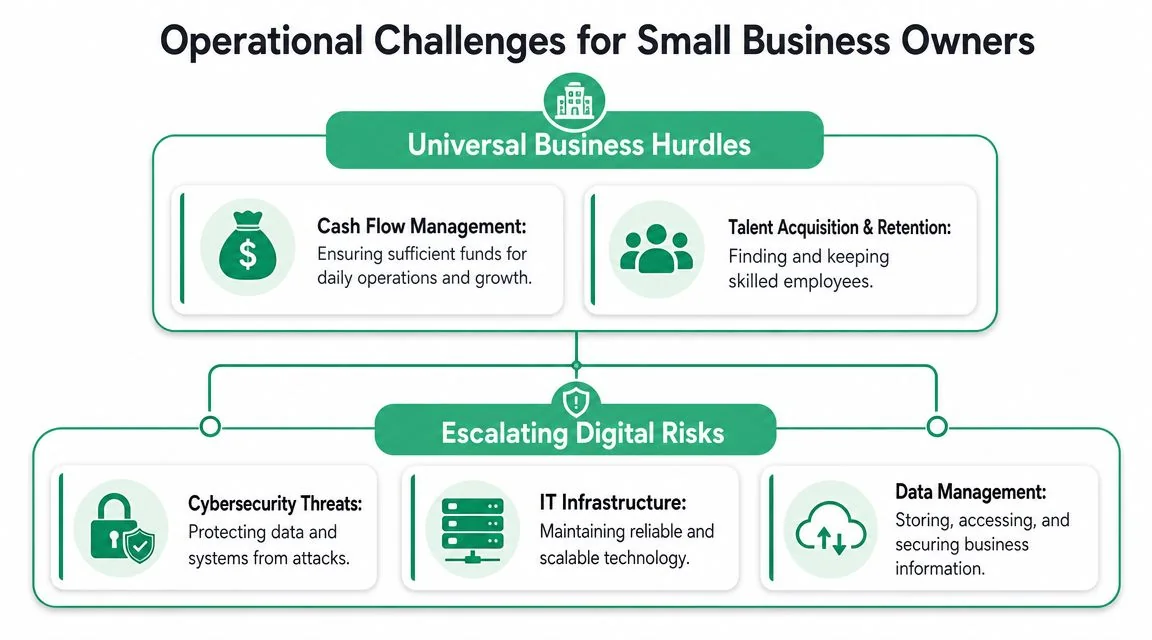
Cash flow, staffing, customer service, and compliance still sit at the top of the worry list. For a small business in Brisbane or South East Queensland, each one is tied to how well your systems are set up.
Hiring feels harder when a new starter walks into a mess of shared logins, old devices, and unclear processes. Quoting and invoicing slow down when staff jump between too many apps or wait on one person to find the right file. Customer service slips when the team misses emails, saves documents in the wrong place, or uses personal workarounds because the approved setup is clunky.
That is the pattern I see again and again. Owners describe a people problem or a time problem. Underneath, there is usually a systems problem making everything slower, riskier, and more expensive than it should be.
A lot of small businesses grow into this by accident. One person signs up for Microsoft 365. Another opens a separate Dropbox account. The Wi-Fi was set up years ago by somebody's mate. Old laptops stay in service because they still boot. Passwords end up in notebooks, text messages, or email threads. It works until it doesn't.
Your Microsoft 365 login is a front door
If your team uses Microsoft 365, Google Workspace, Xero, cloud storage, job management software, or online banking, user accounts and permissions matter more than the old idea of protecting the office network alone. Identity and access management deserves attention early, not after an incident.
Microsoft's small business cybersecurity guidance makes the basics clear. Strong passwords, multi-factor authentication, patching, and regular reviews still matter because the provider secures the platform, while your business still controls users, data, and access.
That division catches owners out.
One compromised mailbox can expose invoices, reset links, supplier conversations, and internal approvals. Email is often the starting point because it touches everything else. A missing MFA setup on one account can wipe out the value of a long list of paid software subscriptions.
A stolen password can quickly become access to files, finance systems, staff records, and client conversations.
Why downtime hits small businesses so hard
Owners often treat cybersecurity as a separate topic from day-to-day operations. That is a mistake. The practical question is simple. If a laptop fails, a file share disappears, or a staff member clicks a bad link, how fast can your business keep working?
For a larger company, disruption gets spread across departments. For a small clinic, trade business, accounting firm, or professional office in SE QLD, disruption lands straight on the owner's desk. Jobs get delayed. Quotes sit unsent. Phones still ring while staff scramble for access. Cash collection slows down at the exact moment stress goes up.
The common threats are not exotic. They are familiar, boring, and expensive:
- Business email compromise: someone gets into email and sends believable payment changes, invoice requests, or document requests.
- Ransomware or malware disruption: a device or shared data source becomes unusable and the team cannot work normally.
- Cloud misconfiguration: files are overshared, access is too broad, or ex-staff still have active accounts.
- Backup failure: everyone assumes recovery will be easy until restore day proves otherwise.
This is why local context matters. Brisbane and SE QLD owners usually do not need a big, abstract cyber strategy document. They need the basics set up properly, in the right order, for the way their business runs. If your team relies on Microsoft 365, mobile devices, shared files, cloud accounting, and a patchwork of business apps, your operational risk sits in those tools first.
Treat IT issues as operating issues. That is how you protect time, cash flow, and your ability to keep serving customers when something goes wrong.
Your Practical IT and Security Priority Checklist
Most owners don't need a giant digital transformation project. They need an order of operations. Start with the controls that reduce the biggest risks first, then build from there.
Right now, that matters more than ever. Recent survey data found 79% of small business owners in underserved communities say digital tools are highly important, and 67% say without them they would fall behind competitors, according to this small business digital tools survey.
Start with the controls that reduce risk fast
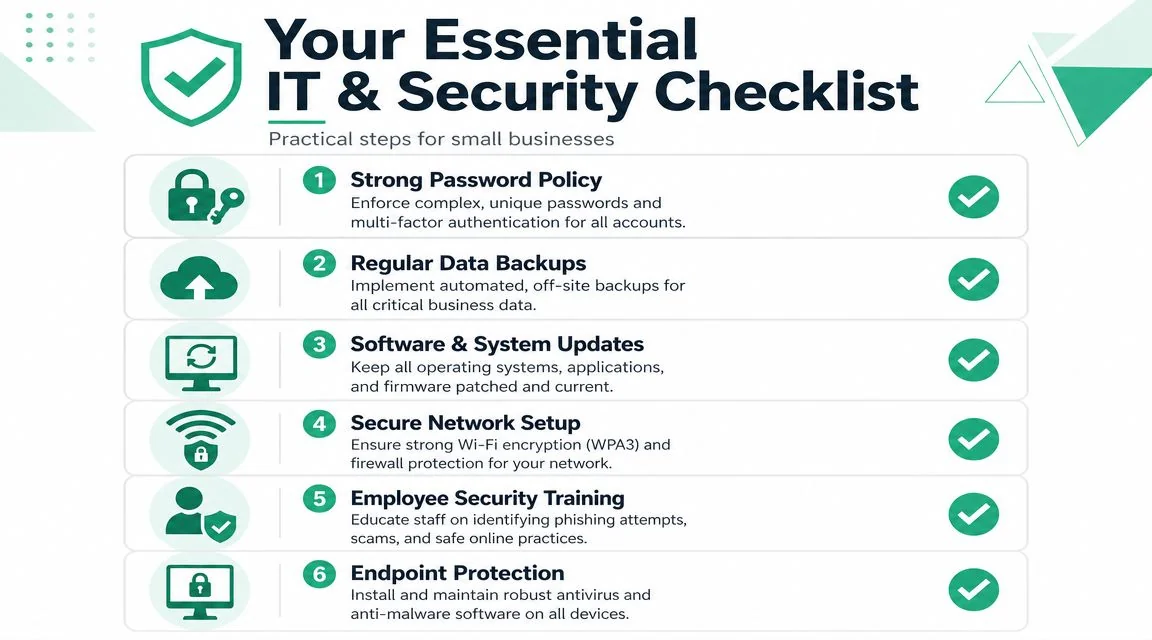
Here's the practical checklist I'd give over coffee to almost any small business owner in Brisbane.
Turn on MFA everywhere that matters
Start with Microsoft 365, email, cloud storage, accounting platforms, payroll, password managers, and remote access tools. If a system holds money, client data, or staff data, MFA belongs on it.Lock down admin access
Not everyone needs admin rights. In fact, many users shouldn't have them. Keep administrator accounts separate, review who has administrative access, and remove old users promptly.Put proper cloud backup in place
Don't assume Microsoft 365 or another cloud platform gives you the recovery options your business expects. Use managed cloud backup for email, OneDrive, SharePoint, and critical business data, then test restores.
Before the next part of the checklist, watch this short explainer if you want the plain-English version.
What good looks like in plain English
The next priorities are less glamorous, but they stop a lot of avoidable pain.
- Keep every device patched: Laptops, desktops, phones, firewalls, and line-of-business apps all need updates. “We'll do it later” is how small issues stay open.
- Use modern endpoint protection: Basic antivirus isn't enough if nobody is watching alerts or checking whether protections are still active.
- Train staff for phishing: Your team doesn't need a lecture. They need short, regular reminders and realistic examples.
- Write a simple recovery plan: Who do staff call? What gets restored first? Where are key logins stored securely? Which suppliers need to be contacted?
A useful standard for owners is this:
| Priority | What to check |
|---|---|
| Access | MFA is on and admin rights are limited |
| Data | Backups run automatically and restores are tested |
| Devices | Updates and endpoint protection are managed |
| People | Staff know how to report suspicious activity |
| Recovery | There is a written plan for the first day of disruption |
Owner test: if you took a day off and a staff member got a phishing email, would they know what to do without calling you first?
If the answer is no, your systems are too dependent on memory and luck.
How a Brisbane IT Partner Solves These Problems
A lot of Brisbane owners hit the same wall. They know the risks are real, they know the checklist makes sense, and they still do not have time to chase backups, device updates, user access, and support tickets between quoting jobs, paying staff, and serving customers.
That is the point where a good IT partner earns their keep.
The job is not just fixing things after they break. The job is taking day-to-day ownership of the work that keeps a small business stable. Backups get checked. Failed jobs get followed up. Devices get patched. Old accounts get removed. Staff get help quickly. If a file vanishes or a laptop dies, there is a restore path and someone responsible for using it.
What actually improves with the right partner
Without internal IT, many small businesses across Brisbane and South East Queensland end up in a reactive cycle. Something fails, everyone scrambles, the owner gets dragged in, and the underlying issue stays half-fixed until the next problem appears.
A managed IT partner changes that by putting routine control around messy, easy-to-ignore tasks. You get regular maintenance, clearer accountability, and faster response when something goes wrong. That matters more than fancy tooling. For a local owner, the key benefit is simple. Less downtime, less guesswork, and far less dependence on you remembering everything.
You also get practical local context. A Brisbane provider who works with similar businesses already knows the pattern. Shared Microsoft 365 accounts, old laptops that should have been replaced last year, patchy Wi-Fi in the warehouse, backups nobody has tested, and staff who are trying their best but need clearer support. Generic advice does not solve that. Consistent hands-on management does.
Mapping common owner headaches to managed IT support
Here is what that looks like in practice.
| Common Challenge or Fear | Managed IT Partner Solution |
|---|---|
| “I don't know if our backups actually work.” | Managed cloud backups with monitoring, alerts, and scheduled test restores for Microsoft 365 and other critical business data |
| “We've got old accounts and shared logins everywhere.” | User onboarding and offboarding, MFA rollout, admin access reviews, and account clean-up |
| “My team clicks things they shouldn't.” | Short staff training, phishing simulations, and a clear process for reporting suspicious emails |
| “When computers slow down, everything slows down.” | Proactive device monitoring, patching, replacement planning, and managed endpoint protection |
| “I only hear about IT when it's already bad.” | Regular reviews, plain-English risk updates, and a named support contact |
| “I can't afford a full-time IT person.” | Ongoing support and planning without the cost of hiring an internal IT team |
Bridge IT Solutions is one Brisbane example. The company provides managed IT support, Microsoft 365 security hardening, cloud backup, phishing simulations, business continuity services, and day-to-day support for small and medium organisations across South East Queensland.
Good managed IT means fewer surprises, faster fixes, and one less operational mess sitting on the owner's shoulders.
What to ask before you choose a Brisbane IT partner
Do not start with brand names or sales promises. Start with operating standards.
Ask direct questions:
- Who owns problems from start to finish? You want clear responsibility, not a ticket number and silence.
- Who checks backups every day or every week? Backup software is not the same as backup management.
- How do they secure Microsoft 365? Ask about MFA, admin roles, shared accounts, and risky sign-ins.
- How are devices maintained over time? Patching, health monitoring, warranty tracking, and replacement planning should all be covered.
- Will your staff get plain-English support? A good partner helps people fix issues without making them feel stupid.
- What happens during an outage or data loss event? You want a restore process, clear priorities, and someone who can lead the response.
Then ask the question many owners forget.
What will they tell you not to buy?
That answer tells you a lot. The right partner will usually simplify your setup, not pile on extra apps and licensing. For many Brisbane small businesses, better use of Microsoft 365, business-grade networking, managed backup, endpoint protection, and tighter access control will solve more real problems than another disconnected platform ever will.
The best local IT relationship is usually quiet. Systems stay usable. Risks get reviewed. Staff know who to call. The owner gets out of the weeds and back into running the business.
From Overwhelmed Owner to Confident Leader
A small business owner doesn't need to know every security setting, every licensing detail, or every backup method. That's not the job. Your job is to make good decisions about risk, continuity, and support.
The confidence shift happens when IT stops being a pile of unresolved tasks and becomes a managed part of the business. Email is locked down. Devices are maintained. Backups are verified. Staff know how to escalate issues. Recovery has been thought through before a bad day arrives.
That isn't weakness. It's leadership. Strong owners don't try to personally hold every technical detail in their head. They build a setup that protects the business, supports the team, and frees them to focus on clients, growth, and cash flow.
If you're in Brisbane or South East Queensland and your current setup feels too fragile, too confusing, or too dependent on you, that's fixable. Start with the priorities that reduce the most risk, then hand the day-to-day ownership to people who do this properly.
If you want a straightforward conversation about tightening up your systems without overbuying, Bridge IT Solutions can help you map out the practical next steps for your Brisbane or South East Queensland business. The goal isn't more complexity. It's secure, dependable technology that lets you get back to running the business.
