

A lot of Brisbane small businesses don't realise their Wi-Fi is the problem until it starts interrupting revenue. The EFTPOS terminal drops out during a lunch rush. A Teams call freezes while a client is talking. Staff walk from the front office to the warehouse and lose access to cloud files halfway through the job. None of that feels like “an IT issue” in the moment. It feels like the business is harder to run than it should be.
That's usually the tipping point for looking at managed Wi-Fi services. Not because Wi-Fi is exciting, but because unstable, poorly secured wireless causes real operational drag. In Brisbane and across South East Queensland, that problem is often made worse by mixed building layouts, expanding device counts, guest access needs, and the reality that not every NBN connection performs the same way in practice.
Table of Contents
- Is Your Wi-Fi Working Against You
- What Is Managed Wi-Fi and Why It Matters Now
- Beyond Speed The Business Case and Real ROI
- The Technology That Powers Great Wi-Fi
- Why Security and Compliance Are Non-Negotiable
- Your Checklist for Choosing a Brisbane Wi-Fi Partner
- Your Path to Better Connectivity
Is Your Wi-Fi Working Against You
A café owner in Brisbane usually notices it first at the counter. The internet still “works”, but the guest network is clogging up, the payment terminal takes too long to respond, and staff start turning devices on and off because that's the only fix they know. A law firm sees it differently. Video calls stutter, document sync pauses, and everyone blames Microsoft 365 when patchy wireless coverage in meeting rooms is the problem.
Trade and field businesses get hit in a less obvious way. The depot might have internet, but if the wireless network can't handle tablets, phones, printers, and job management apps at the same time, crews lose time waiting for data to sync. That's dead time, not a minor inconvenience.
Poor Wi-Fi rarely fails in a dramatic way. It usually leaks time, patience, and confidence all day.
Consumer-grade routers are often the hidden culprit. They're fine for a small household. They're not built to manage staff devices, guest traffic, printers, smart TVs, cameras, EFTPOS, and cloud apps inside a working business. They also tend to be installed wherever the internet first enters the building, which is convenient for cabling and terrible for coverage.
The businesses that struggle most usually share a few signs:
- Dropouts in busy periods: Problems appear when more people connect, not when the office is quiet.
- Dead spots in key areas: The boardroom, treatment room, workshop corner, or back office never gets a stable signal.
- One network for everything: Staff, guests, and business devices all share the same wireless space.
- Reactive support only: Someone gets called after the failure, not before it.
If any of that sounds familiar, the issue probably isn't “bad internet” alone. It's that your wireless network hasn't been designed, secured, and managed like a business system.
What Is Managed Wi-Fi and Why It Matters Now
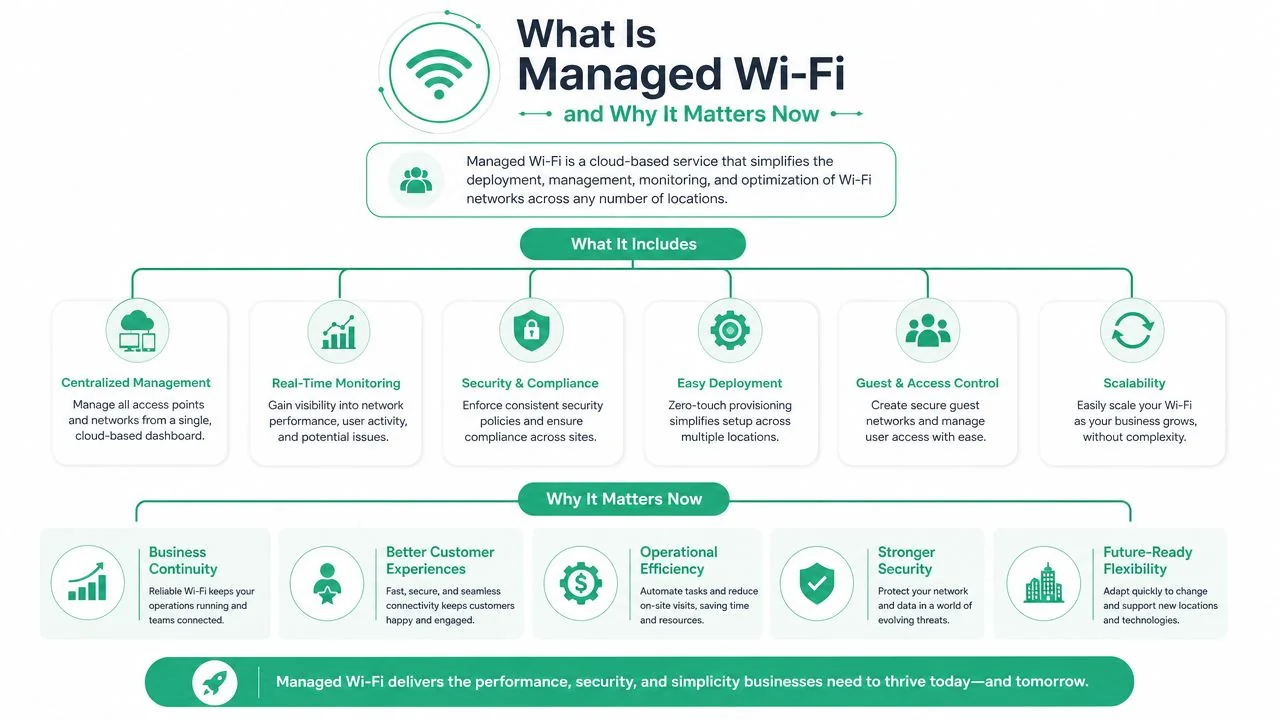
Managed Wi-Fi means the wireless network is treated as an ongoing service, not a one-off hardware purchase. You're not just buying access points and hoping they behave. You're paying for design, setup, monitoring, updates, security controls, and support over time.
That distinction matters. A lot of small businesses in Brisbane still run Wi-Fi on a break-fix model. Someone installs a router, maybe adds a mesh unit later, and nobody touches it again until complaints pile up. Managed Wi-Fi services replace that cycle with active oversight.
It's a service, not just a box on the shelf
A useful analogy is the difference between fitting out your own shop and moving into a serviced space. In the first model, you source everything, maintain everything, and troubleshoot everything. In the second, the environment is built, maintained, and supported so you can focus on running the business.
Managed Wi-Fi works the same way. A provider typically handles:
- Network design: Deciding how many access points are needed, where they should go, and how they should be configured.
- Ongoing monitoring: Watching for failed hardware, overloaded access points, poor roaming, and unusual behaviour.
- Security management: Applying firmware updates, controlling who can connect, and separating business traffic from guest or device traffic.
- Support and fault isolation: Working out whether a problem sits in the NBN connection, the firewall, the switch, the access point, or the device.
That's why managed Wi-Fi services are distinct from buying better hardware. Better hardware helps, but unmanaged business-grade gear still becomes someone's responsibility. If no one is checking alerts, reviewing channel congestion, or pushing updates, the network still degrades over time.
Why the timing matters
Australian businesses now depend on cloud services in ways they didn't a few years ago. In 2021–22, 82% of Australian businesses with 20 or more employees and 51% of micro-businesses used cloud computing services, according to the fact set provided via this managed Wi-Fi industry reference. That shift matters because cloud software only feels efficient when the wireless layer underneath it is dependable.
A cloud-first business with weak Wi-Fi is still a fragile business. Email, file sync, VoIP, scheduling, practice management, point-of-sale, and remote collaboration all rely on stable local connectivity before they ever touch the wider internet.
Practical rule: If your staff need Wi-Fi to do their jobs, Wi-Fi is part of your production environment, not office background noise.
For a small business owner, that changes the conversation. The question isn't “Do I need stronger signal bars?” It's “Do I need a network that someone is actively responsible for?” In most growing businesses, the answer is yes.
Beyond Speed The Business Case and Real ROI
The biggest mistake I see is treating Wi-Fi as a speed problem only. If a business owner hears “managed Wi-Fi”, they often assume the pitch is just faster internet under a different label. That's not where the strongest return usually comes from.
For Australian sites with variable connectivity, the value often sits in reduced support load and faster fault isolation, not just headline performance. The fact set provided notes that the ACCC's Measuring Broadband Australia reports show real-world NBN performance can differ materially from advertised speeds, and that context is discussed in this managed Wi-Fi ROI overview. In plain terms, a business can pay for a good plan and still experience inconsistency. When that happens, someone has to work out whether the fault is the carrier, the modem, the firewall, the switch, the wireless design, or a single overloaded access point.
Where the return actually shows up
The return on managed Wi-Fi services usually appears in four places.

| Business area | What poor Wi-Fi causes | What managed Wi-Fi changes |
|---|---|---|
| Staff productivity | Reconnects, frozen calls, sync delays, roaming issues | More consistent access and less interruption |
| Owner time | Repeated ad hoc troubleshooting | A provider handles monitoring and fault finding |
| Customer experience | Weak guest Wi-Fi, payment issues, front-of-house delays | Cleaner separation and more reliable service delivery |
| Multi-site operations | Different setups at each location | Standardised configuration and central oversight |
A clinic doesn't benefit because Wi-Fi is “fast”. It benefits because reception, consult rooms, printers, and cloud systems stop fighting each other. An accounting office doesn't benefit because a speed test screenshot looks better. It benefits because staff stop dropping out of calls and the office manager stops acting as unpaid IT support.
What doesn't work is paying for managed Wi-Fi and then leaving the rest of the environment messy. If the switching is old, the firewall is overloaded, or the broadband service is undersized for the workload, Wi-Fi alone won't rescue the outcome. Good providers are candid about that.
A simple way to judge value
You don't need a spreadsheet full of invented savings figures to assess ROI. Ask a few practical questions instead:
- How often do staff lose time to connection issues?
- Who currently spends time troubleshooting?
- What happens when EFTPOS, booking systems, or cloud apps stall?
- How quickly can anyone tell whether the problem is internal or with the carrier?
- If you have more than one site, are they managed consistently?
If the honest answer is “too often” or “we don't know”, there's already a cost in the business.
Reliability has financial value even when you can't tie every interruption to a single invoice.
The strongest business case usually appears in places where downtime is disruptive but not dramatic enough to trigger a formal IT project. Cafés, allied health clinics, warehouses, trade offices, and professional firms live in that zone. They rely heavily on wireless, but they often keep stretching consumer gear and ad hoc fixes beyond the point that makes sense.
Managed Wi-Fi services make the cost predictable. They also ensure the environment is supportable.
The Technology That Powers Great Wi-Fi
A good business wireless network isn't built around one all-in-one router from a retail shelf. It's usually built from separate components that each do a specific job well. That's why commercial setups feel more stable. The system is designed for coverage, density, control, and support, not just basic internet access.
Access points and controllers do the heavy lifting
The first building block is the access point, often shortened to AP. This is the device that provides wireless coverage. In business environments, access points are usually mounted where they'll serve users properly, not where the internet line happens to enter the premises.
Commercial APs from vendors such as Cisco, Aruba, and Ubiquiti are designed to handle more users, better roaming, and more granular settings than a home router. They're also managed through a controller or cloud portal, which gives the provider one place to configure networks, push updates, review client behaviour, and investigate faults.
For business owners, the practical difference is simple:
- Retail router thinking: One box, one location, one Wi-Fi network, and manual guesswork.
- Managed Wi-Fi thinking: Multiple APs where needed, centrally controlled, with settings tuned for how the site operates.
If you want a plain-English grounding in the basics behind this, the essential preparation for CompTIA Network+ is a useful primer because it explains how wireless, switching, segmentation, and troubleshooting fit together.
Segmentation keeps traffic in the right lane
A well-run wireless network doesn't put every device on the same path. It creates separate networks, often shown as different SSIDs, with traffic divided behind the scenes using VLANs.
The easiest way to explain that is to think of a road system. Staff laptops, guest phones, cameras, printers, and EFTPOS devices should not all be driving in the same lane. Segmentation creates separate laneways so lower-trust traffic doesn't interfere with business-critical systems.
A sensible setup often looks like this:
- Staff network: Used for company devices and secured access to business systems.
- Guest network: Internet access only, isolated from internal resources.
- Device or IoT network: Printers, scanners, cameras, smart TVs, and other fixed devices.
- Priority services: Voice or key applications configured so they aren't crowded out.
Businesses planning a new rollout often benefit from reviewing examples of business-grade Wi-Fi installation for offices because the physical design matters just as much as the settings.
NBN type changes the design brief
In Australia, Wi-Fi design has to account for the access service underneath it. The fact set provided notes that managed Wi-Fi design must adapt to NBN products such as FTTP and fixed wireless, and that once the WAN connection is strong enough, bottlenecks move to RF design, AP placement, and load balancing, as outlined in this managed Wi-Fi deployment guide.
That point is critical for Brisbane and SEQ businesses. If the internet link is no longer the obvious choke point, weak internal design becomes more visible. That's when businesses start noticing poor roaming between rooms, overloaded access points, and patchy performance in specific parts of the building.
Don't judge a business network by the router model alone. Judge it by coverage, segmentation, roaming behaviour, and whether someone has actually surveyed the site.
That's why professional site surveys matter. Warehouses, clinics, double-brick offices, older Queenslanders, and modern tenancy fit-outs all affect signal differently. Good Wi-Fi isn't accidental. It's designed.
Why Security and Compliance Are Non-Negotiable
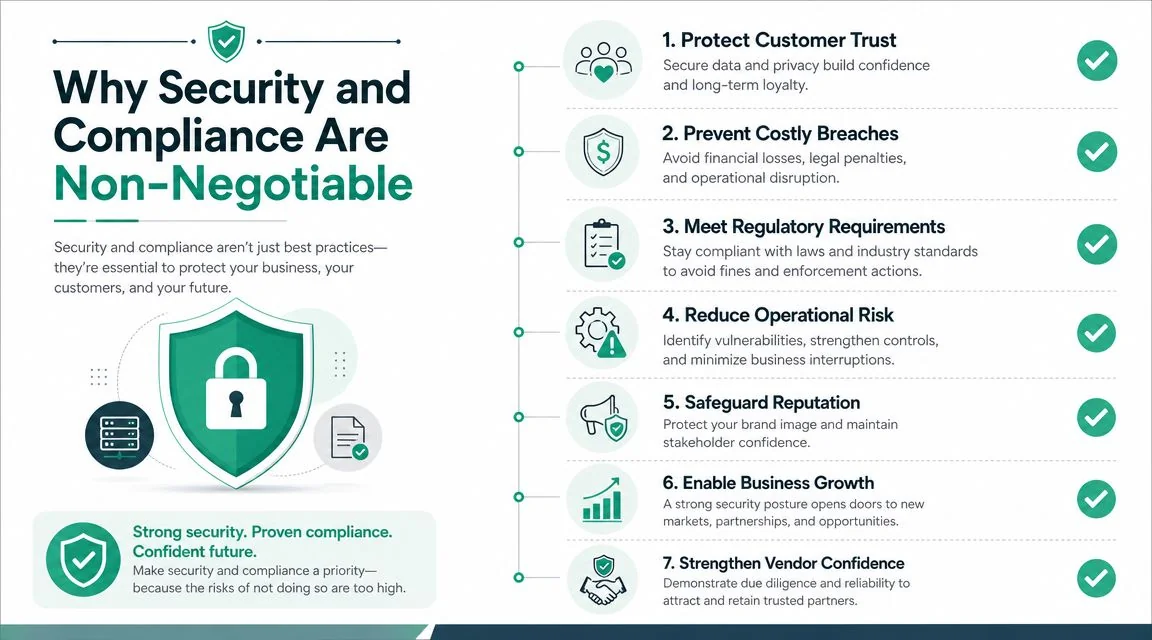
Small business owners often think of Wi-Fi security as “having a password”. That's only the starting point. In a business setting, wireless is one of the first places where staff, visitors, contractors, and unmanaged devices meet your internal systems. If that edge is loose, everything behind it is easier to reach.
The Australian Signals Directorate identifies network segmentation and timely patching as key security controls, and the fact set provided ties managed Wi-Fi directly to those controls through VLAN separation and centralised firmware management in this managed Wi-Fi security guide. That advice lines up with what works in practice. Separate traffic properly, keep devices updated, and reduce the chance that one compromised device can move across the whole network.
Good wireless security starts before someone connects
Strong managed Wi-Fi services usually include controls that go beyond a shared password.
Here's what that often means in business terms:
- WPA3-Enterprise or 802.1X authentication: Staff don't all share one simple password that lives forever on every device.
- Role-based access: Different users and device types get different levels of access.
- Guest isolation: Visitors can use the internet without seeing printers, file shares, or internal applications.
- Central firmware management: Security updates can be pushed consistently instead of relying on someone to remember them.
This is especially important in legal, accounting, healthcare, and financial environments where confidentiality matters every day, not just during an audit. A flat network makes containment harder. A segmented network gives you a better chance of limiting damage.
Compliance is operational, not theoretical
A lot of compliance concerns show up as ordinary technical decisions. Who can join the network. Which devices can talk to each other. How quickly vulnerabilities are patched. Whether logs and monitoring exist when something odd happens.
That's one reason it's worth understanding the basics of how to secure business Wi-Fi before choosing a provider. You don't need to become a network engineer, but you do need to ask the right questions.
A provider should be able to explain:
- how guest, staff, and device traffic are separated
- how wireless credentials are managed
- how access point firmware updates are handled
- how rogue devices or unusual behaviour are monitored
- what happens when a staff member leaves or a device is lost
A secure Wi-Fi network should make access easier for the right people and harder for everyone else.
What doesn't work is layering security language over a flat, loosely managed network. “Business Wi-Fi” isn't secure because the hardware box says business on the label. It's secure when identity, segmentation, patching, and monitoring are all handled deliberately.
Your Checklist for Choosing a Brisbane Wi-Fi Partner
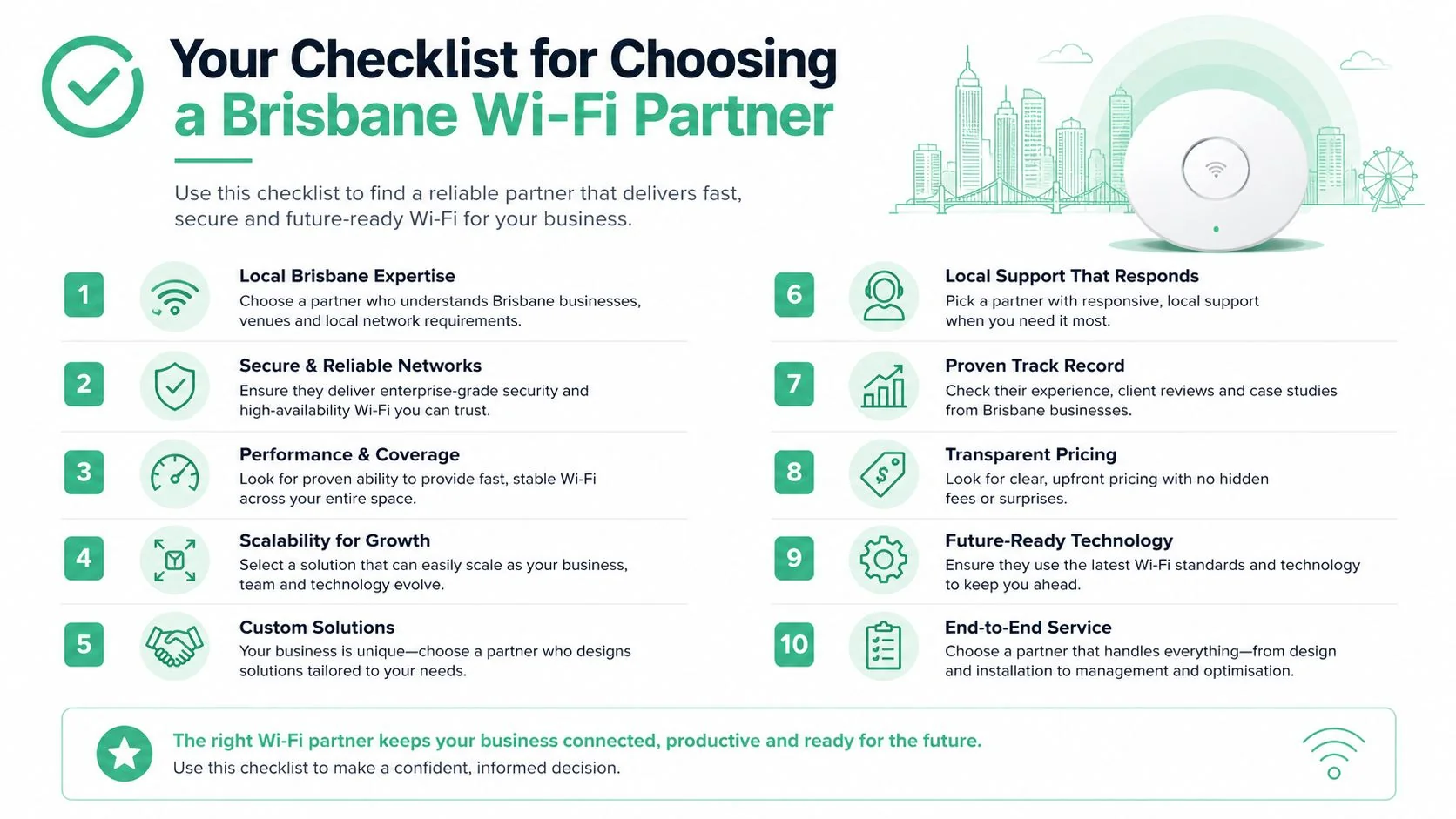
Choosing a provider isn't just about finding someone who can install access points. Plenty of firms can mount hardware and make a signal appear. The harder question is whether they can design a supportable environment for your site, your staff, and your operating risk.
That matters more now because the baseline connectivity picture has changed. The fact set provided notes that the NBN rollout had reached more than 8.1 million premises ready to connect by late 2023, shifting the business focus from the basic task of getting online to securing, optimising, and monitoring the internal wireless layer, as described in this managed Wi-Fi overview for businesses. In Brisbane, that means the local differentiator is rarely “can you get internet here?” It's “can someone make the on-site network perform properly once the connection is there?”
Questions worth asking before you sign
A useful provider selection process should feel closer to an operational review than a product quote.
Ask questions like these:
- Are they local enough to support Brisbane and SEQ sites properly? Remote support is valuable, but some Wi-Fi issues still need on-site verification.
- Do they understand Australian business NBN services? That includes the reality that not all sites behave the same, even on similar plans.
- Will they do a proper site survey? If they quote without understanding walls, floorplan, client density, and device mix, be cautious.
- Can they separate guest, staff, and device traffic? If the answer is vague, the design probably is too.
- How do they handle firmware updates and ongoing monitoring? Installation is the beginning, not the service.
One practical benchmark is whether the provider can discuss support in the same breath as design. If they only talk hardware models and signal strength, they're probably thinking like installers, not long-term operators.
What a solid proposal should include
A worthwhile proposal usually has clear scope and clear accountability. It should show how the network will be managed after go-live, not just what equipment will be supplied.
Look for the following:
| Proposal element | Why it matters |
|---|---|
| Site survey or design notes | Shows the layout was considered, not guessed |
| Named hardware platform | Gives you visibility into supportability and lifecycle |
| SSID and VLAN plan | Confirms segmentation is part of the design |
| Monitoring and update approach | Clarifies how the network stays healthy over time |
| Support terms and response expectations | Prevents ambiguity when problems occur |
You should also expect a straightforward explanation of where managed Wi-Fi fits within broader managed IT services in Brisbane. Wireless doesn't exist in isolation. It depends on switching, security, internet access, user support, and device policy.
A good partner won't pretend managed Wi-Fi fixes everything. They'll tell you when the problem is the carrier, the firewall, the office layout, or an unrelated device problem. That honesty is usually a better sign than the slickest proposal.
Your Path to Better Connectivity
If your business runs on cloud apps, mobile devices, guest access, payment systems, or hybrid work, Wi-Fi isn't a side issue. It's part of how the business functions every day. Good managed Wi-Fi services reduce friction, improve resilience, and tighten security in ways that small businesses feel quickly.
For Brisbane and SEQ operators, the gain isn't just better speed. It's a network that's designed for your premises, managed proactively, and secure enough for modern business use. That's what turns Wi-Fi from a recurring annoyance into dependable infrastructure.
If your business is dealing with patchy coverage, dropouts, or a wireless setup that no longer matches how your team works, Bridge IT Solutions can help assess the environment and recommend a practical path forward for a more reliable and secure workplace network.
