


It's 8:40 pm. Your office is closed, your staff are home, and your phone lights up with a Microsoft 365 sign-in alert from a location nobody recognises. Maybe it's harmless. Maybe it's someone testing a stolen password. Either way, the question isn't technical. It's practical.
Who's watching your systems when nobody in your business is?
That's the gap many Brisbane SMEs sit in right now. They've got antivirus, a firewall, Microsoft 365, maybe some endpoint protection, and an IT provider who helps during business hours. What they often don't have is constant security monitoring, someone to validate suspicious activity, and a clear response path when an incident starts after hours.
For a small business, that gap matters more than most owners realise. A cyber event rarely arrives as a dramatic movie-style breach. It usually starts as something ordinary: a mailbox rule, an odd login, a machine running slowly, an invoice email that looks real, or a user approving a prompt they shouldn't have.
Table of Contents
- Why Your Business Needs 24/7 Security Watchdogs
- What Is Managed Detection and Response
- How an MDR Service Actually Works
- MDR vs EDR vs MSSP Explained for SMEs
- Key Business Benefits for Brisbane and SEQ Organisations
- Choosing the Right MDR Provider A Checklist for SMEs
- Your Next Steps Towards 24/7 Security
Why Your Business Needs 24/7 Security Watchdogs
A common SME pattern looks like this. The business buys decent tools, turns on the default protections, and assumes that if something serious happens, someone will know. In practice, many security products are good at generating alerts and much less good at making decisions.
That's where the business risk sits. An alert at midday is one thing. An alert on a Friday night, during a public holiday, or while your office manager is on leave is another.
In Australia, the scale of the problem is hard to ignore. The Australian Signals Directorate's ACSC received over 94,000 cybercrime reports in FY2022–23, which works out to about one report every 6 minutes, and the average self-reported cost of a cybercrime to small businesses rose to A$46,000 according to IBM's overview of managed detection and response. For a Brisbane SME, that's not abstract national data. It's a reminder that attacks hit ordinary businesses with ordinary budgets.
What breaks in a set-and-forget model
Most small businesses don't fail because they bought nothing. They fail because nobody is actively interpreting what the tools are saying.
- Alerts arrive without context. A sign-in alert might be benign, or it might be account takeover starting to unfold.
- After-hours coverage is thin. Your internal team, or your office manager, can't monitor systems around the clock.
- Response gets delayed. The longer a suspicious account, laptop, or inbox stays active, the more room an attacker has to move.
Practical rule: If your security setup depends on someone noticing an email alert in the morning, you don't have a response capability. You have a notification system.
This is why managed detection response has become a practical control for smaller organisations. It gives you constant monitoring, investigation, and a response path without needing to build your own internal security operations centre.
If you're already thinking about broader outsourced security support, this earlier piece on why managed security services matter is useful background. MDR sits inside that broader conversation, but it solves a more specific problem. It closes the gap between “we got an alert” and “someone contained the threat”.
What Is Managed Detection and Response
Managed Detection and Response, usually shortened to MDR, is a service that combines security technology with human analysts who monitor, investigate, and help respond to suspicious activity in your environment.
That definition is accurate, but it still sounds abstract. For most business owners, the better question is simpler. What do I get?
Think of MDR like building security
Think about a modern office building.
Your locks and alarm system are useful, but they're only part of the picture. A proper security setup also includes cameras, a control room, people watching the feeds, and trained staff who know when to ignore a harmless event and when to act fast.
That's roughly how MDR works in IT.
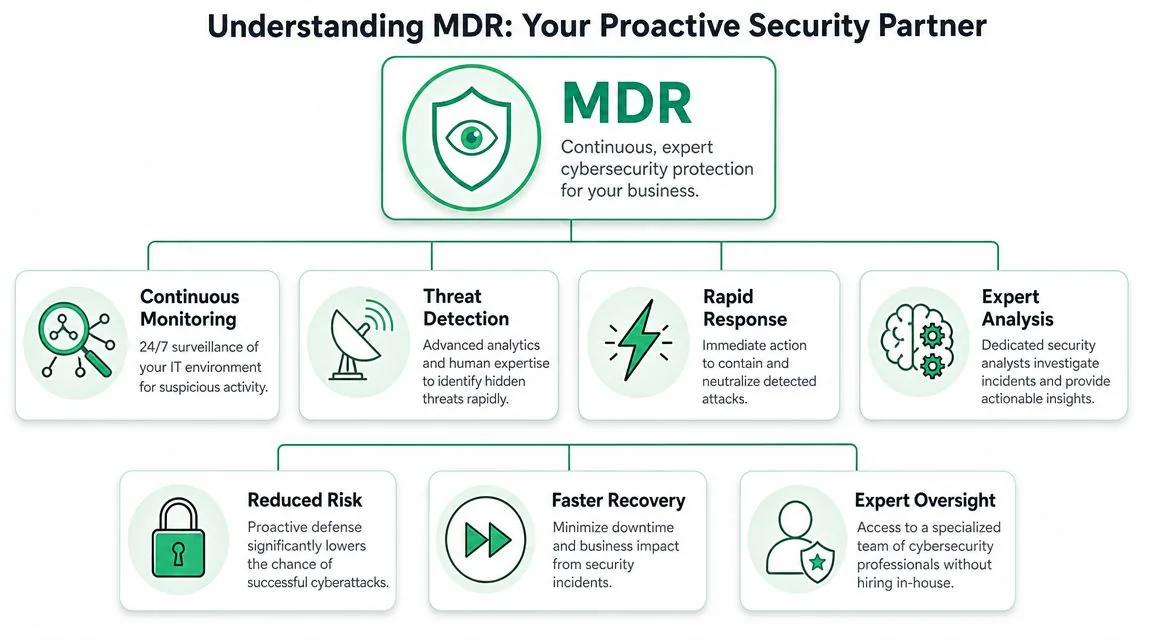
In business terms:
- Your existing security tools are the locks, sensors, and cameras.
- The MDR platform collects and correlates the signals.
- Security analysts act like the control room staff and patrol team.
- Response actions are what happens when they confirm something is wrong.
That matters because most SMEs don't need more raw alerts. They need fewer false alarms and faster decisions.
Here's a simple explainer that shows the idea visually:
What you're actually buying
The operational model behind MDR is built around continuous monitoring, human-led threat validation, and faster response to reduce mean time to detect and mean time to respond, as outlined in Arctic Wolf's MDR glossary. That's why MDR isn't just “better antivirus”. It's a managed security function.
For a Brisbane SME, the practical outputs usually look like this:
- Monitoring across key systems such as endpoints, Microsoft 365, cloud services, email, and identity.
- Analyst review of suspicious activity so your team isn't chasing every low-quality alert.
- Containment guidance or direct response actions when an event is confirmed.
- Incident reporting and follow-up recommendations so the same weakness doesn't stay open.
Good MDR isn't sold as software. It's sold as an operating model.
That difference matters when budgets are tight. Buying another tool often increases alert volume. Buying a managed detection response service should reduce the burden on your team by shifting real operational work to specialists.
How an MDR Service Actually Works
At 7:40 on a Tuesday morning, a Brisbane office manager logs in and finds several Microsoft 365 mailboxes sending phishing emails to customers. Nobody saw the first sign-in overnight. Nobody checked the unusual inbox rules. By the time staff arrive, the problem has shifted from IT to operations, customer trust, and lost time.
That is the gap MDR is built to close. The service collects signals from the systems your business uses every day, filters out the routine noise, and puts a security analyst between your team and a queue of raw alerts.
From signals to decisions
The process starts with telemetry, which is just activity data from systems where attackers tend to show their hand. For most SMEs, that usually means laptops and servers, Microsoft 365 and identity logs, cloud platforms, and email.
One odd sign-in on its own may not justify waking anyone up. A sign-in from an unusual location, followed by mailbox rule changes and a script running on a user device, is a different story. MDR platforms pull those events together so an analyst can judge the pattern, not just the individual alert.
For a Brisbane SME, that matters because your internal IT person is often juggling onboarding, vendor issues, backups, printer problems, and user support. They do not have spare hours to review every suspicious event in context.
What the workflow looks like in practice
A mature MDR service usually runs in this order:
- A security tool or log source records unusual behaviour.
- The MDR platform correlates that event with related activity across endpoints, identities, cloud services, or email.
- An analyst reviews the evidence and decides whether it is harmless, suspicious, or a confirmed incident.
- If the threat is real, the provider starts the agreed response. That may include isolating a device, disabling an account, blocking malicious access, or instructing your IT contact on the next step.
- The provider records what happened, what was contained, and what needs to be fixed so the same weakness does not stay open.
That human review step is where many SME buyers misjudge the service. Detection tools can raise alerts quickly. Good judgement takes context, experience, and clear response authority.
Where the service helps, and where your business still has work to do
MDR does not remove your responsibilities. It reduces the amount of security work your team has to do alone.
If your provider has permission to isolate devices or disable compromised accounts, response is faster. If they can only send an email and wait for approval, the service slows down at the exact point speed matters most. That is a business decision, not just a technical one. Some owners are comfortable giving limited response authority. Others want every action approved. Both approaches are workable, but the trade-off is simple. More approval steps usually mean more delay.
Threat hunting also sits beside alert handling. Instead of waiting for a tool to fire, analysts look for patterns that suggest someone is already inside the environment but has not triggered a high-confidence alarm yet.
A good MDR service answers three business questions fast. Is this real, how serious is it, and who is doing what next?
If you're reviewing your broader incident readiness as well as detection coverage, this guide to threat detection and recovery advice is a sensible companion read. MDR works best when your business already knows who approves containment, who communicates with staff, and how recovery gets handled after the threat is removed.
For SMEs in Brisbane and South East Queensland, that is usually the ultimate test. The service is not just about seeing threats. It is about having a workable operating rhythm at 2 am, during school holidays, or when your one senior IT person is on leave.
MDR vs EDR vs MSSP Explained for SMEs
Small business owners often get pitched three different things at once: EDR, MSSP, and MDR. The acronyms sound close enough that vendors sometimes blur them together. Operationally, they're different purchases.
The decision point most owners care about
The easiest way to separate them is to ask one question:
When an alert fires at 2 am, who owns the next step?
An EDR tool focuses on endpoint telemetry. It can record activity on laptops and servers, detect suspicious behaviour, and sometimes enable containment actions. But it's still a tool. Someone has to review the alert, decide whether it matters, and carry out the response.
A traditional MSSP usually manages security infrastructure more broadly. That can include firewalls, filtering, monitoring platforms, and routine operational tasks. In many cases, the service model is still monitor-and-notify. You get visibility and administration, but the customer often retains more incident response responsibility than expected.
MDR is closer to an outcomes-based service. According to Rapid7's MDR explainer, MDR is a managed service with 24/7 analyst oversight, while EDR focuses on endpoint telemetry and SIEM aggregates logs. The practical difference is what work is outsourced versus what the customer still owns.
For SMEs, that distinction matters more than feature lists.
MDR vs EDR vs MSSP What's the Difference
| Capability | EDR (Endpoint Detection & Response) | Traditional MSSP | MDR (Managed Detection & Response) |
|---|---|---|---|
| Primary focus | Endpoint events on devices | Broad security operations and infrastructure management | Detection, validation, and response to active threats |
| Who watches alerts | Usually your internal IT team or outsourced IT partner | Provider monitors, often across multiple controls | Provider analysts monitor continuously |
| What you usually receive | Alerts, telemetry, investigation tools | Monitoring, administration, reporting, escalations | Investigated incidents and guided or direct response |
| Response ownership | Mostly yours | Shared, but often still largely yours during incidents | More of the response workflow is outsourced |
| Coverage depth | Strong on endpoints, weaker outside them unless paired with other tools | Broad but can be lighter on hands-on incident handling | Built to correlate endpoint, identity, cloud, and email activity |
| Best fit | Teams that already have security expertise in-house | Businesses wanting operational coverage across security tools | SMEs that need 24/7 detection and real incident support |
| Main limitation | Tools don't replace analysts | Breadth can come at the expense of incident depth | Success depends on clear scope, integrations, and response authority |
Here's a practical perspective:
- EDR helps you see what's happening on devices.
- MSSP helps run and watch parts of your security environment.
- MDR helps determine what's real and what to do next.
That's why buying EDR alone often disappoints smaller businesses. The tool may be capable, but the organisation still lacks analyst coverage and a defined response model.
For owners comparing overseas service models as well as local ones, this article on managed security services in Essex is useful because it frames the same operational question from an SME perspective. Don't focus only on brand names or dashboards. Focus on who investigates, who escalates, who contains, and who stays accountable during an incident.
Key Business Benefits for Brisbane and SEQ Organisations
A Brisbane business usually feels a security incident first as an operations problem. Staff lose access to email. A shared file stops opening. The finance manager gets a strange login prompt at 6:10 am, before anyone from IT is online. MDR matters because it shortens the gap between that first sign of trouble and a clear, sensible response.

For Brisbane and SEQ organisations, the benefit is practical. Many SMEs run a mix of Microsoft 365, cloud apps, remote access, mobile devices, and a small internal IT function, or no internal security capability at all. The exposure is spread across identities, inboxes, laptops, and third-party platforms. That changes what good protection looks like.
A legal practice is usually worried about mailbox compromise, partner accounts, and confidential matter files. An accounting firm feels the risk around invoice fraud, client records, and busy periods when staff are under pressure. A medical or dental clinic often cares most about uptime, patient information, and what happens if suspicious activity affects booking systems or reception workflows.
Trades, construction, and field-based businesses have a different set of headaches. Phones get lost. Shared accounts hang around too long. Remote access gets set up quickly because the job has to get done. In those environments, the value of MDR is not theory. It is having someone identify what is real, work out what needs action now, and stop a small issue becoming a day of downtime.
The business case is usually stronger in operations than in technology.
IBM's annual Cost of a Data Breach report consistently finds that organisations with stronger detection and response capabilities reduce the cost and duration of breach events. For an SME, that translates into fewer hours of confusion, less interruption to client work, and a better chance of containing an issue before it spreads into email, file access, finance systems, or customer data.
Here is what that means in practice for a Brisbane SME:
- Less time wasted on false alarms. Internal IT staff and office managers do not have to guess which alerts matter and which ones can wait.
- Faster decisions during an incident. Good MDR services investigate, triage, and escalate with context, so your team is not starting from scratch under pressure.
- Better coverage for hybrid work. Protection follows users, identities, devices, and cloud services, not just the office firewall.
- A more realistic staffing model. Hiring and retaining a full in-house security team is out of reach for many SMEs. MDR gives access to analysts without carrying that headcount.
- Clearer budgeting. A predictable service cost is easier to plan for than the financial hit of downtime, urgent recovery work, legal advice, and client communication after an avoidable incident.
There are trade-offs. MDR is not a substitute for patching, backups, access controls, or staff training. It also works best when the provider has clear authority, enough visibility into your environment, and a documented escalation path. If those pieces are vague, response slows down and the service becomes expensive noise.
Some businesses buy MDR through an existing IT provider. Others use a specialist security firm. Others bundle it into a broader support arrangement. Bridge IT Solutions, for example, provides managed IT and cybersecurity support for Brisbane and SEQ organisations, and that broader service model can affect how well monitoring, escalation, and incident handling fit into day-to-day operations. If you are comparing options, it helps to understand what a managed IT services provider should actually cover for an SME before you decide who should own security monitoring.
For a local business owner, the core question is simple. If something suspicious happens at 2:00 am, who is watching, who is investigating, and what happens before your team logs on in the morning?
Choosing the Right MDR Provider A Checklist for SMEs
The wrong way to choose an MDR provider is to ask who has the flashiest portal. The right way is to test whether they can support your business when something confusing and time-sensitive happens.
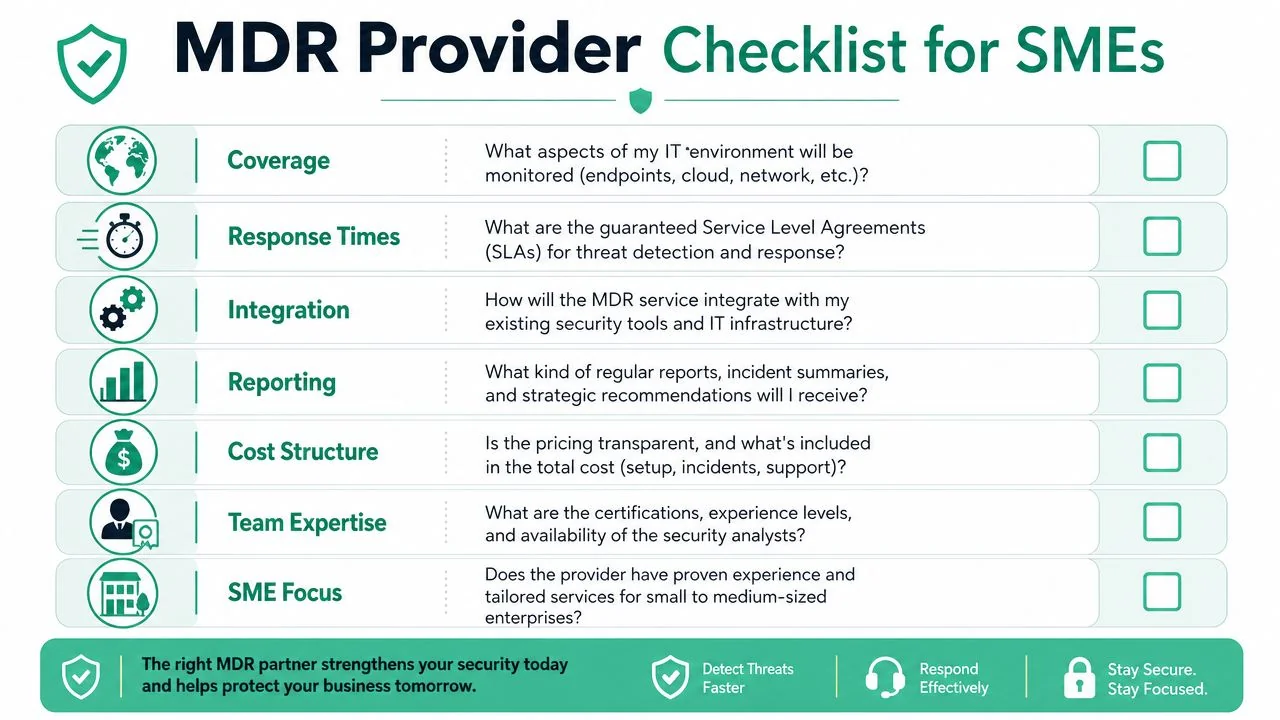
Questions worth asking before you sign
Start with scope. Many disappointments happen because the business thought “everything” was covered, while the provider meant only endpoints.
- What parts of our environment are monitored? Ask specifically about endpoints, Microsoft 365, identity, cloud platforms, email, and network visibility.
- What happens during an incident? Get them to describe the steps, not just the SLA language.
- Who contacts us, and how? You want named escalation paths and clear communication methods.
- What can you do directly, and what requires our approval? Containment speed often hinges on these distinctions.
- How do you integrate with what we already use? Microsoft 365, existing endpoint tools, firewalls, backup systems, and remote management platforms all matter.
- What reporting do we receive? You want incident summaries, trends, and recommendations that a business owner can understand.
- How is pricing structured? Ask what's included, what triggers extra cost, and whether incident support is capped.
A provider that answers these clearly usually runs a cleaner service.
For broader vendor evaluation, this guide on choosing a managed IT services provider is also useful because many of the same buying disciplines apply. Clarity, accountability, integration, and communication matter just as much as technical tooling.
Red flags to watch for
Some warning signs show up early if you know what to ask.
Buyer check: If a provider can explain the technology in detail but can't explain who does what during a live incident, keep looking.
Watch for these problems:
- Vague promises about “AI-driven security”. Automation helps, but analyst involvement and response workflow are what you're buying.
- No clear line on customer responsibilities. If ownership is fuzzy, incidents get slow.
- Weak onboarding questions. A serious provider should ask about your users, systems, risk areas, and existing controls.
- Reporting that's too technical or too thin. You need actionable summaries, not raw logs and screenshots.
- Hidden boundaries. Some services monitor after hours but won't contain without separate approvals or added fees.
The best fit for an SME is usually the provider that can explain complex security work in plain English without watering it down. If they can't make it understandable before the contract, they probably won't make it understandable during a real incident either.
Your Next Steps Towards 24/7 Security
For most Brisbane SMEs, the issue isn't whether cyber risk exists. It's whether the business has a realistic operating model to deal with it outside business hours, during staff leave, and under pressure.
That's where managed detection response fits. It bridges the gap between basic security tooling and a full in-house security team. You keep the systems you rely on. You add continuous monitoring, analyst validation, and a defined response path.
The businesses that get the most value from MDR aren't always the biggest. They're often the ones that know their internal team is already stretched, their cloud footprint has grown, and their tolerance for downtime is low.
If you're assessing your current posture, start with a few direct questions. Which systems are monitored after hours? Who validates suspicious activity? Who has authority to contain an incident? How quickly would your team know the difference between a nuisance alert and a real compromise?
A practical first step is to map your current risks and gaps with a cyber assessment form. That gives you something concrete to work from before you compare vendors, tools, or service models.
If you want a plain-English discussion about your current setup, Bridge IT Solutions can help you review where your monitoring, response responsibilities, and security gaps sit today. It's a low-pressure way to work out whether managed detection response makes sense for your business, your team, and your budget.
