

If you're still handing out keys, chasing fobs, or wondering whether a former staff member can still get into the office after hours, you're not dealing with a small admin issue. You're dealing with a security design problem.
That problem shows up in ordinary ways. A receptionist leaves and never returns the side-door key. A contractor needs access for two weeks, then finishes early. A practice manager wants cleaner records for compliance, but the only answer today is “someone must have let them in”. For a lot of Brisbane businesses, that's the point where locks stop being enough.
Access control systems solve that by turning entry into a managed business process instead of a guess. They let you decide who gets in, where they can go, when they can enter, and what record gets created every time they try. That matters because access is no longer just about the front door. It touches privacy, staff turnover, visitor management, server rooms, stock areas, and after-hours safety. The broader market reflects that shift. The global access control market is projected to reach USD 17.30 billion by 2030, driven by heightened security threats and stricter regulatory demands for secure infrastructure in small and medium organisations, according to Fortune Business Insights on the access control market.
Physical security also works best as part of a wider defence strategy. If you're reviewing doors, credentials, and audit trails, it's worth thinking in terms of layers rather than isolated fixes, which is the same principle behind a layered approach to cybersecurity.
Table of Contents
- Securing Your Business Beyond a Simple Lock and Key
- What Is an Access Control System
- Comparing Access Control System Types
- Why Your SEQ Business Needs More Than Just a Lock
- How to Choose the Right System for Your Business
- Deploying and Managing Your System in Brisbane
- Take Control of Your Business Security Today
Securing Your Business Beyond a Simple Lock and Key
A simple lock works until the day it doesn't. That's usually when a business owner discovers how little control they have. Keys get copied. Staff change roles. Tenants share space. No one can say with confidence who entered, when they entered, or whether access should still be active.
In Brisbane and across South East Queensland, that usually happens during a growth step. A second office opens. A clinic adds more consulting rooms. A trade business needs separate access for workshop staff, office staff, and suppliers. Suddenly the old setup becomes awkward, expensive, and risky all at once.
Where traditional keys start to fail
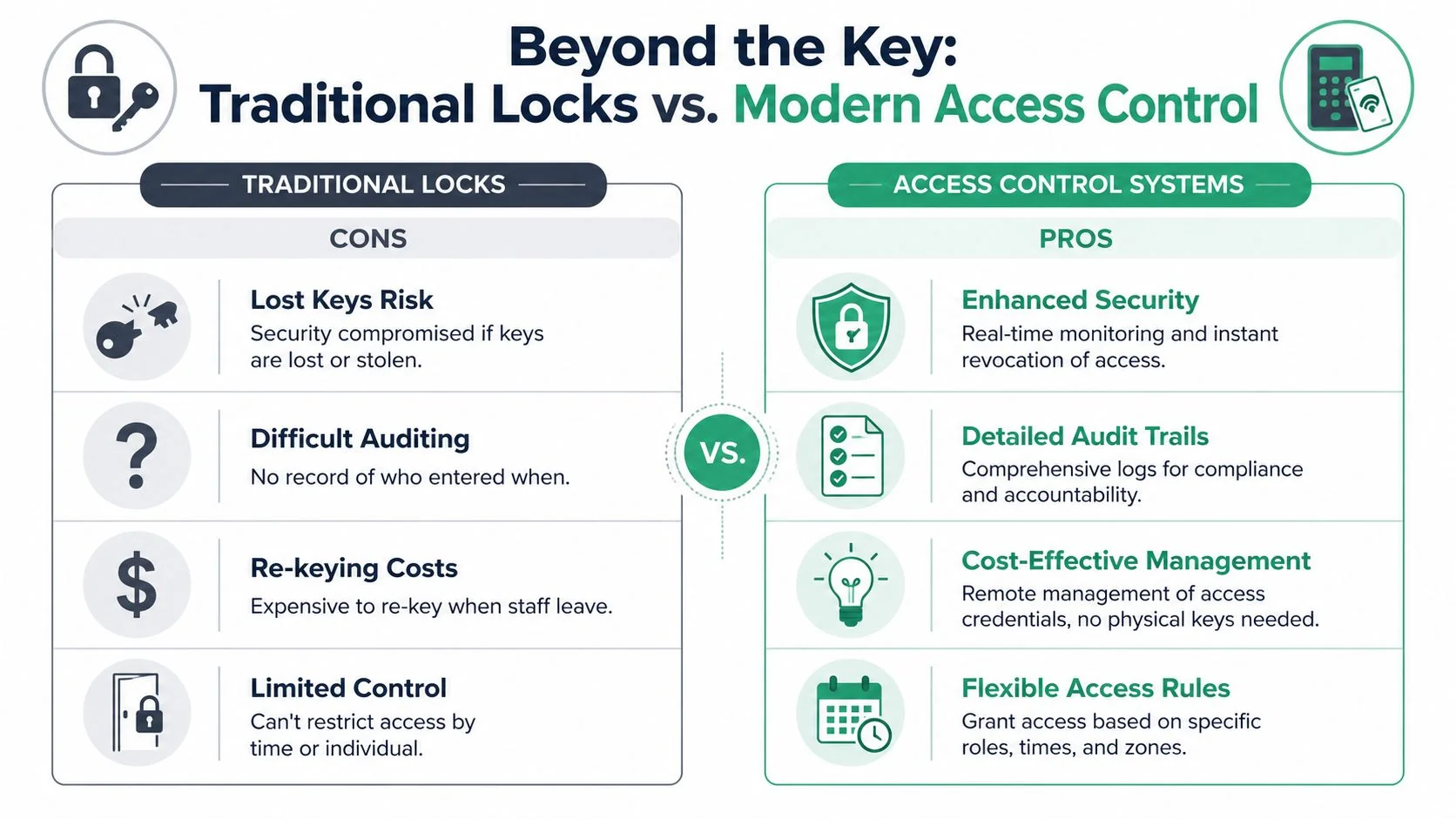
Traditional locks give you a blunt instrument. You can lock or open a door, but you can't apply business rules. You can't say the bookkeeper gets weekday access, the cleaner gets evening access, and the contractor loses entry automatically after Friday. You also can't create a reliable audit trail from a brass key.
That's why access control systems are no longer just for large corporates. They're becoming a practical upgrade for smaller firms that need cleaner operations, tighter compliance, and less dependence on memory.
Practical rule: If losing one key would force you to re-key part of the premises, you've already outgrown a key-only setup.
A better way to manage entry
A proper system gives you controlled credentials, event logs, and rules based on role, time, and location. It also gives managers a process for onboarding and offboarding that isn't held together by sticky notes, key tags, and assumptions.
For a business owner, the benefit is clarity. You know who has access. You know how to remove it. You know what happened if there's a dispute. That's a very different position from hoping everyone handed their keys back.
What Is an Access Control System
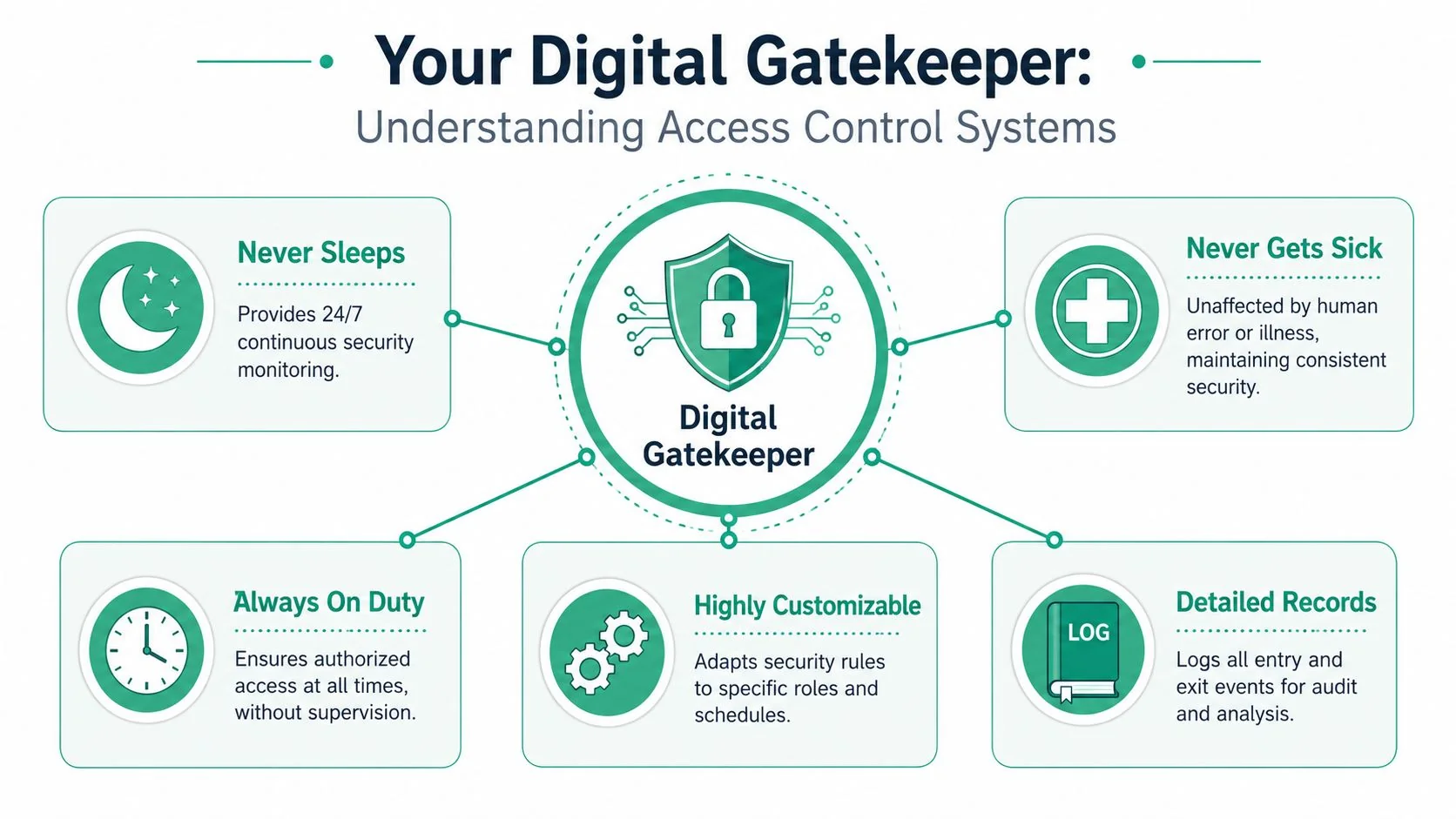
An access control system is a digital gatekeeper for your premises. Instead of relying on a physical key that anyone can copy or lose, it checks a person's credential against a set of rules and then decides whether the door should open.
That sounds technical, but the idea is straightforward. A staff member presents a card, phone, PIN, or biometric factor. The system checks whether that person is allowed through that door at that time. If the answer is yes, the lock releases. If it's no, the door stays secure and the event can be recorded.
Think of it as a digital gatekeeper
The value isn't just that the door opens electronically. The value is that the system applies decisions consistently. It doesn't forget that a casual staff member should only enter during rostered hours. It doesn't overlook that the records room should stay restricted. It doesn't need someone at reception to make a judgement call.
Modern systems also go further than a swipe card at the door. Many now use multi-factor methods, and data cited by FacilityOS on physical access control shows that integrating smart locks with real-time sensors can reduce unauthorised entry attempts by 45% compared with traditional card-only systems.
If you're also looking at doors as part of a wider building setup, this overview of smart security integrations is useful because it shows how access can connect with adjacent systems rather than sit in isolation. On the IT side, those integrations only work well if the underlying network is solid, which is why network security planning belongs in the conversation early.
The four parts that matter
Most business-grade access control systems come down to four core pieces:
Credentials
This is the digital key. It might be a card, fob, mobile credential, PIN, or biometric factor. In a dental clinic, that could mean staff use a card for the main entrance while the practice manager uses an additional factor for the drug storage area.Readers
The reader is the device at the door that receives the credential. Some are basic card readers. Others support mobile credentials, PIN pads, or biometrics.Controllers
This is the decision point. The controller checks permissions and tells the lock what to do. Good controller design matters more than many buyers realise, because it affects speed, resilience, and what happens when other parts of the system fail.Software
With software, managers add users, change permissions, review logs, and handle reports. For a small accounting firm, software is what makes it easy to remove access the same day someone leaves.
The best systems don't just unlock doors. They make access decisions repeatable, reviewable, and easy to administer.
When those four pieces are designed properly, you get a system that supports daily operations instead of creating another admin burden.
Comparing Access Control System Types
A Brisbane business with 20 staff, one front entry, a roller door, and a stock room does not need the same access control design as a medical practice with treatment rooms, contractors, and after-hours cleaning. That is why the first decision is system architecture, not brand.
The practical choice usually comes down to three models. Standalone, networked on-premises, or cloud-managed. Each one changes how the system behaves during an internet outage, how much admin time it needs, and how easy it is to expand later.
Standalone systems
Standalone systems suit narrow, contained jobs. A single comms room, a plant area, or one internal door where you only need basic credential control can justify a simple setup.
They are usually cheaper to install and easier to understand at the start. The trade-off shows up later. User changes are manual, reporting is limited, and managing multiple doors quickly becomes awkward. For a business that expects staff turnover, shifting access hours, or more than one protected area, standalone often creates more admin than it saves.
Networked and cloud-managed systems
Networked on-premises systems keep management and decision-making tied closely to local infrastructure. That makes them a good fit for sites that want tighter control, stronger local resilience, or integration with other systems already running on site. If the internet drops, a well-designed on-premises setup can usually keep core door functions operating normally because the controller is still making local decisions.
Cloud-managed systems reduce the burden on internal IT and make remote administration far easier. Managers can add users, revoke credentials, check events, and handle multiple locations without being in the office. For growing businesses across Brisbane and the wider region, that operational convenience matters.
The trade-off is dependency. Cloud systems still need a properly designed local network and a clear understanding of what happens if connectivity fails. Door behaviour during outages, local cache, controller intelligence, and mobile credential fallback should be checked before purchase. A weak wireless setup can also create unnecessary support issues, which is why business-grade Wi-Fi for offices often needs attention at the same time.
Analysts at MarketsandMarkets on the access control market expect strong growth in software and hybrid models. That lines up with what we see on projects. Many SMBs want cloud convenience, but they also want local decision-making at the door if the internet goes down.
For a plain-English external comparison of where modern access control systems fit in commercial environments, that GM Group Services overview is a useful companion read. It frames the decision around day-to-day operations, not just hardware features.
Access Control System Types Compared
| Feature | Standalone System | Networked (On-Premises) | Cloud-Managed System |
|---|---|---|---|
| Best fit | Single door or isolated area | Multi-door sites with local control needs | Multi-site or growing businesses |
| Initial setup | Usually simpler | More involved design and setup | Moderate setup with platform configuration |
| Ongoing management | Manual and limited | Managed on local infrastructure | Managed through a web portal or app |
| Remote access | Rare | Possible, but usually needs extra setup | Usually built in |
| Audit reporting | Basic or limited | Stronger reporting and policy control | Strong reporting with easier remote review |
| Scalability | Poor once requirements grow | Good if designed properly | Very good for expanding teams and sites |
| Internet dependency | Low | Lower for core local decisions | Varies by design and vendor |
| Internal IT burden | Low at first, awkward later | Higher | Lower for most SMBs |
Cheap systems get expensive when the business outgrows them.
A workshop in Geebung with one secure store room can often justify a simple approach. A professional office in the CBD, or a clinic managing staff, cleaners, and contractors, usually needs central administration, better reporting, and clear rules for who can enter where and when. The right system is the one your team can run reliably with the IT time, network quality, and compliance pressure you have.
Why Your SEQ Business Needs More Than Just a Lock
A lot of business owners still approach access control as a door problem. Lock the entrance. Restrict the stock room. Replace keys with cards. That's only part of the picture.
The stronger business case is identity governance. Who should have access? To which spaces? At what times? Who reviews that access? What record exists after the fact? Those are management questions, not just hardware questions.
The real value is governance
That distinction matters most in professional services, healthcare, and any business handling sensitive information. Guidance highlighted by acre security on healthcare access control puts the emphasis on audit logs, role definitions, and access reviews, not just badges or biometrics. That's a better lens for SMEs because it ties the system to risk reduction rather than novelty.
If you run a clinic, for example, the key issue may be proving that only approved staff can enter specific areas. If you run an accounting or legal office, the issue may be after-hours access, contractor control, and a clear log if something needs investigation.
Where businesses feel the difference
The operational benefits usually show up in a few places first:
Staff changes
Access can be granted and revoked without collecting keys or re-keying doors.Visitor and contractor handling
Temporary permissions are easier to manage when they're tied to a role, schedule, or expiry.Compliance and accountability
A proper event history gives managers something more useful than guesswork when reviewing incidents.Protection of sensitive areas
Not every employee should reach every room. Access control systems let you apply least-privilege thinking to the physical workplace.
Access control earns its keep when it removes ambiguity. Managers stop asking who might have had access and start checking who did.
That's why the purchase shouldn't be framed as “new locks”. It should be framed as controlled access, cleaner offboarding, and a defensible record of what happened.
How to Choose the Right System for Your Business
Most poor access control decisions start with a product demo. The screen looks polished. Mobile access sounds convenient. A vendor promises it can do everything. None of that tells you whether the system fits your business.
The better approach is to start with operating conditions. How many doors matter today? Which spaces carry the highest risk? Who will manage users every week, not just during installation? Those answers shape the right design far more than a feature list.
Start with operations, not features
Use this checklist before you compare vendors:
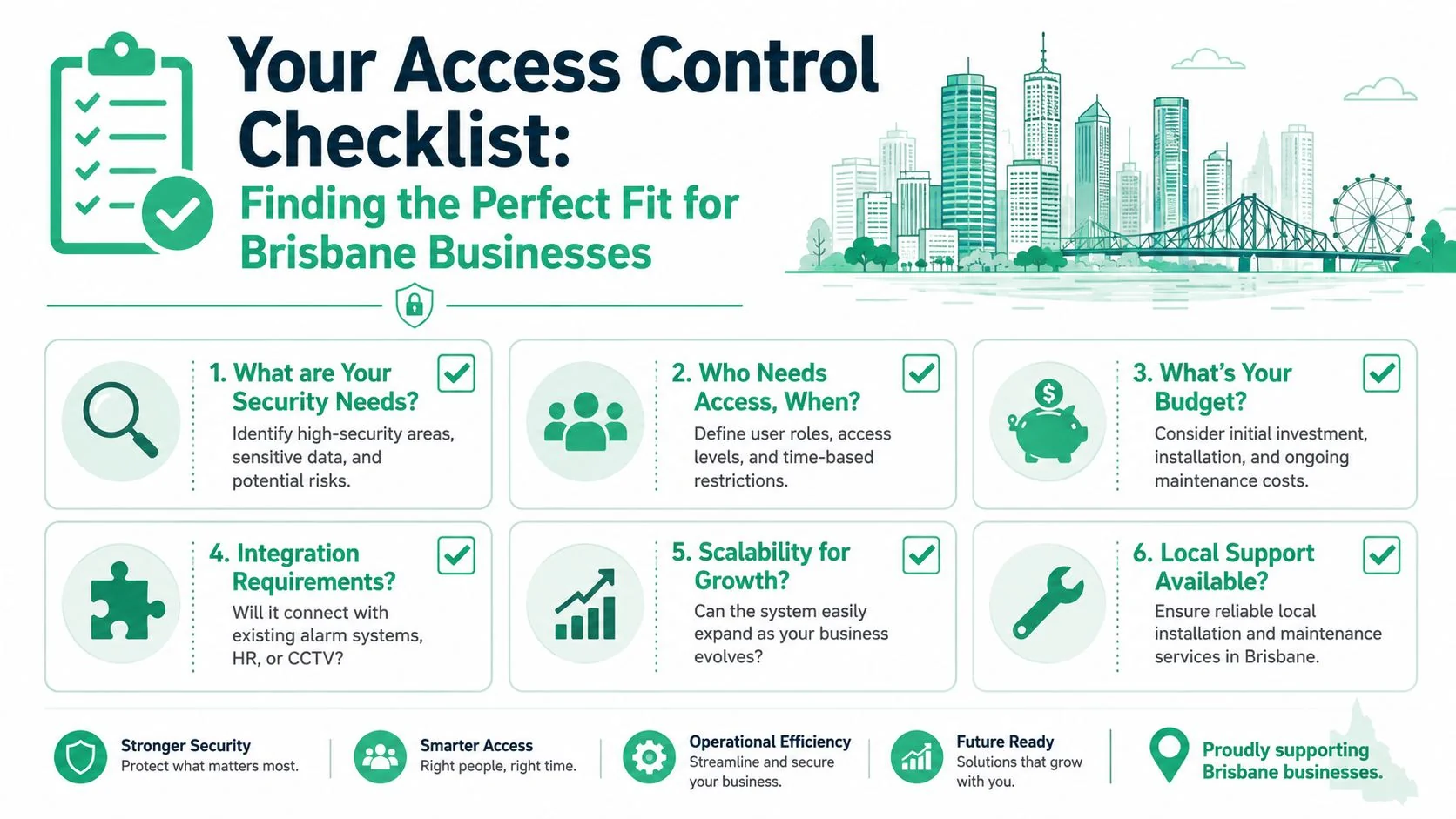
Map the doors that matter
Not every opening needs the same treatment. Front entry, server rooms, medical storage, records rooms, and workshop stores usually deserve different policies.Define people by role, not by exception
If every user gets a custom setup, administration becomes messy fast. Start with role groups such as admin staff, clinicians, contractors, warehouse staff, or cleaners.Check your tolerance for downtime
Many small businesses frequently underbuy here. If the internet drops or the management server is unavailable, what still needs to work?List required integrations early
CCTV, alarm panels, visitor management, HR systems, and building controls can all affect product choice.
A useful reference point here is architecture. For Brisbane firms, systems based on open standards like ONVIF can reduce integration costs by approximately 30% compared with proprietary architectures, and edge-based controllers keep door decisions working even if the central server is offline, according to the ONVIF Access Control Service Specification.
That offline resilience point matters more than most brochures admit. If your practice, office, or warehouse can't tolerate a front door failing open or failing unusable because one service is down, you need to ask harder questions about controller design.
A short explainer can help visualise the buying process before you get into final selection:
Questions that prevent expensive mistakes
Ask these in plain language during vendor discussions:
What works if the internet is down?
Don't accept a vague answer. Ask whether doors can still validate credentials locally.Who manages adds, moves, and removals?
If the process is clumsy, your team won't keep permissions current.How easy is it to review access history?
A log that exists but can't be searched usefully won't help much.Can the system expand without replacement?
A small business today may still need more doors or another site later.Will it integrate cleanly with existing infrastructure?
That includes network design, alarms, and cabling. In practice, a managed provider such as Bridge IT Solutions often collaborates with your electrician, security installer, or facilities team on this, depending on the project scope.
Buy for the environment you operate in on a bad day, not the demo you saw on a good day.
Deploying and Managing Your System in Brisbane
A well-chosen system can still fail in rollout. Most deployment issues come from rushed site surveys, poor cabling decisions, weak user planning, or unclear ownership after handover.
The cleaner approach is staged and practical.
What a proper rollout looks like
A typical deployment moves through four steps:
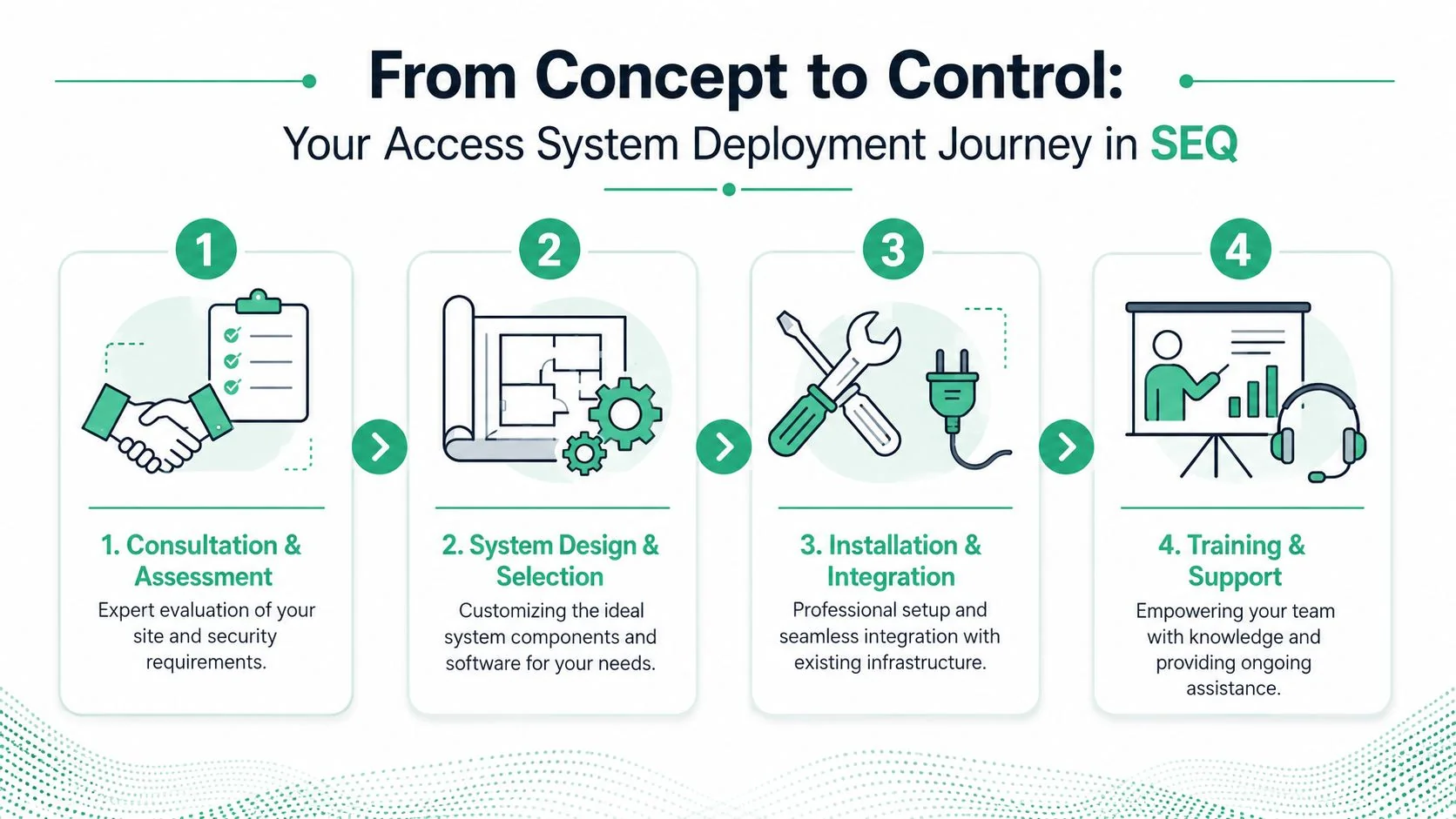
Consultation and assessment
The site gets reviewed for doors, user groups, lock hardware, network availability, and risk points. Weak assumptions should get caught during this review.System design and selection
Hardware, credentials, controller placement, and management software are matched to the way the business runs.Installation and integration
Readers, locks, cabling, controllers, and software are installed and tested as one system, not as separate pieces.Training and support
Managers need to know how to add users, remove access, run reports, and handle exceptions.
A Brisbane rollout also needs local realities in mind. Multi-tenant buildings, mixed-use sites, patchy legacy wiring, and limited onsite IT support can all affect design choices. Police-checked technicians and clear handover documentation matter because access control touches both security and daily operations.
Management after go-live
Once the system is live, the primary work is governance. Businesses should review who has access, whether old credentials are still active, and whether logs are being checked when incidents occur.
Good ongoing management usually includes:
Regular access reviews
Confirm current staff, contractors, and temporary users still need the permissions they have.Firmware and software updates
The platform should stay current, especially where it connects to your wider network.Change control
Record who approved access rule changes and why.Support ownership
Decide whether your internal team, IT provider, or security integrator handles day-to-day administration and escalations.
The installation is the easy part. The discipline to keep permissions current is what makes the system effective six months later.
Take Control of Your Business Security Today
A Brisbane business usually reaches this point after a near miss. A former staff member still has a fob. A storeroom key has been copied. A manager cannot confirm who entered a restricted area after hours. At that stage, access control stops being a wish list item and becomes an operations decision.
A well-chosen system gives you control over entry, staff changes, sensitive spaces, and audit trails without creating more admin than your team can handle. The key decision is architecture. Standalone, on-premises, cloud-managed, and hybrid setups can all work, but each one suits a different mix of risk, budget, compliance needs, and internal IT capacity.
For Brisbane SMBs, the better questions are practical ones. What still works if the internet drops out? Who will manage user changes each week? Which doors justify tighter rules, and which ones do not? What records will you need if there is an incident, a dispute, or a compliance check? Answering those questions leads to a better decision than feature shopping.
Good results also depend on the building itself. Cabling quality, power availability, door hardware, network reliability, and integration planning all shape how dependable the system will be six months from now, not just on install day. If you want a useful reference on that side of the project, AdVoltage Electrical's cabling guide is worth reading before a major fit-out or upgrade.
In practice, the best system is usually the one that keeps operating under local conditions, fits your compliance obligations, and can be managed confidently by the people you already have.
If you're ready to replace keys, tighten access, and choose a system that fits the way your business operates, speak with Bridge IT Solutions. The team works with Brisbane and SEQ organisations on practical technology decisions, including secure access design, network readiness, and ongoing support, so you can upgrade without overbuying or creating avoidable complexity.
