

It's a normal Brisbane workday. Staff are in Microsoft 365, someone's on the office Wi-Fi, another person is logging in from home, and your line-of-business app is humming along. Nothing looks wrong. That's exactly why many small businesses miss the early stages of a breach.
Most attacks don't begin with alarms and flashing lights. They begin with a stolen password, an unusual sign-in, a remote connection that shouldn't be there, or a quiet data transfer out of the business. If you're only relying on a firewall to block obvious threats, you may still have no visibility into what's happening inside your own environment.
That's where network security monitoring comes in. Think of it less like a lock on the front door and more like digital CCTV for your business. It helps you see suspicious activity across your network, cloud services, remote access, and internal systems so you can respond before a problem turns into a business interruption, fraud event, or data loss issue.
Table of Contents
- Your Business Is a Target What Are You Watching For
- Beyond Firewalls A Look Inside Your Digital Walls
- The Building Blocks of Network Visibility
- A Realistic Deployment Plan for Your Business
- Translating Security Alerts into Business Risks
- The Smart SMBs Choice Managed vs DIY Security
- Your Next Steps to a More Secure Network
Your Business Is a Target What Are You Watching For
A common small business scenario goes like this. A staff member receives an email that looks genuine, enters credentials into the wrong page, and keeps working. Nobody notices. Hours later, someone logs in from an unexpected location, reads email, looks through folders, and starts using that account to reach other systems.
The business keeps operating, but the attacker is already inside.
That's why network security monitoring matters. It's not only about blocking bad traffic at the perimeter. It's about watching for behaviour that doesn't fit your normal pattern. That might be a mailbox rule you didn't create, a VPN session at an odd time, a device talking to systems it never normally touches, or a burst of outbound traffic that needs checking.
In Australia, the risk is not theoretical. In the ACSC's Annual Cyber Threat Report 2023–24, Australians reported over 87,400 cybercrime incidents, with a median self-reported loss per incident for businesses of A$30,000, and 28% of incidents involved business email compromise, according to this summary of the ACSC reporting and its relevance to monitoring. For a Brisbane SMB, that's a strong argument for monitoring email, identity, and network activity together instead of treating them as separate problems.

A lot of owners still think in terms of prevention only. Good cyber security does start with prevention, but small businesses also need visibility when something slips through. That's especially true if your team uses cloud apps, works remotely, shares files externally, or relies on email for approvals and payments.
Practical rule: If your business can't answer “who logged in, from where, and what they accessed” after an incident, you don't have enough monitoring.
The uncomfortable reality is that small organisations often have the same exposure points as larger ones, just without the same internal security team. If that sounds familiar, it's worth reviewing these common cybersecurity failure points for small businesses, because monitoring only works when it sits inside a broader security approach.
Beyond Firewalls A Look Inside Your Digital Walls
A firewall is important. It checks traffic at the gate and decides what should be allowed in or out. But once a user is authenticated, a device is connected, or a cloud service is trusted, the firewall alone won't tell you much about whether the activity is legitimate.
That gap is where network security monitoring earns its keep.
The security guard analogy
Think about a commercial building. The front desk checks visitors. That's your firewall. But a proper security operation doesn't stop there. It also uses cameras in hallways, access logs for restricted rooms, and patrols through internal areas where someone could move after getting through the front door.
Your network works the same way. You need visibility at the edge, but you also need visibility inside.
Basic network monitoring asks operational questions. Is the internet up? Is the server reachable? Is the switch online? Those are useful checks for uptime and support.
Security monitoring asks different questions:
- Who signed in unexpectedly
- Which device started reaching systems it never normally uses
- Whether a remote session looks abnormal
- Why a user account suddenly generated suspicious outbound activity
That difference matters because many real incidents don't begin with a dramatic outage. They begin with behaviour that only looks strange when you compare it against what's normal for your business.
What good monitoring is actually doing
A good monitoring setup collects information from different places, lines it up into a timeline, and helps someone decide whether the event is harmless or a sign of compromise. In a small business, that often means looking at identity activity, firewall events, remote access logs, endpoint alerts, and cloud service activity together.
A firewall blocks. Monitoring observes, correlates, and helps you respond.
If you're trying to understand this in practical terms, stop thinking about one appliance or one dashboard. Think about an operating capability. Someone needs to collect the right data, tune alerts so staff aren't flooded with noise, review what matters, and investigate quickly when something looks wrong.
That's also why a lot of off-the-shelf setups disappoint. Businesses buy a tool and expect the tool to create outcomes. It won't. Without context, tuning, and follow-up, you just end up with more notifications.
For a plain-English view of how perimeter protection fits into a wider defence posture, Bridge IT's overview of network security services for business environments is a useful starting point. It helps frame the idea that protection at the edge is necessary, but not sufficient.
The Building Blocks of Network Visibility
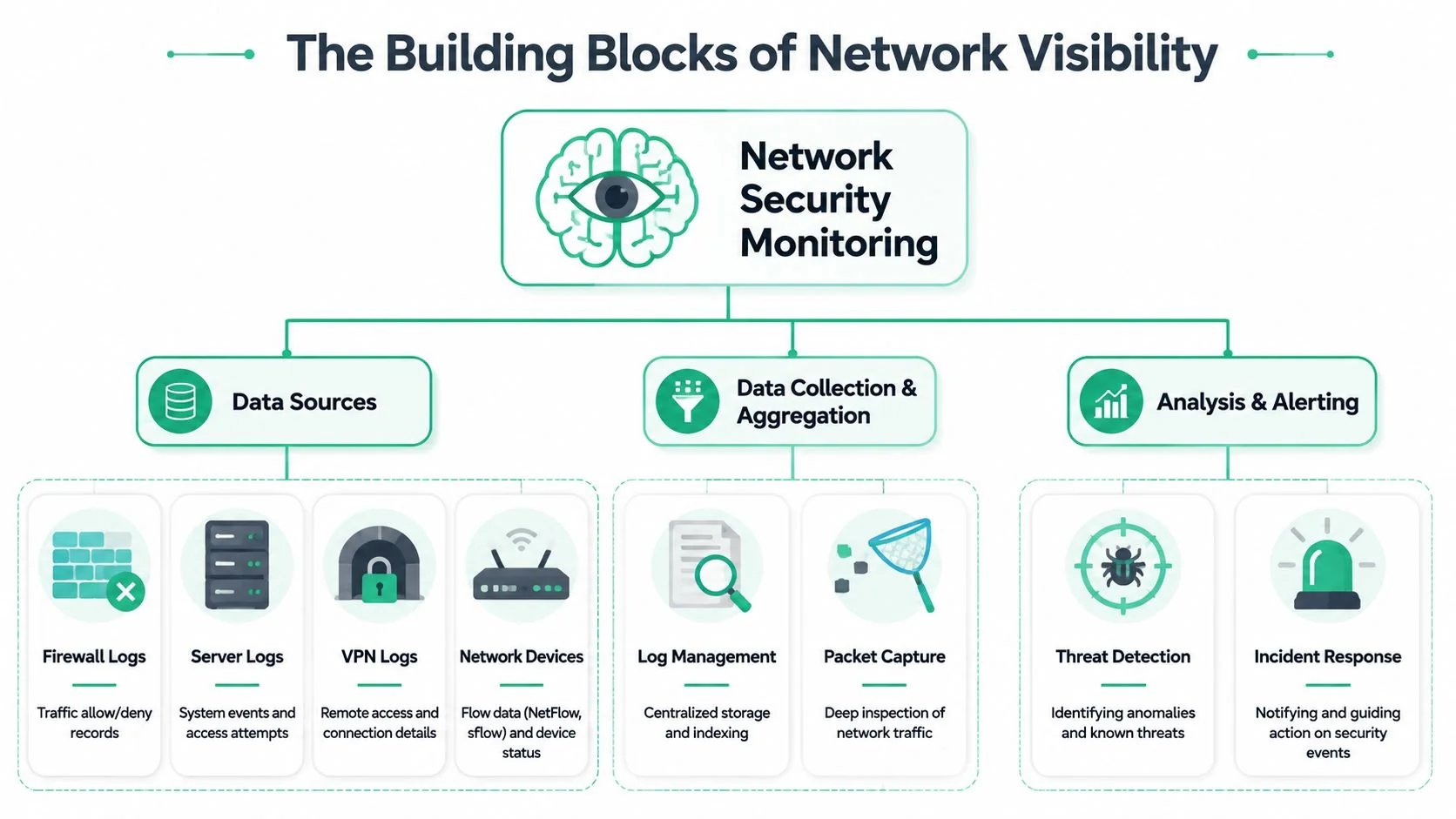
Small businesses often hear terms like SIEM, log collection, event correlation, and behavioural analytics, then switch off because it sounds like enterprise-only jargon. The practical version is much simpler. Useful monitoring has three jobs. Gather evidence, line it up, and flag what deserves attention.
What useful telemetry actually looks like
The most useful starting point isn't packet capture everywhere. It's a layered mix of firewall logs, VPN logs, networking-device logs, and proxy logs. Cisco's ESG research notes that this mix gives security teams enough context to correlate identity, path, and content signals rather than treating every alert in isolation, as outlined in this Cisco research summary on NSM telemetry.
For Brisbane SMBs, that matters because your environment is usually fragmented by default. You might have office staff, remote workers, cloud applications, a business-grade firewall, Microsoft 365, and a few specialised systems that nobody wants touched unless there's a problem. Each part generates a piece of the story. On its own, each piece is weak. Combined, it becomes useful.
A sensible monitoring stack usually draws from:
- Firewall logs that show allowed and blocked traffic, policy hits, and outbound connections
- VPN logs that show who connected remotely, when they connected, and whether the pattern fits
- Switch and router logs that help identify path changes, internal movement, or device issues
- Proxy or web filtering logs that add browsing and access context
Here's a short explainer if you want to see how vendors describe the collection side of this work:
How the flow works in practice
The process usually works in three stages.
| Stage | What happens | Why it matters |
|---|---|---|
| Data collection | Logs and events are gathered from security and network systems | You can't investigate what you never recorded |
| Centralised analysis | A SIEM or similar platform brings events into one place | Separate alerts start to form a timeline |
| Alerting and response | Rules and analyst review decide what needs action | Staff get fewer, better alerts |
Most small businesses get the first part half right. They have logs, but they're scattered. The second part is where value starts. Centralising events lets you compare a remote sign-in, a firewall event, and a suspicious web request in one view instead of chasing screenshots from different systems.
Preserve a separate copy of monitoring data. If an attacker gains access, you don't want them deleting the evidence from the same system they compromised.
The final point is the one many buyers underestimate. Monitoring doesn't work because data exists. It works because someone can distinguish a routine event from a meaningful deviation and act on it fast enough to matter.
A Realistic Deployment Plan for Your Business
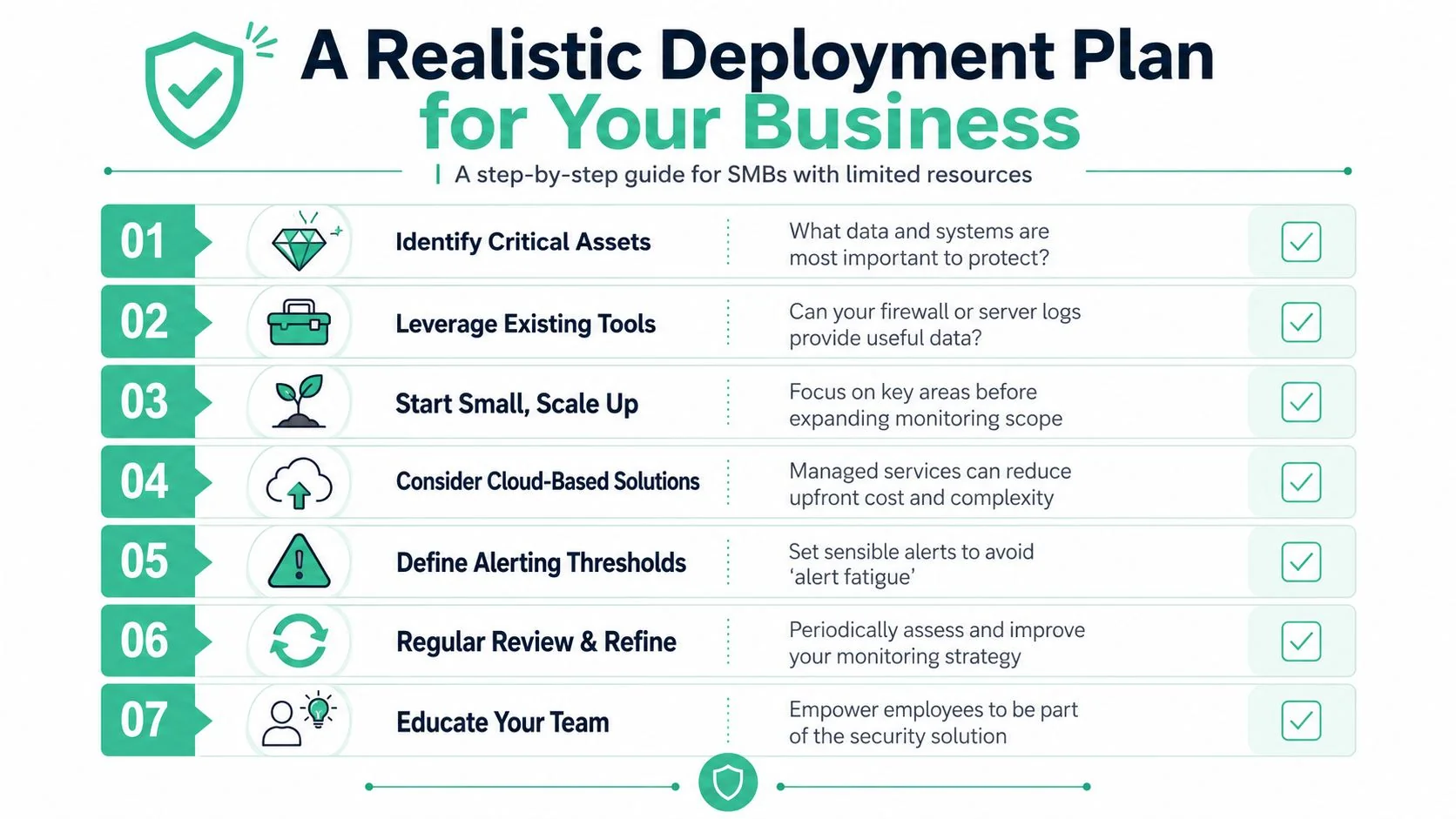
A realistic rollout starts with one question. If someone got into your business tomorrow, where would you see it first.
For most Brisbane small and mid-sized businesses, the answer is not a dedicated security team watching a wall of screens. It is usually a mix of firewall logs, Microsoft 365 alerts, endpoint tools, and whatever your IT provider already collects. That is fine as a starting point. The mistake is trying to buy an enterprise-style setup before you have people, process, and budget to run it properly.
One blind spot causes trouble again and again. Attackers rarely stop at the first device or account they reach. They move between systems, look for admin access, and head toward email, finance platforms, file shares, and customer data. Corelight explains this clearly in its overview of strategic sensor placement. Internal segment boundaries, cloud links, and remote-access points often show the signs that a perimeter firewall misses.
What to monitor first
Start with the controls you already own and the attack paths that matter to your business.
Firewall activity
Centralise firewall logs first. Look for denied traffic, unusual outbound connections, changes to rules, and repeated connection attempts from unfamiliar sources. This gives you useful visibility quickly, without adding another project.
Remote access and identity
Watch VPN logins, Microsoft 365 sign-ins, remote desktop gateways, and MFA failures. In many Brisbane SMB incidents, the first real warning is an account doing something unusual after hours or from a device nobody can verify.
Admin actions
Monitor changes to privileged accounts, security settings, conditional access policies, mailbox rules, and forwarding rules. These events deserve attention because they often show deliberate hands-on activity, not background noise.
Start where an attacker is most likely to get in, gain control, and reach sensitive data.
What to add next
Once those basics are stable, add visibility that helps confirm whether suspicious activity is a real incident or just a noisy alert.
- Endpoint detection tools show what happened on laptops and servers, including suspicious processes, persistence attempts, and signs of malware.
- Internal segment monitoring helps catch movement between office networks, servers, warehouse systems, and any isolated environment that holds sensitive data.
- Cloud service logs matter more as your staff rely more on Microsoft 365, SharePoint, Teams, Xero, and hosted line-of-business platforms.
Encrypted traffic complicates this stage. Small businesses often assume more inspection automatically means better security. In practice, full decryption can create privacy issues, certificate headaches, performance problems, and extra support load when business apps break. A better approach is selective visibility. Review DNS, SNI, firewall metadata, endpoint events, identity logs, and traffic to risky destinations before committing to a broad decryption project.
This is also the point where operating model matters more than tooling. Someone has to review alerts, tune false positives, keep log sources healthy, and decide what needs action at 2 am or on a public holiday. For many firms, managed monitoring is the practical answer because the gap isn't hardware. It is time and specialist coverage. Some businesses use purpose-built business technology solutions as part of that setup, but the appliance is only one piece of the job.
What can wait
Some capabilities are useful later, but they should not delay the first phase.
- Full packet capture across every site creates large storage costs and more data than a small team can reasonably review.
- Broad SSL decryption projects can wait until you know which systems justify the effort and risk.
- Highly customised correlation rules work better after you understand normal behaviour in your own environment.
The best deployment plans are phased and boring in the right way. Get the logs flowing, confirm someone reviews them, document response steps, and expand from there. That approach suits how Brisbane SMBs operate, especially when budgets are tight and internal security staff are limited or non-existent.
Translating Security Alerts into Business Risks
Alerts only matter if someone can translate them into business impact. That's where many small businesses get stuck. The dashboard might be full of warnings, but nobody knows which ones signal inconvenience, which ones point to fraud, and which ones suggest an active compromise.
The ACSC recorded over 94,000 cybercrime reports in the 2022–23 financial year, a 23% increase from the previous year, according to this FireMon summary of ACSC reporting on threat activity. More attacker activity means more events to sift through. The critical skill is knowing what an alert means in plain English.
An unusual sign-in is rarely just an IT problem
A common alert is multiple failed logins followed by a successful login from an unusual location or device. Technically, that may point to attempted account compromise.
The business risk is broader. If the affected account belongs to a director, finance staff member, or practice manager, the attacker may be looking for payment approvals, sensitive client data, or mailbox access for impersonation. The first response should be to validate the sign-in, force a password reset, review MFA status, and inspect recent account activity such as mailbox rules and forwarding changes.
Large outbound traffic can mean data leaving the business
Another alert type is a significant outbound transfer to an external service. Sometimes it's legitimate. Cloud backup, file sync, and software updates can all generate traffic.
Sometimes it isn't. If the transfer comes from a server or workstation that doesn't normally send that volume, outside normal patterns, that can mean data exfiltration or staging. The first response is to identify the device, confirm the user, and check whether the traffic lines up with approved business activity. This is one of the reasons some firms evaluate practical business technology solutions that centralise event review, because context matters more than a single traffic spike.
The best alert is not the loudest one. It's the one that explains who did what, from where, and whether it matches normal business behaviour.
Internal scanning usually means someone is exploring
If a device starts probing multiple internal services or systems, that often means reconnaissance. The attacker is trying to map your environment and find the next target.
For a small business, that can quickly become a downtime event. Once someone is moving laterally, they may be looking for file shares, servers, backups, or systems with weak credentials. The right first move is containment. Isolate the affected device, review adjacent systems, and confirm whether the activity came from an approved admin tool or an unauthorised process.
This is why raw alert volume isn't the metric that matters. Interpretation does. Good monitoring turns technical noise into action that protects payroll, client trust, operations, and recoverability.
The Smart SMBs Choice Managed vs DIY Security
For many small businesses, the primary question isn't whether network security monitoring is useful. It's whether they can operate it properly with the staff, time, and budget they have.
That's where the DIY approach often runs into trouble. Small Australian businesses face the practical challenge of monitoring encrypted traffic, handling alert fatigue, and maintaining coverage without a 24/7 SOC. The same ACSC-linked discussion notes the average self-reported cost of cybercrime for small businesses was A$49,600, which makes the decision as much about operating model as tooling, as discussed in this Netdata article on SMB monitoring trade-offs.
Network Security Monitoring DIY vs Managed Service
| Factor | DIY Approach | Managed Service (MSP) |
|---|---|---|
| Upfront effort | You choose tools, integrate logs, build alert rules, and maintain the stack | The provider handles setup, onboarding, and ongoing operation |
| Required expertise | Depends on in-house staff understanding security telemetry and investigations | You get access to people who work with monitoring daily |
| Coverage | Often limited to business hours and whoever is available | Better suited to ongoing review and response workflows |
| Alert tuning | Internal teams often inherit noise and false positives | Tuning is usually part of the service model |
| Encrypted traffic trade-offs | You need to decide what to inspect, what to log, and what privacy controls apply | Providers can help design a workable balance rather than chasing blanket visibility |
| Scalability | New cloud apps, sites, and users add complexity quickly | Expansion is usually easier because the operating process already exists |
| Business fit | Can work for firms with a mature in-house IT and security capability | Usually suits SMBs that need practical coverage without building a SOC |
DIY can still make sense in some cases. If you have capable internal IT staff, a limited environment, and the discipline to review events consistently, you can build a decent baseline.
For most Brisbane SMBs, though, managed monitoring is the more realistic choice. Not because outsourcing is fashionable, but because security monitoring is a continuous activity. It needs process, tuning, escalation paths, and people who know what suspicious behaviour looks like in practice. If you want a plain-language explanation of that operating model, this article on why managed security services matter is a useful reference.
Your Next Steps to a More Secure Network
If your business depends on email, cloud apps, remote access, shared files, or internet-connected devices, network security monitoring is no longer optional. It's a core control for seeing what prevention tools miss.
The practical takeaway is simple. Don't start by asking which shiny security product to buy. Start by asking what you need to observe continuously, which alerts your team can realistically act on, and who is responsible when something suspicious appears after hours. That shift in thinking usually leads to a better outcome.
For a Brisbane small business, a sensible next move is to review your current visibility in four areas:
- Identity activity across Microsoft 365, VPN, and privileged accounts
- Perimeter logs from the firewall and web filtering stack
- Internal movement between key devices, servers, and sensitive systems
- Response ownership so alerts don't sit untouched waiting for the next business day
If you can't clearly answer those points, your monitoring gap is probably larger than you think.
The good news is that you don't need to solve everything at once. A well-run monitoring program can start small, focus on the highest-risk areas, and expand as the business grows. What matters is that the system is practical, reviewed regularly, and tied to real response actions.
If you want a clear view of where your current gaps are, talk to Bridge IT Solutions. A local review can help you work out what should be monitored, what can be simplified, and whether a managed approach makes more sense than trying to run network security monitoring on your own.
