


Your internet usually gets attention only when it fails. A client call drops halfway through a proposal review. EFTPOS stalls at the counter. Microsoft 365 crawls when the team is trying to send documents before close of business. The problem looks like “slow internet”, but in most Brisbane businesses the underlying issue is broader. It's whether the connection can keep the business operating when the day gets messy.
That's why choosing the best business internet provider isn't a simple speed comparison. In South East Queensland, the right answer depends on your site, your reliance on cloud apps, how quickly you need faults escalated, and what happens if the main link goes down. For many small businesses, continuity matters more than chasing the biggest number on a plan brochure.
Table of Contents
- Why Your Brisbane Business Needs More Than Just Fast Internet
- First Step Assess Your Business's Real Internet Needs
- Comparing Core Connection Types in South East Queensland
- How to Evaluate SLAs Support and Redundancy
- Your Checklist for Costs Contracts and Security
- Let an Expert Partner Manage Your Business Connectivity
Why Your Brisbane Business Needs More Than Just Fast Internet
A lot of owners start with the wrong question. They ask, “What's the fastest plan I can get at this address?” The better question is, “What does an outage or unstable connection do to my staff, customers, and deadlines?”

For a suburban accounting firm, a poor connection can interrupt lodgements, cloud bookkeeping, and client calls all in the same hour. For a medical clinic, it can slow bookings, telehealth, and access to cloud systems. For a trade business, it can stop job photos syncing, delay invoices, and break remote access back to the office.
Near universal internet use changes the risk
This isn't theoretical. In 2023 to 2024, 96% of Australian businesses used the internet and 95% had a web presence or used online services, according to Australian business internet usage data. That level of dependence means downtime hits payroll, cloud software, security tools, and client communication quickly.
When almost every business process touches the internet, connectivity stops being a utility and starts becoming operational infrastructure.
Practical rule: If your phones, files, accounts, bookings, payments, or remote access rely on one connection, you're not buying bandwidth. You're managing business risk.
Why speed alone gives a false sense of security
A fast plan can still be a poor business connection. That happens when the service has weak upload performance, no meaningful fault response, or no backup path. Owners often discover this only after moving key systems into Microsoft 365, Xero, SharePoint, cloud backup, VoIP, or remote desktop tools.
In Brisbane and SEQ, local conditions matter as much as the plan name. The same provider can perform differently by address, building type, NBN access technology, and how congested the service gets during the day. A glossy speed tier doesn't tell you how the link behaves when your whole team is on video calls and syncing files at once.
What the best choice usually looks like
The best business internet provider is rarely the cheapest and rarely the one with the flashiest advertising. It's the provider that matches your site with the right access method, sets realistic service expectations in writing, and gives you a path to stay online when the primary service fails.
That means looking at continuity first, then performance, then price. Not the other way around.
First Step Assess Your Business's Real Internet Needs
Before you compare providers, work out what your business needs the connection to do. Most small businesses over-focus on download speed and under-spec the things that cause day-to-day pain. Uploads, fault handling, and failover usually matter more once you're running cloud-first systems.
One of the most overlooked questions in provider comparisons is continuity. As noted in guidance on outage resilience for small business internet, the core issue for Brisbane businesses using Microsoft 365, VoIP, and remote support isn't just which plan is fastest. It's how the business stays operational when the primary service fails.
Start with the workflows that cannot stop
List the systems that would disrupt the business if they were unavailable for half a day. Don't make this a technical exercise. Make it an operations exercise.
- Client communication: VoIP handsets, Teams calling, email, web enquiries, booking systems
- Core cloud platforms: Microsoft 365, Xero, MYOB, practice management software, line-of-business apps
- Payments and transactions: EFTPOS, online checkout, point-of-sale, supplier ordering
- Access to files: SharePoint, OneDrive, cloud drives, remote desktop, VPN access
- Protection tasks: cloud backup, endpoint monitoring, security dashboards, remote support tools
If a system sits in the “we can't function without it” category, the internet service has to be selected around that dependency.
Count concurrent use, not headcount
A ten-person office doesn't always behave like a ten-person office. If half the team is on the road, your peak usage may be low. If everyone starts at 8:30, joins meetings at 9:00, and syncs files all morning, your peak can be sharp.
Ask practical questions:
- How many people are online at the same time?
- How many video calls happen at once?
- Are staff uploading large files, scans, plans, or photos?
- Do phones rely on the same connection?
- Does overnight backup spill into business hours?
These answers form your baseline. Without them, you're comparing plans blind.
A business with modest browsing needs can still need a strong service if it relies on cloud backup, VoIP, and remote access all day.
Build a simple needs profile
Put your requirements into a one-page scorecard. It doesn't need to be complicated.
| Area | What to record |
|---|---|
| Users | Typical simultaneous users, not just total staff |
| Apps | Microsoft 365, Xero, cloud phones, remote access, booking systems |
| Upload demand | Backups, file transfers, CCTV offsite sync, large attachments |
| Downtime tolerance | What breaks first, and how long you can cope |
| Site factors | Building location, tenancy constraints, current service issues |
| Backup need | Whether mobile failover or second-path connectivity is required |
Watch for the usual mistake
The common buying error is treating internet like power. Owners assume it's either “on” or “off” and every provider is roughly the same. In practice, business services differ in contention, support quality, restoration handling, and whether they're suitable for cloud-heavy work.
If your business depends on always-on communication and cloud platforms, define that before you request quotes. It will save you from buying a cheap plan that becomes expensive the first time it fails on a busy day.
Comparing Core Connection Types in South East Queensland
Most Brisbane businesses aren't choosing between dozens of different networks. They're choosing between a handful of connection models, each with different strengths and weaknesses. The trick is matching the technology to the operational risk.
The biggest market shift was the National Broadband Network. The NBN launched in 2009 as a wholesale access network, and as of 2024 more than 8 million premises were ready to connect, making it the baseline option for most Australian small and medium businesses, as outlined in this overview of Australian business internet options.
What that means in practice
In Brisbane and South East Queensland, the “best business internet provider” often isn't a single brand question. It's a service design question. Which retail provider can supply the right NBN access type, business-grade service options, and support model for your address?
That's why two businesses on “similar speeds” can have very different experiences. One may have acceptable uptime and support. The other may struggle with uploads, fault escalation, or shared bandwidth behaviour.
Business Internet Connection Types at a Glance
| Connection Type | Best For | Typical Speeds | Reliability | Indicative Cost |
|---|---|---|---|---|
| NBN business service | Offices, clinics, retail, general SMB use | Varies by plan and access technology | Good when matched well to site and provider support | Lower to mid-range |
| Enterprise Ethernet or dedicated fibre | Firms that need stronger guarantees, stable uploads, and tighter SLA control | Usually symmetrical or near-symmetrical business-grade service | Strongest option for consistency and fault handling | Higher |
| Fixed wireless | Sites where fibre options are limited or lead times are difficult | Varies by provider and signal conditions | Can work well in the right location, but site testing matters | Mid-range |
| 4G or 5G mobile broadband | Temporary sites, rapid deployment, backup connectivity | Varies by coverage and congestion | Best used as backup or for specific mobile use cases | Low to mid-range |
NBN business services
For many SMEs, NBN is the practical starting point. It's widely available, familiar to providers, and can be enough for offices with ordinary cloud use when the access technology and support layer are right.
The limitation is that not all NBN experiences are equal. Performance depends on the access method at the address and the quality of the retail provider delivering it. If the service is shared and the support is weak, a “business” label won't automatically protect you from congestion pain or slow fault handling.
NBN suits businesses that want reasonable cost control and can pair the service with sensible backup.
Enterprise Ethernet and dedicated fibre
This is the option for businesses that need tighter control and fewer compromises. Legal firms moving large document sets, healthcare practices relying on stable cloud systems, and multi-user offices with heavy video and upload traffic often fit here.
The main benefits are cleaner upstream performance, stronger service definitions, and more predictable business support. The downside is cost and, in some areas, installation complexity or lead time.
If your whole office runs through cloud systems and phones, dedicated fibre is often easier to justify than people expect. The conversation should start with outage impact, not monthly price.
Fixed wireless
Fixed wireless can be a sensible answer where site constraints make fixed-line options awkward, or where a business wants a separate access path from the main service. It can also help in outer-metro or regional fringe scenarios.
But fixed wireless should be tested, not assumed. Building position, line of sight, weather exposure, and local congestion can all affect the result. It's a technology where address-specific testing matters a lot.
4G and 5G mobile broadband
Mobile broadband is excellent for rapid deployment, temporary premises, and backup. It's less convincing as the sole link for a cloud-heavy office unless the use case is light or the business accepts variability.
For many Brisbane SMEs, mobile works best as the second path. If the fixed service fails, routers can fail over and keep email, cloud access, phones, and basic operations alive until the primary circuit is restored.
The practical decision
If you're a small office with moderate cloud use, start by testing whether the right business-grade NBN service plus backup meets your needs. If your operation is upload-heavy, compliance-sensitive, or costly to interrupt, evaluate dedicated fibre early instead of treating it as an optional luxury.
How to Evaluate SLAs Support and Redundancy
The connection itself is only half the story. The other half is the contract and support model behind it. A fast service with vague support terms can leave you offline and arguing about responsibility while your staff wait.

What an SLA should actually tell you
A service level agreement, or SLA, should spell out what happens when the service doesn't perform as expected. For a business owner, the useful parts are straightforward.
Look for these points in writing:
- Restoration commitments: How quickly the provider targets fault resolution
- Support channels: Whether you can phone a business support desk, not just log a ticket
- Escalation path: What happens if the first response doesn't solve the issue
- Performance wording: Whether there are stated expectations around latency, jitter, or minimum service behaviour
- Business hours versus all hours: Some “business” services still narrow meaningful support after hours
If a provider avoids specifics and falls back on broad marketing claims, treat that as a warning sign.
Why minimums matter more than brochure speeds
The ACCC's Measuring Broadband Australia program has shown that real-world throughput can differ from advertised maximums during busy periods. That's why business internet guidance on throughput, uploads, and plan testing puts more weight on SLA-backed minimums, business-grade uploads, and redundancy than on retail speed claims.
For a Brisbane office, this matters when staff are doing real work. Cloud backup, Microsoft 365 sync, VoIP, and remote support are all sensitive to upstream capacity and consistency. A service that looks fine in a sales brochure can become frustrating when everyone is online at once.
Redundancy is not optional for cloud-reliant businesses
A single connection is a single point of failure. If your phones, cloud apps, and remote access all run through one circuit, one fault can stop the business in one hit.
That's why a resilient design usually includes:
- Primary fixed service sized for daily work
- Backup path using a different access method where possible
- Automatic failover so the office doesn't wait for manual intervention
- Regular testing to confirm the backup carries business traffic
This short explainer covers the commercial side well:
Questions worth asking before you sign
Don't settle for “we're very reliable”. Ask direct questions.
- If this service fails at 10:00 am, what happens next? Ask who owns the ticket and how escalation works.
- Is the backup path completely separate? A backup that depends on the same failure domain may not help much.
- How are uploads handled? This matters for backups, scans, legal files, CAD drawings, and offsite sync.
- Can they document latency or jitter targets? Especially relevant for VoIP and remote desktops.
- Will they test failover with you? A backup circuit that's never been validated is a guess.
Buy the outage response, not just the bandwidth. That's usually what separates a workable business service from a painful one.
Your Checklist for Costs Contracts and Security
By the time you're comparing quotes, the main technical questions should already be clear. This final pass is about commercial traps and security gaps. Two plans can look similar on monthly price and be completely different once you account for install terms, support scope, and what's included for protection.
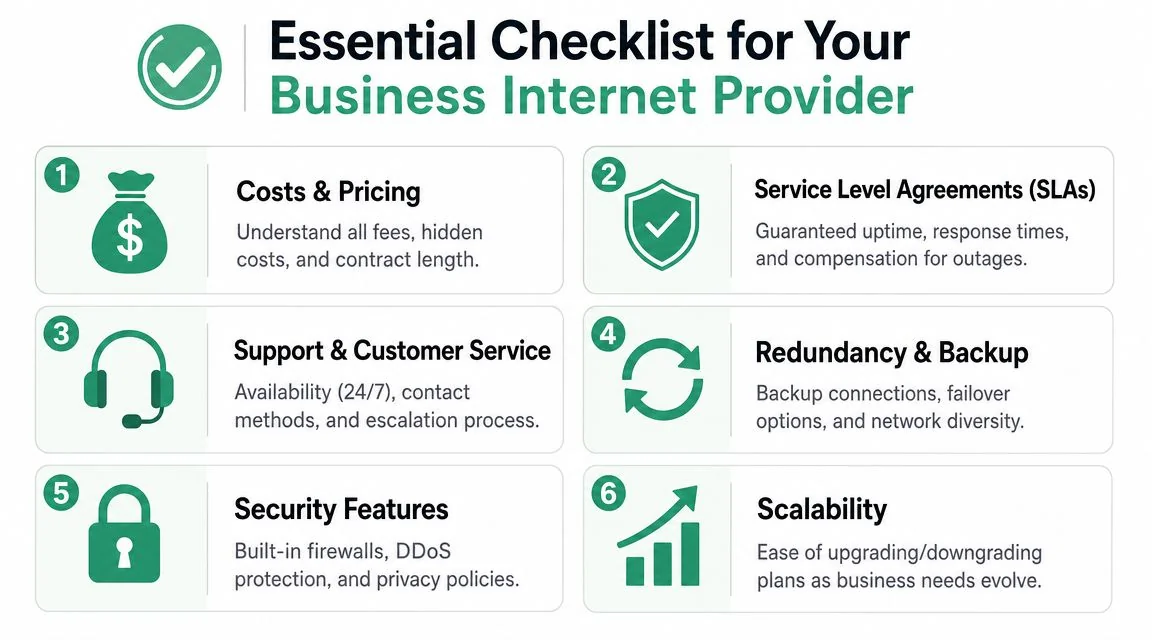
Compare the whole service, not the monthly fee
A robust selection method should score providers on access diversity, SLA design, and performance observability. For Brisbane businesses in professional services or healthcare, the benchmark isn't the advertised speed tier. It's whether the provider offers symmetrical uploads, documented latency targets, and a written outage escalation process, as outlined in this provider selection framework for business internet.
That's the technical side. Commercially, ask for every charge in writing before you approve anything.
- Setup and installation: Confirm whether install, router hardware, and configuration are included
- Contract structure: Check lock-in period, renewal wording, and how notice must be given
- Change costs: Ask what happens if you relocate, upgrade, downgrade, or exit early
- Support scope: Clarify whether the quoted support covers troubleshooting to your firewall or only the carrier handoff
- Backup pricing: Confirm whether failover data or backup hardware adds separate fees
Security questions that often get missed
Internet services aren't security products by default. Some owners assume “business internet” includes meaningful protection. Often it doesn't.
Check these items:
| Area | What to ask |
|---|---|
| Static addressing | Do you need a static IP for remote access, VPN, or hosted services? |
| Edge security | Is a managed firewall included, optional, or your responsibility? |
| DDoS response | What happens if your public-facing service is targeted or saturated? |
| Logging and visibility | Can you see usage, outages, and failover events clearly? |
| Compliance support | Can the provider align with your industry's security and continuity requirements? |
Read the wording around support carefully
A provider can advertise support and still leave you with limited practical help. Look for plain language around after-hours faults, phone availability, escalation ownership, and whether the provider liaises with third parties when multiple vendors are involved.
For businesses that don't want to manage internet, firewall, backup link, and Wi-Fi across separate suppliers, a managed IT partner can sit between the business and carrier. In Brisbane, Bridge IT Solutions handles network management and help desk support as part of its broader managed IT services, which is relevant when connectivity problems overlap with routers, Microsoft 365 access, VoIP, or onsite infrastructure.
“Can you show me how faults are escalated and who I call first?” is a better buying question than “What's your fastest plan?”
A practical sign-off list
Before signing, make sure you can answer yes to most of these:
- The service fits your workflows: especially uploads, cloud apps, phones, and backups
- The SLA is written clearly: with restoration and escalation detail
- The backup path is defined: and preferably uses a different access method
- The provider has tested the site: not just quoted from a coverage tool
- The contract is understandable: with no surprises around exit or renewal
- Security responsibilities are clear: especially at the router, firewall, and remote access layer
If any of those are still fuzzy, you're not ready to sign.
Let an Expert Partner Manage Your Business Connectivity
Most small business owners don't want to become carrier analysts. They want internet that works, support that answers, and a setup that won't collapse because one line fails. That's a reasonable goal, but it usually takes more than comparing plan names on a website.
The strongest outcome comes from treating connectivity as part of the wider IT environment. The internet link affects cloud access, phones, remote work, security controls, backups, guest Wi-Fi, and how quickly your team can recover from a fault. When those pieces are assessed together, the right provider choice becomes much clearer.
What good guidance looks like
A useful adviser should be able to do four things well:
- Review how your business works day to day
- Match that to the connection types available at your address
- Pressure-test provider promises around support and restoration
- Design failover so the office keeps running during an outage
That matters in Brisbane because the best answer for a legal office in the CBD won't necessarily match a clinic in the suburbs or a trade business operating across mobile staff and a warehouse.
The outcome you're really buying
The best business internet provider goes beyond being the fastest provider available in SEQ. It's the provider and service design that fits your risk profile, building constraints, cloud usage, and support expectations.
If your current service leaves you guessing during outages, or if you're moving offices and want to avoid repeating old problems, get the design right before signing the next contract. It's much easier to prevent a single point of failure than to explain one after it knocks the business offline.
If you want help assessing your current setup, comparing provider options, or designing a primary-plus-backup connection for your Brisbane business, talk to Bridge IT Solutions. They work with South East Queensland organisations that need practical advice on connectivity, continuity, and managed IT without the sales fluff.
