


A lot of Brisbane business owners only start shopping for internet when something breaks. A Teams call freezes during a client meeting. Xero stalls while invoices are being processed. The EFTPOS terminal drops out at the front counter. Staff blame “the Wi-Fi”, but the underlying problem is usually deeper. The business connection was never sized, designed, or supported for how the business operates.
That's why choosing internet plans for business isn't the same as picking the cheapest NBN plan on a comparison page. If your team uses Microsoft 365, cloud backups, VoIP phones, booking systems, MYOB, Xero, remote desktops, or shared files, the internet is part of your operating environment. It sits in the same category as power, security, and backups. When it's unstable, productivity slows first, then revenue and customer experience follow.
The reliance is already clear in Australian business use. The Australian Bureau of Statistics reported that in 2023–24, 94% of Australian businesses had internet access and 53% used paid cloud computing services according to business internet guidance citing ABS usage data. That matters because cloud software doesn't tolerate weak upload speeds, congestion, or long outages nearly as well as old desktop-only setups did.
Table of Contents
- Why Your Business Internet Is More Than Just a Bill
- Decoding Your Main Internet Connection Options
- Key Service Terms That Actually Affect Your Business
- How to Size and Budget for Your Business Connection
- Building Resilience with Redundancy and Security
- Your Internet Decision Checklist for Brisbane SMBs
- Next Steps and When to Partner with an IT Expert
Why Your Business Internet Is More Than Just a Bill
A small office can limp along with a mediocre connection for a while. Then one normal workday exposes the weakness. Two staff are on Zoom, someone starts a SharePoint sync, the receptionist is using cloud practice software, and a backup job kicks off in the background. Suddenly every app feels slow, calls break up, and staff waste time retrying simple tasks.
That's the trap. Many businesses still think of internet as a commodity. If email opens and websites load, it must be fine. In practice, the connection is carrying your phones, cloud files, software logins, document sharing, payments, remote access, and often your backup traffic too.
Cloud work changed the standard
The old model was simple. Software ran on one PC or a local server in the office, and the internet handled browsing and email. That's not how most small businesses operate now. Accountants live in Xero or MYOB. Law firms work inside Microsoft 365 and document systems. Clinics rely on booking platforms, patient communications, and cloud-integrated tools. Trade businesses sync job data from the field.
When that connection degrades, the pain shows up as business friction:
- Staff downtime: People wait for files, rejoin calls, or switch to mobile hotspots.
- Customer frustration: Calls sound poor, bookings fail, and online payments stall.
- Hidden cost: A “cheap” plan starts costing more in lost time than it saves on the invoice.
Practical rule: If the internet going down would stop your team from working, it's infrastructure, not overhead.
A weak link affects the whole office
One person working from a home-style service can often get by. Ten or twenty people sharing cloud apps can't. Business owners usually notice download speed first because it's what's advertised. Staff usually feel upload constraints first because that's what cloud systems, video meetings, VoIP, and backups depend on.
That's why the right question isn't “What's the fastest plan I can buy?” It's “What kind of connection keeps my team productive during a normal busy day?”
Decoding Your Main Internet Connection Options
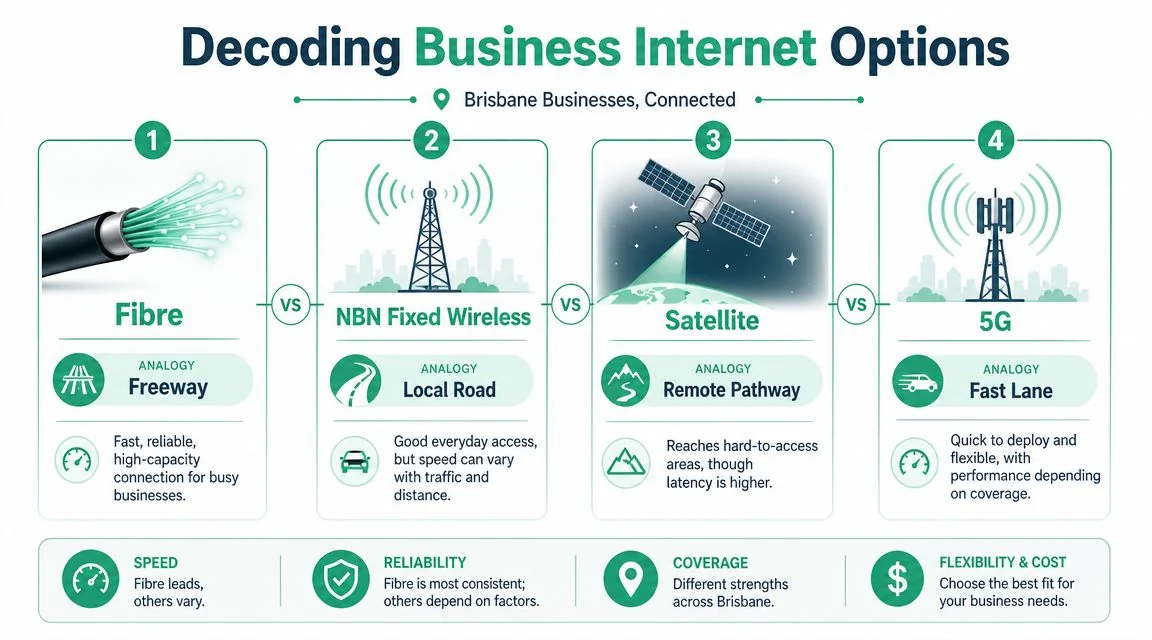
Think in roads, not acronyms
Most internet plans for business make more sense if you picture roads.
Standard and business-grade NBN are like public roads. They can work well, especially where fibre access is good, but you're still sharing the broader network environment with other users. The National Broadband Network has shifted business connectivity in Australia away from old copper-era expectations, with business-grade options commonly offered from 100/20 Mbps up to 1000/50 Mbps and beyond on fibre according to this business internet guide. For many Brisbane SMBs, that means higher-speed access is now a practical baseline rather than a premium extra.
Dedicated Ethernet is more like a private highway. It's built for businesses that need consistent performance, stronger service levels, and often symmetrical bandwidth. If your office is heavily cloud-based and a slowdown hits everyone at once, dedicated fibre usually feels very different from a shared service.
Fixed wireless is a useful access method where fibre isn't available or where a branch site doesn't justify a higher-end circuit. It can support normal business tasks, but it usually isn't the first choice for latency-sensitive workloads.
4G or 5G business broadband is the fast lane you can deploy quickly. It's handy for temporary sites, mobile teams, pop-up offices, construction sheds, and vital for backup connectivity.
What tends to work best for each business type
A suburban accounting office with a stable team often does well on a well-chosen business NBN fibre service if the provider has decent backhaul and support.
A legal firm, design studio, or medical practice with a lot of live cloud usage, file sync, and calls often benefits from dedicated Ethernet or a stronger business fibre option with better support terms.
A warehouse, workshop, or outer-metro site may need to be more pragmatic. Availability matters first. NBN Co's business and enterprise services use different technologies across locations, and whether a site can get fibre, fixed wireless, or satellite directly affects latency and service quality, as discussed in this overview of business and enterprise access options.
Here's a simple comparison:
| Connection type | Best fit | What usually works well | What usually doesn't |
|---|---|---|---|
| Business NBN fibre | Small offices, professional services, growing teams | General cloud apps, VoIP, file sharing, day-to-day operations | Critical sites that can't tolerate long outages |
| Dedicated Ethernet | Multi-user offices, high cloud reliance, performance-sensitive teams | Stable latency, strong uploads, predictable experience | Budgets that only allow a basic access service |
| Fixed wireless | Outer-metro or regional sites, secondary branches | Basic operations, branch connectivity, backup use cases | Real-time workloads that are sensitive to latency swings |
| 4G/5G broadband | Temporary sites, mobile teams, failover | Fast deployment, backup internet, short-term operations | Sole primary link for a busy office with heavy cloud use |
The best plan on paper is useless if it isn't available at your premises.
That's why Brisbane businesses should check actual serviceability first. Not brochure speeds. Not postcode assumptions. Your exact street, building, and tenancy layout matter.
Key Service Terms That Actually Affect Your Business

Why shared and dedicated services feel different
Two services can advertise similar headline speeds and still deliver a very different workday. The reason is usually contention, upload design, and support model.
The key trade-off for many businesses is shared access versus dedicated Ethernet. Business-grade fibre can deliver stronger and more consistent performance than consumer-style services because it's engineered differently, and dedicated Ethernet is typically sold with stronger service levels and symmetric options, as outlined in this discussion of business internet options and performance trade-offs. For an office using Microsoft 365, video calls, VoIP, and cloud backups at the same time, symmetric business fibre is designed to reduce latency spikes and packet loss more effectively than an asymmetrical service.
Think of it this way. Download speed is traffic coming into the office. Upload speed is traffic leaving it. Modern businesses do a lot more outbound traffic than owners realise. Teams upload files to SharePoint, sync OneDrive, send scanned documents, run backups, host meetings, and use cloud phones. If the outgoing lanes are narrow, the whole road clogs.
The contract terms worth reading properly
Some service terms sound technical, but they translate directly into whether your staff can work.
Contention
Contention is shared capacity. On a quiet road, traffic flows. At school pickup time, it doesn't. That's why a service can seem fine in the morning and sluggish later. If a provider's broader network is congested, your users feel it as lag, jitter, and inconsistent throughput.
Ask providers practical questions, not textbook ones:
- Peak performance: How does the service behave during busy periods?
- Business support: Is the plan treated differently from a home-grade product?
- Real-world workload: Will it stay stable during Teams calls plus file sync plus backups?
Symmetrical and asymmetrical bandwidth
An asymmetrical plan gives you more download than upload. That's common and can be acceptable for lighter use.
A symmetrical service gives equal capacity in both directions. If your office lives in cloud apps, this is often where user experience improves most. Staff don't describe it as “better symmetry”. They describe it as “calls stopped breaking up” and “SharePoint finally feels normal”.
If your team uses cloud tools all day, upload capacity stops being a technical detail. It becomes a productivity setting.
SLA
An SLA, or service level agreement, is business uptime insurance. It tells you what support priority, fault response, and restoration commitment you're paying for.
The wrong way to read an SLA is as fine print.
The right way is to ask, “If this fails on a Tuesday morning, what happens next?”
For some businesses, next-business-day handling is acceptable. For others, especially clinics, professional services firms, and revenue-dependent sites, that response can be too slow.
Static IP
A static IP won't matter to every business, but it can matter if you run VPN access, site-to-site connectivity, remote systems, security tools, or hosted services that expect a fixed public identity. If you don't know whether you need one, that's normal. It's a design question, not a shopping-filter question.
How to Size and Budget for Your Business Connection
Buying business internet by speed tier alone is like buying a ute based only on top speed. It tells you almost nothing about whether it suits the job.
Start with user behaviour, not marketing labels
A better way to size internet plans for business is to look at how many people are online at once and what they're doing when things get busy.
A receptionist who uses email, web apps, and light document work behaves differently from a marketing staff member moving large media files, or a bookkeeper reconciling data while syncing cloud storage and sitting on video calls. The connection has to handle the peak overlap, not the average quiet patch.
Use this as a practical starting point:
| User profile | Typical workload | Planning approach |
|---|---|---|
| Light user | Email, browsing, basic SaaS, occasional calls | Lower bandwidth need, but still benefits from stability |
| Standard office user | Microsoft 365, Xero or MYOB, regular Teams or Zoom, shared files | Moderate bandwidth need with solid upload performance |
| Heavy user | Large file transfers, constant video, cloud backups, design/media sync | Higher bandwidth and better upload design become important |
| Mixed team | Front desk, admin, management, field coordination | Plan for concurrency, not just headcount |
A law firm with lots of documents but predictable workflows might not need the same design as a creative agency moving large assets all day. A manufacturing workshop may have fewer desk users but still rely heavily on cloud ERP, supplier portals, and site connectivity.
Budget for downtime, not just the monthly fee
The cheapest monthly plan can be the most expensive option if it causes interruptions.
When comparing providers, budget across three layers:
- Access cost: The recurring fee for the service itself.
- Setup and transition: Installation, hardware, lead times, and any cutover work.
- Support quality: Fault handling, escalation, and whether someone owns the problem when it breaks.
A common buying mistake is paying for speed and ignoring support. Another is paying for a premium service when the business really needs a well-configured mainstream service plus a backup path.
Ask these questions before signing:
- What happens during faults? Slow support often costs more than the service difference.
- Will this still fit in a year? Growth changes internet needs quickly when more staff adopt cloud tools.
- Are we solving the actual bottleneck? Sometimes the issue is upload, Wi-Fi design, or firewall hardware, not the plan itself.
A good internet budget includes the cost of staying productive when normal business traffic hits at once.
Building Resilience with Redundancy and Security
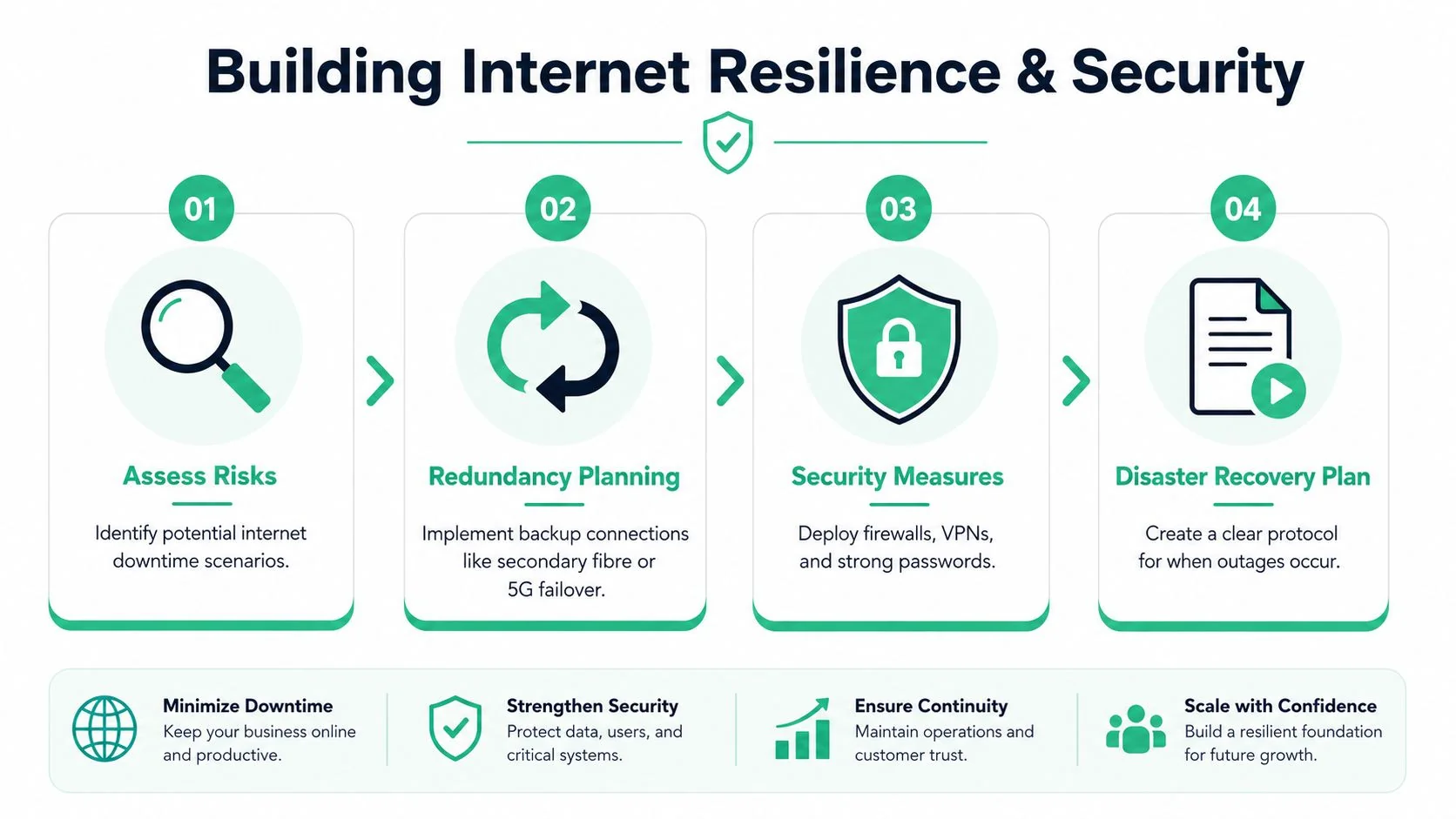
Speed gets attention. Resilience keeps the business open.
Business guides often focus on headline Mbps rather than downtime risk. For firms that rely on SaaS, online payments, booking systems, and remote support, predictable uptime is often more valuable than chasing the highest advertised plan. The more useful question is whether you need a second internet path or 4G/5G failover for business continuity, as highlighted in this fact sheet discussing resilience as a priority in connectivity investment.
Your backup link is a spare tyre
Most Brisbane SMBs don't need a complex carrier design. They do need a plan for when the primary service fails.
The simplest resilient setup is often:
- Primary fibre connection: Your main day-to-day business service
- Automatic 4G or 5G failover: A backup path that takes over when the main link drops
- Business-grade firewall or router: The device that detects failure and switches traffic
That failover link is your spare tyre. You don't buy it because you expect trouble every day. You buy it because one outage at the wrong time can be more expensive than months of backup service.
A practical point that gets missed is path diversity. If the primary and backup depend on the same physical route or same local failure point, you haven't really reduced risk. A local fibre cut can still take out both if they aren't designed properly.
This short explainer shows why backup planning matters in plain language:
Security still matters when connectivity is solid
A reliable internet service still needs a secure edge. That usually means a properly configured firewall, secure remote access, sensible password controls, and visibility into what's happening on the network.
For small businesses, the most useful mindset is simple:
- Resilience keeps you online
- Security keeps the wrong people out
- Recovery planning tells staff what to do when both are tested
If your team wouldn't know how to operate during an outage, you don't have a continuity plan yet. You have a hope-based plan.
Your Internet Decision Checklist for Brisbane SMBs
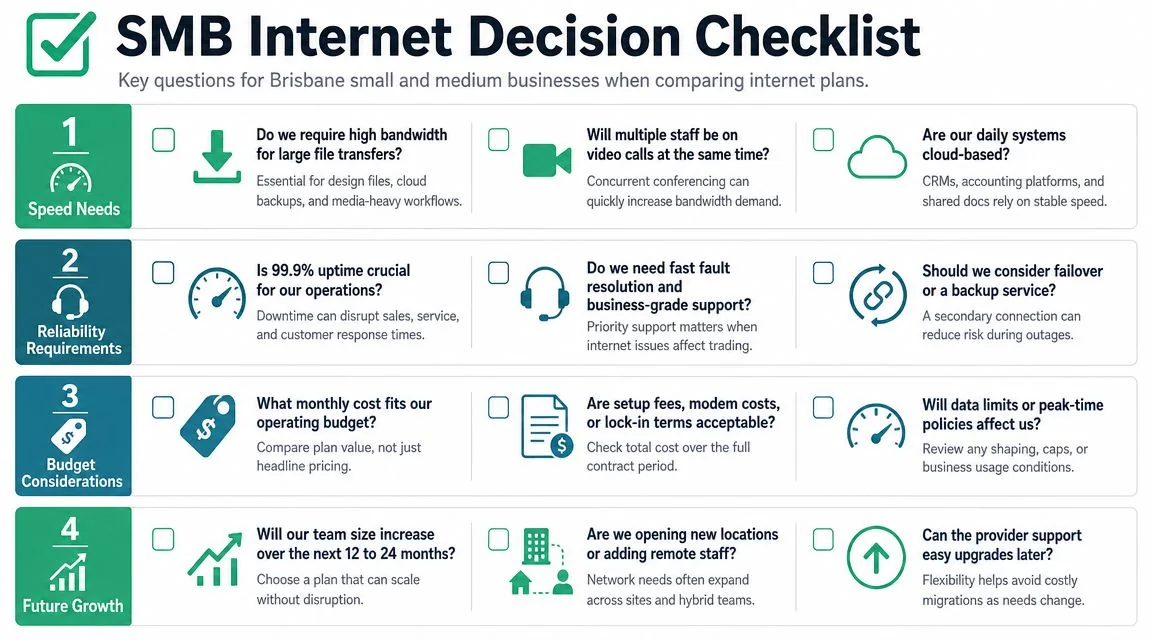
A good buying process is usually less about comparing logos and more about asking the right questions in the right order.
For Brisbane businesses, the first step is verifying service availability and topology, not just advertised speeds. Whether your site can get fibre, fixed wireless, or satellite affects latency and service quality, and a practical design often uses primary fibre with a diverse backup path like 5G, as noted in this small-business broadband availability analysis.
Questions to answer before you sign
- Audit your critical apps: Which systems stop the business if the internet fails? Think Xero, MYOB, Microsoft 365, VoIP, booking systems, EFTPOS, remote access, and cloud file storage.
- Check your exact address: What can you order at your premises today? Fibre availability can differ between neighbouring buildings.
- Work out your outage tolerance: Can you cope with a long outage, or do you need rapid restoration and automatic failover?
- Look at upload needs: Do staff spend the day on Teams, Zoom, SharePoint, OneDrive, scans, backups, or cloud phones?
- Ask who supports the service: When there's a fault, do you get business-grade support or a consumer-style queue?
- Review the handoff point: Who manages the router, firewall, and internal network equipment connected to the service?
- Plan for growth: Will the service still suit you if the team expands, adds cloud software, or opens another location?
A short shortlist should answer these four points clearly:
| Decision area | What to confirm |
|---|---|
| Availability | Which access technologies are genuinely serviceable |
| Performance fit | Whether the connection matches your actual workloads |
| Support model | How faults are handled and escalated |
| Continuity | What happens if the primary link fails |
If a provider can't explain those plainly, keep looking.
Next Steps and When to Partner with an IT Expert
The right business internet service is the one that matches three things. Your workflows, your tolerance for downtime, and the support you'll need when something goes wrong.
When DIY is still reasonable
A very small office can often handle this internally if the setup is simple. One site. Light cloud usage. No unusual security requirements. No dependence on hosted phones, VPNs, or business-critical uptime. In that case, checking availability, choosing a sensible business-grade plan, and adding basic failover may be enough.
That works best when someone in the business is comfortable speaking to providers, comparing SLAs, and owning the cutover.
When it's time to bring in help
DIY usually starts breaking down when the internet decision stops being a single-service purchase and becomes part of a bigger operational design.
Bring in an IT expert when any of these are true:
- You have multiple sites: Connectivity, backup paths, and vendor coordination get complicated quickly.
- You need stronger security or compliance: Clinics, legal firms, and financial services businesses often need more than a standard router and ISP support number.
- You don't have internal IT capacity: Someone still needs to manage faults, firewall rules, Wi-Fi design, failover, and provider escalation.
- You want one accountable partner: It's much easier when one team can look at the connection, the firewall, the phones, and the users together instead of everyone blaming someone else.
The main point is simple. Don't buy internet plans for business like a household utility if your business depends on being online. Buy it like core infrastructure.
If you want a practical second opinion before signing a contract, Bridge IT Solutions can help you assess your current setup, check what's available at your Brisbane or South East Queensland site, and work out whether you need a straightforward business plan, a resilient failover design, or a fully managed solution. The aim isn't to overcomplicate it. It's to match connectivity, security, and support to the way your business operates.
