


It usually starts on an ordinary workday. Someone cannot log in to Microsoft 365. The office Wi-Fi drops out. A staff member clicks a suspicious email. Backups have not been checked in months, but everyone hopes they are fine. In a Brisbane small business, those problems rarely stay small for long. They interrupt sales, delay client work, and pull the owner back into IT instead of running the business.
That is the point where many business owners ask a fair question: what does an MSP do, and is it different from ordinary outsourced IT support?
An MSP, short for Managed Service Provider, is a third-party IT company that looks after your systems, devices, security, and day-to-day support under an ongoing agreement. The main difference is the approach. Managed services focus on preventing issues, maintaining systems, and responding before a small fault turns into lost time or a security incident. That proactive model is what separates managed services from the older break/fix approach, where support arrives after something has already failed, a distinction also outlined in TechTarget's MSP definition.
For businesses across Brisbane and South East Queensland, that shift matters. Local firms are dealing with more cloud software, more devices outside the office, and more exposure to email fraud, ransomware, and avoidable downtime. A good MSP does not just fix computers. It helps keep the business secure, the team productive, and the operation stable when something goes wrong.
That matters even more for smaller organisations without an internal IT manager. In practice, the right MSP gives you a clear point of accountability, regular maintenance, better visibility over risk, and fewer nasty surprises. For a law firm in the CBD, a medical practice on the southside, or a trade business servicing sites across SEQ, that peace of mind is often the true value.
Table of Contents
- What an MSP Actually Does Beyond IT Support
- Key Business Benefits of Partnering with an MSP
- Tailored IT Solutions for Your Industry
- Understanding MSP Pricing Models and SLAs
- How to Choose the Right Local MSP in Brisbane
- Your Next Step Towards Smarter IT
What an MSP Actually Does Beyond IT Support
A lot of Brisbane business owners come to this point after the same kind of week. Internet issues slow the office on Monday. A staff member gets locked out of Microsoft 365 on Tuesday. By Thursday, someone clicks a fake invoice email and now everyone is asking, “Who is looking after this?”
That is the gap an MSP fills.
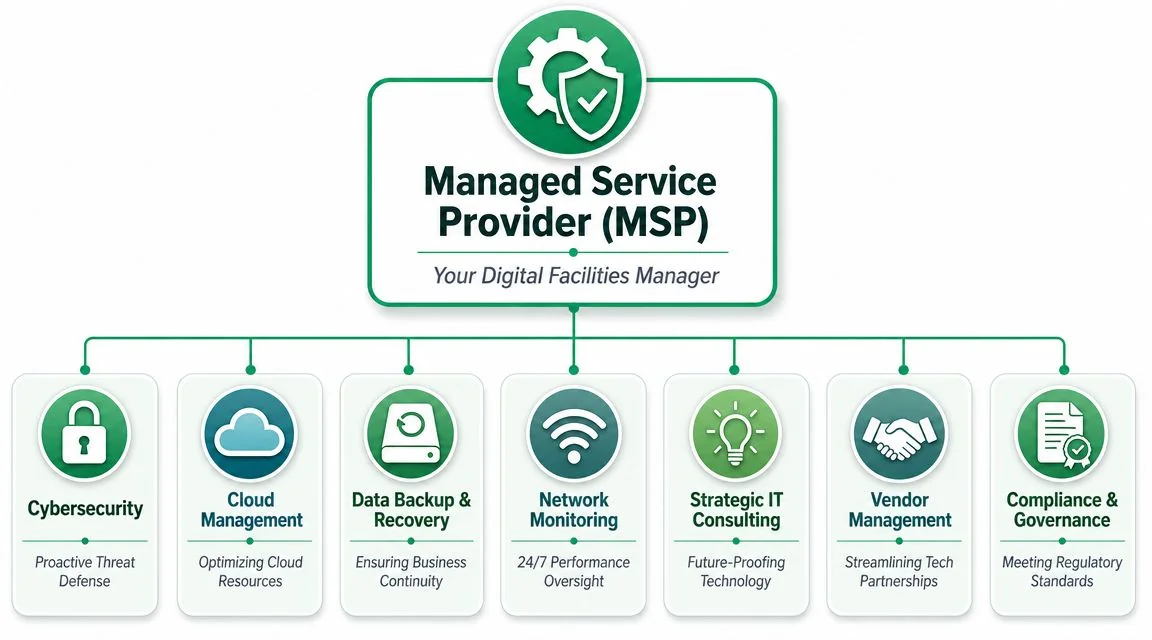
An MSP manages the day-to-day health of your business technology on an ongoing basis, rather than waiting for something to fail and then charging to repair it. That usually includes support, system maintenance, security controls, user management, device oversight, and planning. LogMeIn's explanation of what an MSP is outlines the model well, but for a small business in South East Queensland, the practical point is simple. Your systems need attention before problems interrupt work.
Practical rule: If your IT provider only gets involved after work has stopped, you are buying repairs, not managed service.
Your digital facilities manager
The job is broader than a helpdesk.
A good MSP keeps your digital workplace running in the same steady way you expect your premises to run. Staff should be able to sign in, access files, send email, use Wi-Fi, print, join meetings, and work remotely without constant interruptions. Behind that, someone needs to maintain devices, apply updates, review alerts, check backups, secure accounts, and make sure small faults do not turn into expensive downtime.
For Brisbane SMBs, local context matters here. Australian businesses are dealing with more phishing, account compromise, and ransomware pressure than they were a few years ago. That changes the role of an MSP. The provider is not just fixing laptops. They are reducing the chance that one weak password, missed patch, or poorly secured Microsoft 365 account turns into a serious business problem.
The five pillars most small businesses rely on
Most managed service agreements for smaller businesses sit across five core areas.
Proactive monitoring and maintenance keeps watch over laptops, servers, Microsoft 365, firewalls, backups, and network gear. The goal is to catch warning signs early. That might mean dealing with a failing hard drive before accounts loses access to Xero, or spotting a bad update before it affects the whole office.
Helpdesk support gives your team a clear place to go when they hit a problem. Outlook stops syncing, Teams audio fails, the printer disappears, a user cannot access a shared folder. Its value is speed and consistency. Your staff get help quickly, and the issue does not keep landing on the owner or the one admin person who is “good with computers”.
Cybersecurity management covers the protective work many small businesses cannot maintain on their own. That includes multi-factor authentication, endpoint protection, patching, email security, access controls, and alert review. In practice, this is one of the biggest reasons Brisbane firms move to managed services. The risk is no longer theoretical, and the cost of a security incident usually reaches far beyond the initial fix.
Cloud administration matters more than many owners expect. Microsoft 365, Teams, SharePoint, and OneDrive still need structure and oversight. Users need the right permissions. Licences need to be managed. Data needs to be stored in the right place. A messy cloud setup creates slow, frustrating work and avoidable security gaps.
Backup and recovery planning is the safety net. Good providers do not stop at setting backups to run. They monitor jobs, test restores, document recovery steps, and prepare for scenarios such as accidental deletion, hardware failure, ransomware, or an office outage.
Here is how that plays out on the ground:
- For a law firm: email, document access, and user permissions need to stay reliable under deadline pressure.
- For a medical clinic: reception systems, scanners, and practice software need to work consistently because appointments continue whether IT is ready or not.
- For a trade business: mobile access to quotes, job photos, schedules, and files matters just as much as the office setup.
The better MSPs take ownership of the whole operating environment, not just the ticket queue. They help reduce recurring stress, set standards, and give you a clearer picture of where your risks sit. For a Brisbane small business, that often means fewer interruptions, tighter security, and confidence that someone local can step in when a problem affects the whole team.
Key Business Benefits of Partnering with an MSP
A good MSP gives a Brisbane business more than a number to call when something breaks. It gives you structure, accountability, and a clearer grip on risk.
Better control over cost and downtime
Small business owners usually feel IT pain in two places. Surprise bills and lost time.
Break/fix support tends to create both. You wait until something fails, then pay for the repair while staff sit idle, work around the issue, or chase updates. On paper, that can look cheaper. In practice, it often means the business absorbs the hidden cost of delays, repeated faults, and no clear plan for what gets improved next.
Managed services shift that model toward prevention and consistency. With a recurring monthly arrangement, the provider has a reason to keep systems stable, patch issues early, and reduce repeat problems. For the business owner, that usually means more predictable spending and fewer days derailed by avoidable outages.
The savings are not always dramatic in month one. They show up over time in fewer interruptions, less rework, and less management energy wasted on IT problems that should not keep coming back.
Security becomes part of daily operations
For many Brisbane SMBs, security is the point where managed services start to make financial sense.
As noted earlier, cybercrime in Australia keeps rising, and smaller organisations are regularly in the firing line. The local risk is not abstract. We see it in phishing emails hitting Microsoft 365 accounts, weak passwords on shared systems, unmanaged laptops used off-site, and backups that have never been properly tested. A business does not need to be large to be targeted. It only needs to be easier to breach than the next one.
Industry analysis, such as Trend Micro's managed service provider overview, reinforces the same pattern. Smaller organisations are frequent targets because they often have fewer internal controls and less capacity to spot early warning signs.
A good MSP treats security as an ongoing operating standard, not a one-off product purchase.
That usually includes:
- Identity protection: MFA, sensible access rules, password standards, and clean user offboarding when staff leave.
- Device protection: Managed endpoint security across laptops, desktops, and any business-used mobile devices.
- Update management: Regular patching for computers, routers, firewalls, and key business software.
- Recovery planning: Backups that are checked, monitored, and tested so recovery is possible under pressure.
No provider can promise perfect protection. A capable one lowers your exposure, catches problems earlier, and gives you a workable response plan if something goes wrong.
A useful primer on the business case is below.
Access to a broader skill set
One internal IT person can be a solid fit for some businesses. Many small and mid-sized Brisbane companies need something different. They need access to several areas of knowledge without carrying the cost of building a full internal team.
That matters because IT issues rarely stay in one lane. A staff member might report a login problem that turns out to involve Microsoft 365, device policy, conditional access, and a mobile phone setup. A backup alert might need someone who understands both cloud services and restore procedures. A Wi-Fi complaint in the office can trace back to network design, not the internet provider.
An MSP gives you access to those different capabilities under one service relationship. The practical upside is straightforward. Faster resolution, less reliance on one person, better coverage during leave, and less pressure on the owner or office manager to play part-time IT coordinator.
For a South East Queensland business, there is also a local benefit. If the internet drops at the office, a switch fails, or a site move is causing trouble, having a nearby team who can support both remote work and on-site issues is often worth more than a cheaper provider based interstate.
Tailored IT Solutions for Your Industry
A Brisbane law firm, clinic, and construction business can all use Microsoft 365, cloud backups, and managed devices. Their day-to-day pressure points are still very different. A capable MSP adjusts the setup, support approach, and security controls to match how the business earns money and where downtime hurts most.
Professional services
For legal, accounting, and financial services firms, trust sits at the centre of the business. Clients expect sensitive information to stay protected, easy to find, and available when deadlines hit. If a solicitor cannot reach matter files or an accountant loses access to cloud documents during BAS or EOFY periods, the problem turns into lost time, missed work, and reputational damage.
In these firms, a good MSP usually focuses on secure Microsoft 365 configuration, clear file permissions, email protection, device management, backups, and reliable remote access. Support also needs to reflect commercial reality. If staff bill by the hour, slow systems are not a minor annoyance. They cost revenue.
One common mistake is buying extra security tools before fixing basic access control. If too many staff can open too many files, the risk is already inside the business.
Healthcare practices
Medical and dental clinics need systems that work the same way every day. Front desk staff, clinicians, and practice managers do not have spare time to troubleshoot printers, Wi-Fi dropouts, or software issues while patients are waiting.
For healthcare, MSP work often centres on consistency and continuity. Reception PCs, shared devices, scanners, phones, backups, and line-of-business applications all need to stay stable. Access permissions also need more care because patient information brings obvious privacy obligations under Australian rules and expectations.
The best IT in a clinic is quiet. Systems load properly, appointments stay moving, and staff do not have to wonder whether patient data is exposed.
A provider with healthcare experience will usually pay closer attention to user access, device security, and recovery planning than a general office setup would require. That matters if a machine fails mid-day or a staff member clicks a bad link.
Trades and construction
Trades, construction, and field-based businesses usually run across utes, warehouses, homes, and active job sites. That changes the IT brief. The priority is giving mobile staff reliable access to job information without making the tools so clumsy that people stop using them.
Staff on site may need plans, photos, quotes, emails, supplier details, and job notes from a phone, tablet, or laptop. The office team needs the same information stored in a way that stays organised and recoverable if a device is lost, damaged, or stolen.
For this kind of business, an MSP should focus on practical decisions such as:
- Device selection: Business-grade laptops, tablets, and phones suited to travel, dust, vehicle use, and rough handling.
- Secure mobile access: Login security that protects company data without slowing site staff to a crawl.
- Cloud file structure: Shared folders, permissions, and naming rules that crews can follow in practice.
- Lost device response: Clear steps to lock, wipe, and replace equipment fast if it goes missing.
A field business needs an IT setup built for movement, patchy connectivity, and busy staff. Office-first systems usually create workarounds, and workarounds create risk.
The right MSP does not force every Brisbane business into the same template. It should understand how your team works, where interruptions cost you money, and which risks matter most in your industry.
Understanding MSP Pricing Models and SLAs
A Brisbane business owner usually notices MSP pricing at the same moment they start comparing quotes. One provider charges per user. Another prices per device. A third looks cheaper until you realise backup checks, after-hours help, or onsite work sit outside the monthly fee.
That is why the monthly number on its own tells you very little.
Why managed pricing works differently
Managed services pricing is built around ongoing responsibility, not one-off repair jobs. The provider is paid to keep systems stable, secure, and supported over time. In a break/fix setup, support costs rise when things go wrong. In a managed arrangement, both sides benefit when problems are prevented early.
The catch is scope.
Two MSPs can both say they offer managed IT and mean very different things in practice. One may include monitoring, patching, Microsoft 365 admin, endpoint protection, backup oversight, and vendor liaison. Another may include only basic help desk support and charge extra for anything that looks like project work.
That difference matters more than the label on the proposal.
Common MSP Pricing Models Compared
| Pricing Model | How It Works | Best For |
|---|---|---|
| Per-user | You pay a monthly fee based on the number of staff or active users being supported. Devices are usually covered as part of the service for those users. | Businesses with staff using multiple devices, remote work, and a need for predictable support across the team. |
| Per-device | You pay for each supported device, such as laptops, desktops, servers, firewalls, or printers. | Businesses with a stable device fleet, shared workstations, or a small number of users managing many devices. |
| Tiered | The provider offers packaged service levels, often with different inclusions for security, backup, support hours, and strategic advice. | Businesses that want a choice between baseline support and a broader service stack. |
No pricing model is right for every business.
A professional services firm with laptops, mobiles, Microsoft 365, and staff working from home will often find per-user pricing easier to budget. A warehouse, workshop, or medical practice with shared machines may get better value from per-device pricing. A growing company trying to control spend may start on a tiered plan, but it should check what security and support limits sit inside each level before signing.
Cheap monthly pricing can become expensive fast if every real issue falls outside scope.
If you cannot tell what is included, the fee is not predictable. It only looks predictable.
What to check in the SLA
The service level agreement, or SLA, is where sales language meets day-to-day reality. If an MSP says it is proactive and responsive, the SLA should spell out what that means in writing.
Read it like an operator, not a lawyer. Ask what happens when a staff member cannot log in at 8:15 on a Monday, when a backup fails unnoticed for a week, or when ransomware hits a laptop connected to your Microsoft 365 account. Brisbane SMBs do not need fancy wording here. They need clear commitments and clear boundaries, especially with cyber risk rising across Australia and small businesses often carrying more exposure than they realise.
Look for these points in plain English:
- Response times: How quickly they acknowledge critical, high, medium, and low-priority issues.
- Resolution targets: Whether they commit only to first response, or also to progressing the job toward a working fix.
- Support hours: What is covered during business hours, what counts as after-hours, and what costs extra.
- Included services: Monitoring, patching, Microsoft 365 administration, endpoint security, backup checks, onsite visits, and vendor liaison.
- Exclusions: New projects, hardware supply, major migrations, software development, and any labour billed separately.
- Escalation path: Who steps in if an issue drags on or the first response is not good enough.
A shorter SLA is often better if it is specific. Clarity beats padded wording every time.
If a quote promises "unlimited support", test that claim. Ask whether it means unlimited remote help for covered services, unlimited labour, or unlimited ticket logging with strict exclusions once the core tasks begin. A good local MSP will answer directly and give examples based on how your business operates.
How to Choose the Right Local MSP in Brisbane
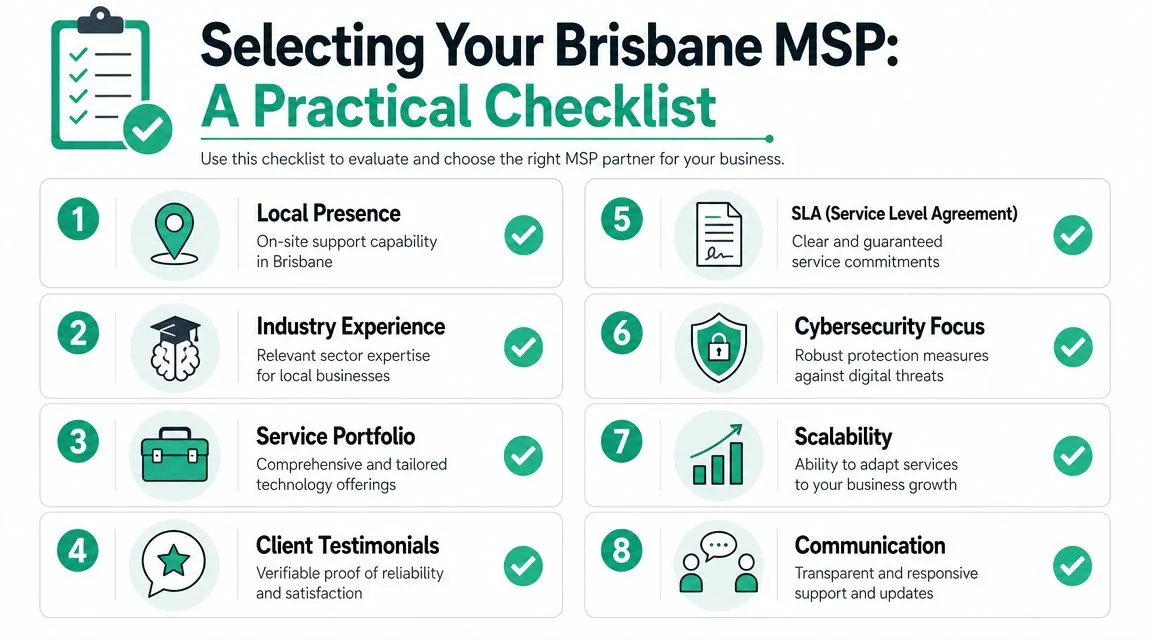
A local provider isn't automatically better, but for many Brisbane businesses it's a practical advantage. When a firewall dies, a workstation rollout stalls, or a new office fitout needs hands-on setup, on-site capability matters. So does familiarity with how South East Queensland businesses operate.
What to look for first
Start with fit, not branding.
If you run a ten-person accounting practice, you don't need the same provider profile as a multi-site manufacturer. Ask whether the MSP regularly supports businesses of your size, with your mix of devices, cloud platforms, compliance concerns, and internal processes.
Then look at operating maturity. That usually shows up in a few places:
- Clear service scope: They can explain what they manage, what they don't, and how support requests are handled.
- Relevant vendor capability: If you rely on Microsoft 365, HPE, Sophos, Cisco, Veeam, or similar platforms, they should be comfortable supporting them.
- Documented onboarding: They have a process for reviewing your environment, identifying risks, and bringing systems under management without chaos.
- Local proof: They can point to Brisbane or South East Queensland clients willing to vouch for responsiveness and quality of support.
Client reviews matter, but context matters more. Look for comments about communication, follow-through, and whether the provider explains issues in plain English.
The right MSP should make your business feel less dependent on individual staff heroics, not more dependent on one external technician.
Red flags that should slow you down
Some warning signs are obvious. Others only show up after you've signed.
Be careful if you see any of these:
- Vague pricing: The monthly fee sounds simple, but nobody can explain what sits outside it.
- High-pressure sales: The conversation rushes toward the contract before anyone has properly assessed your current setup.
- No local references: They talk confidently but can't connect you with businesses nearby who've had a good experience.
- Weak security conversation: They lead with cheap support and barely mention MFA, backups, endpoint protection, user access, or incident handling.
- Poor communication: Emails are unclear, calls are missed, and answers come back full of jargon instead of decisions.
Another concern is a provider who only wants to inherit the environment exactly as it is. A good MSP should be willing to challenge poor setups, unsupported hardware, messy Microsoft 365 permissions, or backup gaps. Not aggressively, but forthrightly.
Questions worth asking in the first meeting
You don't need to be technical to run a strong MSP selection process. Ask practical questions and listen for practical answers.
A useful shortlist includes:
- How do you handle onboarding for a business our size?
- What's included in your standard managed service, and what's charged separately?
- How do you manage Microsoft 365 security, MFA, and user access?
- How are backups monitored, and how do you test restores?
- What happens if we need on-site support in Brisbane?
- How do you report on issues, risks, and recommendations?
- Can you provide local references from similar organisations?
Notice whether the provider answers clearly or pivots into broad sales language. You're not buying promises. You're choosing an operating partner.
For many small businesses, the best local MSP is the one that combines steady helpdesk support with disciplined security, plain-English advice, and the willingness to show up when needed.
Your Next Step Towards Smarter IT
If you've been treating IT as a series of interruptions, that approach usually gets more expensive as the business grows. More staff, more devices, more cloud apps, more passwords, and more cyber risk create more points of failure.
A strong MSP changes that pattern. Instead of reacting to each issue one by one, you put structure around the essentials. Monitoring. Support. Security. Backups. Vendor coordination. Clear service levels. That's why the definitive answer to what is an MSP provider isn't “an outsourced helpdesk”. It's a partner that helps keep your business stable, secure, and easier to run.
For Brisbane SMBs, the decision should be practical. Do you want unpredictable fixes, patchy accountability, and technology that only gets attention after a disruption? Or do you want a managed environment where problems are spotted earlier, staff get help faster, and your systems are aligned with the way your business works?
If you're comparing providers, start with clarity. Ask what they manage, how they protect your business, how they report on issues, and what happens when something fails at the worst possible time.
If you'd like a clearer view of where your current setup stands, Bridge IT Solutions offers Brisbane businesses a complimentary, no-obligation business technology review. It's a practical way to identify gaps in security, support, backup, and day-to-day performance, then map out a smarter path forward without the sales pressure.
