


Your internet drops out at the worst possible moment. The EFTPOS terminal won't connect. A Teams call freezes just as a client starts asking questions. Xero won't load. Staff can still open a browser on one laptop, but nobody knows whether the problem is the Wi-Fi, the NBN service, the router, or the ISP.
That's what makes internet connectivity issues so disruptive for Australian businesses. The problem usually isn't just “the internet is down”. It's that one fault can break payments, cloud apps, VoIP, booking systems, remote access, and customer service all at once. For a small business, that turns a technical issue into an operations issue very quickly.
Generic advice doesn't help much here. Australian businesses deal with NBN technology differences, local congestion, mixed Wi-Fi and wired networks, and the simple fact that continuity matters. If your internet is flaky, you don't just lose speed. You lose the ability to trade normally.
Table of Contents
- The True Cost of an Unreliable Internet Connection
- Your Immediate Diagnostic Checklist
- Quick Fixes and Temporary Workarounds
- Finding the Root Cause of Your Connection Problems
- Building a Resilient and Reliable Business Network
- When DIY Is Not Enough Partner with a Managed IT Provider
The True Cost of an Unreliable Internet Connection
When a connection goes unstable, most owners first think about annoyance. The full cost is broader than that. Staff stop processing work in the normal order. Customers wait longer. Payments get delayed. Someone starts using a personal hotspot, someone else retries uploads, and the whole day becomes a patchwork of workarounds.
For many Brisbane and South East Queensland businesses, internet access now sits in the same category as power, phones, and physical premises. If Microsoft 365, Xero, cloud backups, remote desktops, booking systems, or security platforms depend on a stable connection, the internet isn't a convenience. It's a business asset.
Connectivity gaps are still real
Australia is highly connected, but access still isn't universal. The ABS found that 96% of households had internet access in 2023–24, while access was 93% for the lowest income quintile and 90% for households where the reference person had no non-school qualification, according to this ABS summary cited here. That matters because it shows internet access problems are still structural for part of the market, not just the result of a bad modem reset or a one-off outage.
A business owner doesn't need to run a telecom company to feel that impact. If you work with clients, contractors, or staff across different locations, uneven connectivity becomes part of your operating risk whether you planned for it or not.
Practical rule: If losing internet stops you from taking payments, serving clients, or accessing your core systems, treat the connection as critical infrastructure.
Downtime rarely stays in one lane
The technical fault may start in one place, but the consequences spread. A minor DNS issue can look like “the whole internet is broken”. Poor Wi-Fi in one corner of the office can turn into missed calls and failed uploads. Congestion at peak time can make cloud software feel unreliable even though the line never fully drops.
That's why the right response starts with triage, not guesswork. You need to know whether the problem is isolated, shared, wireless-only, provider-side, or tied to a specific business application. Once you know that, the next action gets much clearer.
Your Immediate Diagnostic Checklist
When the internet starts misbehaving, don't change five things at once. The fastest path is a structured one. Professional troubleshooting methods such as Cisco's model stress gathering information and forming a probable cause before implementing a fix, using tools like ping and traceroute to isolate whether the problem sits on the local network or beyond it, as outlined in this network troubleshooting methodology guide.

Start by narrowing the scope
Before opening command prompt or logging into a router, ask a few blunt questions:
- One device or everyone: If one laptop has no connection but other devices are fine, the issue is probably local to that device.
- Wi-Fi only or wired too: If Wi-Fi fails but a wired PC works, focus on wireless coverage, interference, or access point issues.
- One app or everything: If websites load but one cloud platform won't, don't assume the internet is down.
- Sudden change or recurring pattern: If problems happen every afternoon, think congestion, scheduled sync jobs, or peak-time performance.
Those answers stop you wasting time. They also give your ISP or IT support something useful to work with if you need to escalate.
If you can compare one wired device and one Wi-Fi device on the same network, you'll usually cut the problem space in half very quickly.
Use a simple command set
You don't need advanced tooling to get useful evidence. A few basic commands tell you a lot.
| Command | What It Does | What to Look For |
|---|---|---|
ping |
Tests whether a target responds and how quickly | Timeouts, inconsistent replies, or obvious delay |
traceroute |
Shows the path traffic takes across networks | Where delay or failure starts appearing |
nslookup |
Checks whether DNS is resolving names properly | Failed lookups, slow responses, or wrong resolver behaviour |
ipconfig or device network status |
Shows local addressing and adapter state | Missing address details, disconnected adapter, or invalid configuration |
Here's the plain-English version of what each one helps prove:
- Ping answers “can I reach this destination at all?”
- Traceroute answers “where along the path does it start going wrong?”
- Nslookup answers “is the name being translated into a reachable destination?”
- Network status checks answer “does this device even have valid local network settings?”
What to test first
Use this order because it avoids random troubleshooting:
- Test a known website or cloud app from the affected device.
- Try a second device on the same connection.
- Compare Wi-Fi with wired Ethernet if possible.
- Run ping and nslookup from one affected machine.
- Check the router status page for WAN status, drops, or obvious alerts.
- Record what you found before rebooting everything.
That last point matters. If you reboot too early, you erase clues. A router log showing repeated disconnects is far more useful than saying, “it was broken, then we restarted it”.
Quick Fixes and Temporary Workarounds
Some fixes are worth trying immediately because they solve a large share of everyday faults without making things worse.

Restore the basics first
Start with the reboot sequence. Power down the modem or NBN connection device, then the router, wait briefly, and power them back on in order. This can clear stuck sessions, refresh WAN negotiation, and recover from temporary software faults inside network gear.
Then check the physical basics.
- Reseat cables: Loose Ethernet leads, damaged patch cords, and half-seated WAN cables create faults that look more complex than they are.
- Try a wired test: If the office Wi-Fi is struggling, plug one machine in directly. That tells you whether the internet service is affected or just the wireless layer.
- Flush local DNS cache: If one machine can't reach sites that load fine elsewhere, stale name resolution can be the culprit.
- Try another browser: A browser extension, cached session, or local browser issue can mimic a wider outage.
A lot of business interruptions come down to simple failures in sequence, not dramatic equipment death. One loose cable plus one confused router plus one overloaded Wi-Fi band can create a mess that looks like a major provider outage.
Keep the business moving
If you can't fix the root issue in the next few minutes, switch to continuity mode. The goal changes from “perfect connection” to “critical functions restored”.
- Use a mobile hotspot for urgent tasks: EFTPOS processing, sending key emails, accessing cloud documents, and lodging urgent work can often continue over tethering.
- Prioritise essential systems: Put payments, bookings, phones, and client communication ahead of large downloads or non-urgent sync tasks.
- Pause bandwidth-heavy activity: Stop cloud backup jobs, operating system updates, and media streaming on the office network until stability returns.
- Move one critical workstation to the fallback link: Don't try to shift the whole office unless you have a proper failover setup.
This walkthrough gives a useful visual overview of common recovery steps before you escalate further.
What doesn't work well
The least effective response is random trial and error. Avoid these habits:
- Changing several settings at once: You won't know what fixed it.
- Factory resetting network gear too early: That can create more downtime, especially if business credentials or custom settings are lost.
- Assuming the ISP is always at fault: Local Wi-Fi and internal congestion are common causes.
- Leaving all traffic running during an outage: If the link is unstable, background traffic can drown out business-critical use.
Keep one question in mind: “What's the fastest safe step that gets payments, phones, or cloud access back online?”
Finding the Root Cause of Your Connection Problems
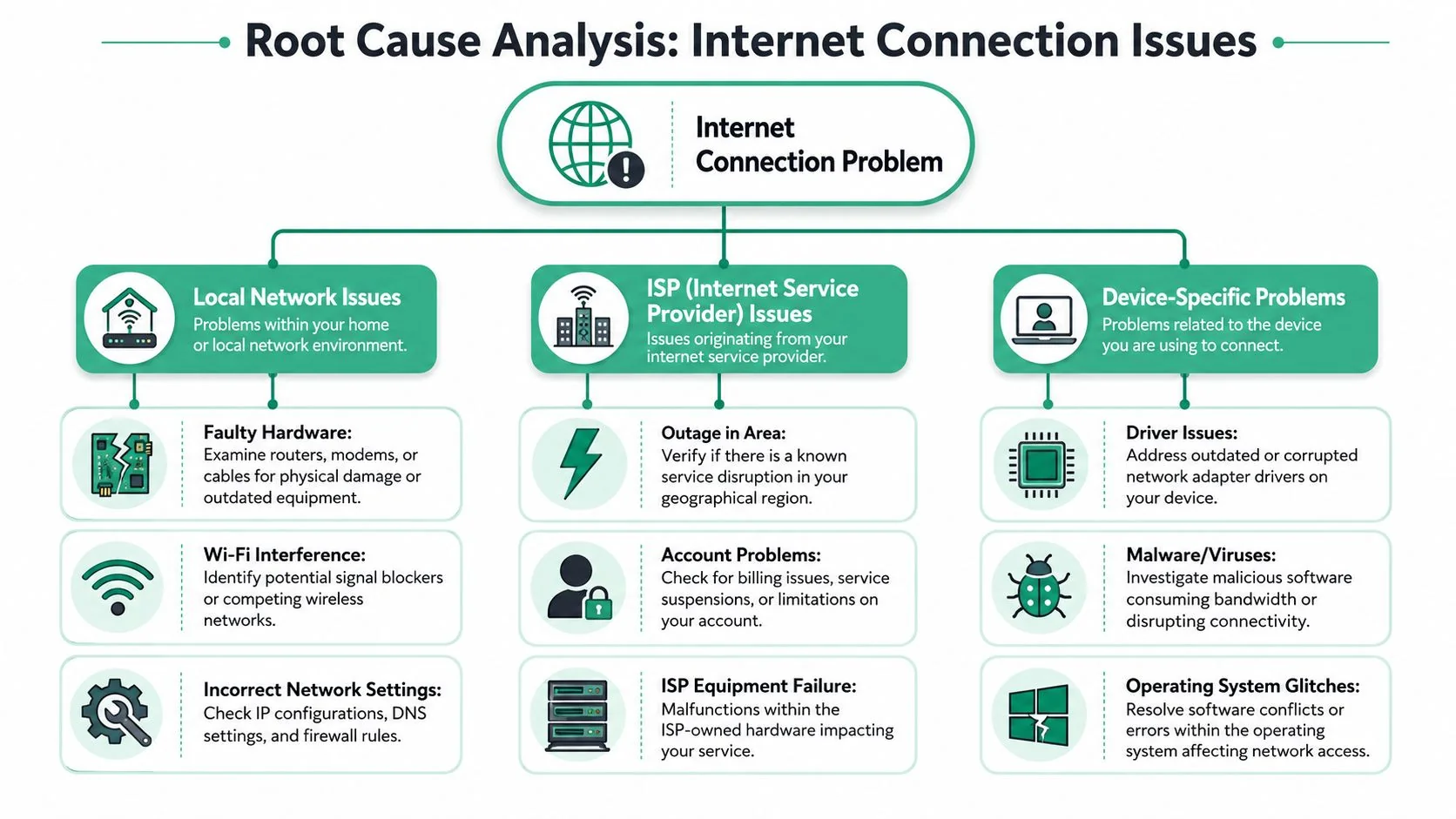
Once the immediate pressure is off, it's time to work through the network chain properly. Most internet connectivity issues sit in one of three places: your local network, your provider path, or an individual device.
Separate local faults from provider faults
For Australian business troubleshooting, one of the most useful habits is comparing results across a wired client, a Wi-Fi client, and a second device on the same circuit, then tracing to key endpoints to see whether loss or latency appears locally, inside the access network, or beyond the ISP handoff. Practical guidance on slow internet also recommends isolating local congestion, stale DNS, routing issues, and confirming that physical cabling is CAT5e or better in business environments, as covered in this slow internet troubleshooting guide.
That approach matters because “slow internet” often isn't one thing. It can be:
- An access network issue: the service itself is unstable or congested.
- A Wi-Fi problem: the line is fine, but wireless coverage or interference is poor.
- An endpoint problem: one PC has a driver or software issue.
- A path issue further upstream: your ISP is up, but traffic to a specific service is impaired.
If a wired desktop performs normally while Wi-Fi devices struggle, stop blaming the NBN and start looking at wireless coverage, crowded channels, or bad access point placement.
Look for hidden internal causes
A common business problem is the invisible bandwidth hog. Someone's OneDrive or SharePoint sync starts pushing a large file set. A backup job kicks off. Multiple PCs begin software updates. The line still works, but latency-sensitive traffic like VoIP, video meetings, remote desktop, and EFTPOS starts failing first.
That's where QoS or traffic shaping helps. It doesn't create extra bandwidth, but it does protect important traffic from being swamped by lower-priority traffic.
“Connected” doesn't always mean “usable”. A line can stay up while business traffic becomes effectively unusable.
DNS is another frequent culprit. Think of DNS as the phone book for online services. If the phone book is stale, slow, or misbehaving, staff may say “the internet is down” when the underlying problem is that devices can't translate service names quickly or correctly. Check resolver health, clear local caches where appropriate, and compare behaviour across devices.
Check the physical layer and local setup
Don't overlook plain hardware and local configuration.
| Area to check | Typical symptom | What to inspect |
|---|---|---|
| Router or firewall | Random drops, poor performance, failed sessions | Uptime, logs, firmware state, WAN status |
| Switches and cabling | Intermittent faults on some desks or rooms | Patch leads, wall ports, link lights, cable standard |
| Wi-Fi coverage | Good internet near router, poor service elsewhere | Access point placement, signal overlap, interference |
| Device settings | One machine fails while others work | Adapter status, DNS behaviour, local firewall, updates |
A few patterns are especially common in small offices:
- Old cabling in one part of the premises causes unstable links that come and go.
- Consumer-grade routers under business load struggle once many devices, cloud apps, and guest traffic pile on.
- Single access point layouts leave dead zones in meeting rooms, back offices, or workshops.
- NAT or firmware quirks create odd issues with some apps while general browsing still appears fine.
If the problem keeps returning after basic fixes, stop treating it as a one-off outage. Recurring faults usually mean there's a design issue underneath.
Building a Resilient and Reliable Business Network
Monday at 9:05 am, the internet drops, the EFTPOS terminal stops processing, staff cannot open cloud files, and customers start waiting. That is the ultimate test of a business network in Australia. The question is not whether your service looks fast on a plan brochure. The question is what keeps operating when the primary link has a bad day.
Choose for consistency not just headline speed
Australian businesses often hear “you've got NBN” as if that settles the matter. It does not. NBN Co reports national rollout and active service figures in its corporate updates, including its Weekly Progress Report and rollout reporting, but coverage alone does not tell you how well a specific service will handle VoIP, Microsoft 365, cloud practice systems, or card payments in peak periods.
The access technology matters. So does the retailer selling the service, how faults are handled, and what contention looks like in your area. A shop on FTTP and an office on FTTN can both say they are on the NBN while having very different day-to-day results.
The ACCC's Measuring Broadband Australia program has consistently shown that performance can vary by technology and provider, especially during busy hours. For a business owner, that matters more than a headline speed tier. Stable performance usually beats a faster plan that drops quality every afternoon.
Ask these questions before renewing a contract or changing providers:
- What NBN access technology are we using
- How does the service perform during our busiest trading hours
- What are the provider's fault response and escalation times
- Will this plan comfortably support voice calls, cloud apps, CCTV, and guest Wi-Fi at the same time
- What happens to EFTPOS and key systems if the main service fails
Build for failure, so the business keeps trading
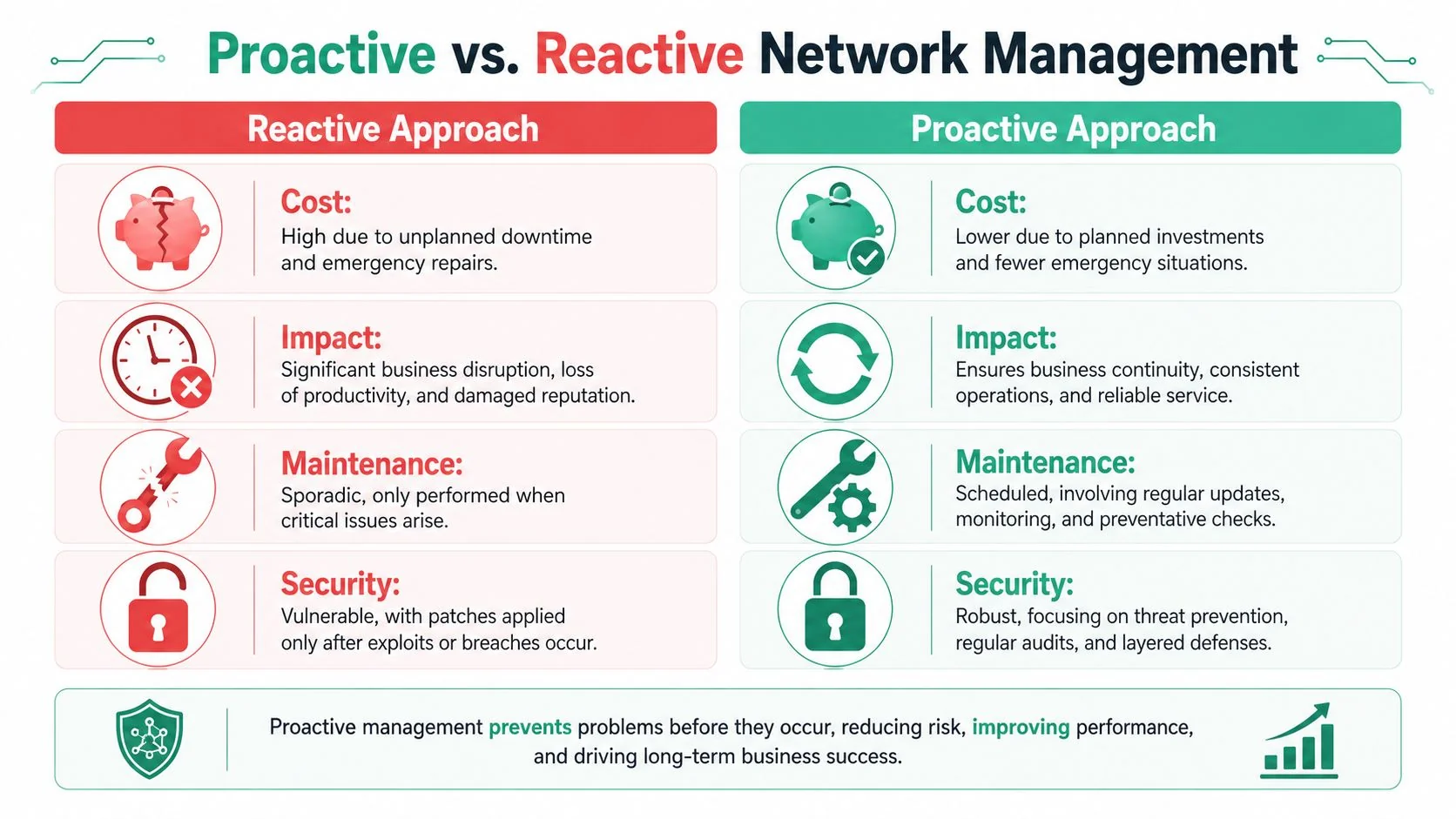
Good network design accepts that outages happen. The goal is to limit the blast radius.
For most small and mid-sized Australian businesses, resilience comes from a few practical layers that work together:
- Business-grade router or firewall: Better hardware handles more concurrent traffic, cleaner VPN sessions, clearer logging, and automatic failover with fewer odd behaviours.
- 4G or 5G backup connection: This is often the fastest way to keep EFTPOS, email, and line-of-business apps running during an NBN fault or ISP outage.
- Traffic separation: Put guest Wi-Fi, staff devices, phones, cameras, and critical systems on separate networks or rules so one type of traffic does not choke everything else.
- Monitoring and alerting: Basic WAN and device monitoring helps spot recurring dropouts, packet loss, overheating gear, or failing links before staff report “the internet is down again.”
- Documented priorities: Decide in advance what must stay online first. For many businesses, that means EFTPOS, phones, cloud apps, and remote access before general browsing or guest internet.
There is a trade-off here. More resilience usually means more cost, more planning, or both. But the right question is not “how do we avoid spending on backup?” It is “what does one hour offline cost us in lost sales, delayed work, and staff downtime?”
A practical setup does not need enterprise complexity. In many offices, the right answer is a stable primary NBN service, decent Wi-Fi design, a firewall that supports automatic mobile failover, and clear rules that protect business traffic first.
That approach gives you room to keep operating while the fault is being fixed.
When DIY Is Not Enough Partner with a Managed IT Provider
At some point, repeated internet connectivity issues stop being a “have you tried turning it off and on again?” problem. They become an operational risk. That's the point where DIY troubleshooting starts costing more than it saves.
The warning signs are usually operational
You likely need outside help if any of these sound familiar:
- The issue keeps returning: Reboots help for a day, then the fault comes back.
- Multiple users are affected differently: One room has poor Wi-Fi, another has dropouts, one app is slow, phones sound bad, and nobody has a clear view of the whole network.
- You rely on cloud systems to trade: If internet failure affects EFTPOS, Microsoft 365, practice software, or remote access, the impact is greater.
- You need accountability: Someone has to own fault isolation, ISP escalation, backup connectivity, and network documentation.
The Australian Digital Inclusion Index has highlighted that connectivity is also about resilience, with rising outage risk making businesses more exposed to disruption of EFTPOS, cloud services, and telehealth, which is why continuity planning such as 4G/5G failover matters, as noted in this digital resilience and continuity summary.
What a provider should actually handle
A managed IT provider should do more than answer calls when the internet is already down. The useful work happens before and between outages:
- Document the network properly: Routers, switches, access points, circuits, and who depends on what.
- Monitor link health and device stability: So recurring faults are visible instead of anecdotal.
- Set up continuity options: Mobile failover, traffic prioritisation, and sensible fallback procedures.
- Deal with vendors and ISPs: Someone technical should be able to present evidence, not vague complaints.
- Review whether the service still suits the business: Especially if staff count, cloud usage, or site layout has changed.
If your internet connection now underpins revenue, client communication, and daily operations, leaving it to ad hoc fixes is risky. The better model is to treat connectivity as part of managed business infrastructure.
If recurring dropouts, unstable Wi-Fi, or NBN performance issues are interfering with your business, it's worth getting a proper review before the next outage hits. Bridge IT Solutions works with Brisbane and South East Queensland organisations that need practical help with network troubleshooting, failover planning, business continuity, and day-to-day IT support.
