

You're probably already relying on more technology than you realise. Email runs through Microsoft 365. Quotes and invoices live in Xero or MYOB. Client files sit in SharePoint, OneDrive, a file server, or all three. Your team uses phones, laptops, and cloud apps from job sites, home offices, and the workshop.
That setup works well until one thing breaks and everything else depends on it. A staff member clicks a bad link. A Microsoft 365 account gets locked out. A folder is deleted. Internet access drops at the wrong time. Suddenly the problem isn't “where's the backup?” It's “how do we keep trading today?”
A practical IT disaster recovery plan gives you an answer before that day arrives. For a Brisbane small business, that plan doesn't need to be huge, expensive, or written in enterprise jargon. It does need to be clear, tested, and built around how your business operates.
Table of Contents
- Why Your Plan Must Cover More Than Just Backups
- Identify Your Most Critical Business Operations
- Build Your Core Recovery and Backup Strategies
- Develop an Incident Communication Plan
- How to Test and Maintain Your Recovery Plan
- When to Partner with a Local IT Expert
Why Your Plan Must Cover More Than Just Backups
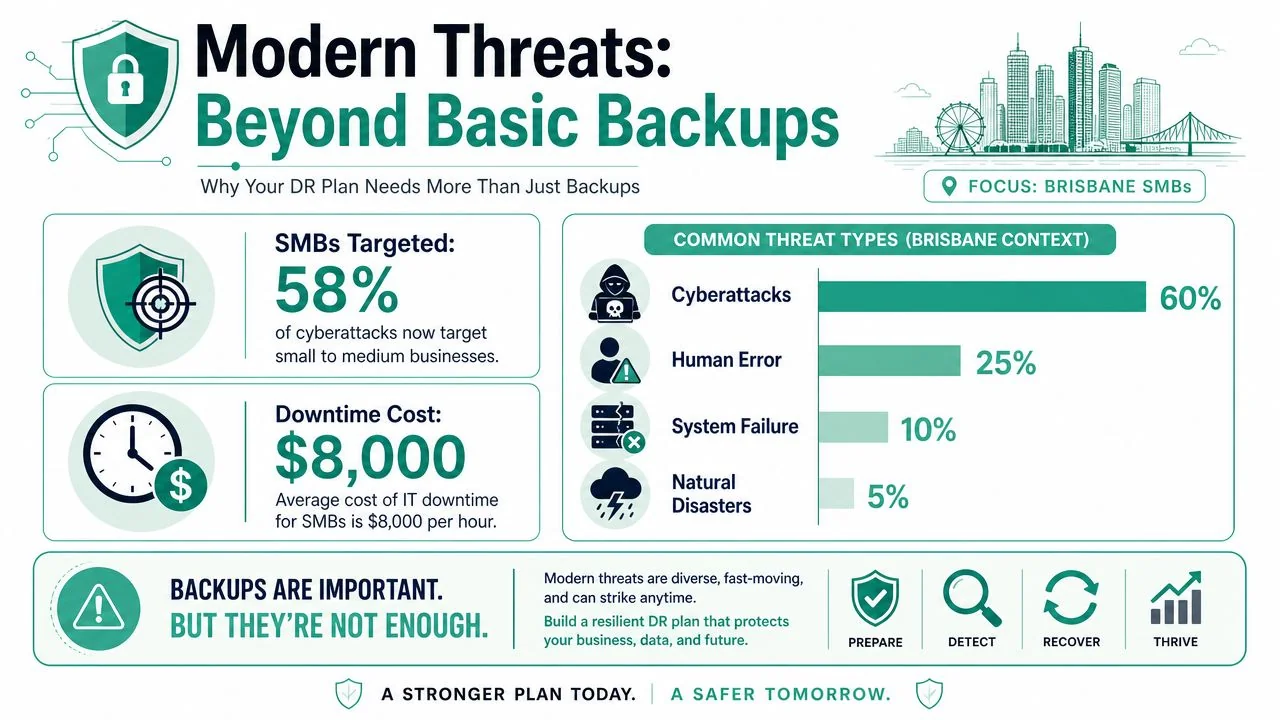
A lot of Brisbane business owners still hear “disaster recovery” and think of flood, fire, or a dead server in a comms cupboard. Those risks still exist, but they're no longer the main reason most small businesses lose access to systems. The more common problems are credential compromise, ransomware, cloud service dependency, accidental deletion, and supplier failure.
If your Microsoft 365 tenant is locked down, your internet is fine and your backups might be fine too, but your staff still can't send email, access calendars, open SharePoint files, or reset passwords. If someone encrypts a file server, you don't just need data restored. You need accounts secured, affected devices isolated, and a clear order for getting people working again.
Backups solve only one part of the problem
A backup answers one question: do you have a copy of the data?
A proper IT disaster recovery plan answers several more:
- What failed first: Was it a user account, a laptop, a cloud platform, a server, or a third-party provider?
- What gets restored first: Email, quoting, file access, phones, payroll, practice software, job scheduling?
- Who can authorise action: If your office manager is away, who approves a tenant lockdown or emergency supplier call?
- How do staff keep operating: Can they use paper forms, mobile hotspots, alternate devices, or a temporary mailbox?
- What must be checked before reconnecting: Restoring infected data or re-enabling a compromised account creates a second outage.
That difference matters financially. In Australia, the average cost of a data breach rose to A$4.26 million in 2024, up from A$4.03 million in 2023, and 29% of breaches involved compromised credentials, according to the Australian figures cited in IBM-related breach-cost reporting. For a local SMB, that doesn't mean every incident becomes a multi-million-dollar event. It means the downstream cost of downtime, response effort, customer disruption, and clean-up can become far larger than the original technical fault.
Practical rule: If your plan starts and ends with “restore from backup”, you don't have a recovery plan. You have stored copies of data.
Modern recovery means business resilience
The useful way to think about disaster recovery today is business resilience. You're not trying to rebuild everything perfectly on day one. You're trying to restore the minimum set of services that lets your business keep operating safely.
For most small organisations, that usually means protecting a short list such as:
- Identity and access: Microsoft 365 admin access, password resets, MFA methods.
- Communication tools: Email, phones, Teams, client messaging.
- Core records: Accounting data, client files, job documents, medical or case notes.
- Operational systems: CRM, quoting, scheduling, line-of-business software.
- Recovery tools themselves: Backup consoles, admin credentials, vendor contacts, licence records.
What doesn't work is treating every system as equally urgent. A workshop screen in the lunchroom doesn't need the same restoration priority as Xero, Best Practice, MYOB, Outlook, or your document store.
A sensible Brisbane-focused plan is shorter, sharper, and based on likely incidents. It covers ransomware, cloud lockout, deleted data, failed hardware, internet disruption, and key supplier outages. That's what makes it usable on a bad day.
Identify Your Most Critical Business Operations
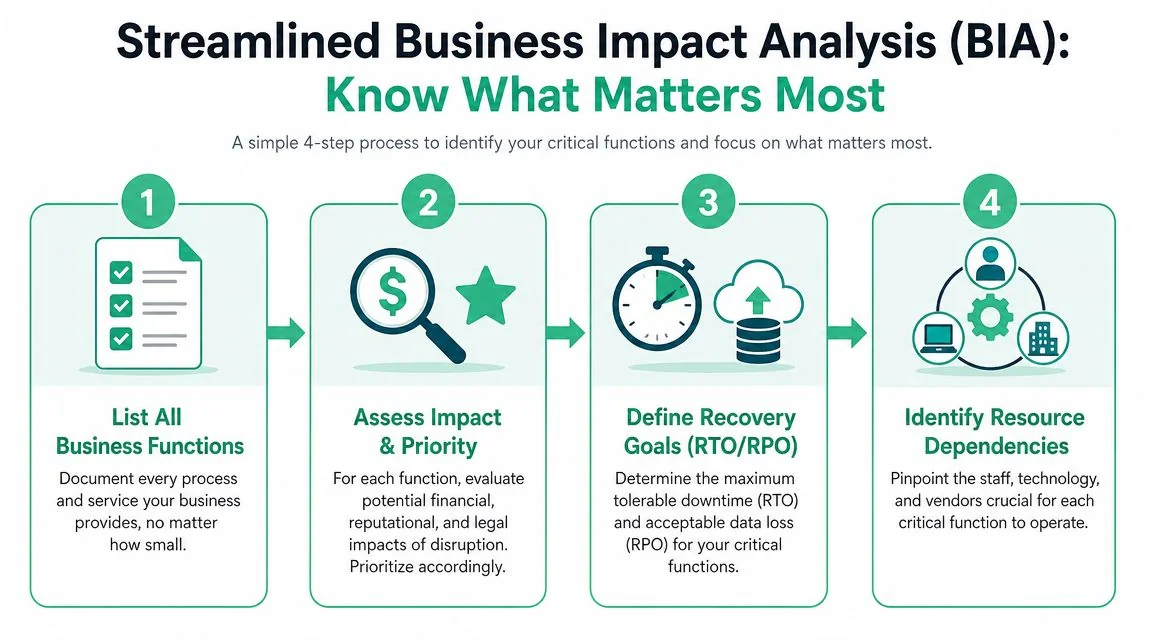
The best recovery plans don't begin with hardware, software, or backup products. They begin with a business impact analysis, or BIA. That's the discipline of deciding what hurts if it stops, how quickly it hurts, and what has to come back first.
Authoritative guidance treats this as the foundation of disaster recovery. The method is straightforward: identify critical applications and infrastructure, rank them by business impact, define acceptable downtime and data loss, then build recovery procedures to meet those targets. The policy guidance in the University of Michigan DS-12 documentation captures that approach well.
Start with business impact, not technology
Don't begin by listing servers. Start by listing the work your business must perform to trade.
For a Brisbane SMB, that list often includes:
- Taking enquiries and bookings
- Sending and receiving email
- Accessing client or patient records
- Producing quotes, jobs, or advice
- Issuing invoices and taking payment
- Meeting legal, regulatory, or contractual obligations
Now attach systems to each function. “Can't invoice clients” might rely on Xero, Outlook, SharePoint, bank feeds, PDF templates, and one person who knows how to approve payments. “Can't see patients” might rely on practice software, scanners, printers, internet, SMS reminders, and a pathology integration.
That exercise usually reveals something useful. The critical thing often isn't the server. It's the chain of dependencies around it.
A backup can restore a database. It can't tell your team which passwords, approvals, vendors, and workarounds they'll need in the first hour.
A short visual explainer can help if you want to see the BIA process in plain language:
Turn business pain into RTO and RPO
Once you know what matters, you can set two practical targets.
RTO, or Recovery Time Objective, means the longest acceptable downtime.
RPO, or Recovery Point Objective, means the most data you can afford to lose.
Business owners usually answer these faster when the questions are phrased plainly:
- RTO question: How long can this be unavailable before the business is materially disrupted?
- RPO question: If we had to roll back, how much recent work could we recreate without serious pain?
Here's a simple example table. These are example targets only. Your actual numbers should come from your own workflow, obligations, and tolerance for downtime.
| Business System | Example RTO (Max Downtime) | Example RPO (Max Data Loss) |
|---|---|---|
| Email and calendar | Same business day | Minimal recent changes |
| Accounting platform | Next business day | Up to one business day of re-entry |
| Shared documents | Same business day | A few hours for active files |
| Job scheduling system | Within several hours | Minimal recent updates |
| Archive files | A few business days | Older data may tolerate longer gaps |
Map the dependencies people forget
Often, plans become unrealistic; businesses identify the main app, but not the supporting services that make it usable.
Commonly missed dependencies include:
- Identity systems: Microsoft 365 admin access, MFA devices, password reset paths
- Internet and DNS-related services: especially where cloud apps are central
- Email itself: many vendor alerts, reset links, and approval messages land there
- Printers and scanners: still essential in healthcare, legal, and construction workflows
- Third-party support contacts: software vendors, internet providers, line-of-business support desks
- A specific staff member's knowledge: often the biggest hidden dependency in a small business
When we help businesses do this exercise, the biggest improvement usually comes from simplification. You don't need a giant spreadsheet. You need a realistic priority list with approved downtime targets and enough detail that someone else can execute the plan if your key person is unavailable.
Build Your Core Recovery and Backup Strategies
Once you know what matters most, you can design protection that matches those priorities. Despite this, many small businesses overspend in the wrong place. They pay for broad backup coverage but never define how recovery happens.
The better approach is to set different recovery levels for different systems. Your accounting platform, Microsoft 365 data, and line-of-business application probably need stronger controls than a low-priority archive folder or a spare workstation image.
Choose recovery tiers that fit your budget
A practical small-business model is a tiered one.
- Tier 1 services: These are the systems that stop trading if they go down. Think Microsoft 365 identity, email, core files, accounting, practice software, or a production database. These usually justify frequent backups, faster restore methods, and tightly documented steps.
- Tier 2 services: Important, but not immediate showstoppers. These may suit scheduled backups and scripted restores.
- Tier 3 services: Nice to have, or slower-moving data that can be recovered manually if needed.
This keeps spending aligned with impact. It also stops the common mistake of promising the same speed of recovery for every system when the budget doesn't support it.
A useful lens for backup design is diversity. Keep copies in different places, protect admin access, and make sure your recovery method still works if the main environment is unavailable. For cloud-heavy businesses, that means thinking about tenant access, retention, and restore options, not assuming Microsoft 365 or Google Workspace alone covers every recovery scenario.
If you're moving files between platforms, planning ahead matters even more. During migrations, data can be changed, misplaced, or cleaned up in ways that are hard to reverse. This guide to SharePoint pre-migration data protection is worth reviewing before any major SharePoint move.
Create simple runbooks for likely incidents
A runbook is just a step-by-step recovery checklist for a specific incident. Good runbooks are short, precise, and written for a stressed human being, not for a perfect world.
A basic Microsoft 365 account compromise runbook might include:
- Confirm the report from the user and check what access is still available.
- Disable sign-in or force containment using the appropriate admin path.
- Revoke active sessions and reset the password.
- Review MFA methods and remove anything suspicious.
- Check mailbox rules, forwarding, and delegated access.
- Confirm whether SharePoint, OneDrive, or Teams content was accessed or changed.
- Restore affected items if needed.
- Document what happened, who approved actions, and what the user must do next.
That's the kind of checklist a small business can use.
The best runbook isn't the longest one. It's the one your team can follow accurately when email is down, phones are ringing, and nobody has time to interpret jargon.
Set expectations with vendors before an outage
Your IT disaster recovery plan should also document what your suppliers are responsible for and what they are not.
For each critical vendor, capture:
- Support contact paths: not just the general number, but the right escalation route
- Your account details: tenant names, licence records, support IDs, contract references
- Service boundaries: what the vendor restores, what your business must restore, and who owns data export or rollback
- Alternate workarounds: how your team operates if that supplier is unavailable for a period
What doesn't work is discovering during an incident that your software vendor only supports the application, not the server, not the printer, not the workstation, and not the data recovery sequence around it.
Develop an Incident Communication Plan
Even when the technical response is solid, poor communication creates extra damage. Staff get conflicting instructions. Clients hear rumours before they hear facts. A supplier waits for approval that never comes. Recovery slows down because nobody is sure who owns the next step.
A good communication plan is usually one page. It doesn't need corporate language. It needs names, order, channels, and pre-approved messages.
Decide who speaks to whom
Keep the contact structure simple and role-based.
Your plan should identify:
- Incident lead: the person who decides when the plan is activated
- Technical lead: internal IT contact or external provider
- Business approver: owner, manager, or director who authorises major actions
- Staff contact: the person who updates employees
- Client contact: who communicates with customers or key accounts
- Supplier contact: who calls software vendors, internet providers, insurance, or other external parties
Then define the order. For example: technical lead first, business approver second, internal staff third, key clients fourth, broader customer notice only if needed.
Runbooks and playbooks become useful beyond IT. If you want a plain-English view of how documented procedures help teams achieve operational excellence, that comparison is a helpful reference.
Keep your messages short and useful
Under pressure, long updates make things worse. Your messages should answer only the questions people need answered now.
Use templates like these:
We're experiencing a systems issue affecting access to email and shared files. We're working through our recovery process now. Please avoid restarting devices unless directed, and use mobile calls for urgent matters until the next update.
We're currently dealing with an IT service disruption that may affect response times. Our team is operating with temporary workarounds and we'll provide an update as soon as service is restored.
A one-page communication plan should include:
- Primary and alternate contact methods: because email may be unavailable
- A staff call tree or group message path: so updates don't depend on one platform
- Client message templates: short, factual, and calm
- Approval rules: who must approve external messaging
- Record-keeping notes: who said what, when, and to whom
Keep it practical. In a real incident, clarity beats polish.
How to Test and Maintain Your Recovery Plan
The most common failure point in disaster recovery isn't missing backups. It's untested recovery. Guidance consistently emphasises that plans need regular testing, task-level runbooks, and post-test improvement because recovery often breaks in orchestration, sequencing, credentials, or approvals rather than storage alone. That's the core message in this industry guidance on effective IT disaster recovery planning.
That finding matches what small businesses run into in practice. The backup exists. The restore account is locked. The admin MFA device belongs to someone on leave. The restored data is there, but the application service, printer mapping, licence activation, or mail flow dependency is still missing.

Testing finds the gaps backups won't show you
A practical testing sequence for an SMB usually looks like this:
- Tabletop exercise: Sit down with the owner, office manager, and IT lead. Walk through a scenario such as ransomware, internet failure, or a compromised Microsoft 365 admin account.
- Isolated restore test: Recover a file, mailbox item, or small dataset into a safe test location.
- Service recovery test: Validate that a business process works end to end, not just that data exists.
- Review and remediation: Record what ran on time, what ran late, and what didn't start.
That last part matters most. If a test reveals a bad password vault process, missing vendor contact, or unclear approval chain, the test has done its job.
Measure success by the recovery time you actually achieved in testing, not by a green backup alert.
A simple testing rhythm for small businesses
You don't need to turn the business upside down. You do need a repeatable rhythm.
A manageable pattern looks like this:
| Activity | Practical focus |
|---|---|
| Tabletop session | Walk through one realistic outage scenario |
| Restore check | Recover a small sample of critical data |
| Runbook review | Update contacts, screenshots, steps, and approvals |
| Staff refresher | Confirm who does what during an outage |
| Change review | Update the plan after software, vendor, or staffing changes |
The key is consistency. A plan should be updated after material changes such as:
- New software or cloud platforms
- A Microsoft 365 tenant restructure
- Office relocation or connectivity changes
- New compliance obligations
- Staff departures in key admin roles
- Changes to backup products or vendors
What doesn't work is writing a plan once, storing it in SharePoint, and assuming it's still accurate a year later. If your business changes, your recovery plan has to change with it.
When to Partner with a Local IT Expert
Some businesses can build and maintain a basic recovery plan internally. Others reach a point where DIY becomes fragile. The issue usually isn't effort. It's time, complexity, and the fact that the person who “sort of knows the setup” also has a full-time job.
Australian organisations also need to plan in a tougher operating environment. The Australian Cyber Security Centre recorded 94,000 cybercrime reports in 2023–24, and the OAIC reported 527 data breach notifications in the first half of 2024, which was the highest half-year total since the Notifiable Data Breaches scheme began, as summarised in this disaster recovery reference article. For a Brisbane SMB, that means recovery planning should be treated as a normal operational requirement, not an edge case.
Signs your business has outgrown a DIY plan
It's usually time to bring in specialist help when several of these are true:
- Your systems are now mixed and layered: on-premises files, Microsoft 365, cloud apps, laptops, phones, and a line-of-business application that nobody fully documents.
- You have compliance pressure: healthcare, legal, finance, and many professional services firms need stronger evidence of control and recoverability.
- Testing never happens: backups run, but nobody has time to validate restores or rehearse incidents.
- Admin access is concentrated: one staff member, one contractor, or one notebook contains too much critical knowledge.
- Downtime decisions are getting harder: you're no longer asking “can we restore this?” but “in what order, with what risk, and who approves it?”
- Supplier coordination is messy: multiple vendors point at each other during outages.
Those are strategic signals, not just technical ones.
What good external support should actually do
A worthwhile local IT partner should do more than sell backup software. They should help you build a workable operating model around recovery.
That typically includes:
- Business impact workshops to identify critical services and realistic priorities
- Recovery design matched to your budget and tolerance for downtime
- Documented runbooks for likely incidents such as account compromise, ransomware, deleted data, and hardware failure
- Regular testing with evidence of what passed, failed, and changed
- Vendor coordination so your software, cloud, and connectivity providers aren't managed ad hoc
- Clear communication paths for owners, managers, and staff during an event
The local angle matters too. A Brisbane-based business often wants someone who understands the practical mix of small-office networking, Microsoft 365 dependence, field staff mobility, and the need for plain-English support when things go wrong.
If your current setup depends on hope, memory, and a backup dashboard, that's the point where a professional review usually pays for itself. A good IT disaster recovery plan doesn't remove every outage. It does make the outcome shorter, calmer, and more controlled.
If you'd like help turning your current backups, cloud apps, and business workflows into a practical recovery plan, Bridge IT Solutions can help. We work with Brisbane and South East Queensland businesses that need clear priorities, tested recovery procedures, and local support when an outage hits.
