

Your backup ran last night. The office opens, staff log in, invoices start moving, bookings get changed, emails get filed, and the day takes off. At 2:30 pm, a server fails or ransomware locks a key folder. The question that matters isn't whether you have “a backup”. It's how much of today you're prepared to lose.
That's what a recovery point objective really means.
For small businesses in Brisbane and South East Queensland, this isn't an abstract IT metric. It's the gap between your last usable save point and the moment things went wrong. If that gap is too wide, the damage lands in very ordinary places: re-entering jobs, rebuilding appointments, chasing unpaid invoices, explaining missing records to customers, and trying to reconstruct what happened from memory.
Most guides stop at the technical definition. The more useful approach is to treat RPO as a business decision first. How often does your critical data change? What would one hour of missing data cost you? And are you setting a realistic target, or paying for an enterprise-grade setup that your business doesn't need?
Table of Contents
- How Much Data Can Your Business Afford to Lose
- RPO vs RTO Understanding the Two Pillars of Recovery
- How to Calculate Your Businesss True RPO
- Real-World RPO Targets for Queensland Businesses
- Choosing the Right Backup Strategy and Technology
- Putting It All Together with Bridge IT Solutions
- Turning Your RPO into a Rock-Solid Recovery Plan
How Much Data Can Your Business Afford to Lose
A Brisbane café runs a busy Friday lunch service. Orders are flying through the point-of-sale system, staff are switching tables, suppliers are being paid, and casuals are clocking in and out. If the system crashes at 3 pm and the last clean backup was taken at 9 am, six hours of trading history may be gone.
That's the plain-English version of a recovery point objective. It answers one business question: what's the maximum amount of data, measured in time, that you can afford to lose?
For one business, the answer might be “we can survive losing half a day of archived marketing files”. For another, it might be “we can't lose more than a few minutes of patient bookings or financial transactions”. The right number depends on the work you do, how often your records change, and how painful it would be to recreate them.
What data loss looks like in real life
Data loss rarely arrives as one dramatic event. It usually turns into a messy afternoon:
- Sales vanish: Staff know transactions happened, but the system record is missing.
- Appointments disappear: Customers show up, but no one can prove who booked what.
- Admin doubles: Someone has to rebuild records from paper notes, emails, or memory.
- Trust takes a hit: Clients don't love hearing that their file update can't be found.
A lot of owners think of backups as a checkbox. The better way to think about them is as a business tolerance setting. If your last backup is too old, your backup isn't protecting today's work.
Practical rule: If recreating the missing data would take longer, cost more, or create more stress than tighter backups, your current RPO is too loose.
If you want a useful outside framework for thinking through operational impact, the critical BIA insights for Indiana companies are worth reading because the business impact logic applies well beyond one region. For a more local foundation on protecting business information, these backup best practices for business data give a solid starting point.
RPO vs RTO Understanding the Two Pillars of Recovery
A Brisbane clinic can lose only 15 minutes of patient notes and still be unable to reopen for half a day. That is the gap between RPO and RTO, and it is where many small businesses misjudge their real exposure.
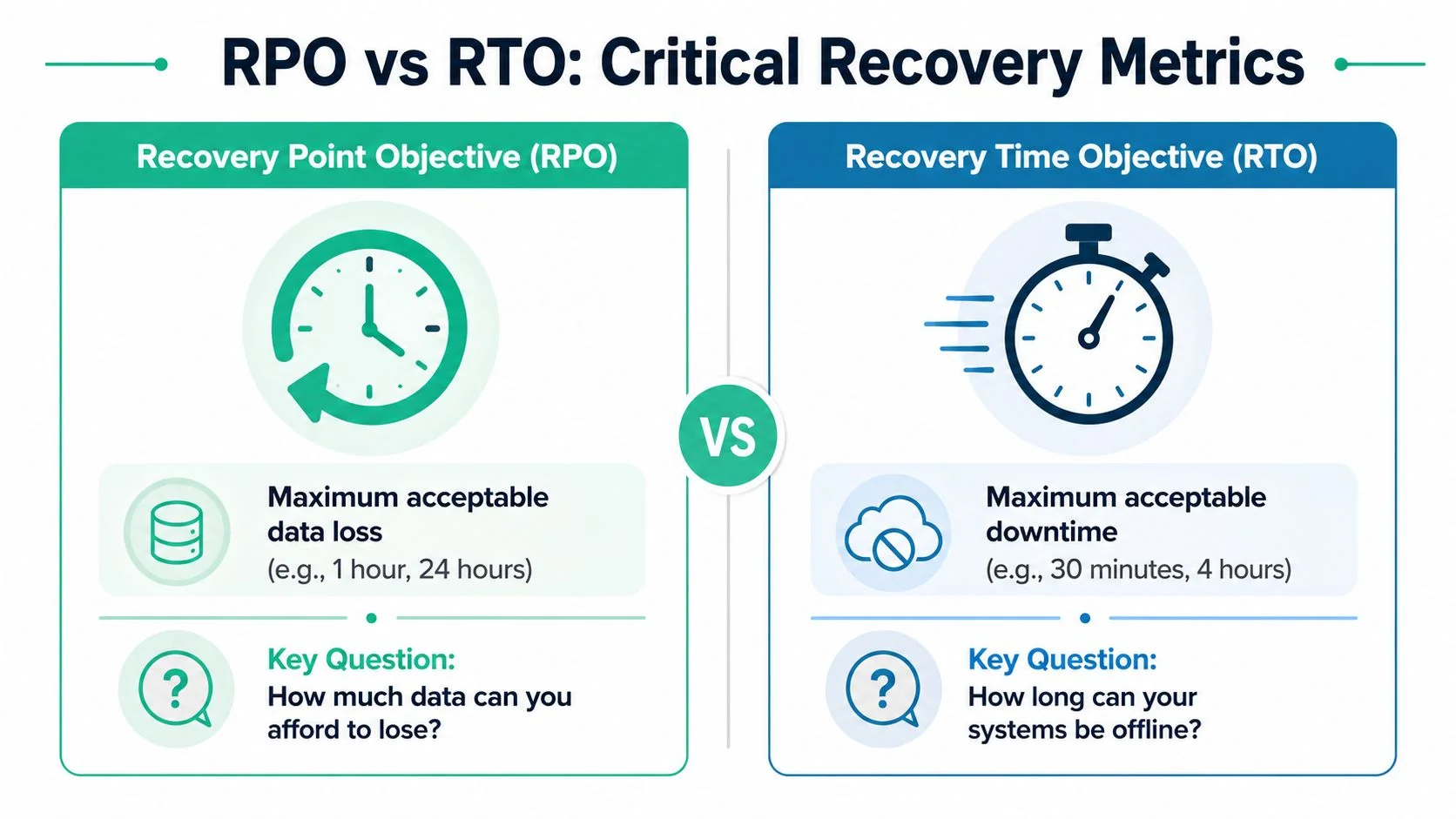
RPO sets the maximum data loss you can tolerate. RTO sets the maximum downtime you can tolerate. One measures how far back you may need to roll your data. The other measures how long the business can operate without the system.
Here is the plain-English difference:
| Metric | What it measures | Business question |
|---|---|---|
| RPO | Maximum acceptable data loss | How much work can we afford to lose? |
| RTO | Maximum acceptable downtime | How long can we afford to be offline? |
A business can have a 15-minute RPO and a 4-hour RTO. In practice, that means the records are fairly current after an outage, but staff may still sit idle for hours while systems are restored, tested, and signed off for use.
A critical consideration is that owners often buy backup tools based on frequency alone. More frequent backups reduce potential data loss, but they do not automatically shorten the restore process. Recovery still depends on where the backup lives, how much data needs to be restored, whether servers or cloud apps must be rebuilt, and how quickly internet links and local networks can move the data back into production.
In regional and suburban Queensland, I often see the same planning mistake. The backup schedule looks good on paper, but nobody has timed a real restore. A one-hour backup interval sounds safe until the business learns that pulling data back from cloud storage, reconnecting line-of-business apps, and checking user access turns into a half-day outage.
A fast backup schedule protects recent work. A tested restore process gets people operating again.
That distinction is why RPO should be set as a business risk decision, not a technical preference. If your accounting platform loses 30 minutes of entries, the cost may be manageable. If your booking system is unavailable for four hours on a Monday morning, the downtime may hurt more than the lost data. For many SE Queensland businesses, the right answer is not the lowest possible number. It is the point where the cost of tighter protection is lower than the cost of rework, delays, and customer disruption.
For owners who want another practical explanation of disaster recovery planning in business terms, this Regina disaster recovery guide is a helpful reference. If you are still deciding how formal your planning needs to be, this guide on whether your business needs a business continuity plan gives useful context.
A short explainer helps if you want the concepts in another format:
How to Calculate Your Businesss True RPO
A practical RPO starts with one question. If a server failed at 2:37 pm, how much of today's work would you be willing to re-enter before the cost and disruption become unacceptable?
That framing gets owners to the right answer faster than a technical discussion about backup schedules. RPO is a business loss limit. It is the last save point your business can live with.
Start with the work that would hurt to redo
Focus on the systems where staff are creating or changing information all day. In many Queensland small businesses, that means the tools tied directly to revenue, service delivery, and compliance.
Check systems such as:
- Booking and scheduling platforms. Clinics, consultancies, trades, and field service teams depend on them.
- Financial records. Invoices, payments, POS transactions, payroll adjustments, and debtor notes.
- Client and case information. Matter files, accounting workpapers, approvals, and customer histories.
- Operational records. Job updates, stock movements, delivery status, and production logs.
For each system, ask staff the plain-English version, not the IT version: if we lost everything entered since lunch, could we rebuild it accurately by tomorrow?
The answer is usually more honest when it comes from the people who would have to do the rework.
Calculate the cost of lost work
A sensible RPO usually comes from four checks. This is a light business impact review, not a formal workshop with a stack of templates.
- How often does the data change? A live booking calendar changes very differently from an archive folder.
- What would rework cost? Count wages, overtime, missed appointments, delayed invoicing, and customer callbacks.
- Would lost records create legal or contractual trouble? Health, finance, NDIS, and professional services often have tighter tolerances.
- Can you set different targets for different systems? A file archive can often tolerate more loss than the database running the business day to day.
Many owners often confuse RPO and RTO. RPO asks, "How much data can we lose?" RTO asks, "How long can we be down?" Those numbers are related, but they solve different problems. A business may recover a system in two hours and still lose half a day of transactions if backups only run twice a day.
That is why I usually recommend putting a dollar figure next to the time window. If losing one hour of bookings means three reception staff spend the afternoon reconstructing appointments, plus a dentist loses billable chair time, a one-hour RPO may already be too loose. If losing four hours of archived marketing files creates little more than annoyance, that system does not need the same protection.
Set your RPO by the cost of re-creating lost work, not by the default backup interval in your current software.
Write the target as a business rule
The final check is simple. Put the target into a sentence that an owner, manager, and IT provider would all interpret the same way.
For example: “If the file server or cloud app fails, we can tolerate losing no more than 30 minutes of accounting data, two hours of booking data, four hours of general admin files, and one business day of archived marketing content.”
That gives you something you can test, price, and challenge. It also stops overspending. Many SE Queensland businesses do not need the tightest possible RPO across every system. They need a tighter target for the systems that drive cash flow and customer service, and a cheaper, looser target for everything else.
Real-World RPO Targets for Queensland Businesses
A Brisbane dental clinic loses access to its practice system at 3:40 pm. The server is restored before close of business, but the latest usable backup is from noon. The clinic is technically back online, yet the team still has to reconstruct bookings, treatment notes, invoices, and payment records for the busiest part of the day. That is the business impact of RPO.
For Queensland small businesses, the right target usually comes down to one question. If you had to roll a system back to its last save point, how much work could your team realistically rebuild without blowing out labour cost, customer trust, or compliance risk?
Different systems deserve different targets
One business rarely needs one RPO across everything. A better approach is to set tighter targets for the systems that drive revenue, service delivery, and regulated recordkeeping, then allow looser targets for lower-value data.
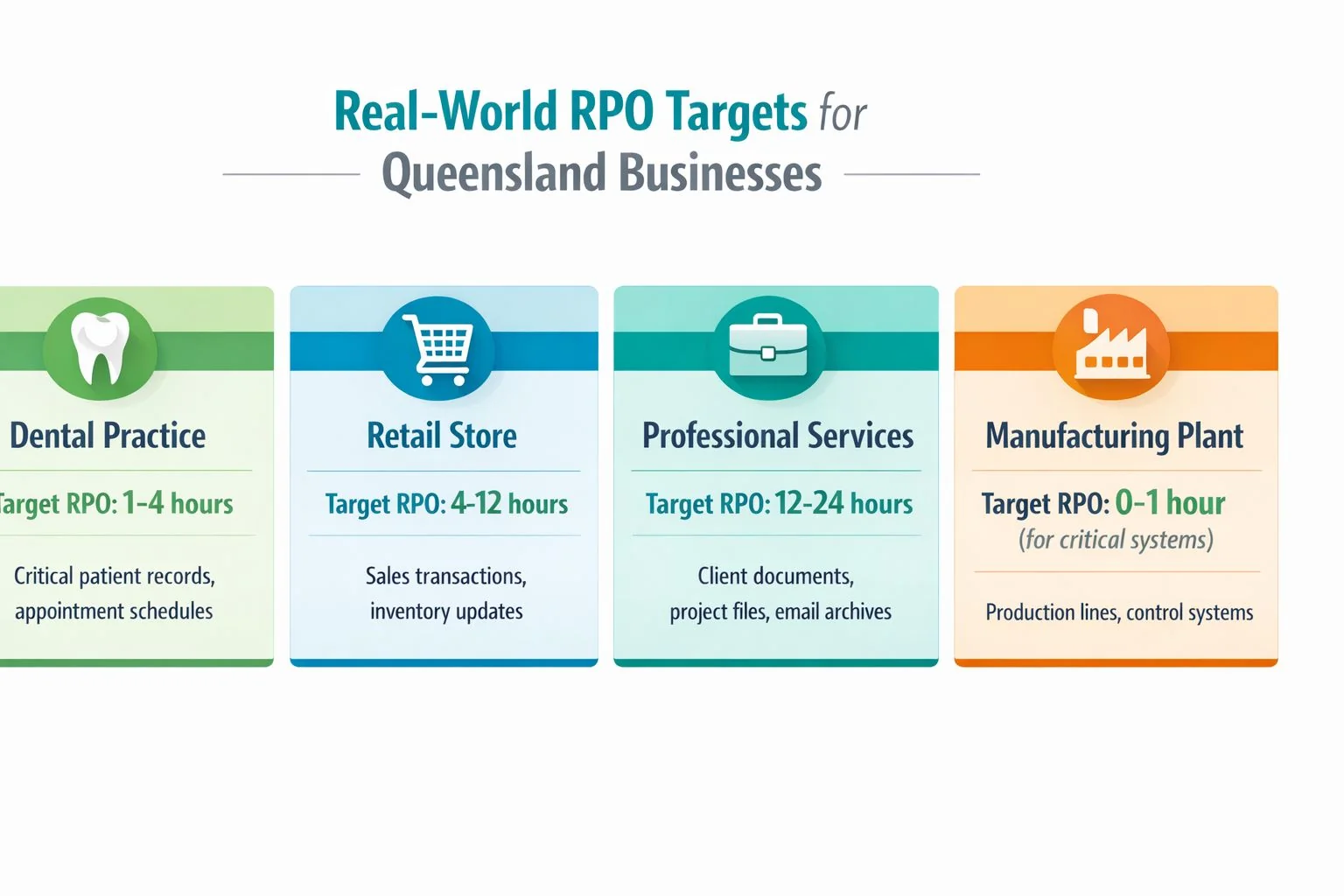
A dental clinic will usually need a tight RPO for patient bookings, clinical notes, and same-day billing. Losing even 30 to 60 minutes of updates can create appointment confusion, treatment record gaps, and extra admin work. Older reference files or archived images often sit in a different tier.
A law firm tends to need a tight RPO for active matter files, correspondence, and document versions. If solicitors and support staff spend half a day editing contracts or advice letters, that work is expensive to recreate and hard to reconstruct perfectly. Closed matters and long-term archives usually do not justify the same protection level.
A construction business often has mixed priorities. Current project documents, variations, procurement changes, and site photos may need a much tighter RPO than payroll history or general office files. The practical split is between data tied to live jobs and data that can wait.
This summary chart is useful as a starting point, not a universal rule:
Ransomware changes the cost calculation
Ransomware does not just take systems offline. It can also corrupt data between backup points, which means a loose RPO can leave a business restoring a copy that is already too old to be useful.
That matters most for businesses handling fast-changing or sensitive information. Healthcare, legal, financial, and customer-facing service businesses usually feel the pain faster because their records change all day and errors are harder to repair later.
In practice, I usually see the best results from a tiered posture like this:
| Business type | System | Likely RPO posture |
|---|---|---|
| Healthcare or dental | Clinical records and bookings | Very tight |
| Professional services | Active client matter data | Tight |
| Retail or hospitality | POS and inventory | Moderate to tight |
| Construction or trades | Project-critical data tighter than admin | Tiered |
The point is not to chase the lowest possible number everywhere. A five-minute RPO across every server, workstation, and file share can get expensive fast, and many small businesses will never see a return on that spend. A smarter model is to protect the data that keeps cash flow moving and customer commitments intact, then use a cheaper setting for everything else.
If the business relies heavily on Microsoft 365, cloud files, or line-of-business apps, a managed cloud backup service for business continuity can help match protection levels to each workload instead of applying one blanket rule.
That is usually where Queensland businesses avoid the two common mistakes. They stop under-protecting live operational data, and they stop overpaying to protect low-value archives at the same level.
Choosing the Right Backup Strategy and Technology
A Brisbane office loses power at 10:15. Staff are back at their desks by 11:00, but the key question is simpler. How much work vanished between the last good copy and the outage?
That is the job of your backup design. Once the target is clear, the technology choice stops being a product hunt and becomes a business decision about speed, risk, and cost.
A backup setup has to answer two different problems. First, how often can it capture changes without slowing the business down or blowing out the budget? Second, where does that recovery copy live if the office, server, or internet link is the thing that fails?
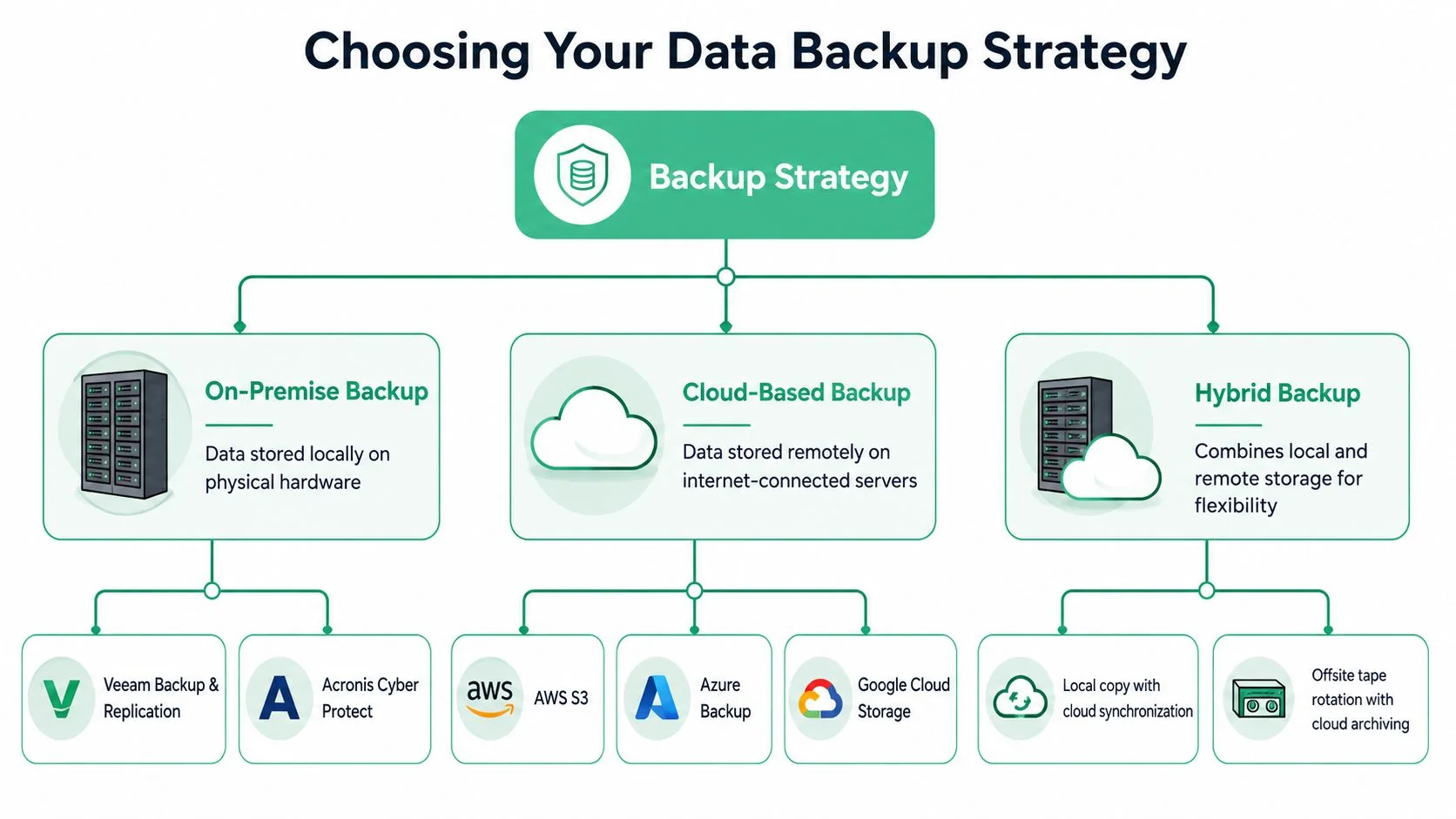
Most small businesses choose between three broad approaches:
- On-premise backup. Fast to restore from and useful for servers, shared files, and virtual machines. The weakness is obvious. If the site has a fire, theft, flood, or serious hardware event, the backup may be affected too.
- Cloud-only backup. Keeps data off-site and can be easier to manage day to day. The trade-off is dependence on internet upload speed, download speed, and service availability during both backup and recovery.
- Hybrid backup. Uses local backups or snapshots for fast recovery, then copies data off-site for disaster protection. For many Queensland businesses, this is the most practical balance.
Why hybrid is often the sensible choice
If you want a tight RPO, local snapshotting usually does the heavy lifting. A local appliance or host-based snapshot can capture changes every few minutes, or faster in some environments, without waiting on the public internet. The cloud copy then protects the business if the whole site goes down.
That split matters because RPO and RTO get tangled here. A cloud-only design might still meet the data-loss target on paper, but restoring everything through a slow connection can drag out downtime. A local copy helps with recovery speed. An off-site copy helps with site loss. Businesses often need both.
I usually explain it like a video game save point. The snapshot is your last save. The off-site copy is the spare console in another house. One protects recent progress. The other protects the business if your main setup is gone.
A practical way to choose
Start with the system, not the vendor pitch.
If a system drives bookings, sales, job scheduling, customer records, or billable work, it usually needs more frequent backups and a faster restore path. If it stores old archives, completed projects, or files you rarely touch, a cheaper and slower method may be enough.
That often leads to a mixed design:
- Critical live systems get frequent local snapshots plus off-site replication.
- Standard file shares get scheduled backups with versioning.
- Low-value archives move to lower-cost retention storage with a looser schedule.
That approach controls spend without pretending every folder deserves the same protection.
For businesses comparing options, managed cloud backup services for business continuity often work best as part of that broader design, not as a one-size-fits-all answer.
What to watch for before you sign off
A backup proposal is usually weak if it promises a very low RPO but skips over any of these points:
- how often snapshots run
- whether backups are application-aware
- how long a full restore would take
- whether restores are tested, not just reported
- what happens if the internet link is down
- whether the backup itself is isolated from ransomware or accidental deletion
The pattern is consistent. Cheap backup is easy to buy. Reliable recovery takes planning.
For most SE Queensland small businesses, the best fit is not the most expensive platform or the lowest advertised RPO. It is the design that protects the systems that make money, keeps recovery time realistic, and avoids paying premium rates to preserve low-value data every few minutes.
Putting It All Together with Bridge IT Solutions
A Brisbane practice gets hit with a server failure at 10:15 on a Tuesday. The owner asks two simple questions. How much work is gone, and how long until staff can use the system again?
That is the point where backup stops being an IT purchase and becomes a business decision.
A lot of small businesses in SE Queensland get pushed toward the wrong target for one of two reasons. They treat RPO and RTO as the same thing, or they buy a very aggressive backup schedule because it sounds safer. Both mistakes cost money. One leaves the business exposed. The other piles premium backup costs onto systems that do not justify them.
The better approach is to price the risk in plain terms. If your team lost the last hour of bookings, invoices, job notes, or file changes, what would that cost in rework, missed revenue, customer frustration, and compliance pressure? That answer usually gives a clearer RPO target than any vendor brochure.
For a dental clinic, one hour of data loss may mean re-entering patient bookings and treatment records while the front desk fields calls from confused patients. For a legal practice, it may mean lost document edits, disputed versions, and unbilled work. For a trade business, it may mean missed job updates, wrong site details, and delays that ripple through the rest of the week. Archived records are different. They still matter, but they usually do not need the same recovery point as the systems the business uses every hour.

A sensible setup usually looks like this:
- Business-led targets: Recovery points are set by the cost of lost data, not by a default product setting.
- Clear separation of RPO and RTO: The business knows how much data loss is acceptable and how long systems can stay down. Those are different decisions.
- Tiered coverage: High-impact systems get tighter protection. Lower-value data gets a cheaper schedule.
- Tested recovery steps: Staff know who restores what, in what order, and what the fallback process is if a cloud app, server, or internet link fails.
That is the practical value of working with a provider that understands both infrastructure and business continuity. A good partner should be able to explain why Microsoft 365 protection, Veeam, Acronis, local backup appliances, cloud replication, or immutable storage are used for specific workloads, and equally, why some systems do not need the expensive option.
I have found that owners make better decisions once the conversation shifts from features to consequences. RPO is the last save point. RTO is the wait to get back into the game. If those are set properly, the recovery plan is easier to justify, easier to budget, and far less likely to disappoint when something goes wrong.
For a broader operational view beyond the IT layer, Onsite Pro Restoration business continuity is a useful reference. It frames continuity as a business process, which is exactly how small businesses should treat recovery planning.
Turning Your RPO into a Rock-Solid Recovery Plan
A recovery point objective only helps if it becomes part of an actual recovery plan. That means documenting the target, matching technology to it, and testing whether the business can restore what it needs when it matters.
From target to agreement
The strongest plans turn RPO and RTO into operational commitments. In a managed IT relationship, that usually means they appear in a service agreement or supporting documentation with enough detail to be measurable.
For a small business owner, that should answer a few non-technical questions clearly:
- Which systems are covered
- How much data could be lost in the worst accepted case
- How long recovery should take
- Who is responsible for responding, restoring, and communicating
That turns backup from hope into process.
If you want another business-facing perspective on continuity planning beyond the IT layer, this overview of Onsite Pro Restoration business continuity is a useful companion read because it frames continuity as an operational discipline, not just a technology purchase.
The key takeaway is straightforward. Recovery point objective is your data loss tolerance. It is not the same as recovery speed. It should be set by business impact, not by guesswork or vendor pressure. And for many South East Queensland businesses, the most reliable outcome comes from a tiered, tested, hybrid approach that protects the systems that matter most.
If you want help setting a realistic recovery point objective for your business, Bridge IT Solutions can help you map your actual risk, separate RPO from RTO, and design a cost-effective recovery plan that fits the way your Brisbane or SE Queensland business really operates.
