

You're probably here because something in your business tech already feels harder than it should.
A staff member can't log in five minutes before a client meeting. The printer stops talking to the network on invoice day. Microsoft 365 starts prompting for something nobody understands. Your internet is “working”, but cloud files crawl, phones drop out, and everyone loses half the morning trying to work around it. In a small business, that disruption doesn't stay in the IT corner. It spills straight into sales, service, payroll, appointments, and reputation.
That's where people usually ask, “What is IT support, really?” They often picture a person who fixes broken laptops after the fact. In practice, IT support is much broader. It's the function that keeps your team productive, your systems usable, and your data protected well enough that the business can keep moving.
For Brisbane and South East Queensland businesses, that matters because local firms often run lean. You don't have spare time for recurring tech drama, and you usually don't have spare staff to babysit systems either. A good support setup gives you fewer interruptions, clearer accountability, and technology that helps the business grow instead of slowing it down. If you also want practical reading around connected business risks, including physical and operational security topics, Nimbio's security system resources are a useful companion.
Table of Contents
- Why Every Business Owner Needs to Understand IT Support
- What IT Support Actually Means for Your Business
- The Two Paths of IT Support Break-Fix or Managed Services
- Key IT Support Services for Modern Businesses
- How Quality IT Support Drives Business Growth
- Choosing the Right IT Partner in South East Queensland
- How Much Does IT Support Cost
- Your IT Support Questions Answered
Why Every Business Owner Needs to Understand IT Support
A Brisbane business owner once described their setup to me like this: “Most days it's fine. Then one thing goes wrong and the whole office turns into a help desk.” That's a very common stage of growth. You've got laptops, phones, Wi-Fi, cloud apps, shared files, printers, email security, maybe a specialised line-of-business app, and they all depend on each other more than most owners realise.
The trouble starts when tech is treated like power tools in a shed. If something breaks, you pull it out, repair it, and put it back. Business IT doesn't work that way. One password issue can block access to email. One failed update can stop accounting software. One poorly secured account can put client data at risk.
The business cost is bigger than the tech issue
When your systems fail, the primary loss usually isn't the device. It's the interrupted work behind it. Staff pause. Customers wait. Deadlines tighten. Everyone starts creating workarounds, and workarounds are where mistakes and security gaps creep in.
Practical rule: If a tech issue can stop your team from serving customers, taking payments, or accessing records, it's a business issue, not “just IT”.
That's why understanding IT support matters even if you never want to become a “tech person”. You don't need to know how every system works. You do need to know what a proper support function should do for your business, what good service looks like, and why reactive fixes usually cost more than they first appear to.
What IT Support Actually Means for Your Business
If you want the simple answer to what IT support is, think of it as the people, processes, and tools that keep your technology usable day to day.
That includes obvious things like fixing login problems, setting up new laptops, sorting out printers, and helping staff with Microsoft 365. But it also includes less visible work, like checking backups, monitoring devices, applying updates, managing access, documenting systems, and making sure one small fault doesn't turn into a full office outage.
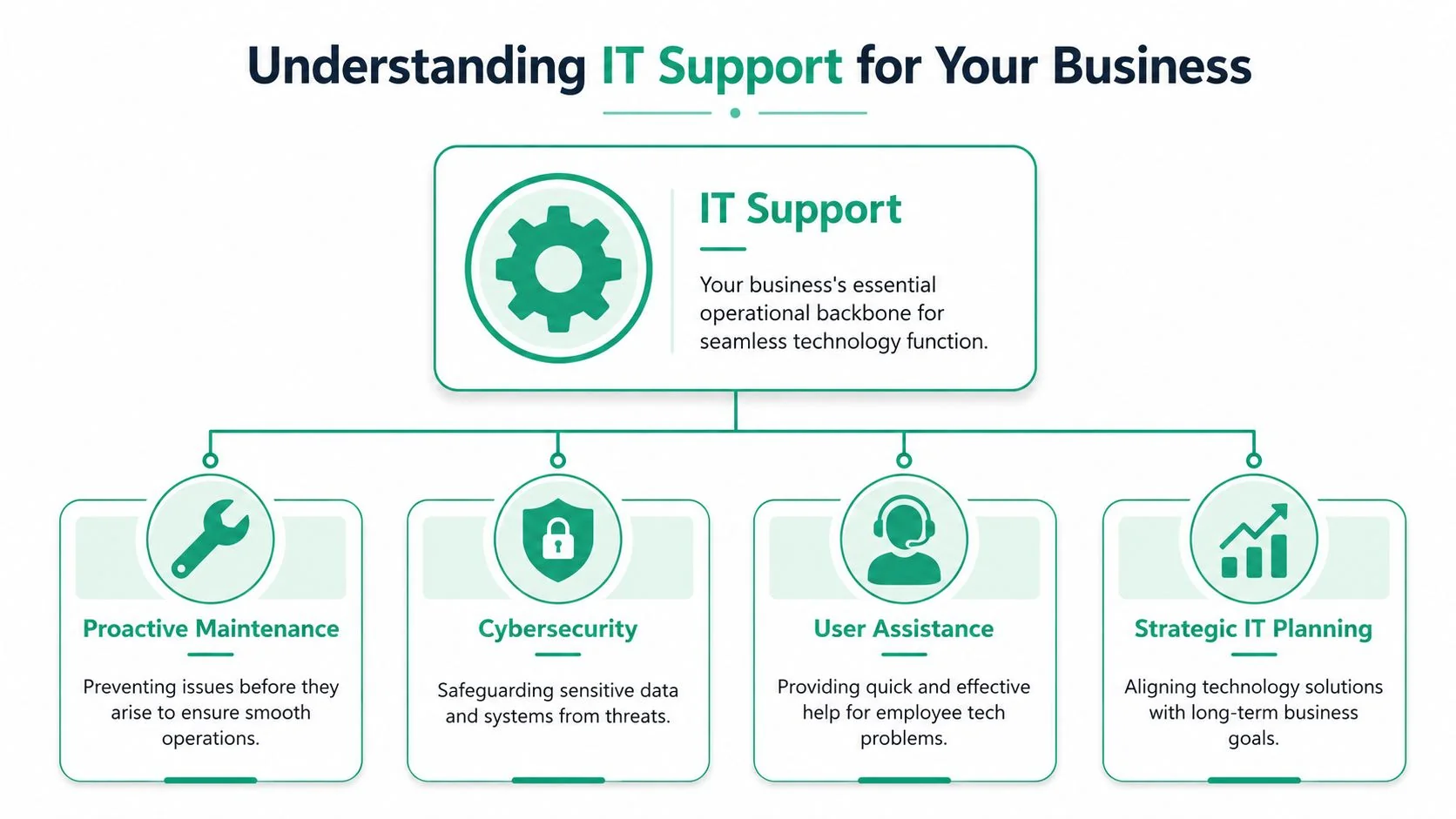
In Australia, the practical definition is broader than break-fix help. It includes first-line troubleshooting for software, hardware, access, and device issues, plus remote administration that often requires privileged access to endpoints or networks. Support teams also commonly use tiered or swarming models where more complex issues move beyond the service desk, as explained in BeyondTrust's overview of IT support and service desk work.
Think of IT support like building management
A useful analogy is a commercial building.
You've got a building manager who keeps daily operations running. You've got security controlling access. You've got electricians and specialist tradespeople who step in when something more technical fails. A business doesn't usually survive by calling all of them only after the ceiling caves in.
IT support works the same way.
- Daily operations: Staff need access to files, email, printers, business apps, Wi-Fi, and phones.
- Security and access control: The right people need the right access, and the wrong people need to stay out.
- Specialist intervention: Some issues are simple. Others need a deeper technical investigation.
How support teams are usually structured
Small businesses often hear terms like Tier 1, Tier 2, and Tier 3 and assume that's corporate jargon. It's just a practical sorting system.
| Support level | What they usually handle | Real example |
|---|---|---|
| Tier 1 | Fast, common issues | Password resets, mailbox access, printer setup |
| Tier 2 | Technical troubleshooting | Laptop performance issues, sync failures, network faults |
| Tier 3 | Specialist engineering work | Server issues, advanced cloud config, security incidents |
Good IT support isn't just “someone good with computers”. It's an organised way of getting the right problem to the right person quickly.
Once you see it that way, the phrase what is IT support becomes much easier to answer. It's not a repair person. It's an operating function.
The Two Paths of IT Support Break-Fix or Managed Services
Most small businesses end up on one of two paths.
They either call for help only when something breaks, or they put a support arrangement in place that aims to stop problems before they become expensive. That choice shapes downtime, budgeting, staff frustration, and the owner's stress level more than almost any other IT decision.
Break-fix means waiting for the pipe to burst
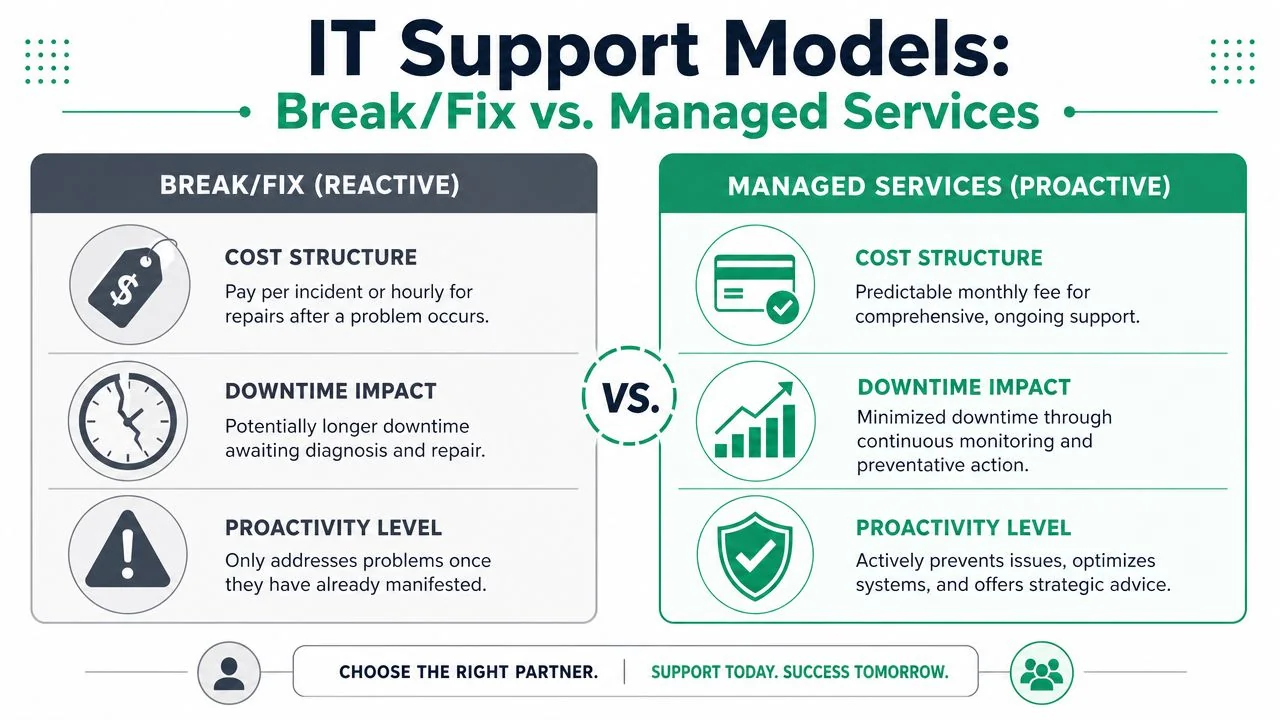
Break-fix is the old model. Something goes wrong, you ring someone, and they charge to repair it.
There's nothing dishonest about that model. For a very small setup with non-critical systems, it can feel simple. You only pay when you need help. The downside is that the clock usually starts after damage has already been done. Staff are idle, customers are waiting, and the issue has to be diagnosed under pressure.
It's like calling a plumber only after a pipe bursts through the office wall. You're not paying for prevention. You're paying during the flood.
Managed services means preventing the flood
Managed services turn that logic around. Instead of treating support as a series of isolated emergencies, the provider keeps watch over the environment, maintains systems, responds to user issues, and plans improvements over time.
The monthly arrangement changes incentives in a useful way. The provider benefits when your systems stay stable, because fewer preventable problems mean less firefighting and better service delivery. You benefit because costs are easier to forecast and downtime is less likely to catch you by surprise.
For a business owner, the practical shift is this: you stop buying repairs and start buying reliability.
If you want a plain-English companion piece on that model, this managed IT services guide gives a good overview of how the arrangement works in a business setting.
A side-by-side business view
| Area | Break-fix | Managed services |
|---|---|---|
| Trigger for action | Something fails first | Ongoing monitoring and maintenance |
| Budgeting | Variable and unpredictable | Usually more predictable |
| Downtime risk | Often higher because response starts after failure | Usually lower because issues are caught earlier |
| Strategic advice | Limited. Focus is on the immediate repair | Built into the relationship more often |
| Provider incentive | Revenue can increase when things break | Better alignment with prevention and stability |
| Best fit | Occasional, low-stakes support needs | Businesses that rely on tech every day |
There's also a customer service angle that business owners shouldn't ignore. A customer is four times more likely to switch to a competitor when the problem is service-based, and 52% of consumers would pay more for greater speed and efficiency in customer service, according to Help Scout's customer service statistics roundup. If your team can't respond quickly because systems are slow, inaccessible, or constantly breaking, IT becomes a frontline service issue.
Business view: Managed services aren't mainly about gadgets or software. They're about protecting your ability to respond, deliver, and keep trust.
For many Brisbane SMBs, that's a significant turning point. They stop asking, “Who can fix this when it breaks?” and start asking, “How do we stop this sort of thing happening again?”
Key IT Support Services for Modern Businesses
For a lot of small businesses, IT support starts with one obvious need. Someone has to fix problems when staff get stuck. Useful support goes further than that. It covers the day-to-day help your team relies on, the maintenance work that keeps systems steady, the security controls that reduce risk, and the recovery planning that keeps the business operating if something goes wrong.
A good way to view these services is like building maintenance for your office. You need someone to answer the phone when the air conditioning fails. You also need regular servicing, working locks, smoke alarms, and a plan for what happens if the power goes out. Business IT works the same way.
Proactive monitoring and maintenance
This is the quiet work that keeps small issues from turning into expensive interruptions.
Monitoring checks the health of devices, servers, internet connections, backups, and key business apps. Maintenance covers patching, update control, licence reviews, hardware checks, and routine cleanup. If a laptop drive starts failing, storage fills up, or a business-critical service stops responding, the aim is to spot it early and deal with it before your team loses half a day.
For Brisbane SMBs, this is often the point where IT stops being a repair service and starts becoming an operations function. Instead of paying attention only when something breaks, you have a process that reduces avoidable downtime in the first place.
Help desk and remote support
This is the service staff notice first because it affects their work immediately.
People need fast, practical help when they cannot sign in, access files, send email, print documents, connect to Wi-Fi, or get a business app to behave properly. A well-run help desk does more than close tickets. It sorts urgent issues from minor ones, fixes common problems quickly, records what happened, and spots patterns that keep coming back.
Remote support matters here because speed matters. If a technician can connect securely and fix the problem in minutes, your team gets back to work sooner and the interruption stays small.
Typical requests include:
- User access issues: New starter setup, password resets, multi-factor authentication prompts, mailbox permissions
- Software problems: Microsoft 365 errors, accounting platform issues, browser faults, plugin conflicts
- Device support: Laptop setup, docking station faults, webcam issues, printer mapping
Cybersecurity services
Support and security overlap every day in a modern business.
The same team that helps staff stay productive often also manages access controls, endpoint protection, email filtering, device policies, and account reviews. Microsoft 365 is a good example. Keeping it secure usually means setting up stronger sign-in rules, limiting risky sharing options, reviewing permissions, and watching for suspicious activity. None of that is glamorous, but it lowers the chance of an ordinary mistake turning into a serious problem.
If you want a practical starting point, this small business cybersecurity checklist covers the basics in plain English.
A lot of owners expect cyber incidents to look dramatic. In practice, the trouble often starts with ordinary gaps. Shared passwords. Old user accounts that were never removed. Staff approving a sign-in request in a hurry. Poor IT support leaves those gaps open. Good support closes them steadily.
Cloud management
Many businesses already depend on cloud services without giving them that label. Microsoft 365, hosted email, cloud file storage, browser-based business software, and cloud backup all sit in this category.
Cloud management means someone is responsible for how those tools are set up, secured, and maintained over time. That includes creating users, setting permissions, supporting migrations, fixing sync issues, and making sure staff can use the systems the business is paying for.
The technical setup is only part of the job. If a business moves files from scattered desktops and shared drives into SharePoint and OneDrive, the actual work also includes folder structure, access rules, training, and cleanup. Without that support, cloud tools can become a more expensive version of the same old mess.
Backup and business continuity
Backups and business continuity are related, but they are not the same thing.
A backup is a copy of data. Business continuity is the plan for keeping the business operating and recovering in a sensible order. That difference catches many owners off guard. Having files backed up somewhere does not answer how long recovery will take, which systems come back first, who makes decisions during an outage, or how staff keep serving customers while systems are down.
A workable continuity plan should answer questions like these:
- What must be restored first: Email, accounting, phones, file access, booking software
- Who sets priorities: Owner, operations manager, practice manager, or another decision-maker
- How staff keep working during disruption: Spare devices, remote access, temporary manual processes
- How recovery is tested: Restores are checked regularly, not just assumed to work
This joined-up approach is what separates basic support from support that helps a business stay stable as it grows. In real operations, IT, security, and continuity are connected. Treating them as one coordinated service gives small businesses a stronger footing than a simple break-fix arrangement ever can.
How Quality IT Support Drives Business Growth
It's easy to think of support as a defensive spend. Keep things running. Stop disasters. Fix tickets. That's true, but it's only half the story.
Quality IT support also creates room for growth because your team spends less time working around friction. Systems become easier to trust. Decisions get made earlier. New staff can be onboarded faster. The business stops losing energy to recurring technical noise.

The support function itself isn't a temporary extra in modern business operations. The role remains stable and recurring. The US Bureau of Labor Statistics reports about 50,500 openings per year on average for computer support specialists, even with a projected 3% decline from 2024 to 2034, which points to ongoing replacement demand and the continuing operational need for support work. The same source lists a median annual wage of $60,340 for user support specialists and $73,340 for network support specialists in May 2024 in the United States benchmark role definition, which includes maintaining networks and helping users directly, according to the Occupational Outlook Handbook entry for computer support specialists.
When support helps an accounting firm
For an accounting practice, the busiest times are also the least forgiving. If staff can't access client files, shared folders, email, or line-of-business software during deadline periods, billable work stalls immediately.
Good support helps by keeping access stable, reducing interruptions, and making sure security controls don't become chaotic barriers to getting work done. Clients don't see “the network problem”. They see whether deadlines were met and whether their information feels safe.
When support helps a builder or trade business
A construction or trade business often works across office staff, field staff, mobile devices, plans, photos, job systems, and suppliers. The issue usually isn't one dramatic outage. It's a constant drip of friction. Slow access to current documents, patchy connectivity, poor device setup, and staff using whatever workaround seems fastest on site.
Good support turns that into a cleaner operating model. Devices are set up consistently. Access is controlled. Cloud files are usable. If someone loses a device or can't reach a critical job document, there's a process instead of a scramble.
When support helps a clinic
A medical or dental clinic depends on reliable systems in a different way. Appointments, records, communications, and staff workflows all stack tightly together. If reception can't access the right information at the right time, the day backs up quickly.
Reliable IT support protects more than systems. It protects the pace and professionalism patients experience.
In each case, the growth benefit is the same. Less disruption gives owners more room to improve service, train staff, add locations, adopt better tools, and say yes to new opportunities without wondering whether the tech can cope.
Choosing the Right IT Partner in South East Queensland
Once a business decides it wants proper support, the next challenge is choosing a provider. That's where many owners get stuck. Most providers sound similar at first glance. They all mention support, security, cloud, and responsiveness. The difference is usually in how they work when something important goes wrong, and what they do before it does.
Questions worth asking before you sign
A short checklist can tell you a lot.
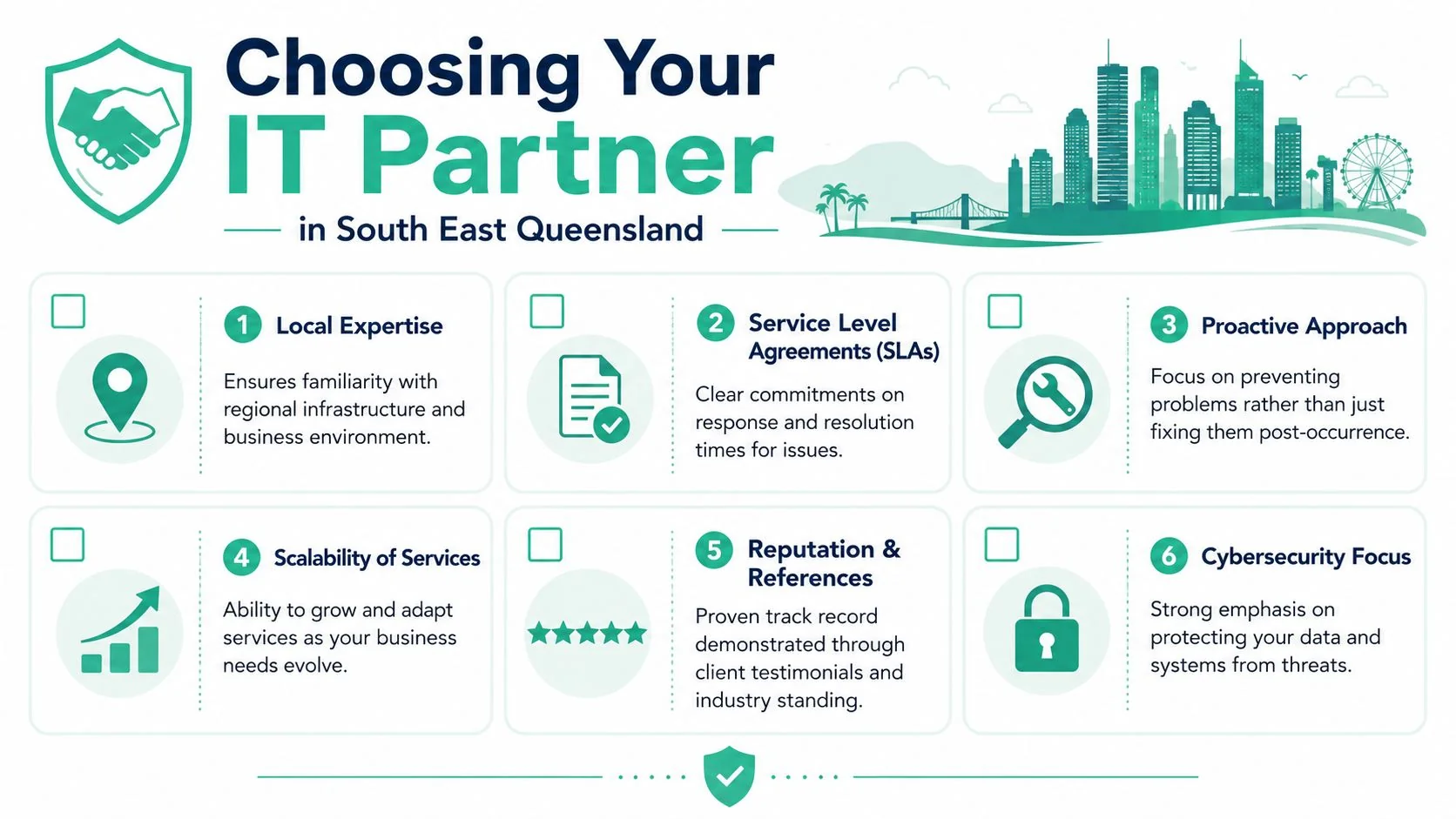
- How quickly do you respond: Ask what response commitments are written into the agreement, not just promised verbally.
- Do you support businesses like mine: Industry experience matters when your software, compliance, and workflows are specific.
- Can you help remotely and on site: Brisbane and South East Queensland businesses often need both.
- How do you handle cybersecurity as part of support: Security should be built in, not treated as a separate afterthought.
- What happens when an issue is beyond first-line support: You want a clear escalation path.
- How do you review our environment over time: Good partners don't just close tickets. They help you improve the setup.
If you want another perspective on that evaluation process, this guide on why a small business needs an IT partner lays out the business case clearly.
What a strong answer sounds like
You're not looking for polished marketing language. You're listening for operational clarity.
A strong provider should be able to explain how requests are logged, how urgent issues are prioritised, what their service boundaries are, and when they come on site. They should also be comfortable talking about documentation, onboarding, backups, access control, and review meetings in plain language.
Look for signs of maturity such as:
| What to ask about | Why it matters |
|---|---|
| SLAs | They set expectations for response and handling |
| Local presence | Some issues still need hands on site |
| Documentation | Support gets faster when systems are recorded properly |
| Scalability | Your support model should still fit in a year or two |
| Security mindset | Support staff often hold privileged access |
| References | Past client experience tells you how the relationship feels in real life |
A good IT partner should make your environment easier to understand, not more mysterious.
For South East Queensland businesses, local context helps too. A provider who understands regional operations, mixed office and field work, and the constraints of small business budgets will usually give more practical advice than one selling a generic package.
How Much Does IT Support Cost
The fairest answer is that IT support pricing depends on the model, the size of the environment, and how much responsibility the provider is taking on. The better question is often not “What's the cheapest option?” but “Which pricing model fits how we work?”
Common pricing models
- Hourly break-fix: You pay when something goes wrong. That can suit occasional needs, but costs are harder to predict and the model only starts after disruption has already happened.
- Block hours: You buy a set pool of support time in advance. This can work for businesses with steady but moderate demand, though it still tends to focus on issue handling rather than prevention.
- Per-user monthly fee: Common in managed services. This usually makes budgeting easier and suits businesses where staff rely on a standard set of devices and cloud tools.
- Per-device monthly fee: Useful where shared devices, specialist machines, or mixed setups make user-based pricing less practical.
When comparing quotes, check what's included. Monitoring, patching, help desk access, security tasks, vendor liaison, backup oversight, and strategic reviews aren't always bundled the same way. A lower price can mean more gaps.
Your IT Support Questions Answered
Should I hire in-house or outsource
If you're a smaller business, outsourcing often gives you broader coverage than one in-house generalist can provide. One person can be away, overloaded, or strong in some areas but not others. An outsourced team usually gives you access to multiple skill sets, shared processes, and better continuity.
What is an SLA and why does it matter
An SLA, or Service Level Agreement, is the written commitment around how support is delivered. It usually covers response expectations, priority levels, and what happens with urgent issues. Without one, “fast support” is just a sales phrase.
Do very small businesses still need IT support
Yes. Small businesses often need it more than they realise because there's less spare capacity when something breaks. Even a team of a few people depends on email, devices, access, and shared systems to keep operating.
Australia's occupation data places ICT Support Technicians in a defined professional category, with work that commonly includes installing software, setting up workspaces, maintaining networks, and troubleshooting user incidents. The role is practical and operational, and a strong support function is measured by how well it reduces downtime by fixing hardware, software, and network faults, as described in CompTIA's tech support specialist role overview.
The short version is this. If your business depends on technology every day, IT support isn't optional. The key choice is whether you want it after the pain starts or before.
If you want a practical conversation about your current setup, Bridge IT Solutions works with Brisbane and South East Queensland businesses on managed IT support, cybersecurity, cloud systems, and business continuity. A good first step is reviewing where your biggest day-to-day risks and bottlenecks sit, then deciding whether your current support model is helping the business grow or just helping it recover.
