

Your EFTPOS hangs in the middle of a sale. A staff member tries to reopen Xero. Someone else is on a Teams call that starts breaking up. Meanwhile, a file upload to a client portal stalls again, because your connection looks fast on paper but falls over when the whole office uses it at once.
This is often the case for a lot of Brisbane SMEs. They buy internet the same way they buy electricity. Find a plan, compare the monthly fee, glance at the download speed, sign the contract, move on. Then the hidden costs show up in missed calls, frozen cloud apps, broken backups, and staff waiting on spinning wheels.
If you're choosing internet for a business, the advertised download number is usually the least interesting part of the decision. What matters is whether the service can handle cloud software, voice, uploads, support response, and failure recovery without turning every outage into an office-wide stoppage. In Australia, internet use is already built into normal operations. The Australian Bureau of Statistics reported that 95.5% of businesses used the internet, 47.4% purchased cloud services, and 63.2% used paid internet advertising in 2021 to 2022, which shows how directly connectivity ties into revenue, systems, and customer contact in day-to-day business activity via this ABS-referenced summary.
Table of Contents
- Your Internet Is More Than a Utility Bill
- Why Business Internet Is Not Like Your Home Connection
- Decoding Your Business Internet Options in Brisbane
- Matching Internet Speed to Your Business Needs
- Beyond Speed The Real Measures of Reliability
- Security and Networking Implications
- Your Checklist for Choosing and Migrating Your Connection
Your Internet Is More Than a Utility Bill
It's 11:45 on a Tuesday in Brisbane. Lunch orders are coming in, staff are on calls, Microsoft 365 is syncing in the background, and the EFTPOS terminal starts lagging. Nobody cares what plan you bought. They care that work has stopped.
That's why internet for a business should never be treated as a background expense. If the connection drops, stalls, or chokes on uploads, the problem lands straight in operations. Sales pause. Staff lose time. Customers notice.
The warning signs are usually obvious once you know where to look. A café struggles with EFTPOS and online orders during a rush. An accounting firm waits for client files to sync before a deadline. A clinic gets poor call quality at reception while staff are also pulling data from cloud systems and sending patient communications.
Those are business problems, not IT trivia.
The connection is now part of the business model
If your team relies on cloud apps, VoIP, shared files, booking systems, remote access, or browser-based business software, the internet connection is part of delivery. It affects how fast your staff can work, how well your phones perform, and whether customers get served without friction.
That means the buying decision needs to be sharper. Stop judging plans by the biggest download number on the page. For Brisbane SMEs, the expensive mistakes usually sit elsewhere.
Ask these questions first:
- Can the service handle your upload load: Microsoft 365 sync, cloud backups, Xero attachments, design files, CCTV offsite recording, and CRM updates all depend on upstream capacity.
- What are the provider's obligations when things break: You want a meaningful SLA, clear response targets, and a business support path that doesn't dump you into a residential queue.
- What is your backup plan: A second service, 4G or 5G failover, or a properly configured secondary link matters more than promises after an outage starts.
A home-style plan might be cheap. If your business sells, calls, syncs, uploads, backs up, and supports customers online all day, cheap stops looking cheap very quickly.
Downtime costs more than the plan ever saves
Businesses rarely replace an internet service because they want cleaner tech. They replace it after preventable interruptions start costing money.
Treat the connection the same way you treat your accounting platform or phone system. If it fails, can your business still trade, answer calls, process payments, and access files? If not, buy and design it that way from day one.
Why Business Internet Is Not Like Your Home Connection
A lot of owners assume internet is internet. It isn't. A home connection is built for convenience and price. A business connection should be built for consistency, support, and recovery when something goes wrong.
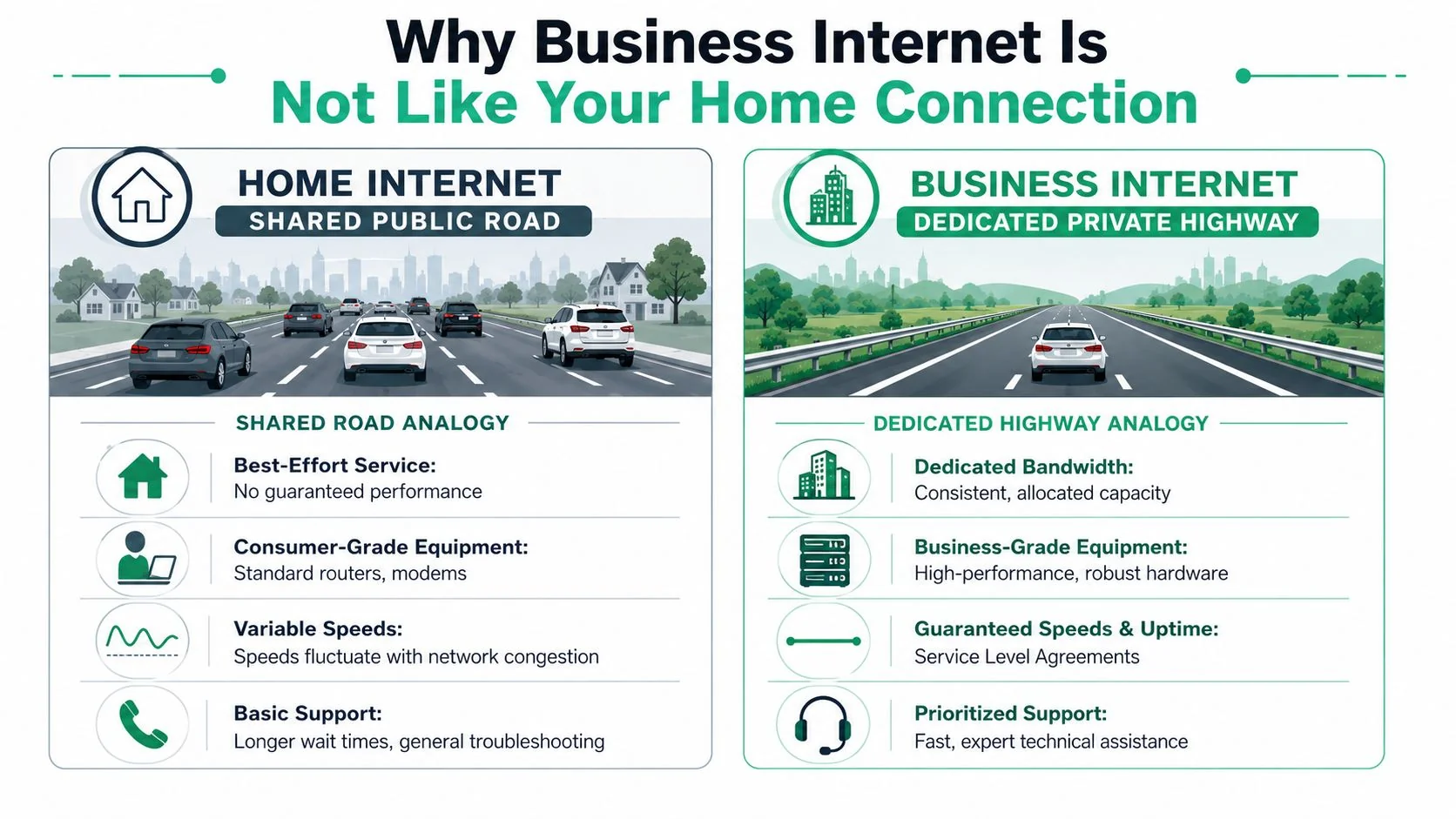
The easiest way to think about it is roads. Home internet is a shared public road. Everyone uses it, congestion happens, and you're largely on a best-effort service. Business internet is closer to a managed commercial route. It's designed around predictable performance, better support, and clearer obligations.
Cheap plans create expensive downtime
The biggest trap is buying based on download speed alone. Providers know most buyers compare plans by the biggest number on the page, so that's what gets advertised. But your office doesn't run on headline marketing.
What matters in practice is:
| Factor | Home-style thinking | Business-grade thinking |
|---|---|---|
| Speed | Highest download figure | Stable performance under load |
| Support | Call when it breaks | Defined response expectations |
| Traffic | Mostly browsing and streaming | Voice, cloud apps, backup, remote access |
| Risk | Annoying outage | Operational stoppage |
A residential-style service often gives you asymmetrical performance. Downloads look fine. Uploads are the weak point. That's exactly backwards for many modern SMEs.
Upload speed is where many SMEs get caught
Cloud-heavy businesses push data up constantly. Microsoft 365 sync, cloud backups, video meetings, CRM updates, file sharing, and remote desktop sessions all depend on upstream capacity and low latency. If uploads choke, the whole office feels slow even when download tests look respectable.
That's why the most useful lens isn't “How fast is the plan?” It's “How well does this service support the way my team works?” The coverage constraints are real too. A broadband access report noted that in 2024, 92% of small business establishments had access to terrestrial broadband at at least 25/3 Mbps, while only 48.3% had fibre availability, which means many small businesses still can't choose from ideal options even before they optimise for performance according to this small business broadband access report.
Practical rule: If your staff spend the day in Microsoft 365, Teams, Xero, cloud storage, VoIP, or remote support tools, prioritise upload quality, latency, and support terms before download speed.
Decoding Your Business Internet Options in Brisbane
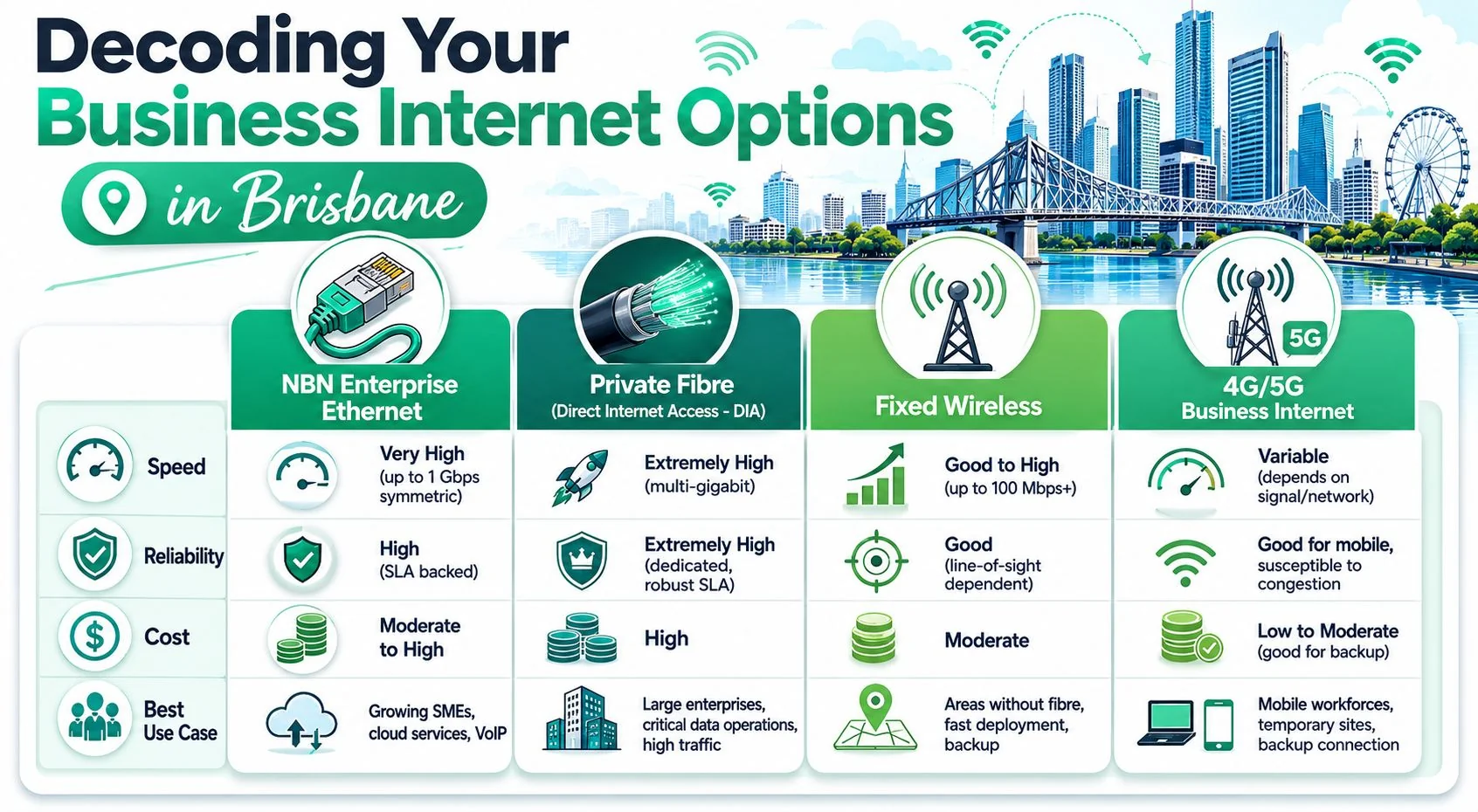
Brisbane SMEs usually end up looking at four practical categories. They're not interchangeable. Each suits a different level of risk, budget, and dependency on cloud and voice.
To make the comparison easier, here's the broad overview first.
What each option is actually good for
NBN Enterprise Ethernet
This is often the sensible middle ground for a growing SME. It's a better fit than standard consumer-style NBN if your office relies on cloud apps, hosted phones, and stable day-to-day performance. It's the option many businesses should evaluate before they jump straight to more expensive private fibre.
Private fibre or DIA
If your office depends on symmetrical traffic, low latency, and predictable throughput, this is the strongest technical fit. Business connectivity material notes that fibre supports dedicated access and symmetrical speeds, with advanced business access offerings reaching 40 Gbps, 100 Gbps, and 1 Tbps in this overview of business internet connection options. Most Brisbane SMEs won't need those top-end service levels, but the key point stands. Dedicated fibre is built for serious upload-heavy and interactive workloads.
Fixed wireless
This can be a strong option where fibre availability is poor, lead times are awkward, or you need a connection deployed quickly. It can also work well as a secondary service for failover. The catch is that performance depends heavily on the local environment and service design, so site assessment matters.
A quick explainer can help if you're still sorting out the vocabulary providers use.
4G or 5G business internet
This is useful, but usually not as your only critical office connection. I like it for temporary sites, pop-up operations, mobile teams, and backup links. I don't like it as the sole production service for a cloud-dependent office that expects stable voice and file performance all day.
If you want a plain-English reference on internet connection types for businesses, that guide is a useful companion when you're comparing provider terminology.
What I'd shortlist first
Here's the practical shortlist I'd use for most Brisbane SMEs:
- Office with cloud apps and VoIP: Start with NBN Enterprise Ethernet or dedicated fibre.
- Professional services firm moving larger files: Lean toward dedicated or dedicated-equivalent fibre.
- Industrial site or tricky location: Assess fixed wireless and fibre side by side.
- Any business that can't tolerate an outage: Add a secondary service, usually wireless or mobile-based failover.
The mistake is trying to force one technology to solve every problem. A lot of the time, the right answer is a primary wired service plus a separate backup path.
Matching Internet Speed to Your Business Needs
Most businesses ask for speed before they've defined workload. That's backwards. The better question is what your people do every hour, not what number appears on the quote.
Start with applications, not megabits
A five-person bookkeeping or accounting office has different needs from a design studio, a clinic, or a warehouse. Staff count matters, but application mix matters more.
If your team mostly uses Xero, Microsoft 365, web browsing, email, and occasional Teams meetings, you don't need to buy internet like a media company. If your office pushes large CAD files, runs cloud backups during business hours, hosts lots of video calls, or relies on remote desktop, you need far more upstream headroom and much less variability.
Use this simple lens:
- Light cloud office: Email, web apps, accounting software, basic document sharing
- Interactive office: Frequent Teams or Zoom, VoIP, CRM, shared cloud files
- Heavy transfer office: Backups, design files, video assets, engineering documents, remote desktop
If staff complain that “the internet is slow”, they often mean one of three things. Uploads are saturated, latency is unstable, or the Wi-Fi and firewall setup is poor. Raw download speed isn't always the culprit.
Simple sizing rules that hold up
When you're scoping internet for a business, work through these questions in order:
How many people are online at once
Count concurrent users, not total staff. Ten staff across staggered shifts behave differently from ten staff all hitting cloud systems at 9 am.Which apps are always on
Microsoft 365 sync, cloud line-of-business apps, VoIP handsets, security cameras, and backup jobs all consume bandwidth in the background.What's time-sensitive
Voice, video calls, remote desktop, and live database work are far less tolerant of delay and jitter than casual browsing.What uploads happen daily
This is the one many businesses miss. Scanned records, media files, job photos, compliance documents, and backup tasks can saturate upstream capacity quickly.What will change in the next contract term
If you're adding staff, moving more systems into Microsoft 365, rolling out hosted phones, or introducing cloud backup, size for the near future, not last year's usage.
A practical quote request should include staff numbers, key applications, expected growth, office hours, and whether calls or cloud access are business-critical. If you only ask for “fast internet”, you'll get a generic plan.
Beyond Speed The Real Measures of Reliability
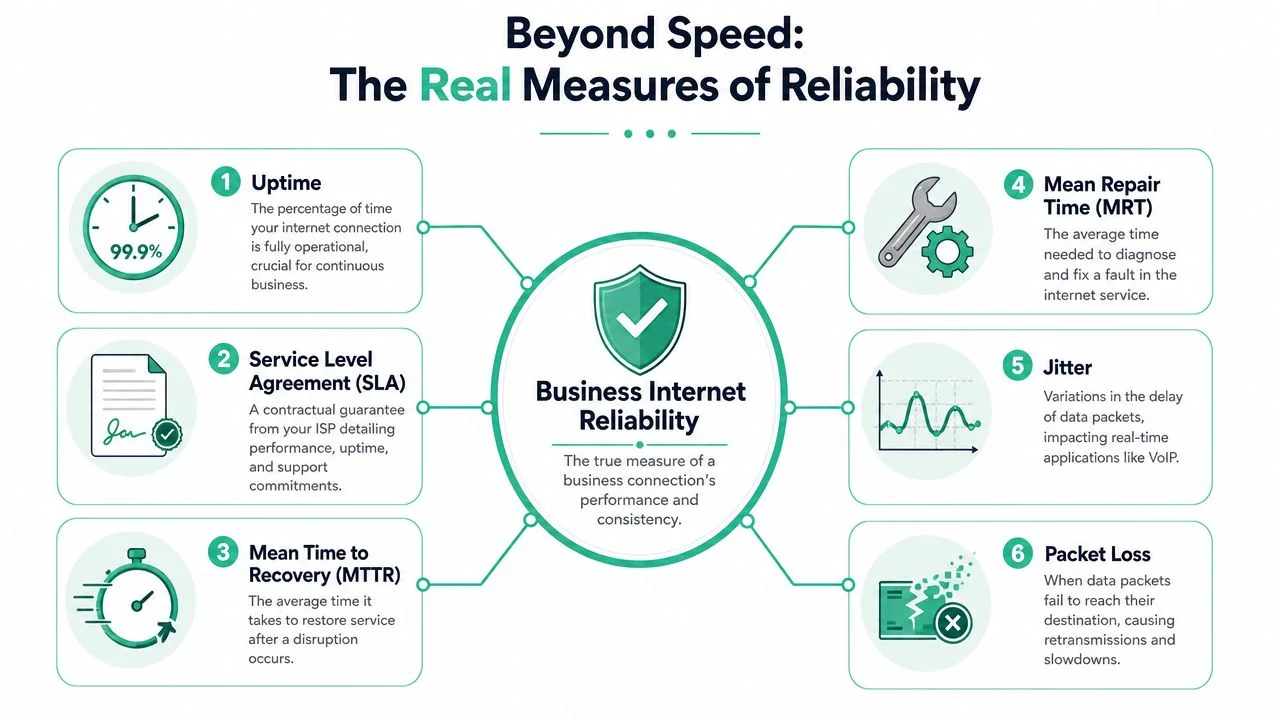
Fast internet that drops out is still bad internet. For most SMEs, uptime beats peak speed every day of the week.
That's why reliability should be designed, not hoped for.
An SLA is a contract, not a sales promise
Plenty of providers talk about reliability. Fewer put meaningful obligations around it. A real Service Level Agreement should spell out uptime expectations, support response, fault handling, and restoration terms.
When you review a quote, don't stop at the monthly fee. Check:
- What the uptime commitment covers: Not just broad marketing language.
- How faults are logged and escalated: Especially after hours.
- What response times apply: For acknowledgement and for restoration.
- Whether performance measures are testable: Through acceptance checks and monitoring.
For Australian businesses, guidance on connectivity design puts the emphasis in the right place. It argues that diverse-path redundancy is often more important than buying a faster primary service, and that resilience comes from engineered redundancy plus SLAs covering uptime and support response as outlined in this business internet selection guide.
Redundancy is the spare tyre
If your office has one internet service and no backup, you have a single point of failure. That's not strategy. That's optimism.
The simplest form of protection is a primary wired link with automatic 4G or 5G failover. Better than nothing. But the stronger design is a backup service that doesn't rely on the same path, pit, conduit, or carrier architecture as the primary.
Consider this:
| Setup | What happens during a fault |
|---|---|
| One service, one path | Office stops |
| Primary plus basic mobile backup | Core work can continue |
| Primary plus diverse secondary path | Outage risk is reduced properly |
If you're investing in a resilient office, your internal network has to match the internet design. Good failover can be ruined by poor switching, weak firewall rules, or bad wireless coverage. If that's part of your current problem, this guide to business-grade Wi-Fi installation for offices is worth reviewing alongside your internet upgrade.
Buy bandwidth for performance. Buy redundancy for continuity. They are not the same thing.
Security and Networking Implications
Monday morning in a Brisbane office. Staff can open websites, but Microsoft 365 is lagging, Teams calls are breaking up, and cloud backups did not finish overnight. On paper, the internet is still "working". For the business, it is already a security and operations problem.
A business connection shapes more than speed. It affects remote access, voice quality, cloud security controls, backup success, and how safely your team can work when they are in the office, at home, or on the road.
Your internet service affects your security posture
Poor connectivity pushes people into bad habits. They start using personal hotspots, saving files locally, delaying backups, bypassing VPNs, or jumping onto consumer messaging apps because the approved tools are too unreliable. That is how a connectivity issue turns into a security issue.
For Brisbane SMEs using cloud platforms heavily, upload performance matters just as much as download speed. Microsoft 365 sync, SharePoint, OneDrive, cloud backups, large email attachments, CCTV uploads, remote desktop sessions, and VoIP all rely on stable upstream capacity. If uploads choke during the day, staff blame "the internet" broadly, but the actual problem is often a plan sold on download numbers that do not match how the business works.
Connectivity is central to normal business activity. The ABS reported that 95.5% of Australian businesses used the internet, 47.4% purchased cloud services, and 63.2% used paid internet advertising in 2021 to 2022, as summarised by IBISWorld's industry overview referencing ABS data. If your connection is unstable, sales, service delivery, backups, and internal systems all feel it.
If your business runs SaaS heavily, do not stop at the circuit. Application exposure matters too. For owners reviewing broader risk around cloud platforms, this article on Affordable Pentesting for SaaS apps is a useful reminder that software-layer security deserves the same scrutiny as network reliability.
The router and firewall matter as much as the line
A good service connected to a cheap router is still a weak setup.
Your firewall or edge router needs to handle secure remote access, traffic prioritisation for voice, monitoring, and failover between links without dropping core sessions. It also needs proper logging. If nobody can see packet loss, VPN instability, or repeated failover events, faults drag on longer and support becomes guesswork.
Static IP addressing also matters more often than owners expect. If you run site-to-site VPNs, remote administration, IP allowlisting, hosted phone systems, or external access to business systems, confirm that requirement before you sign the contract. Cleaning that up after deployment wastes time and usually costs more.
Wi-Fi needs the same level of discipline. Strong policies mean very little if the office wireless network is poorly segmented, underpowered, or still using weak security settings. If that part of your setup needs work, review this guide on how to secure business Wi-Fi.
For businesses that want outside help, a managed IT provider such as Bridge IT Solutions can align the internet service, firewall, Wi-Fi, Microsoft 365 access, and backup requirements as one environment instead of leaving each piece to different vendors with different assumptions.
Your Checklist for Choosing and Migrating Your Connection
Most bad internet decisions happen before installation day. The business signs a plan that wasn't scoped properly, asks the wrong questions, and discovers the weaknesses after the cutover. A clean migration starts with sharper buying criteria.
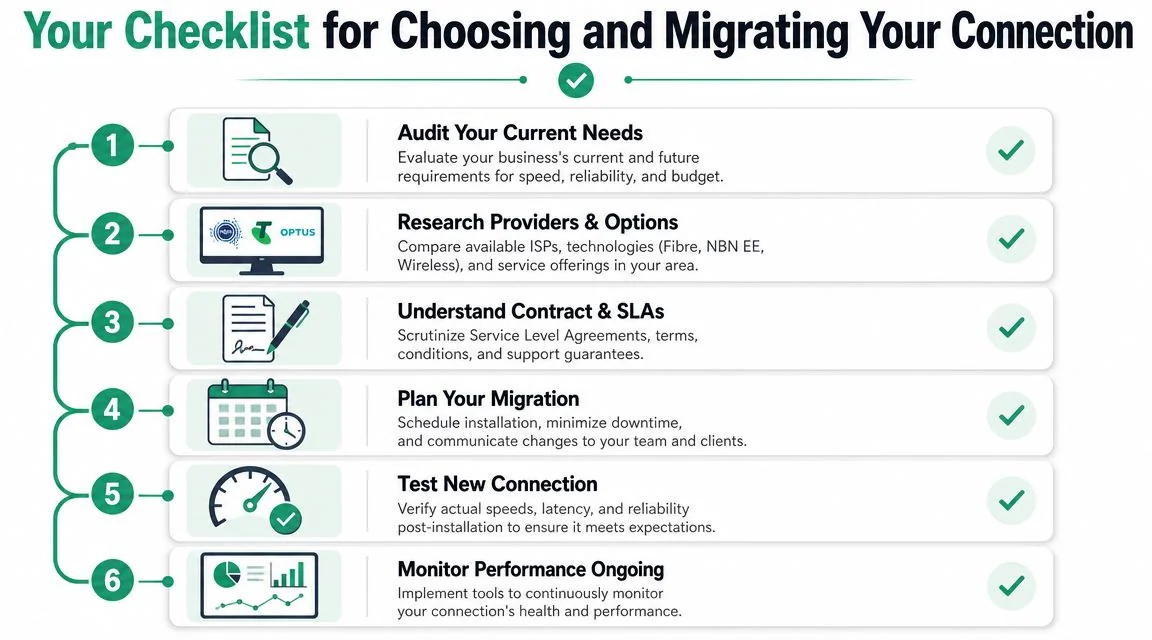
What to ask before you sign
Use this as a practical checklist when reviewing providers and proposals:
Audit your current pain points
Don't just ask whether the internet is “slow”. Identify when issues happen, which apps are affected, whether calls break up, and whether uploads or backups are the bottleneck.Define critical systems
List the tools that cannot go down during business hours. That usually includes Microsoft 365, VoIP, cloud file storage, practice management systems, CRMs, EFTPOS, and remote support access.Ask for the SLA in writing
If the provider talks about fast support, ask what that means contractually. Sales reassurance isn't the same as an enforceable service commitment.Check the backup design
Ask whether failover is included, how it works, whether it's automatic, and whether the secondary service is separate from the primary path.Confirm business-grade equipment
A strong service still needs the right firewall, switching, and Wi-Fi setup to deliver the result you're paying for.
How to migrate without chaos
Migration day shouldn't be a leap of faith. Plan it like any other infrastructure change.
- Keep the old service live during transition: Don't disconnect early just because the new line is installed.
- Test before cutover: Validate throughput, latency, voice quality, VPN access, and failover behaviour.
- Schedule around business impact: Avoid peak periods, payroll deadlines, month-end processing, or clinic-heavy appointment windows.
- Communicate with staff: Let them know what's changing, when to expect disruption, and who to contact if something breaks.
- Monitor after go-live: The first few days often reveal routing, wireless, device, or application issues that weren't obvious during install.
If your team is already struggling with unstable service, this article on internet connectivity issues in business environments can help you separate provider faults from internal network problems before you commit to a new service.
The short version is simple. Don't buy internet for a business the way you'd buy a household plan. Prioritise upload performance, meaningful SLA terms, and practical redundancy. That combination prevents more real-world pain than chasing the biggest download number on a sales page.
If you want a second opinion before you sign a new contract, Bridge IT Solutions can review your current setup, identify weak points in the connection and network design, and help you plan a cleaner migration with the right mix of service, failover, firewall, and office Wi-Fi for your Brisbane business.
