

You move into a new office in Brisbane, sign up for an NBN business plan, connect the router, and expect the internet problem to be solved. Then the calls still break up, cloud apps lag, EFTPOS stalls at the wrong moment, and staff start blaming the provider. In a lot of small businesses, the NBN service isn't the bottleneck. The weak point is the cabling inside the tenancy.
That matters because internal cabling isn't just a technical detail. It affects how quickly staff can work, how stable your phones and Wi-Fi stay, whether your security systems behave properly, and how expensive your next office change becomes. Cabling for NBN is one of those jobs that looks simple until poor decisions start costing time, money, and patience.
Brisbane businesses run into this constantly in older commercial buildings, mixed-use sites, suburban offices, medical suites, warehouses, and shared tenancies across South East Queensland. Some locations have fibre right in the premises. Others still depend on older copper inside the building. The business risk changes with each setup, so the right answer starts with understanding what you have on site, and choosing an installer the same way you'd choose an IT provider for your business. Cheap and fast isn't the same as reliable and compliant.
Table of Contents
- Why Your Internal NBN Cabling Is a Critical Business Decision
- Decoding Your Brisbane NBN Connection Type
- Planning Your Internal Cabling for Performance and Growth
- NBN Installation Best Practices and Legal Compliance
- Common Pitfalls and Realistic Brisbane Cabling Costs
- When to Engage a Professional NBN Cabling Expert
- Frequently Asked Questions About Business NBN Cabling
- Can I use the old phone wiring already in the building
- How do I tell whether my slow internet is a cabling problem or a provider problem
- Is it legal to run ethernet through the ceiling myself in my office
- Is NBN Co responsible for fixing internal wiring issues
- Where should the NBN connection equipment go in a business premises
- Should I just rely on Wi-Fi instead of installing more data points
- What should I ask for before signing off on a cabling job
Why Your Internal NBN Cabling Is a Critical Business Decision
A common Brisbane scenario goes like this. A business owner upgrades their internet plan because staff complain that everything feels slow. The new service goes live, but nothing really changes. Microsoft 365 still drags, VoIP still clips, and the front desk still loses confidence every time a payment terminal hesitates.
The reason is simple. NBN access and internal network performance are not the same thing. The service coming into the building is one part of the chain. The cabling, sockets, patching, rack layout, and switching inside your tenancy are the part you control, and often the part that gets ignored until it fails.
Where the responsibility shifts
NBN Co handles the network to a defined handoff point. After that, your business usually owns the quality of what happens inside the premises. If your internal runs are messy, poorly terminated, undocumented, or built around old phone-era infrastructure, your team feels the impact every day.
That shows up in practical ways:
- Staff productivity drops when cloud files take too long to open or sync.
- Customer experience suffers when phones, booking systems, or payment systems become unreliable.
- Security risks increase when cameras, access control, or backups depend on a shaky network.
- Office changes cost more because every desk move becomes a tracing exercise.
Practical rule: If your business depends on cloud software, internet calling, cameras, shared files, or line-of-business systems, cabling is operational infrastructure, not a handyman task.
Why business owners should treat it as an investment
Good cabling for NBN gives you a platform you can build on. Bad cabling forces you into workarounds. That usually means extra Wi-Fi bandaids, random unmanaged switches under desks, mystery wall ports no one can identify, and recurring support costs that never seem to end.
The return on a proper job isn't flashy. It's fewer interruptions, cleaner upgrades, easier troubleshooting, and less money wasted chasing symptoms. For most SMBs, that's the difference between an office that works effectively and one that keeps draining attention.
Decoding Your Brisbane NBN Connection Type
Before planning any internal work, identify the NBN technology at your address. It's similar to plumbing. The quality of the main supply line affects what you can deliver at each tap, but the pipework inside the building still determines how well the system performs where people use it.
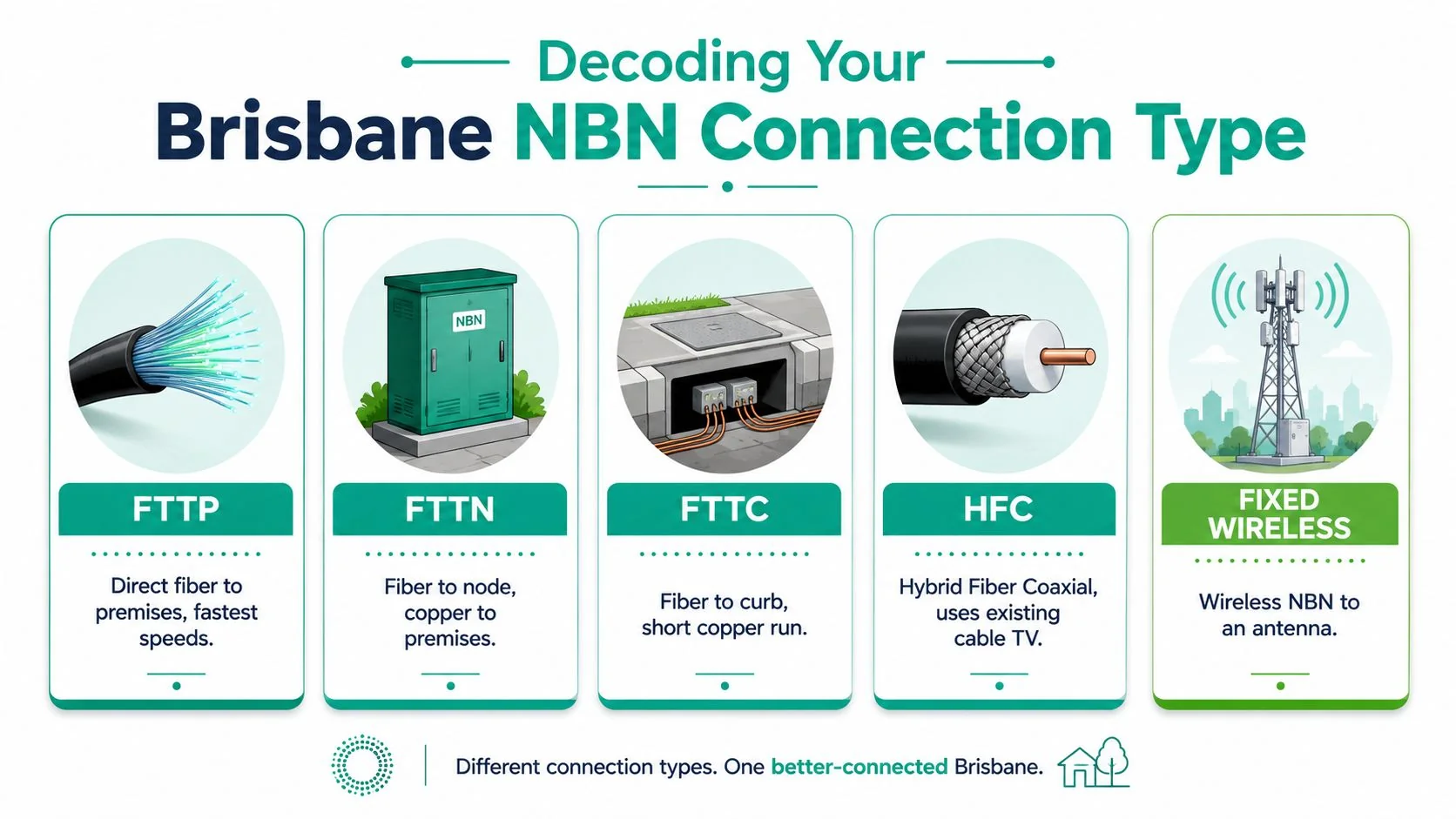
This visual gives a quick overview of the main connection types found around Brisbane.
What each connection type means in practice
FTTP is the cleanest option for most business use. Fibre runs directly into the premises, which gives you the strongest foundation for high-bandwidth work and future expansion.
FTTN uses fibre to a nearby node, then older copper for the final run. That final copper segment can become the weak point, especially in older areas where line condition varies.
FTTC brings fibre closer than FTTN, usually to a point near the kerb, then uses a shorter copper segment into the building. It often behaves better than FTTN because less copper means less opportunity for degradation.
HFC uses a hybrid fibre coaxial setup. It can perform well, but the layout and equipment path are different from a pure fibre install, so internal planning still matters.
Fixed Wireless is less about internal copper path issues and more about antenna position, service conditions, and local site constraints. For regional fringe business sites, it can be workable, but expectations need to stay realistic.
Why FTTB deserves special attention in commercial buildings
A lot of Brisbane SMBs operate from offices in mixed-use or multi-tenant buildings, and that's where FTTB needs a more careful look. In FTTB, fibre runs to the building's main distribution frame, then older copper wiring carries the service to each unit. According to this NBN cabling guide covering FTTB and FTTP, that copper segment typically limits maximum bandwidth to 100Mbps, while FTTP can support up to 1Gbps or higher.
That's not just a speed discussion. It affects what your business can comfortably run at the same time, especially if you rely on file sync, hosted phones, video meetings, cloud backups, and multiple users hitting cloud platforms all day.
Here's a simple way to think about the handoff point and likely implication:
| Connection type | Where the network effectively ends for planning purposes | Main business implication |
|---|---|---|
| FTTP | Inside the premises at the NBN equipment | Best base for high-demand use |
| FTTN | At the phone-line entry and modem path | Copper quality can hold you back |
| FTTC | Near the kerb, then into your premises | Shorter copper run helps |
| FTTB | Building frame, then building copper to your suite | Shared building wiring can become the constraint |
| HFC | Coax entry and NBN device inside | Different media path, still needs clean internal design |
For a broader business-side view of service choices, this guide on internet for a business is worth reading before you sign a contract.
A short explainer can also help if you're sorting through the technology labels with a landlord or provider.
If you don't know your NBN type, don't approve internal cabling work yet. The right design depends on where the provider's network stops and your responsibility starts.
Planning Your Internal Cabling for Performance and Growth
Most network problems in small businesses don't start with a dramatic outage. They start with shortcuts. One extra cable run here, a switch under a desk there, repurposed phone wiring somewhere else, and before long the office has a network that technically works but can't grow cleanly.
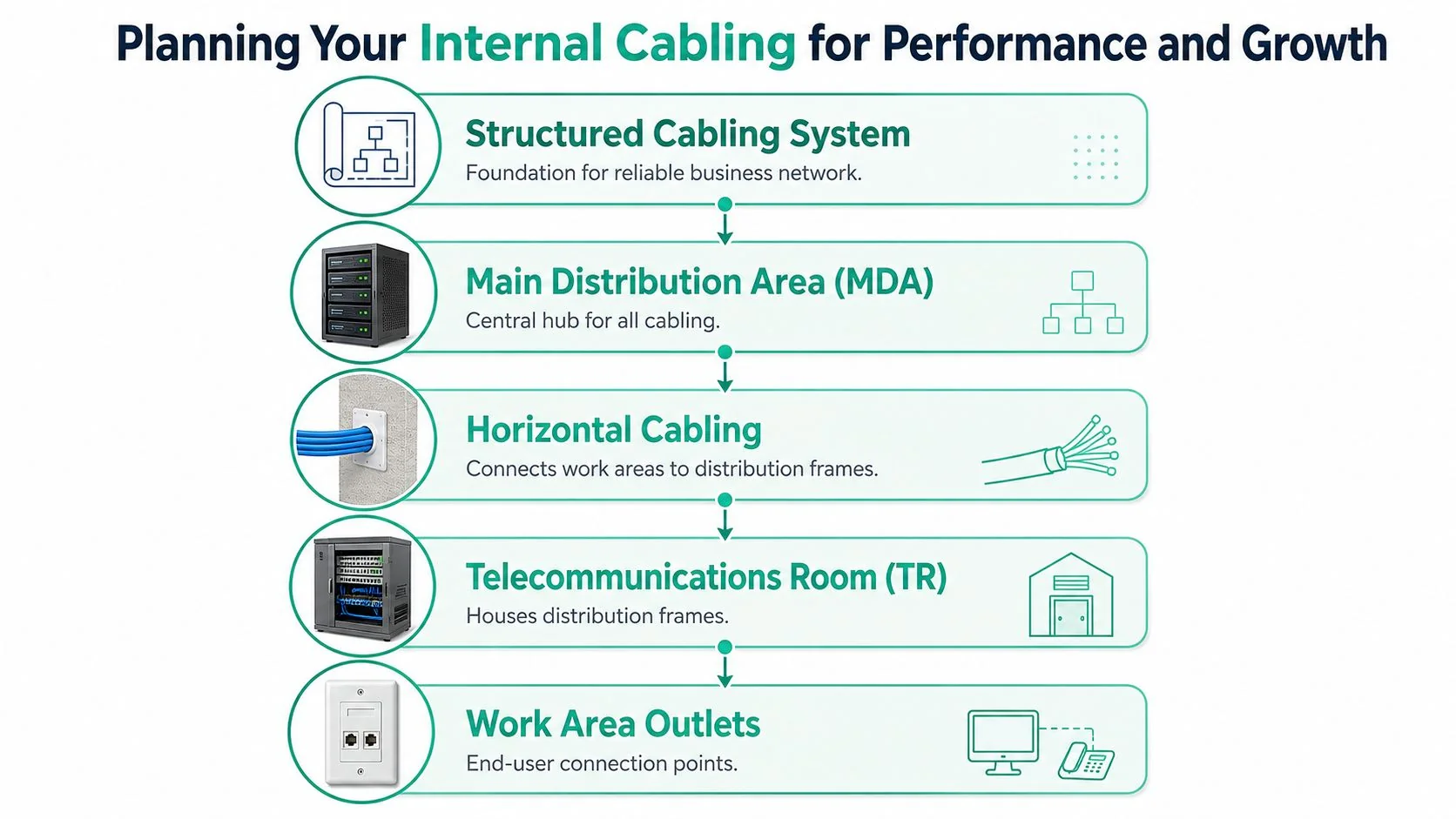
That's why structured cabling matters. It gives every port, patch, and run a clear place and purpose. Instead of building the network around immediate convenience, you build it so the next staff member, room change, phone system, or firewall upgrade doesn't become a minor renovation.
What a clean business setup usually includes
A proper office layout usually centres on a main distribution area, often a comms rack or cabinet, where patch panels, switching, internet equipment, and labelled terminations live together. From there, horizontal cabling runs out to work areas, phones, printers, wireless access points, cameras, and specialist devices.
The practical advantage is control. When a port fails, you can identify it. When a team moves desks, you can repatch it. When you need another access point or VLAN-ready switch, you've got a foundation that supports the change instead of resisting it.
Why better cable choices pay off
For Brisbane SMBs fitting out or refitting an office, I'd treat better-grade cabling as insurance against early obsolescence. The cheapest compliant option often looks fine on day one. It usually looks less clever once the business adds more cloud usage, more endpoints, more voice traffic, and more demand on Wi-Fi backhaul.
A sensible design conversation should cover:
- Work area density. How many desks, phones, and shared devices are really needed, not just today's headcount.
- Wireless support. Modern Wi-Fi still depends on good cabling to each access point.
- Critical systems. Cameras, alarms, EFTPOS, printers, and meeting room gear all compete for dependable connections.
- Future changes. If you're likely to grow, relocate teams, or add services, a rigid bare-minimum design becomes expensive later.
For business owners planning office fitouts or network refreshes, this guide to network infrastructure design is a useful companion to the cabling decision.
When a fibre backbone makes sense
Not every business needs internal fibre, but some clearly do. If you operate across multiple levels, connect separate warehouse and office areas, or want clean separation between comms rooms, a fibre backbone is often the better long-term move. Copper is fine within many office runs. It becomes less attractive when distances, interference risks, or building layout start working against it.
A tidy rack and labelled patch panel don't just look professional. They reduce fault-finding time and make every future change cheaper.
The best result is boring in the best possible way. Staff plug in and work. Phones stay stable. Wireless access points have solid uplinks. Adding a user or moving a department doesn't trigger a network mystery hunt.
NBN Installation Best Practices and Legal Compliance
A compliant installation starts before the first cable is pulled. You need the right NBN technology identified, the route planned properly, the connection point chosen carefully, and the installer qualified to do the work. If any of that is skipped, the business ends up paying twice. Once for the install, then again to fix it.
According to guidance summarising AS/CA S009:2020 requirements for NBN cabling installations, all NBN cabling installations must strictly adhere to Australian Standard AS/CA S009:2020. The standard requires a registered cabler to verify the specific NBN technology type before determining cable routes and connection points. It also requires pathways to avoid water hazards, direct sunlight, and physical damage risks, with connection boxes installed within 1.2m of a power point and within a 12m radial distance from the utility box. For multi-level premises, ground-floor installation is mandatory.
What good installation practice looks like on site
A proper install usually includes a site inspection that looks beyond the internet service itself. The installer should assess wall paths, ceiling cavities, comms cupboard location, power availability, ventilation, future access, and where your active hardware will sit once the handoff comes into the premises.
Good practice also means keeping the network organised:
- Cables should follow planned routes, not the easiest random path.
- Termination points should be labelled so faults can be traced quickly.
- The NBN equipment location should support airflow and service access.
- Business hardware should be positioned for maintenance, not hidden behind furniture or jammed into a hot cupboard.
What compliance protects you from
Compliance is often treated as paperwork. It isn't. It protects you from safety problems, unstable services, and disputes about who installed what and whether it meets standard.
For a business owner, the practical checklist is straightforward:
- Ask whether the installer is a registered cabler.
- Confirm they've identified the NBN technology type before quoting the path.
- Make sure the hardware location is suitable for power, ventilation, and access.
- Require labelling and documentation before sign-off.
If someone proposes an install without those basics, you're not getting a bargain. You're accepting risk that will surface later, usually when the office is busy and the outage is expensive.
Common Pitfalls and Realistic Brisbane Cabling Costs
The most expensive cabling jobs are often the ones that looked cheap at the start. Brisbane business owners see a quote, assume a cable is a cable, and choose on price alone. Then come the odd faults, patchy performance, unclear port layouts, illegal DIY work in ceilings, or a fresh round of spend because the original job can't support the next upgrade.
That's the primary problem with cutting corners on cabling for NBN. The hidden cost isn't only the rework. It's the downtime, staff frustration, and support hours wasted proving that the issue was internal all along.
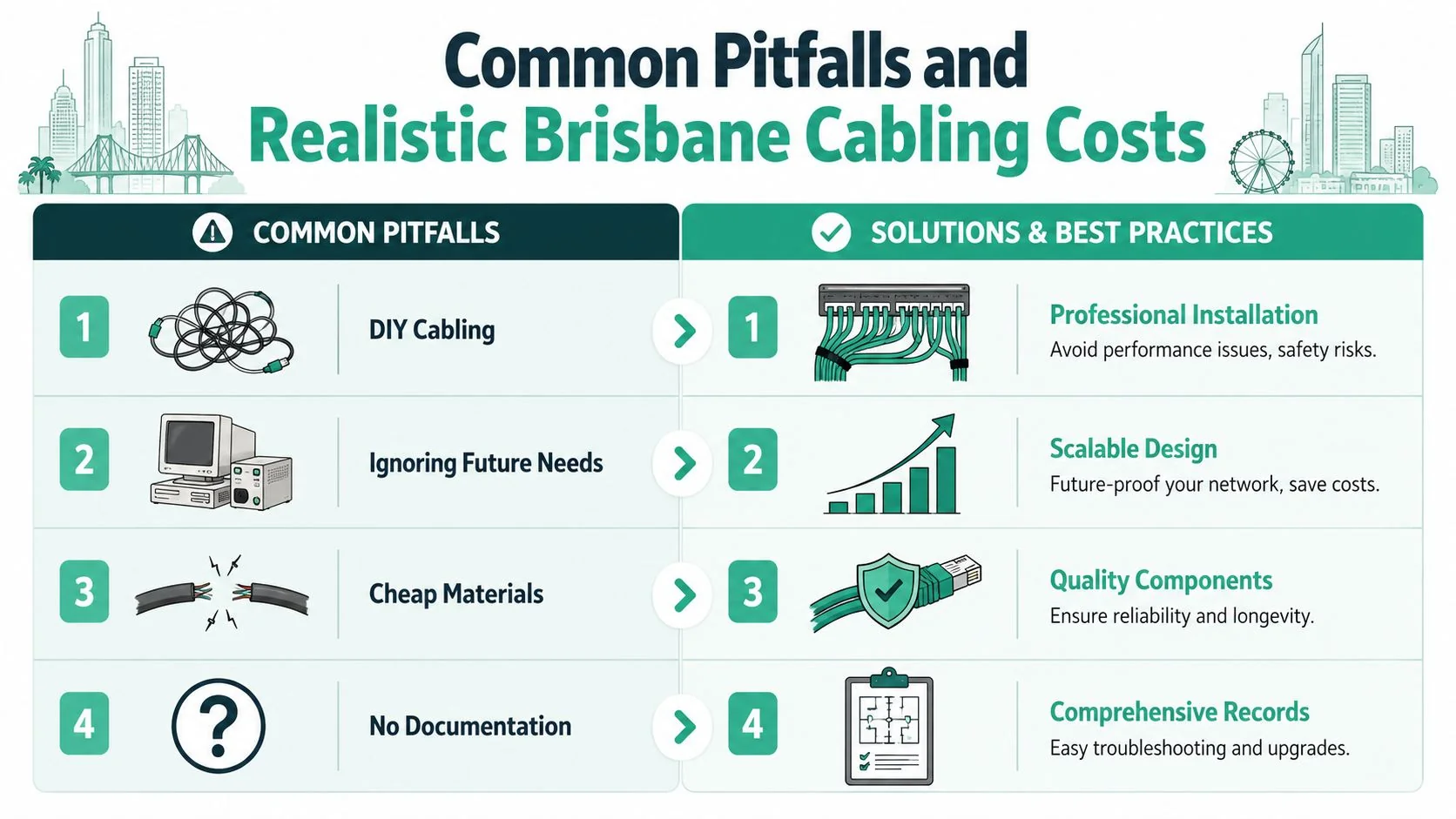
Four mistakes that keep showing up
- DIY cabling in ceilings or roof spaces. This is a legal problem, not just a quality issue. A discussion of Australian cabling compliance requirements notes that running ethernet cables through ceiling or roof cavities without a licence is illegal in Australia, and ACMA and industry standards require structured cabling work to be done by a registered cabler.
- Building around old wiring. Reusing legacy phone cabling or whatever was already in the walls often creates limits you only discover after the move-in.
- Buying on quote price alone. Low quotes can leave out testing, labelling, tidy rack work, or proper planning.
- Skipping documentation. If no one knows what each port does, every future change gets slower and more expensive.
What realistic budgeting looks like
There isn't one universal price for business cabling because site conditions drive the labour. Access is a major variable in Brisbane sites. A single-storey office with easy ceiling access is very different from a tenancy in an older commercial strip, a warehouse office with long runs, or a medical suite where work has to happen around operating hours.
The better budgeting approach is to ask what the quote includes:
| Quote item | Why it matters |
|---|---|
| Site inspection | Reveals access constraints and route complexity |
| Cable and hardware specification | Shows whether the materials suit business use |
| Termination and testing | Confirms the runs work properly |
| Rack, patching, and labelling | Determines how maintainable the network will be |
| Documentation | Saves time on future support and changes |
Cheap cabling usually isn't cheap. It just delays the real invoice.
How to spot a quote that will hurt later
A quote deserves scrutiny if it's vague about materials, silent on compliance, or doesn't mention testing and labelling. The same applies if the installer talks mainly about “getting you online” rather than how the internal network will support phones, Wi-Fi, shared files, security systems, and future growth.
If you want a network that lasts, judge the design quality, not just the install speed. Businesses rarely regret a clean, compliant job. They often regret trying to save money on something buried in the walls.
When to Engage a Professional NBN Cabling Expert
Some cabling decisions are small enough to leave alone. Others are too tied to business risk to treat casually. If your internet, phones, cloud systems, cameras, or compliance obligations matter to daily operations, there's a point where bringing in a specialist stops being optional.
That point usually arrives sooner than business owners expect.
Clear triggers that mean it's time
You should engage a professional when any of these apply:
- You're fitting out a new office and want the network done once, properly.
- Your current site has random dropouts or mystery ports and no one trusts the wiring.
- You operate in healthcare, finance, legal, or another regulated setting where documentation and reliability matter.
- You're moving to better NBN access but still depend on old internal cabling.
- You need a set-and-forget environment so staff can work without constant workarounds.
In those situations, the value isn't just installation labour. It's design judgment, compliance awareness, and the ability to avoid choices that box you in later.
What a specialist brings that a general installer often doesn't
A good NBN cabling expert looks at the whole chain. Not just where the cable can physically go, but how the tenancy will operate once the job is finished. They think about the rack, switching, access points, voice services, shared devices, fail points, and what happens when you add more people or more rooms.
They also leave behind a network that someone else can understand.

For a business owner, that means lower operational friction. You're not paying someone to decipher a mess every time a port changes, a switch fails, or a new desk needs live data. You're paying to reduce future uncertainty.
The right time to call an expert is before you lock in a flawed design, not after staff have spent months working around it.
Frequently Asked Questions About Business NBN Cabling
Can I use the old phone wiring already in the building
Sometimes, but it's often a poor foundation for a modern business network. Old phone cabling may be fine for a narrow purpose in certain legacy setups, yet it usually creates limits once you depend on cloud apps, VoIP, Wi-Fi access points, printers, cameras, and shared office equipment. If the building relies on older copper paths, treat them as something to assess critically, not trust by default.
How do I tell whether my slow internet is a cabling problem or a provider problem
Start by isolating variables. Test from a known-good device connected as directly as possible to the network equipment. Compare that with the experience at staff desks, over Wi-Fi, and in different rooms. If the service looks acceptable at the handoff point but performance degrades across the office, internal cabling, switching, or wireless design is a more likely culprit.
Is it legal to run ethernet through the ceiling myself in my office
No. Structured cabling work must be done by a registered cabler. If the job involves running permanent cabling through ceilings, cavities, or fixed building pathways, treat it as licensed work.
Is NBN Co responsible for fixing internal wiring issues
Usually, your responsibility begins once the service reaches the relevant handoff point. That's why understanding the connection type matters. For FTN premises under upgrade programs, there is one area of uncertainty worth noting. A video discussing NBN Co's FTN free upgrade position states that NBN Co has confirmed it will upgrade in-home wiring for about 750,000 FTN premises at no cost, reversing the prior $150 fee standard, but the eligibility criteria and timeline remain vague.
For businesses, the practical lesson is simple. Don't plan around assumptions that NBN Co will solve internal cabling issues on your schedule.
Where should the NBN connection equipment go in a business premises
The best location is accessible, ventilated, near appropriate power, and aligned with the rest of your network hardware. It shouldn't be chosen purely because it was convenient for the first available wall. A poor equipment location can make every later change harder, especially if your firewall, switch, patching, and backup connectivity need to live nearby.
Should I just rely on Wi-Fi instead of installing more data points
Not if you want consistency. Wi-Fi is important, but business-grade Wi-Fi still depends on well-placed access points connected by solid cabling. If you skip fixed data points entirely, you often end up overloading wireless, adding more troubleshooting, and reducing performance for the devices that need stability.
What should I ask for before signing off on a cabling job
Ask for confirmation that the installer is registered, that the work is compliant, that ports are labelled, and that the final layout is documented. You should also know where each run terminates and which devices or areas it serves. If that information isn't available at handover, the job isn't really finished.
If your business in Brisbane or South East Queensland needs reliable, compliant cabling for NBN, Bridge IT Solutions can help you plan the right setup before poor wiring choices turn into downtime, rework, and frustration. Whether you're fitting out a new office, cleaning up an unreliable network, or aligning connectivity with broader managed IT and security needs, their team can design a practical solution that supports the way your business works.
